


项目-08-事务
1. 什么是事务
事务是由N步数据库操作序列组成的逻辑执行单元,这系列操作要么全执行,要么全放弃执行。
事务的特性(ACID)
-
原子性(Atomicity):事务是应用中不可再分的最小执行体。
-
一致性(Consistency):事务执行的结果,须使数据从一个一致性状态,变为另一个一致性状态。
-
隔离性(Isolation):各个事务的执行互不干扰,任何事务的内部操作对其他的事务都是隔离的。
-
持久性(Durability):事务一旦提交,对数据所做的任何改变都要记录到永久存储器中。
2. 事务的隔离性
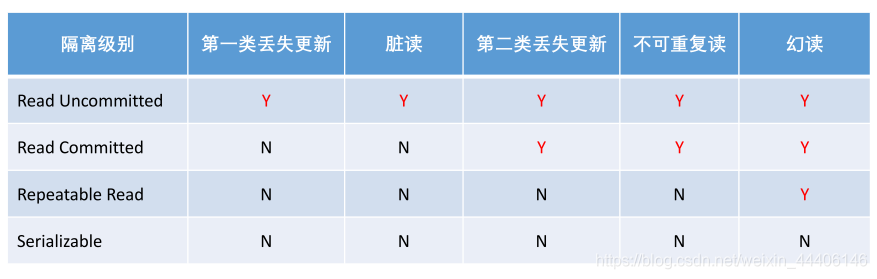
常见的并发异常
第一类丢失更新、第二类丢失更新。
脏读、不可重复读、幻读。
常见的隔离级别
- Read Uncommitted:读取未提交的数据。
- Read Committed:读取已提交的数据。
- Repeatable Read:可重复读。
- Serializable:串行化。
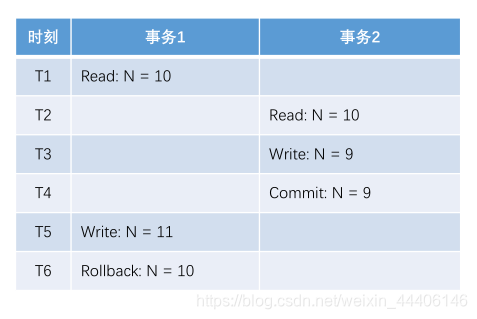
第一类的丢失更新
某一个事务的回滚,导致另外一个事务已更新的数据丢失了。
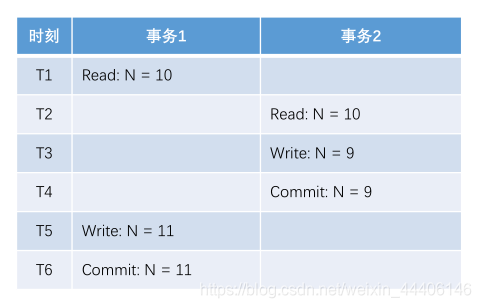
第二类丢失更新
某一个事务的提交,导致另外一个事务已更新的数据丢失了。
实现机制
悲观锁(数据库)
共享锁(S锁)
事务A对某数据加了共享锁后,其他事务只能对该数据加共享锁,但不能加排他锁。
排他锁(X锁)
事务A对某数据加了排他锁后,其他事务对该数据既不能加共享锁,也不能加排他锁。
乐观锁(自定义)
版本号、时间戳等
在更新数据前,检查版本号是否发生变化。若变化则取消本次更新,否则就更新数据(版本号+1)。
Spring事务管理
声明式事务
- 通过XML配置,声明某方法的事务特征。
- 通过注解,声明某方法的事务特征。
编程式事务
- 通过 TransactionTemplate 管理事务,并通过它执行数据库的操作。
演示声明式事务
1.在AlphaService中写一个新方法加@Transaction注解
 /**
     * 传播机制--两个不同的业务都有可能有不同隔离级别且可能一个业务使用了另一个业务,
     * 传播机制就是解决不同隔离隔离级别同时出现的情况。
     * Propagation.REQUIRED:支持当前事务,就是调用者事务,如果不存在那就创建新事务
     * Propagation.REQUIRES_NEW:创建一个事务,并且暂停当前事务(外部事务)
     * Propagation.NESTED:如果存在外部事务,那么就会嵌套在外部事务之中,A调B,B有独立提交和回滚的能力,否则和REQUIRED一样。
     */
    @Transactional(isolation = Isolation.READ_COMMITTED,propagation = Propagation.REQUIRED)
    public Object save1(){
        //新增用户
        User user = new User();
        user.setUsername("hsw");
        user.setSalt(CommunityUtil.generateUUID().substring(0,5));
        user.setPassword(CommunityUtil.md5("123"+user.getSalt()));
        user.setEmail("hsw@qq.com");
        user.setHeaderUrl("http://image.nowcoder.com/head/99t.png");
        user.setCreateTime(new Date());
        userMapper.insertUser(user);
        //新增帖子
        DiscussPost post = new DiscussPost();
        post.setUserId(user.getId());
        post.setTitle("hello");
        post.setContent("新人报道");
        post.setCreateTime(new Date());
        discussPostMapper.insertDiscussPost(post);
        int i = 1/0;
        return "ok";
    }
2.写个测试方法调用这个方法,发现数据库中并没有插入任何数据
演示编程式事务
1.在加一个方法
	@Autowired
    private TransactionTemplate transactionTemplate;
    public Object save2(){
        transactionTemplate.setIsolationLevel(TransactionDefinition.ISOLATION_READ_COMMITTED);
        transactionTemplate.setPropagationBehavior(TransactionDefinition.PROPAGATION_REQUIRED);
        return transactionTemplate.execute(new TransactionCallback<Object>() {
            @Override
            public Object doInTransaction(TransactionStatus transactionStatus) {
                //新增用户
                User user = new User();
                user.setUsername("hsw");
                user.setSalt(CommunityUtil.generateUUID().substring(0,5));
                user.setPassword(CommunityUtil.md5("123"+user.getSalt()));
                user.setEmail("hsw@qq.com");
                user.setHeaderUrl("http://image.nowcoder.com/head/99t.png");
                user.setCreateTime(new Date());
                userMapper.insertUser(user);
                //新增帖子
                DiscussPost post = new DiscussPost();
                post.setUserId(user.getId());
                post.setTitle("hello");
                post.setContent("新人报道");
                post.setCreateTime(new Date());
                discussPostMapper.insertDiscussPost(post);
                int i = 1/0;
                return "ok";
            }
        });
    }
2.测试发现也没有插入数据
1. 显示评论
- 数据层
- 根据实体查询一页评论数据。
- 根据实体查询评论的数量。
- 业务层
- 处理查询评论的业务。
- 处理查询评论数量的业务。
- 表现层
- 显示帖子详情数据时,
- 同时显示该帖子所有的评论数据。
1.创建数据库comment
DROP TABLE IF EXISTS `comment`;
/*!40101 SET @saved_cs_client     = @@character_set_client */;
 SET character_set_client = utf8mb4 ;
CREATE TABLE `comment` (
  `id` int(11) NOT NULL AUTO_INCREMENT,
  `user_id` int(11) DEFAULT NULL,
  `entity_type` int(11) DEFAULT NULL,
  `entity_id` int(11) DEFAULT NULL,
  `target_id` int(11) DEFAULT NULL,
  `content` text,
  `status` int(11) DEFAULT NULL,
  `create_time` timestamp NULL DEFAULT NULL,
  PRIMARY KEY (`id`),
  KEY `index_user_id` (`user_id`) /*!80000 INVISIBLE */,
  KEY `index_entity_id` (`entity_id`)
) ENGINE=InnoDB DEFAULT CHARSET=utf8;
2.编写实体类
import java.util.Date;

public class Comment {

    private int id;
    private int userId;
    private int entity_type;
    private int entity_id;
    private int target_id;
    private String content;
    private int status;
    private Date createTime;
}
3.编写dao CommentMapper
@Mapper
@Repository
public interface CommentMapper {
    //查询评论
    List<Comment> selectCommentByEntity(int EntityType, int EntityId, int limit);
    //查询评论的总数
    int selectCountByEntity(int EntityType, int EntityId);
}
4.Comment-Mapper.xml
<?xml version="1.0" encoding="UTF-8" ?>
<!DOCTYPE mapper
        PUBLIC "-//mybatis.org//DTD Mapper 3.0//EN"
        "http://mybatis.org/dtd/mybatis-3-mapper.dtd">
<mapper namespace="com.nowcoder.community.dao.CommentMapper">

    <sql id="selectFields">
        id, user_id, entity_type, entity_id, target_id, content, status, create_time
    </sql>

    <select id="selectCommentByEntity"  resultType="Comment">
        select <include refid="selectFields"></include>
        from comment
        where status=0
        and entity_type = #{entityType}
        and entity_id = #{entityId}
        order by create_time asc
        limit #{offset},#{limit}
    </select>


    <select id="selectCountByEntity">
        select count (id)
        from comment
        where status=0
        and entity_type = #{entityType}
        and entity_id = #{entityId}
    </select>
</mapper>
5.service
@Service
public class CommentService {

    @Autowired
    private CommentMapper commentMapper;
    //查询评论
    public List<Comment> selectCommentByEntity(int entityType, int entityId, int offset, int limit){
        return commentMapper.selectCommentByEntity(entityType,entityId,offset,limit);
    }
    //查询评论的总数
    public int selectCountByEntity(int entityType, int entityId){
        return commentMapper.selectCountByEntity(entityType,entityId);
    }
}
6.DiscussPostController
//根据ID查找帖子 点击帖子题目进行详情页 同时显示评论的详细信息
@RequestMapping(path = "/detail/{discussPostId}", method = RequestMethod.GET)
public String getDiscussPost(@PathVariable("discussPostId") int discussPostId, Model model, Page page) {
    // 帖子
    DiscussPost post = discussPostService.findDiscussPostById(discussPostId);
    model.addAttribute("post", post);
    // 作者
    User user = userService.findUserById(post.getUserId());
    model.addAttribute("user", user);

    // 评论分页信息
    page.setLimit(5);
    page.setPath("/discuss/detail/" + discussPostId);
    page.setRows(post.getCommentCount());

    // 评论: 给帖子的评论
    // 回复: 给评论的评论
    // 评论列表
    List<Comment> commentList = commentService.findCommentsByEntity(
            ENTITY_TYPE_POST, post.getId(), page.getOffset(), page.getLimit());
    // 评论VO列表
    List<Map<String, Object>> commentVoList = new ArrayList<>();
    if (commentList != null) {
        for (Comment comment : commentList) {
            // 评论VO
            Map<String, Object> commentVo = new HashMap<>();
            // 评论
            commentVo.put("comment", comment);
            // 作者
            commentVo.put("user", userService.findUserById(comment.getUserId()));

            // 回复列表
            List<Comment> replyList = commentService.findCommentsByEntity(
                    ENTITY_TYPE_COMMENT, comment.getId(), 0, Integer.MAX_VALUE);
            // 回复VO列表
            List<Map<String, Object>> replyVoList = new ArrayList<>();
            if (replyList != null) {
                for (Comment reply : replyList) {
                    Map<String, Object> replyVo = new HashMap<>();
                    // 回复
                    replyVo.put("reply", reply);
                    // 作者
                    replyVo.put("user", userService.findUserById(reply.getUserId()));
                    // 回复目标
                    User target = reply.getTargetId() == 0 ? null : userService.findUserById(reply.getTargetId());
                    replyVo.put("target", target);

                    replyVoList.add(replyVo);
                }
            }
            commentVo.put("replys", replyVoList);

            // 回复数量
            int replyCount = commentService.findCommentCount(ENTITY_TYPE_COMMENT, comment.getId());
            commentVo.put("replyCount", replyCount);

            commentVoList.add(commentVo);
        }
    }

    model.addAttribute("comments", commentVoList);

    return "/site/discuss-detail";
}
添加评论
- 数据层
- 增加评论数据。
- 修改帖子的评论数量。
- 业务层
- 处理添加评论的业务:
先增加评论、再更新帖子的评论数量。
- 处理添加评论的业务:
- 表现层
- 处理添加评论数据的请求。
- 设置添加评论的表单。
1.mapper and xml
 //添加评论
    int insertComment(Comment comment);

        <insert id="insertComment" parameterType="Comment">
        insert into comment(<include refid="insertFields"></include>)
        values(#{userId},#{entityType},#{entityId},#{targetId},#{content},#{status},#{createTime})
    </insert>
2.CommentService
package com.nowcoder.community.service;

import com.nowcoder.community.dao.CommentMapper;
import com.nowcoder.community.entity.Comment;
import com.nowcoder.community.util.CommunityConstant;
import com.nowcoder.community.util.SensitiveFilter;
import org.springframework.beans.factory.annotation.Autowired;
import org.springframework.stereotype.Service;
import org.springframework.transaction.annotation.Isolation;
import org.springframework.transaction.annotation.Propagation;
import org.springframework.transaction.annotation.Transactional;
import org.springframework.web.util.HtmlUtils;

import java.util.List;

@Service
public class CommentService implements CommunityConstant {

    @Autowired
    private CommentMapper commentMapper;

    @Autowired
    private SensitiveFilter sensitiveFilter;

    @Autowired
    private DiscussPostService discussPostService;

    //查询全部的评论和回复
    public List<Comment> findCommentsByEntity(int entityType, int entityId, int offset, int limit) {
        return commentMapper.selectCommentsByEntity(entityType, entityId, offset, limit);
    }

    //查询评论和回复的数量
    public int findCommentCount(int entityType, int entityId) {
        return commentMapper.selectCountByEntity(entityType, entityId);
    }


    //插入评论
    //因为添加评论时需要调用commentMapper实现评论的添加,同时需要调用DiscussPostService对评论数量的更新
    //为保证数据的安全性,需要增加事务的处理
    @Transactional(isolation = Isolation.REPEATABLE_READ,propagation = Propagation.REQUIRED)
    public int addComment(Comment comment){

        if (comment == null){
            throw new IllegalArgumentException("参数不能为空");
        }
        //对评论进行过滤,防止出现敏感词
        comment.setContent(HtmlUtils.htmlEscape(comment.getContent()));
        comment.setContent(sensitiveFilter.filter(comment.getContent()));

        //添加评论
        int rows = commentMapper.insertComment(comment);
        //更新评论数量,只有评论帖子时,才更新
        if (comment.getEntityType() == ENTITY_TYPE_POST){
            //查询帖子评论数量
            int count = commentMapper.selectCountByEntity(ENTITY_TYPE_POST, comment.getEntityId());
            discussPostService.updateCommentCount(comment.getEntityId(),count);
        }
        return rows;

    }
}
3.CommentController
package com.nowcoder.community.controller;

import com.nowcoder.community.entity.Comment;
import com.nowcoder.community.entity.User;
import com.nowcoder.community.service.CommentService;
import com.nowcoder.community.util.HostHolder;
import org.springframework.beans.factory.annotation.Autowired;
import org.springframework.stereotype.Controller;
import org.springframework.ui.Model;
import org.springframework.web.bind.annotation.PathVariable;
import org.springframework.web.bind.annotation.RequestMapping;
import org.springframework.web.bind.annotation.RequestMethod;

import java.util.Date;

@Controller
@RequestMapping("/comment")
public class CommentController {
    /*
    private int id;
    private int userId;
    private int entityType; //评论的类型,比如帖子的评论,评论用户评论的评论
    private int entityId;  //评论的帖子的id
    private int targetId;  //记录评论指向的人
    private String content; //评论的内容
    private int status; //表明状态,是否被拉黑
    private Date createTime;    //创建的时间*/

    @Autowired
    private CommentService commentService;

    @Autowired
    private HostHolder hostHolder;
    //添加评论
    @RequestMapping(path = "/add/{discussPostId}", method = RequestMethod.POST)
    public String addComment(@PathVariable("discussPostId") int discussPostId, Comment comment,String username){
        //客户端表单中向服务器需要提交以下内容
        /*
        private int id;
        private int userId;
        private int entityType;         //评论的类型,比如帖子的评论,评论用户评论的评论
        private int entityId;           //评论的帖子的id
        private int targetId;           //记录评论指向的人
        private String content;         //评论的内容
        private int status;             //表明状态,是否被拉黑
        private Date createTime;        //创建的时间*/
        //其中 entityType entityId targetId content 需要表单中进行提交
      /*  comment.setId(user.getId());
        String username = user.getUsername();
        System.out.println(username);
        model.addAttribute("username",username);*/
        System.out.println(username);
        comment.setUserId(hostHolder.getUser().getId());
        comment.setStatus(0);
        comment.setCreateTime(new Date());
        commentService.addComment(comment);
        //添加成功后,重定向至帖子详情页
        return "redirect:/discuss/detail/" + discussPostId;

    }

}





 扫一扫
扫一扫


 656
656

 被折叠的 条评论
为什么被折叠?
被折叠的 条评论
为什么被折叠?
 到【灌水乐园】发言





