



 本文详细介绍了在iOS开发过程中可能遇到的三个常见问题:如何支持HTTP、找不到rootviewcontroller和真机调试出现-fembed-bitcode错误。针对这些问题,提供了具体的解决方法,包括在Info.plist中添加NSAppTransportSecurity配置、修改程序入口代码以及调整DeploymentTarget和EnableBitcode设置。通过这些步骤,开发者可以顺利解决开发过程中的技术难题。
一:支持http
-
在Info.plist中添加
NSAppTransportSecurity类型Dictionary。 -
在
NSAppTransportSecurity下添加NSAllowsArbitraryLoads类型Boolean,值设为YES
二:找不到rootviewcontroller
程序入口
用了[window
addSubview:viewController
.view]。
换成[window setRootViewController:viewController];即可
解决方案1:target --> building settings -->enable bitcode 设为 NO 即可
解决方案2:
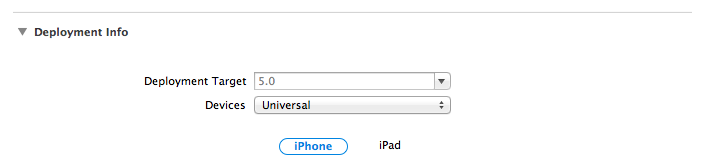
Your problem is that the "Deployment Target" for your project is "5.0" and you are using a feature that isn't available for iOS 5.
Check the "General" tab for your build target

and update it to at least 6.0 to use Auto Layout





 扫一扫
扫一扫


 被折叠的 条评论
为什么被折叠?
被折叠的 条评论
为什么被折叠?
 到【灌水乐园】发言





