



 这篇博客详细介绍了如何在C#中操作DataGridView控件,包括设置标题和文本居中、隐藏行和列、调整行高、动态添加行、添加CheckBox列、为单元格赋值以及解决界面假死和清除选中状态的问题。通过这些技巧,可以更好地定制和优化DataGridView的显示和交互效果。
1、//dataGridView標題居中
dataGridView2.ColumnHeadersDefaultCellStyle.Alignment = DataGridViewContentAlignment.MiddleCenter;
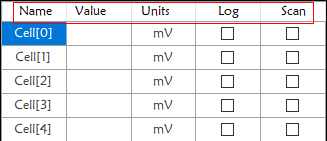
2、//dataGrideView文本居中
dataGridView2.RowsDefaultCellStyle.Alignment = DataGridViewContentAlignment.MiddleCenter;
3、//dataGridView 最後一行不顯示
dataGridView2.AllowUserToAddRows = false;
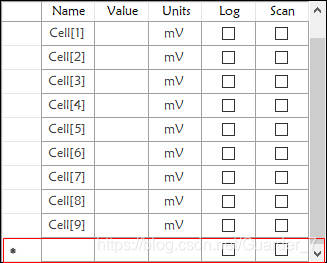
4、//dataGridView 第一列不顯示
dataGridView2.RowHeadersVisible = false;
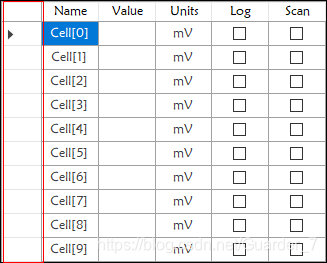
5、//設置行高
設置行高需要將DataGridView屬性中AutoSizeRowsMode設置為None.
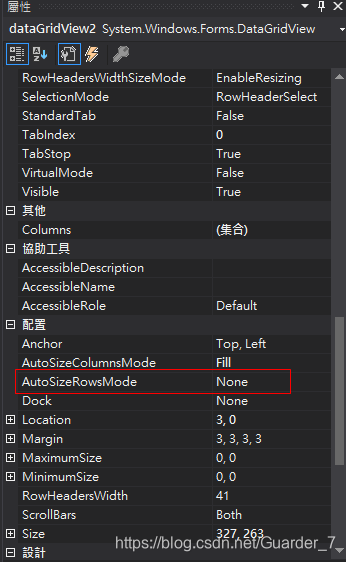
dataGridView2.RowTemplate.Height = 100;
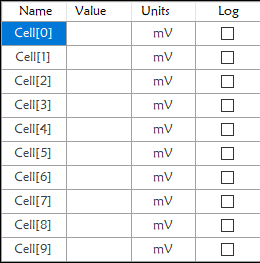
6、//增加行
 		for (int i = 0; i < 10; i++)
            {
                DataGridViewRow row = new DataGridViewRow();
                DataGridViewTextBoxCell textboxcell = new DataGridViewTextBoxCell();
                textboxcell.Value = "Cell["+i.ToString()+"]";
                row.Cells.Add(textboxcell);
                DataGridViewTextBoxCell textboxcel2 = new DataGridViewTextBoxCell();
                textboxcel2.Value = "";
                row.Cells.Add(textboxcel2);
                DataGridViewTextBoxCell textboxcel3 = new DataGridViewTextBoxCell();
                textboxcel3.Value = "mV";
                row.Cells.Add(textboxcel3);
                dataGridView2.Rows.Add(row);
            }
7、//DataGridView中添加CheckBox列(其他控件類似)
			DataGridViewCheckBoxColumn checkBoxColumn = new DataGridViewCheckBoxColumn();//添加一列,如果只需要一個用DataGridViewCheckBoxColumn
            checkBoxColumn.Name = "select2_Log";
            checkBoxColumn.HeaderText = "Log";
            dataGridView2.Columns.Insert(3, checkBoxColumn);//3為第三列
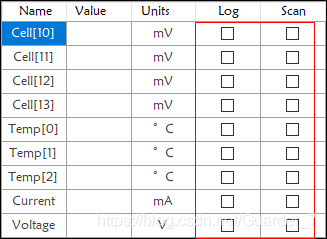
8、給DataGridView中控件賦值
			for(int i=0;i<3;i++)
                    {
                        dataGridView3.Rows[i+4].Cells[1].Value = Temp[i].ToString();
                    }
最後效果圖
9、DataGridView界面假死
private void dataGridView_Transefer_RowStateChanged(object sender, DataGridViewRowStateChangedEventArgs e)
        {
            e.Row.HeaderCell.Value = string.Format("{0}", e.Row.Index + 1); //增加序列号
            dataGridView_Transefer.CurrentCell = dataGridView_Transefer.Rows[this.dataGridView_Transefer.Rows.Count - 1].Cells[0];  //自动定位到最后一行
            dataGridView_Transefer.Update();    //解决假死现象
        }
7、DataGridView清除选中状态
private void dataGridViewProtect_SelectionChanged(object sender, EventArgs e)
{
    DataGridView dgv = sender as DataGridView;
    dgv.ClearSelection();
}






 扫一扫
扫一扫


 1730
1730

 被折叠的 条评论
为什么被折叠?
被折叠的 条评论
为什么被折叠?
 到【灌水乐园】发言





