
el-dialog设置el-head固定

0 效果

在这里插入图片描述

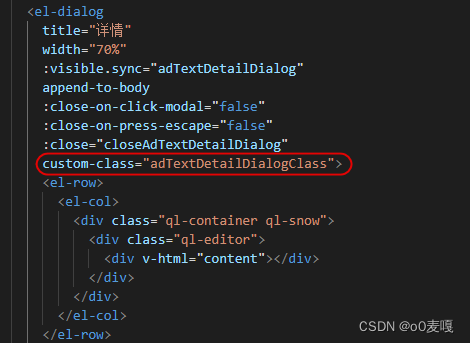
1 代码

在这里插入图片描述

::v-deep .adTextDetailDialogClass .el-dialog__body{
  max-height: calc(100vh - 150px);
  overflow: auto;
  border-top:1px solid #dfdfdf;
  border-bottom:1px solid #dfdfdf;
}
::v-deep .adTextDetailDialogClass .el-dialog{
  position: fixed;
  height:fit-content;
  left:0 !important;
  right:0 !important;
  top:0 !important;
  bottom:0 !important;
  margin:auto !important;
}
### Vue3 中集成 Element Plus 的 `el-dialog` 组件并添加富文本编辑器 以下是基于 Vue3 和 Element Plus 实现的一个完整的示例代码,展示如何在 `el-dialog` 中集成 Wangeditor 富文本编辑器。 #### 安装依赖 首先需要安装必要的库: ```bash npm install @wangeditor/editor-for-vue element-plus vue@next ``` #### 示例代码实现 ```vue <template> <div> <!-- 打开弹窗按钮 --> <el-button type="primary" @click="dialogFormVisible = true">打开对话框</el-button> <!-- 对话框 --> <el-dialog title="富文本编辑器" v-model="dialogFormVisible"> <div id="editorElem" style="text-align:left;"></div> <template #footer> <span class="dialog-footer"> <el-button @click="hide()">取消</el-button> <el-button type="primary" @click="modifyplan()">确认</el-button> </span> </template> </el-dialog> </div> </template> <script> import { ElDialog, ElButton } from 'element-plus'; import '@wangeditor/editor/dist/css/style.css'; // 引入样式文件 import WangEditor from '@wangeditor/editor-for-vue'; export default { components: { ElDialog, ElButton, WangEditor, }, data() { return { dialogFormVisible: false, // 控制弹窗显示隐藏 editor: null, // 编辑器实例 getPlan: { plan: '<p>初始内容</p>', // 默认内容 }, }; }, methods: { modifyplan() { this.dialogFormVisible = false; this.getPlan.plan = this.editor.txt.html(); // 将富文本内容保存到数据中 }, show() { const editor = new WangEditor('#editorElem'); this.editor = editor; // 配置菜单栏 editor.config.menus = [ 'head', 'bold', 'fontSize', 'fontName', 'italic', 'underline', 'strikeThrough', 'foreColor', 'backColor', 'justify', 'undo', 'redo', ]; // 初始化默认内容 editor.config.onchange = (newHtml) => { console.log('新的内容:', newHtml); }; editor.create(); this.editor.txt.html(this.getPlan.plan); // 加载已有内容 }, hide() { if (this.editor) { this.editor.destroy(); // 销毁编辑器实例 } this.dialogFormVisible = false; }, }, mounted() { this.show(); // 页面加载完成后初始化编辑器 }, }; </script> <style scoped> /* 自定义样式 */ #editorElem { height: 300px; } </style> ``` --- ### 功能说明 1. **弹窗控制** 使用 `v-model` 双向绑定变量 `dialogFormVisible` 来控制 `el-dialog` 的显隐状态[^1]。 2. **富文本编辑器初始化** 在 `mounted` 生命周期钩子中调用 `show()` 方法完成编辑器的初始化操作。通过配置 `menus` 属性自定义工具栏功能列表[^1]。 3. **内容存储与恢复** 当用户点击“确认”按钮时,将当前编辑器中的 HTML 内容赋值给 `getPlan.plan` 数据字段;当关闭弹窗时,销毁编辑器实例以释放资源,并防止内容残留问题[^2]。 4. **样式适配** 添加了简单的 CSS 样式设置编辑区域高度为固定值(如 300 像素),可根据实际需求进一步调整布局效果。 --- ### 注意事项 - 如果项目使用的是 Vue3,则需确保所选插件支持 Composition API 或 Options API 模式下的兼容性。 - 在动态创建或移除 DOM 结构的情况下,请务必手动管理好 Wangeditor 的生命周期方法(create/destroy),以免引发潜在错误或者性能损耗[^2]。 ---
评论
成就一亿技术人!
拼手气红包6.0元
还能输入1000个字符
 
红包 添加红包
表情包 插入表情
 条评论被折叠 查看
添加红包

请填写红包祝福语或标题

红包个数最小为10个

红包金额最低5元

当前余额3.43前往充值 >
需支付:10.00
成就一亿技术人!
领取后你会自动成为博主和红包主的粉丝 规则
hope_wisdom
发出的红包
实付
使用余额支付
点击重新获取
扫码支付
钱包余额 0

抵扣说明:

1.余额是钱包充值的虚拟货币,按照1:1的比例进行支付金额的抵扣。
2.余额无法直接购买下载,可以购买VIP、付费专栏及课程。

余额充值


