



一、编码格式介绍
1.1、常见的字符编码格式

1.2、Python字符编码格式
Python的解释器使用的是Unicode(内存)
.py文件在磁盘上使用UTF-8存储(外存)
#encoding=gbk

print('你好,中国')
二、文件的读写原理
2.1、文件的读写
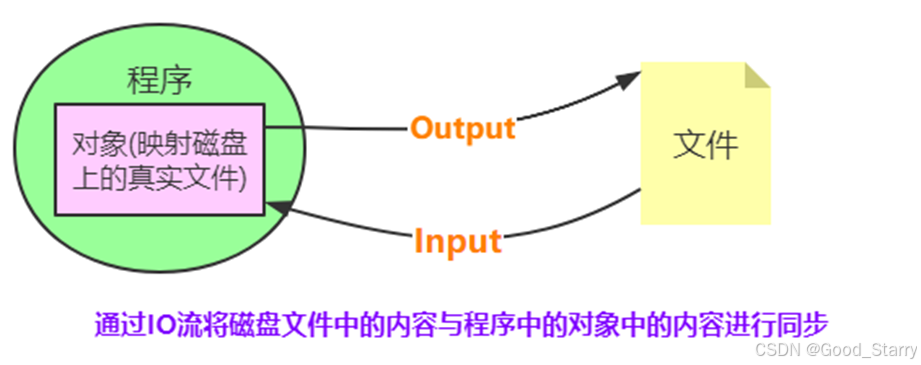
文件的读写俗称“IO操作”,即输入输出操作
2.2、文件读写操作流程

2.3、操作原理


三、文件读写操作
3.1、内置函数open()创建文件对象
3.2、语法规则
file = open(filename [,mode,encoding])
3.3、文件的类型
按文件中数据的组织形式,文件分为以下两大类
1、文本文件:存储的是普通“字符”文本,默认为unicode字符集,可以使用记本事程序打开
2、二进制文件:把数据内容用“字节”进行存储,无法用记事本打开,必须使用专用的软件打开 ,举例:mp3音频文件,jpg图片 .doc文档等
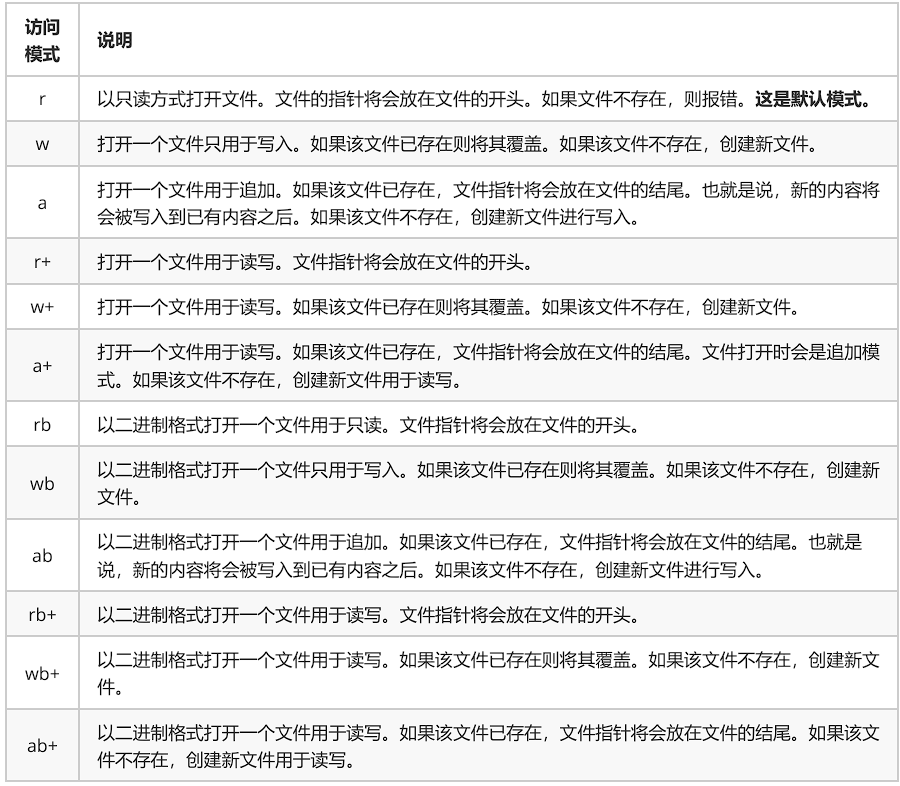
3.4、常用的文件打开模式
file=open('a.txt','r')
print(file.readlines())
file.close()
file=open('b.txt','w')
file.write('Python')
file.close()
file=open('b.txt','a')
file.write('Python')
file.close()
src_file=open('logo.png','rb')

target_file=open('copylogo.png','wb')

target_file.write(src_file.read())

target_file.close()
src_file.close()
四、文件对象常用的方法
4.1、常用“方法”

4.2、示例
# readline()
f = open('test.txt', 'r')

content = f.readline()
print("1:%s" % content)

content = f.readline()
print("2:%s" % content)

f.close()

# readlines()
f = open('test.txt', 'r')

content = f.readlines()
print(type(content))

for temp in content:
    print(temp)

f.close()
file=open('c.txt','a')
#file.write('hello')
lst=['java','go','python']
file.writelines(lst)
file.close()
file=open('c.txt','r')
file.seek(2)
print(file.read())
print(file.tell())
file.close()
file=open('d.txt','a')
file.write('hello')
file.flush()
file.write('world')
file.close()
file=open('d.txt','a')
file.write('hello')
file.close()
#file.write('world')
#file.flush()
五、with语句(上下文管理器)
5.1、with语句
with语句可以自动管理上下文资源,不论什么原因跳出with块,都能确保文件正确的关闭,以此来达到释放资源的目的

with open('a.txt','r') as file:
    print(file.read())
with open('logo.png','rb') as src_file:
    with open('copy2logo.png','wb') as target_file:
        target_file.write(src_file.read())
5.2、上下文管理器
MyContentMgr实现了特殊方法__enter__(),__exit__()称为该类对象遵守了上下文管理器协议
该类对象的实例对象,称为上下文管理器
class MyContentMgr(object):
    def __enter__(self):
        print('enter方法被调用执行了')
        return self

    def __exit__(self, exc_type, exc_val, exc_tb):
        print('exit方法被调用执行了')

    def show(self):
        print('show方法被调用执行了',1/0)

with  MyContentMgr() as file:    #相当于file=MyContentMgr()
    file.show()
六、目录操作
6.1、os模块
1、os模块是Python内置的与操作系统功能和文件系统相关的模块,该模块中的语句的执行结果通常与操作系统有关,在不同的操作系统上运行,得到的结果可能不一样。
2、os模块与os.path模块用于对目录或文件进行操作
3、示例
#os模块与操作系统相关的一个模块
import  os
#os.system('notepad.exe')
#os.system('calc.exe')
#直接调用可执行文件
os.startfile('C:\\Program Files\\Tencent\QQ\\Bin\\qq.exe')
6.2、os模块操作目录相关函数
6.2.1、相关函数

import  os
print(os.getcwd())

lst=os.listdir('../chap15')
print(lst)

#os.mkdir('newdir2')
#os.makedirs('A/B/C')
#os.rmdir('newdir2')
#os.removedirs('A/B/C')
os.chdir('E:\\vippython\\chap15')
print(os.getcwd())
import  os
path=os.getcwd()
lst=os.listdir(path)
for filename in lst:
    if filename.endswith('.py'):
        print(filename)
6.2.2、os.walk()函数
import  os
path=os.getcwd()
lst_files=os.walk(path)
for dirpath,dirname,filename in lst_files:
    '''print(dirpath)
    print(dirname)
    print(filename)
    print('-------------------------------------')'''
    for dir in dirname:
        print(os.path.join(dirpath,dir))

    for file in filename:
        print(os.path.join(dirpath,file))
    print('----------------------------------')
6.2.3、os.remove()函数
import os
try:
    os.remove('test.txt')
    print('文件删除成功')
except Exception as e:
    print('文件删除失败', e)
6.3、os.path模块操作目录相关函数

import  os.path
print(os.path.abspath('demo13.py'))
print(os.path.exists('demo13.py'),os.path.exists('demo18.py'))
print(os.path.join('E:\\Python','demo13.py'))
print(os.path.split('E:\\vipython\\chap15\\demo13.py'))
print(os.path.splitext('demo13.py'))
print(os.path.basename('E:\\vippython\\chap15\\demo13.py'))
print(os.path.dirname('E:\\vippython\\chap15\\demo13.py'))
print(os.path.isdir('E:\\vippython\\chap15\\demo13.py'))
七、文件的实操案例
7.1、记录用户登录日志
提示:创建XX客服管理系统的登录界面,每次登录时,将用户的登录日志写入文件中,并且可以在程序中查看用户的登录日志
import time
def show_info():
    print('输入提示数字,执行相应操作: 0.退出  1.查看登录日志')
#读录日志
def write_loginfo(username):
    with open ('log.txt','a') as file:
        s='用户名名:{0},登录时间:{1}'.format(username,time.strftime('%Y-%m-%d %H:%M:%S',time.localtime(time.time())))
        file.write(s)
        file.write('\n')

#读取日志
def read_loginfo():
    with open('log.txt','r')as file:
        while True:
            line=file.readline()
            if line=='':
                break #退出循环s
            else:
                print(line,end='')#输出一行内容

#以主程序方式运行
if __name__ == '__main__':
    username=input('请输入用户名:')
    pwd=input('请输入密码:')
    if 'admin'==username and 'admin'==pwd:
        print('登录成功')
        write_loginfo(username) #写入日志
        show_info() #提示信息
        num=int(input('输入操作数字:'))
        while True:
            if num==0:
                print('退出成功')
                break
            elif num==1:
                print('查看登录日志')
                read_loginfo()
                show_info()
                num = int(input('输入操作数字:'))
            else:
                print('您输入的数字有误')
                show_info()
                num = int(input('输入操作数字:'))
    else:
        print('用户名或密码不正确 ')
7.2、模拟淘宝客服自动回复
提示:淘宝客服为了快速回答卖家问题,设置了自动回复的功能,当有买家咨询时,客服自助系统会首先使用提前规划好的内容进行回复,请用Python程序实现这一功能
def find_answer(question):
    with open('replay.txt','r',encoding='gbk') as file:
        while True:
            line=file.readline()
            if not line: #if line==''到文件末尾退出
                break
            #字符串的分割
            keyword=line.split('|')[0]
            reply=line.split('|')[1]
            if keyword in question:
                return  reply
    return  False

if __name__ == '__main__':
    question=input('Hi,您好,小蜜在此等主人很久了,有什么烦恼快和小蜜说吧')
    while True:
        if question=='bye':
            break
        #开始在文件中查找
        replay=find_answer(question)
        if not replay :  #如果回复的是False ,  not False-->True
            question=input('小蜜不知道你在说什么,您可以问一些关于订单、物流、账户、支付等问题,(退出请输入bye)')
        else:
            print(replay)
            question=input('小主,你还可以继续问一些关于订单、物流、账户、支付等问题(退出请输bye)')
    print('小主再见')
replay.txt
订单|如果您有任何订单问题,可以登录淘宝账号,点击“我的订单”,查看订单详情
物流|如果您有任何物流问题,可以登录淘宝账号,点击“我的订单”,查看商品物流
账户|如果您有任何账户问题,可以联系淘宝客服,电话:XXXX-XXXXXX
支付|如果您有任何支付问题,可以联系支付宝客服,QQ:xxxxxxx
八、序列化和反序列化
通过文件操作,我们可以将字符串写入到一个本地文件。但是,如果是一个对象(例如列表、字典、元组等),就无法直接写入到一个文件里,需要对这个对象进行序列化,然后才能写入到文件里。
设计一套协议,按照某种规则,把内存中的数据转换为字节序列,保存到文件,这就是序列化,反之,从文件的字节序列恢复到内存中,就是反序列化。
对象---》字节序列 === 序列化
字节序列--》对象 ===反序列化
Python中提供了JSON这个模块用来实现数据的序列化和反序列化。
8.1、JSON模块
JSON(JavaScriptObjectNotation, JS对象简谱)是一种轻量级的数据交换标准。JSON的本质是字符串。
8.2、使用JSON实现序列化
JSON提供了dump和dumps方法,将一个对象进行序列化。
8.2.1、dump方法
dump方法可以在将对象转换成为字符串的同时,指定一个文件对象,把转换后的字符串写入到这个文件里。
import json

file = open('names.txt', 'w')

names = ['zhangsan', 'lisi', 'wangwu', 'jerry', 'henry', 'merry', 'chris']

# dump方法可以接收一个文件参数,在将对象转换成为字符串的同时写入到文件里
json.dump(names, file)

file.close()
8.2.2、dumps方法
dumps方法的作用是把对象转换成为字符串,它本身不具备将数据写入到文件的功能。
import json

file = open('names.txt', 'w')

names = ['zhangsan', 'lisi', 'wangwu', 'jerry', 'henry', 'merry', 'chris']
# file.write(names)  出错,不能直接将列表写入到文件里

# 可以调用 json的dumps方法,传入一个对象参数
result = json.dumps(names)

# dumps 方法得到的结果是一个字符串
print(type(result))  # <class 'str'>

# 可以将字符串写入到文件里
file.write(result)
file.close()
8.3、使用JSON实现反序列化
使用loads和load方法,可以将一个JSON字符串反序列化成为一个Python对象。
8.3.1、load方法
load方法可以传入一个文件对象,用来将一个文件对象里的数据加载成为Python对象。
import json

# 以可读方式打开一个文件
file = open('names.txt', 'r')

# 调用load方法,将文件里的内容加载成为一个Python对象
result = json.load(file)

print(result)

file.close()
8.3.2、loads方法
loads方法需要一个字符串参数,用来将一个字符串加载成为Python对象。
import json

# 调用loads方法,传入一个字符串,可以将这个字符串加载成为Python对象
result = json.loads('["zhangsan", "lisi", "wangwu", "jerry", "henry", "merry", "chris"]')

print(type(result))  # <class 'list'>





 扫一扫
扫一扫


 1万+
1万+

 被折叠的 条评论
为什么被折叠?
被折叠的 条评论
为什么被折叠?
 到【灌水乐园】发言





