


 本文详细介绍MapReduce编程模型,包括Mapper、Reducer和Driver的编写规范,通过WordCount案例演示如何统计文件中每个单词的出现次数,涵盖了从环境搭建到代码实现的全过程。
MapReduce基本使用
MapReduce编程规范
用户编写的程序分成三个部分:Mapper、Reducer 和 Driver。
1、编写Mapper类
(1)用户自定义的Mapper要继承框架提供的Mapper类。
(2)Mapper的输入数据是KV键值对的形式(KV的类型可自定义)。
(3)对数据的处理逻辑写在Mapper类中map() 方法中。
(4)Mapper的输出数据是KV键值对的形式(KV的类型可自定义)。
(5)map() 方法(maptask进程)每一个<K,V>数据执行一次。
2、编写Reducer类
(1)用户自定义的Reducer要继承框架提供的Reducer父类。
(2)Reducer的输入数据类型对应Mapper的输出数据类型,也是KV。
(3)Reducer的业务逻辑写在reduce() 方法中。
(4)每一组相同k的<k,Iterator>组调用一次reduce() 方法。
3、Driver阶段
整个程序需要编写一个Driver来进行提交,将自定义Mapper和Reducer类组合成一个job,并提交job对象。
实现WordCount案例
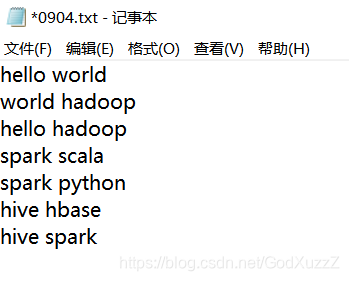
1、需求:统计一个文件中每一个单词出现的总次数。
2、案例数据:
3、分析
按照前面介绍的MapReduce编程规范,分别编写自定义Mapper,Reducer,Driver。
Mapper类处理逻辑:
(1)将map端输入为内容转换为String类型。
(2)根据文件内容分隔符(空格)将每一行切分为单词。
(3)Map端输出数据的<K,V> 格式为<word,1>,将每一个的那次作为K输出。
Reducer类处理逻辑:
(1)统计每一个K(单词)的个数。
(2)Reduce端输出数据<K,V>格式为<word,总次数>。
Driver类:
(1)获取配置信息类对象。
(2)指定Driver程序的jar包所在的本地路径。
(3)关联自定义的Mapper/Reducer业务类。
(4)指定Mapper端数据的K,V类型。
(5)指定最终输出的数据的K,V类型。
(6)指定job任务的输入路径和输出路径。
(7)提交任务。
4、编码实现
(1)使用idea创建maven工程,添加依赖如下:
<!-- hadoop-common -->
<dependency>
      <groupId>org.apache.hadoop</groupId>
      <artifactId>hadoop-common</artifactId>
      <version>2.6.0</version>
</dependency>
<!-- hadoop-client -->
<dependency>
      <groupId>org.apache.hadoop</groupId>
      <artifactId>hadoop-client</artifactId>
      <version>2.6.0</version>
</dependency>
<!-- hadoop-hdfs -->
<dependency>
      <groupId>org.apache.hadoop</groupId>
      <artifactId>hadoop-hdfs</artifactId>
      <version>2.6.0</version>
</dependency>
(2)编写Mapper类
public class WordCountMapper extends Mapper<LongWritable,Text,Text,IntWritable> {
	Text k = new Text();
	IntWritable v = new IntWritable(1);

	@Override
	protected void map(LongWritable key,Text value,Context context) throws IOException,InterruptedException {
		String line = value.toString();
		String[] words = line.split(" ");
		for(String word:words) {
			k.set(word);
			context.write(k,v);
		}
	}
}
(3)编写Reducer类
public class WordCountReducer extends Reducer<Text,IntWritable,Text,LongWritable> {
	int sum;
	LongWritable v = new LongWritable();
	@Override
	protected void reduce(Text key,Iterable<IntWritable> value,Context context) throws Exception {
		sum = 0;
		for(IntWritable count:value) {
			sum += count.get();
		}
		v.set(sum);
		context.write(key,v);
	}
}
(4)编写驱动类
public class WordcountDriver {
	public static void main(String[] args) throws Exception {
		// 1、获取配置信息以及封装任务
		Configuration conf = new Configuration();
		Job job = Job.getInstance(conf);

		// 2、设置jar加载路径,一般设置都是driver类
		job.setJarByClass(WordcountDriver.class);

		// 3、设置map和reduce类
		job.setMapperClass(WordcountMapper.class);
		job.setReducerClass(WordcountReducer.class);

		// 4、设置map输出
		job.setMapOutputKeyClass(Text.class);
		job.setMapOutputValueClass(IntWritable.class);

		// 5、设置Reduce输出及最终的输出
		job.setOutputKeyClass(Text.class);
		job.setOutputValueClass(IntWritable.class);

		// 6、设置输入和输出路径,其中args是main犯法传入的参数
		FileInputFormat.setInputPaths(job,new Path(args[0]));
		FileOutputFormat.setOutputPath(job,new Path(args[1]));

		// 7、提交任务
		boolean result = job.waitForCompletion(true);
		System.exit(result ? 0 : 1);
	}
}
5、在windows上测试MapReduce
(1)在windows环境上解压Hadoop安装包(前面linux安装使用的Hadoop包),并配置HADOOP_HOME环境变量。





 扫一扫
扫一扫


 990
990

 被折叠的 条评论
为什么被折叠?
被折叠的 条评论
为什么被折叠?
 到【灌水乐园】发言





