



内置函数
内置函数
无需导包即可使用的函数
不同版本的Python内置函数可能略有不同
之前已经接触过的内置函数
type()、dir()、input()、print()、id()
内置函数和使用方法参考文档
https://docs.python.org/zh-cn/3/library/functions.html
自定义函数
定义函数
def func_name(参数列表):
	函数体
	[return/yield函数返回值]
Python函数的特点
函数参数类型多样
允许嵌套函数
无需声明函数返回值类型
yield可以作为函数返回值的关键字
函数能够被赋值给变量
Python的函数参数
无参函数
位置参数
关键字参数
包裹位置参数
包裹关键字参数
### 无参函数
def show_log():
	print('I am a log')
show_log()
** 位置参数**
传入的参数与定义的参数一一对应
def func_name(arg1,arg2,arg3):
	print(arg1,arg2,arg3)
func_name(val1,val2,val3)
关键字参数
直接通过等号传递参数
def func_name(arg1,arg2,arg3):
	print(arg1,arg2,arg3)
func_name(arg1=val1,arg2=val2,arg3=val3)
默认值参数
定义函数时,设置参数的默认值
调用函数时,可以指定通过位置或者关键字指定参数的值,如果不指定,参数为默认值
def func_name(arg1=val1,arg2=val2,arg3=val3) :
	print(arg1,arg2,arg3)
func_name()
不定长参数
参数的个数不确定
可适应更加复杂情况
不定长参数种类
- 包裹(packing)位置参数
- 接收不定长的位置参数,参数被组织成一个元组传入
- 包裹(packing)关键字参数
- 接收不定长的关键字参数,参数被组织成一个字典传入
包裹位置参数
参数表示为*args
调用函数时,参数自动会组织成一个元组传入
传入的位置参数与组织成的元组索引位置一致
- 接收不定长的关键字参数,参数被组织成一个字典传入
def  func2( *t ) :	# t is a tuple
	print(t)
func2()		# no argument
func2(1,2,3)
func2(1,2,3,4,5)
包裹(packing)关键字参数
参数表示为**kwargs
调用函数时,参数自动会组织成一个字典传入
传入的位置参数与组织成的字典的键值对一致
def  func3( **d ) :      # d is a dictionary
	print(d)
func3()		# no argument
func3(a=1, b=2, c=3)
不同类型函数参数混用顺序
位置参数
默认值参数
包裹位置参数
包裹关键字参数
def  func5(x, y=10, *args,  **kwargs) :
	print(x, y, args, kwargs)
func5(0) :
func5(a=1, b=2, y=3, x=4)
func5(1, 2, 3, 4, a=5, b=6)
函数是对象
Python中函数是对象
函数可以被引用,即函数可以赋值给一个变量
函数可以当作参数传递
函数可以作返回值
函数可以嵌套
def  factorial(n):
    if n <= 2: return n
    return factorial(n-1)*n
f=factorial
f(4)
l=[factorial, f]
l[0](4)
l[1](4)
d={'x':factorial}
d['x'](4)
嵌套函数
在函数内部定义新的函数
内部函数不能被外部直接调用
函数可以被当做变量赋值,因为本质函数是一个对象
def  func6() :
    def  nestedFunc() :
        print('Hi')
    return nestedFunc

x = func6()	  # x is the nestedFunc
x()
装饰器
修改其他函数的功能的函数
使函数更加简洁
def my_decorator(some_func):
    def wrapper(*args):
        print("I am watching you!")
        some_func(*args)
        print("You are called.")
    return wrapper

@my_decorator
def add(x, y):
    print(x,'+',y,'=',x+y)

add(5,6)
my_decorator 的参数是一个函数,也就是被装饰的函数 add(x,y)。
在函数 my_decorator 中定义一个函数 wrapper,这个函数的参数在本例 中就是 add(5,6)中传进来的参数。这个参数你是否要继续传给 some_func 使用都可以由你自己来决定,这就是装饰器的强大之处体现了。my_decorator 的返回值就是也是一个函数,也就是 wrapper。
在使用装饰器使需要在使用@符号。
变量作用域
变量能够生效的范围
按照作用域划分变量类型
全局变量、局部变量
全局变量
定义在模块中的变量
全局变量在整个模块中可见
globals()函数
- 返回所有定义在改模块中的全局变量
修改全局变量时,要先使用global关键字声明变量
msg = 'created in module'
def outer_1() :
    def inner() :
        print("print in inner",msg)
    inner()
outer_1()
msg = 'created in module'
def outer() :
    def inner() :
        global msg
        msg = 'changed in inner'
    inner()
outer()
print(msg)
局部变量
定义在函数中的变量
局部变量仅在定义的函数中中可见
locals()函数
- 返回所有定义在函数中的局部变量
自由变量
- 在函数中使用,但未定义在该函数中的非全局变量
def outer_1() :
    msg = 'created in outer'
    def inner() :
        print(msg)	# msg is a Free variable
    inner()
outer_1()
nonlocal关键字
修改自由变量时,要先使用nonlocal关键字声明变量
def outer():
    msg = 'created in outer'
    def inner() :
        nonlocal msg
        msg = 'changed in inner'   # msg is a Free variable
    inner()
    print(msg)
outer()
LEGB规则
使用LEGB的顺序来查找一个符号对应的对象
Local -> Enclosed -> Global -> Built-in
Local:一个函数或者类方法内部
Enclosed:嵌套函数内
Global:模块层级
Built-in:Python内置符号
type=4
def f1():
    type=3
    def f2():
        type=2
        def f3():
            type=1
            print('type=', type)
        f3()
    f2()
f1()
函数的返回值
函数无需声明返回值类型
在函数没有返回值时,函数默认返回None
return关键字用于返回返回值
yield关键字
当函数使用yield关键字时,函数变为生成器
- 生成器是Python中的一种可迭代对象
- 能够使用for循环遍历
- 生成器每次只被读取一次
- 生成器有内置方法__next()__,调用后返回下一个元素
yield不会终止程序,返回值之后程序继续运行
求斜边小n的勾股数组合:
def  list_pythagorean_triples(n) :
    for c in range(n):
        for a in range(1, c):
            for b in range(1, c):
                if a*a+b*b==c*c:
                    yield (a,b,c)
生成器的使用方法
for循环迭代生成器
next()函数从生成器中取值
构造生成器的结果列表
#使用循环迭代生成器
for i in list_pythagorean_triples(35):
    print(i)
#使用next()方法从生成器中取值
g = list_pythagorean_triples(100)
next(g)
#构造生成器的结果列表
g = list_pythagorean_triples(100)
list(g)
生成器表达式和列表表达式
生成器表达式
(x**3 for x in range(10))
列表表达式
[x**3 for x in range(10)]
lambda表达式
lambda表达式是一个匿名的函数
语法:
lambda param1, param2, … : expressio
使用示例
f = lambda x:x*x
f(3)
# return results of +, -, *, //, % in a list
lambda x,y: [x+y, x-y, x*y, x//y, x%y]

# return max, min, sum in a tuple
lambda *n: (max(n), min(n), sum(n))

# sum 1 to n
lambda n: sum(range(1, n+1))
filter() 函数中使用lambda表达式
过滤掉不符合条件的元素,返回由符合条件元素组成的新列表
items = [0,1,2,3,4,5]
list(filter(lambda x:x%2 == 0,items))
list(filter(None,items))
map() 函数中使用lambda表达式
根据提供的函数对指定序列做映射
i1=[1, 2, 3, 4, 5, 6]
i2=[11, 12, 13, 14]
i3=[111, 112]
list(map(lambda x,y,z: x+y+z, i1, i2, i3))
max()函数中使用lambda表达式
返回序列中的最大值
max(1,2,3,4)
max([1,2,3,4])
max([1,2,3,4], key=lambda x:-x)
min()函数中使用lambda表达式
返回序列中的最小值
min(1,2,3,4)
min([1,2,3,4])
min([1,2,3,4], key=lambda x:-x)
sorted()函数中使用lambda表达式
对序列进行排序
sorted([1,2,3,4], reverse=True)
sorted([1,2,3,4], key=lambda x:-x)
Python中使用正则表达式
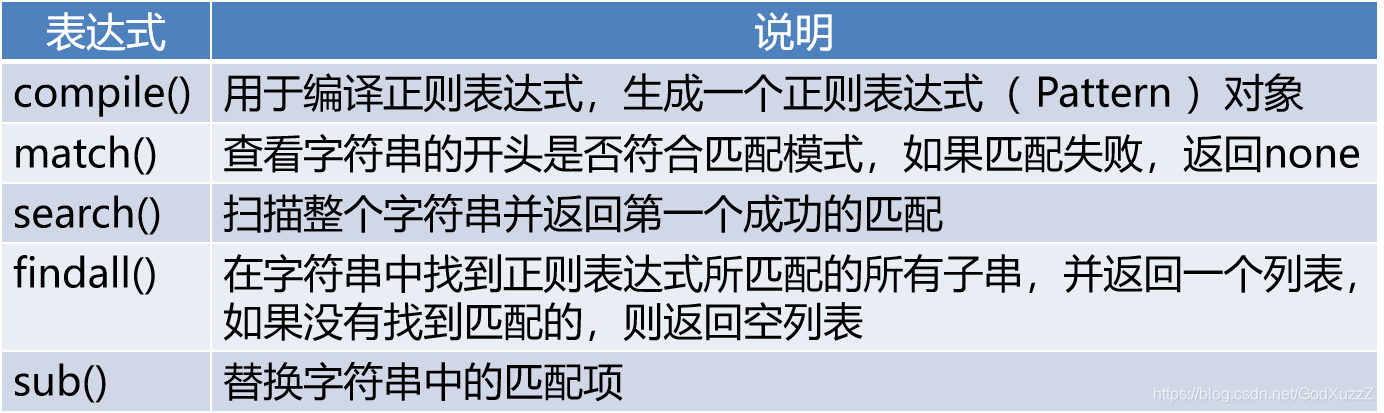
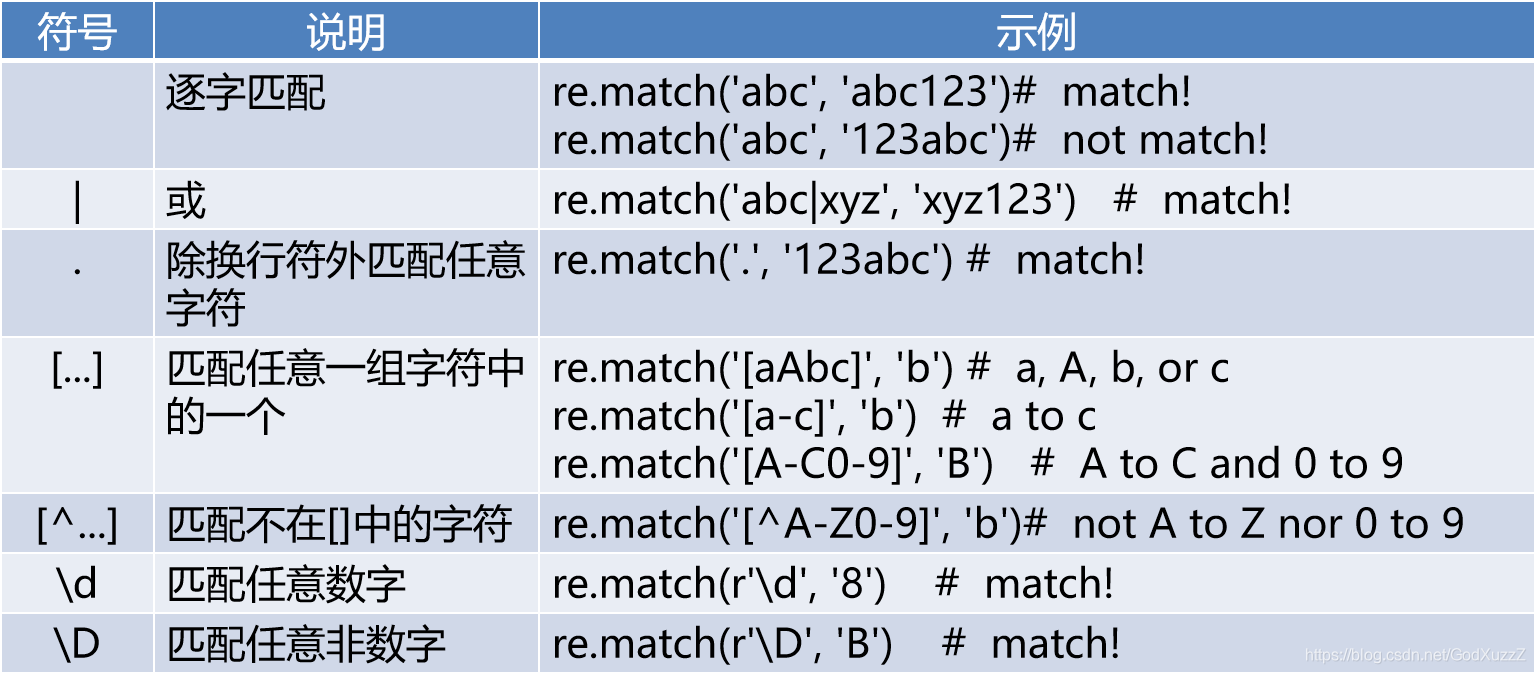
Python正则表达式模块
re模块
常用方法
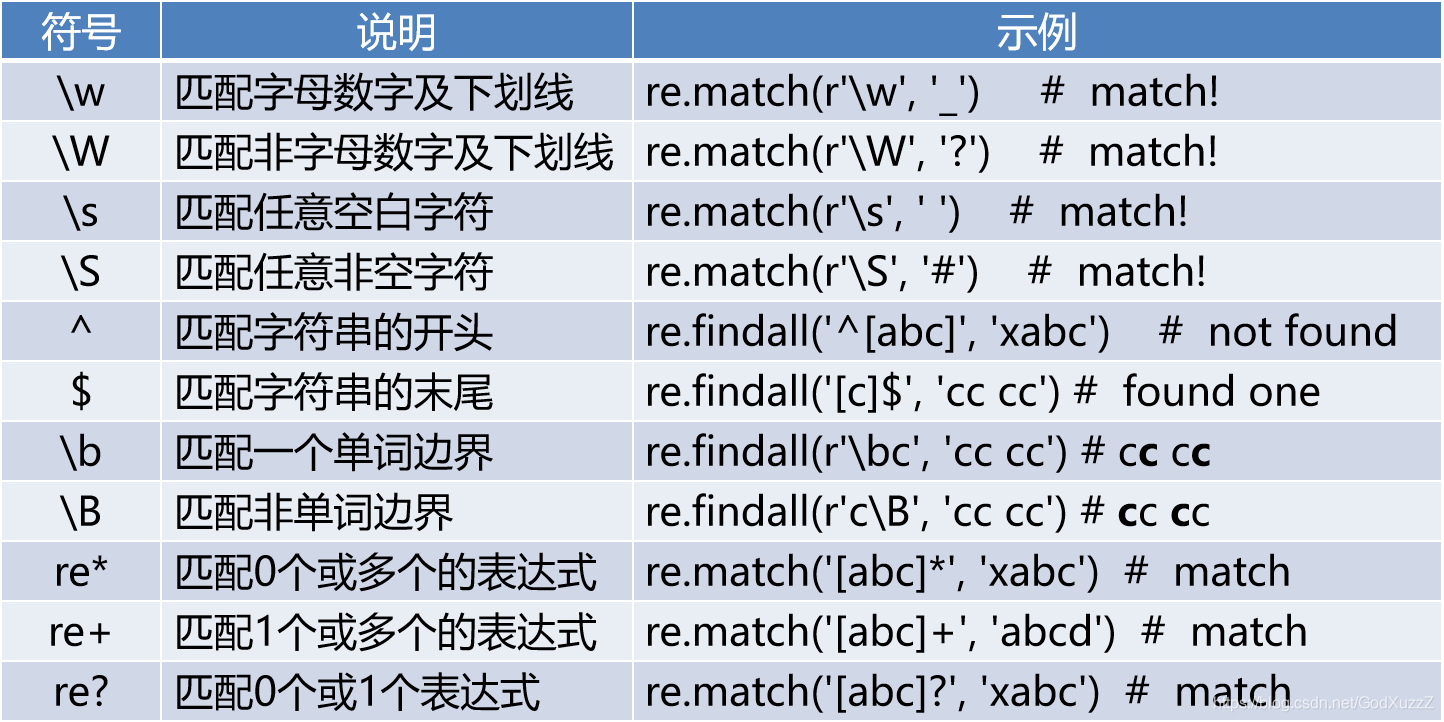

默认为贪婪匹配
re.match('.{2,6}c','cc cc cc') # match 'cc cc c'
?为非贪婪匹配
re.match('.{2,6}?c','cc cc cc') # match 'cc cc c'
0长度匹配
re.sub('a?', '-', 'bb') #  result: '-b-b-'
re.sub('a*', '-', 'bb') #  result: '-b-b-'
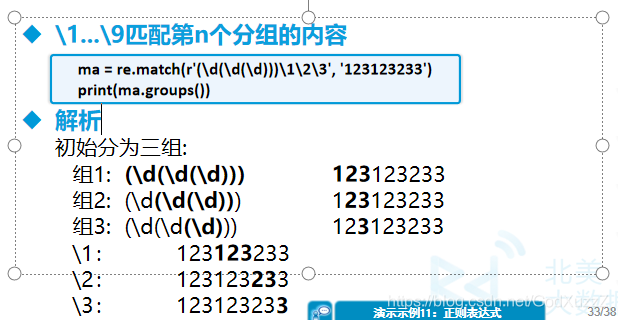
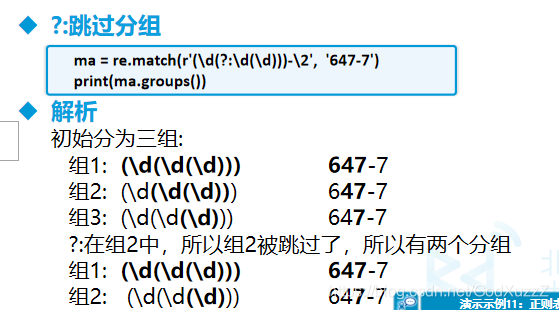
使用 () 分组
match=re.match(r'(\d+)', '123')
groups=match.groups() 	#  groups is ('123',)
g1=match.group(1) 		#  g1 is '123'

match=re.match(r'(\d)(\d)(\d)', '123')
groups=match.groups() 	#  groups is ('1', '2', '3')
g1=match.group(1) 		#  g1 is '1'
g2=match.group(2) 		#  g2 is '2'
g3=match.group(3) 		#  g3 is '3'
Python面向对象
class Shape:    # 定义类关键字
	def __init__(self,x=0,y=0):
		self.x = x      # 实例变量
		self.y = y
	def move(self,deltaX,deltaY):   # 实例方法
		self.x += deltaX
		self.y += deltaY
init:构造方法
self:对象实例
shape = Shape()
shape.move(2,3)
print(shape.x)
print(shape.y)
实例方法
使用对象才能够调用的方法
方法的第一个参数为self表示对象本身





 扫一扫
扫一扫


 被折叠的 条评论
为什么被折叠?
被折叠的 条评论
为什么被折叠?
 到【灌水乐园】发言





