 NIO阻塞与非阻塞模式对比:ServerSocketChannel与Selector实现详解


 本文探讨了NIO的阻塞和非阻塞服务端与客户端编程,通过实例展示了ServerSocketChannel在单线程和多线程下的工作原理,以及如何使用Selector进行事件驱动的IO处理,包括accept和read事件的处理,以及异常的捕获和取消。
文章目录
一、NIO阻塞服务端
下面演示的代码是单线程处理服务端的连接,以及读取数据。
import java.io.IOException;
import java.net.InetSocketAddress;
import java.nio.Buffer;
import java.nio.ByteBuffer;
import java.nio.channels.ServerSocketChannel;
import java.nio.channels.SocketChannel;
import java.util.ArrayList;
import java.util.List;

import org.apache.dubbo.qos.server.Server;

import static com.gosaint.bio.buffer.ByteBufferUtil.debugRead;
import lombok.extern.slf4j.Slf4j;

/**
 * @Author: gosaint
 * @Description:
 * @Date Created in 20:19 2021/6/20
 * @Modified By:
 */
@Slf4j
public class EchoServer1 {

    public static void main(String[] args) throws IOException {
        ServerSocketChannel channel= ServerSocketChannel.open();
        channel.bind(new InetSocketAddress(8080));
        ByteBuffer buffer= ByteBuffer.allocate(16);
        List<SocketChannel> scc=new ArrayList<>();
        while (true){
            log.debug("连接中.......");
            SocketChannel socketChannel = channel.accept();
            log.debug("连接建立.......{}",socketChannel);
            scc.add(socketChannel);
            for (SocketChannel s:scc){
                log.debug("读取数据之前.......{}",channel);
                s.read(buffer);
                buffer.flip();
                debugRead(buffer);
                buffer.clear();
                log.debug("读取数据之后.......{}",channel);
            }
        }
    }
}
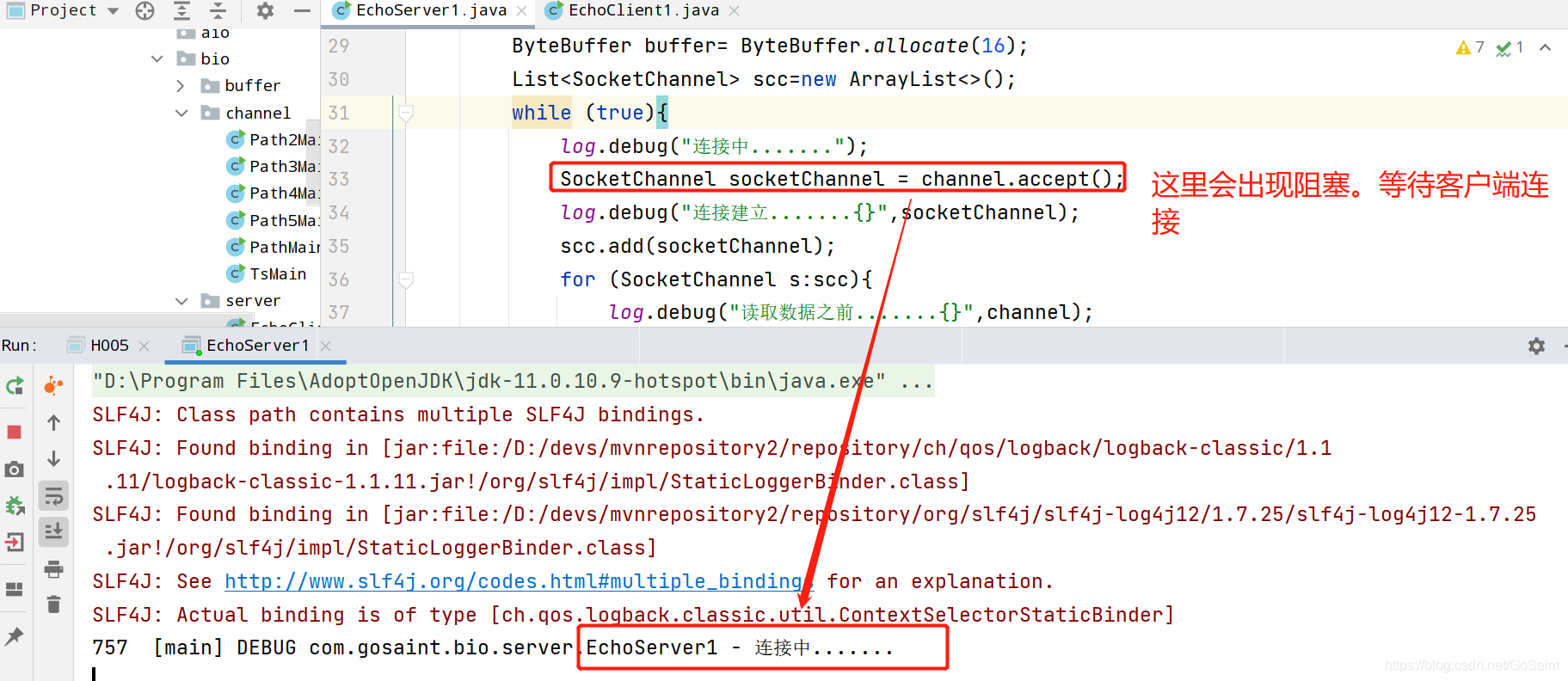
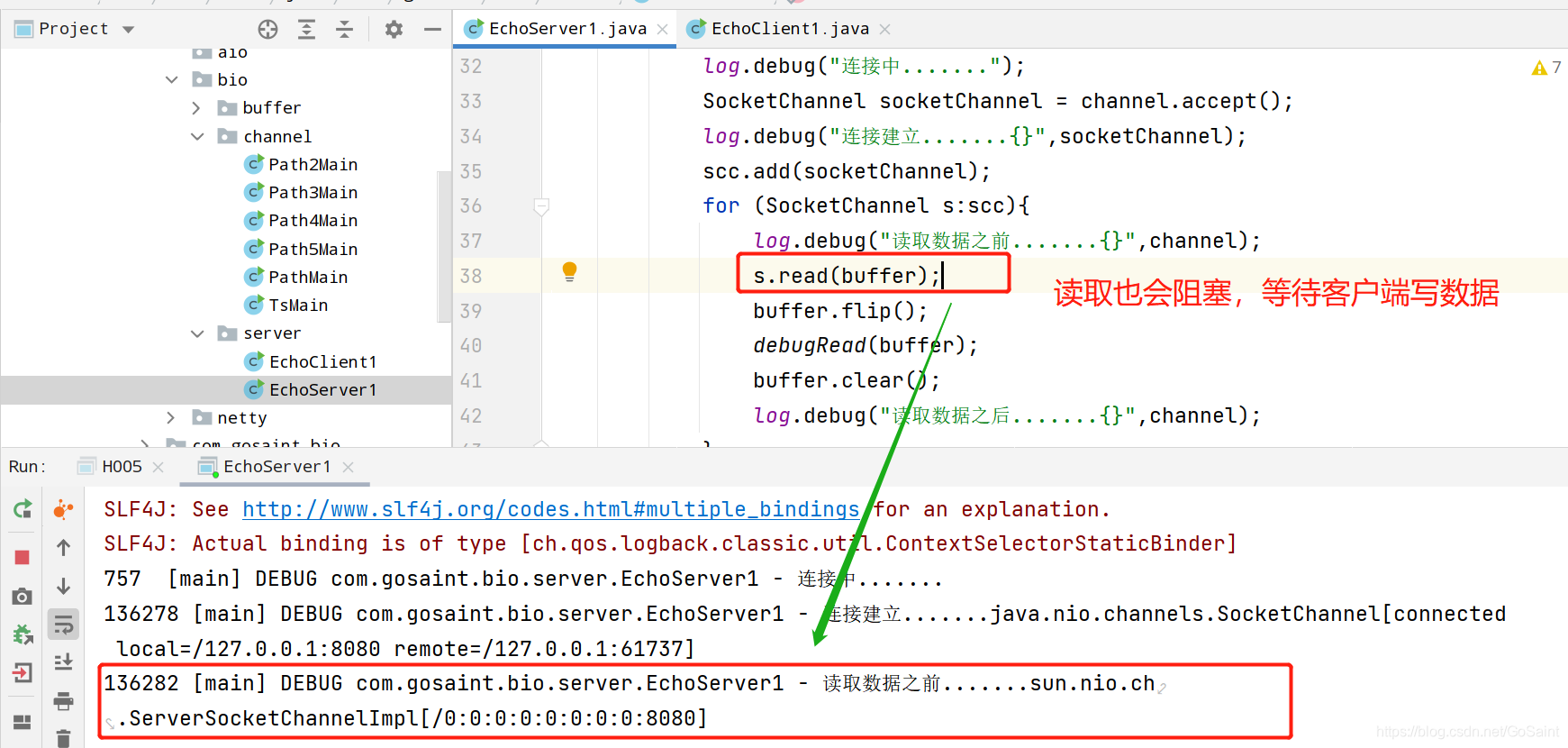
也是就说服务端的连接和读取都会阻塞。
客户端代码
@Slf4j
public class EchoClient1 {

    public static void main(String[] args) throws IOException {
        SocketChannel socketChannel = SocketChannel.open();
        socketChannel.connect(new InetSocketAddress("localhost",8080));
        System.out.println("waiting...");
    }
}
二、NIO非阻塞设置
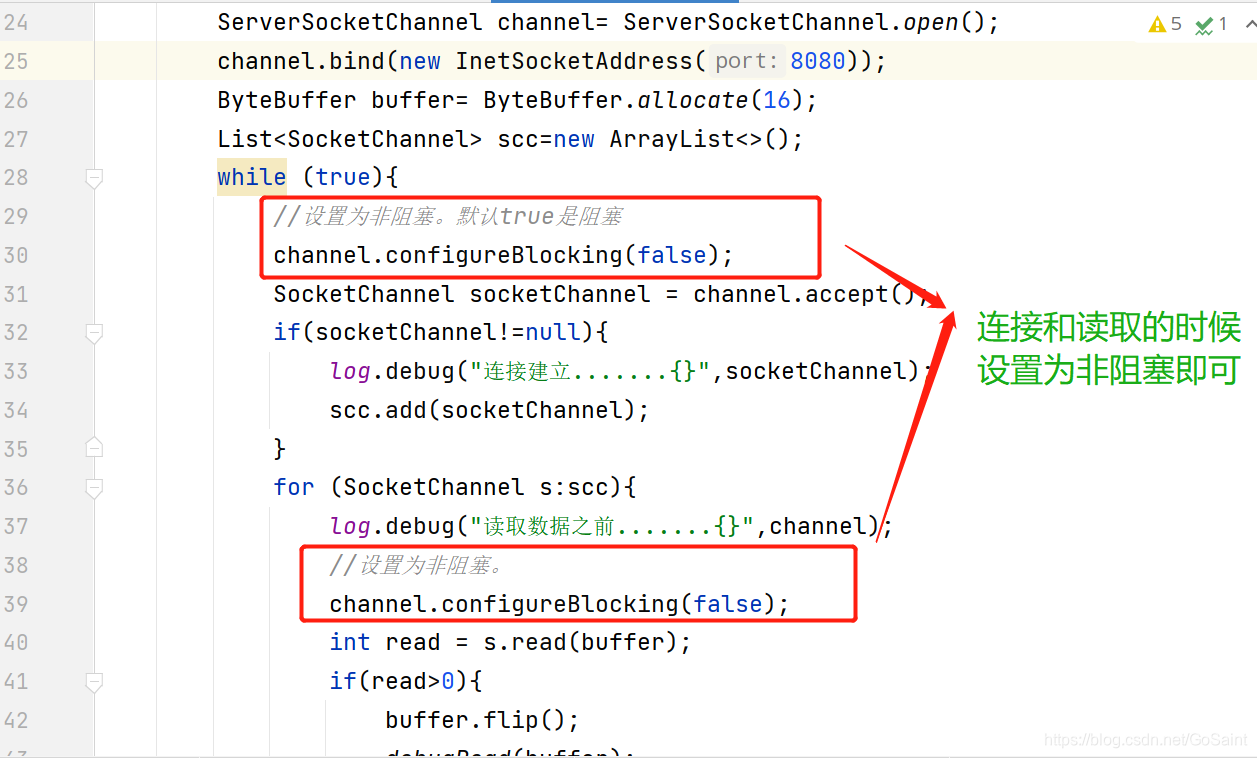
@Slf4j
public class EchoServer2 {

    public static void main(String[] args) throws IOException {
        ServerSocketChannel channel= ServerSocketChannel.open();
        channel.bind(new InetSocketAddress(8080));
        ByteBuffer buffer= ByteBuffer.allocate(16);
        List<SocketChannel> scc=new ArrayList<>();
        while (true){
            //设置为非阻塞。默认true是阻塞
            channel.configureBlocking(false);
            SocketChannel socketChannel = channel.accept();
            if(socketChannel!=null){
                log.debug("连接建立.......{}",socketChannel);
                scc.add(socketChannel);
            }
            for (SocketChannel s:scc){
                log.debug("读取数据之前.......{}",channel);
                //设置为非阻塞。
                channel.configureBlocking(false);
                int read = s.read(buffer);
                if(read>0){
                    buffer.flip();
                    debugRead(buffer);
                    buffer.clear();
                    log.debug("读取数据之后.......{}",channel);
                }
            }
        }
    }
}
三、ServerSocketChannel
结构图如下:
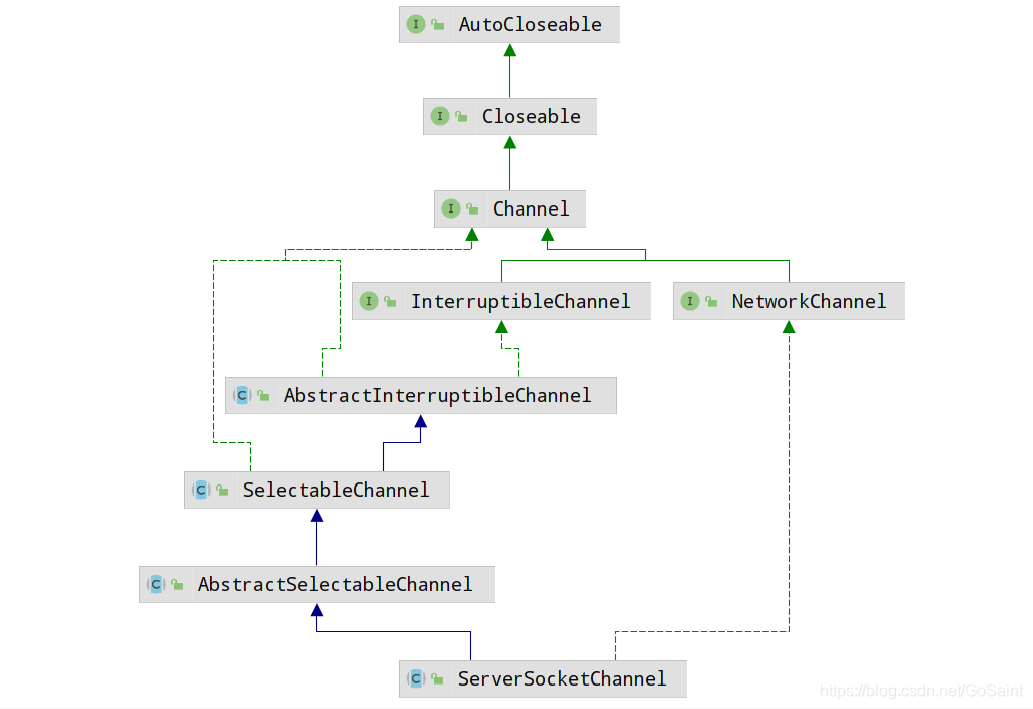
- static ServerSocketChannel open();是ServerSocketChannel的静态工厂方法。返回ServerSocketChannel,并且处于阻塞模式。
- abstract SocketChannel accept();用于客户端的连接。如果ServerSocketChannel处于非阻塞模式,当没有客户端连接,该方法返回null。当ServerSocketChannel处于阻塞模式,当没有客户端连接时,会一直阻塞下去。
- socketchannel设置为非阻塞
socketchannel.configureBlocking(false);
四、NIO Selector处理accept
1、Selector的创建
Selector selector = Selector.open();
2、服务端
import java.io.IOException;
import java.net.InetSocketAddress;
import java.nio.channels.SelectionKey;
import java.nio.channels.Selector;
import java.nio.channels.ServerSocketChannel;
import java.nio.channels.SocketChannel;
import java.util.Iterator;

import lombok.extern.slf4j.Slf4j;

/**
 * @Author: gosaint
 * @Description:
 * @Date Created in 20:19 2021/6/20
 * @Modified By:
 */
@Slf4j
public class EchoServer3 {

    public static void main(String[] args) throws IOException {
        // 创建selector,可以管理多线程
        Selector selector = Selector.open();
        ServerSocketChannel ssc= ServerSocketChannel.open();
        ssc.bind(new InetSocketAddress(8080));
        //设置为非阻塞
        ssc.configureBlocking(false);
        //注册ServerSocketChannel到selector里面
        SelectionKey sscKey = ssc.register(selector, 0, null);
        log.debug("sscKey:{}",sscKey);
        //关注accept事件
        sscKey.interestOps(SelectionKey.OP_ACCEPT);
        while (true){
            //如果没有连接,那么会阻塞在这里
            selector.select();
            Iterator<SelectionKey> iterator = selector.selectedKeys().iterator();
            while (iterator.hasNext()){
                SelectionKey key = iterator.next();
                log.debug("key:{}",key);
                //获取对应的channel
                ServerSocketChannel channel = (ServerSocketChannel)key.channel();
                SocketChannel sc = channel.accept();
                log.debug("{}",sc);
            }
        }
    }
}
3、客户端
@Slf4j
public class EchoClient1 {

    public static void main(String[] args) throws IOException {
        SocketChannel socketChannel = SocketChannel.open();
        socketChannel.connect(new InetSocketAddress("localhost",8080));
        System.out.println("waiting...");
    }
}
测试如下:(debug客户端最后一行)

4、取消事件
调用SelectKey的 cancel()方法可以取消事件
selectionKey.cancel();
5、处理read事件
核心代码如下:
        while (true){
            //如果没有连接,那么会阻塞在这里
            selector.select();
            Iterator<SelectionKey> iterator = selector.selectedKeys().iterator();
            while (iterator.hasNext()){
                SelectionKey key = iterator.next();
                log.debug("key:{}",key);
                //连接事件
                if (key.isAcceptable()) {
                    //获取对应的channel
                    ServerSocketChannel channel = (ServerSocketChannel)key.channel();
                    SocketChannel sc = channel.accept();
                    sc.configureBlocking(false);
                    //注册SocketChannel
                    SelectionKey scKey = sc.register(selector, 0, null);
                    //关注读取事件
                    scKey.interestOps(SelectionKey.OP_READ);
                    log.debug("{}",sc);
                    //读取事件
                }else if(key.isReadable()){
                    SocketChannel channel =(SocketChannel) key.channel();
                    ByteBuffer buffer = ByteBuffer.allocate(16);
                    channel.read(buffer);
                    buffer.flip();
                    debugRead(buffer);
                }

            }
        }
此时使用客户端发送消息,出现了java.lang.NullPointerException异常。
5.1、处理空指针异常
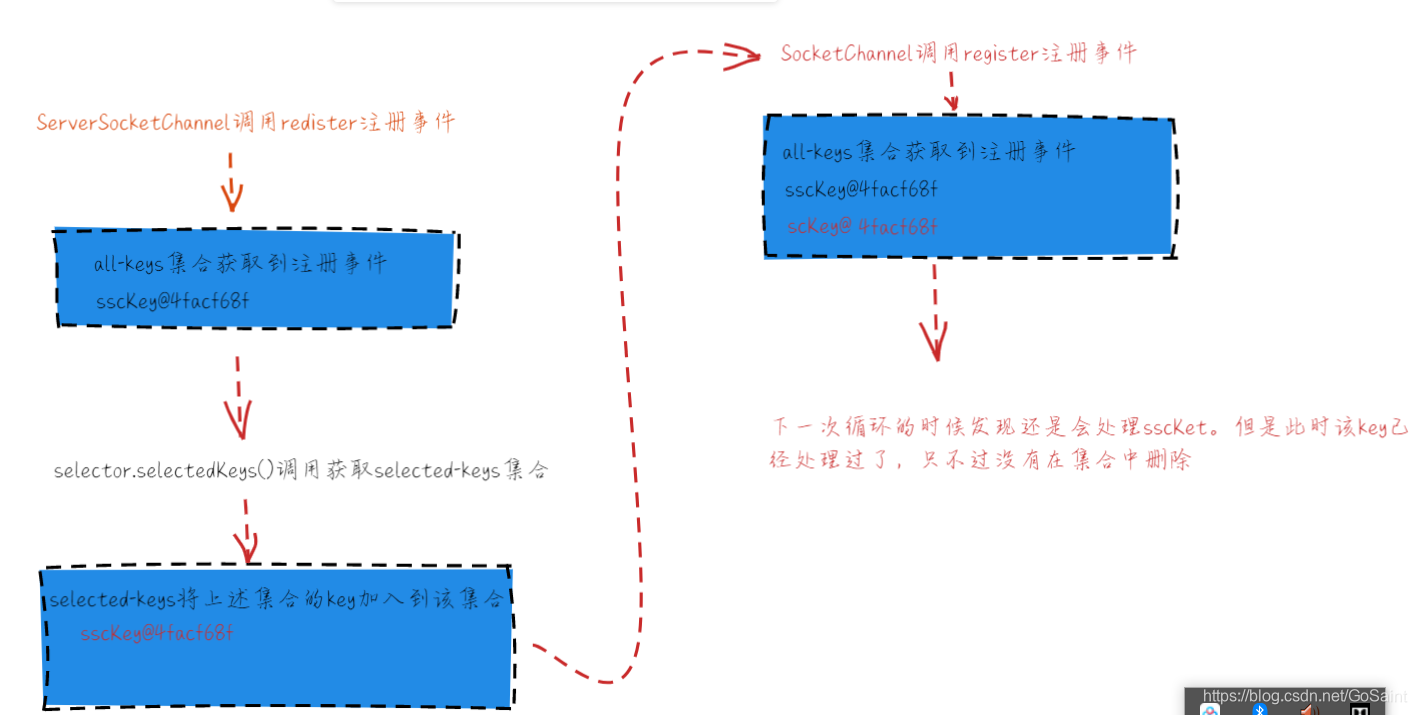
只要ServerSocketChannel及SocketChannel向Selector注册了特定的事件,Selector就会监视这些事件是否发生。register()方法负责注册事件。该方法会返回一个SelectionKey对象,该对象是用于跟踪这些注册事件的句柄。一个Selector包含3中类型的Selectionkey集合。
- all-keys集合: 向所有的Selector注册的SelectionKey注册的集合。Selector的keys()方法返回。
- selected-keys集合:向相关事件被Selector捕获的Selectionkey的集合。使用Selector的selectedKeys()返回。
- cancelled-keys集合:已经取消的SelectionKey的集合
5.2、IO异常
当客户端关闭连接的时候,有异常:java.io.IOException:
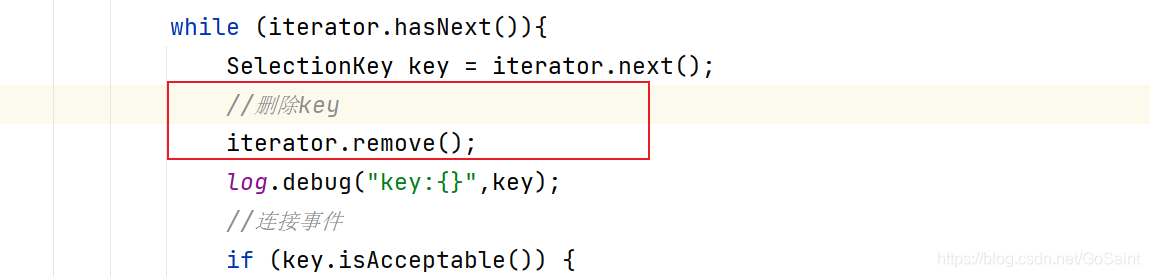
处理方法:异常处理,并且对处理完毕的key调用cancel()方法。
代码如下:
@Slf4j
public class EchoServer3 {

    public static void main(String[] args) throws IOException {
        // 创建selector,可以管理多线程
        Selector selector = Selector.open();
        ServerSocketChannel ssc= ServerSocketChannel.open();
        ssc.bind(new InetSocketAddress(8080));
        //设置为非阻塞
        ssc.configureBlocking(false);
        //注册ServerSocketChannel到selector里面
        SelectionKey sscKey = ssc.register(selector, 0, null);
        log.debug("sscKey:{}",sscKey);
        //关注accept事件
        sscKey.interestOps(SelectionKey.OP_ACCEPT);
        while (true){
            //如果没有连接,那么会阻塞在这里
            selector.select();
            Iterator<SelectionKey> iterator = selector.selectedKeys().iterator();
            while (iterator.hasNext()){
                SelectionKey key = iterator.next();
                //删除key
                iterator.remove();
                log.debug("key:{}",key);
                //连接事件
                if (key.isAcceptable()) {
                    //获取对应的channel
                    ServerSocketChannel channel = (ServerSocketChannel)key.channel();
                    SocketChannel sc = channel.accept();
                    sc.configureBlocking(false);
                    //注册SocketChannel
                    SelectionKey scKey = sc.register(selector, 0, null);
                    //关注读取事件
                    scKey.interestOps(SelectionKey.OP_READ);
                    log.debug("{}",sc);
                    //读取事件
                }else if(key.isReadable()){
                    //ctrl+alt+t   try-catch快键
                    try {
                        SocketChannel channel =(SocketChannel) key.channel();
                        ByteBuffer buffer = ByteBuffer.allocate(16);
                        int read = channel.read(buffer);
                        if(read==-1){
                            key.cancel();
                        }else {
                            buffer.flip();
                            debugRead(buffer);
                        }
                    } catch (IOException e) {
                        e.printStackTrace();
                        key.cancel();
                    }
                }

            }
        }
    }
}





 扫一扫
扫一扫


 291
291

 被折叠的 条评论
为什么被折叠?
被折叠的 条评论
为什么被折叠?
 到【灌水乐园】发言





