一.不修改前端代码
1.发现问题
1.为什么按照课中的代码来写,输出不了验证码的日志呢?
2.为什么后端传递的验证码长度为4,而前端却生成6位的验证码?
3.想要获取验证码,必须开通阿里云服务,那如果不开通阿里云服务,怎样才能使登入页面跳转到点餐系统里呢?
2.问题分析(回答上述发现的问题)
1.前端并未设置相应的‘url’请求路径,不会走当前‘url’的路径
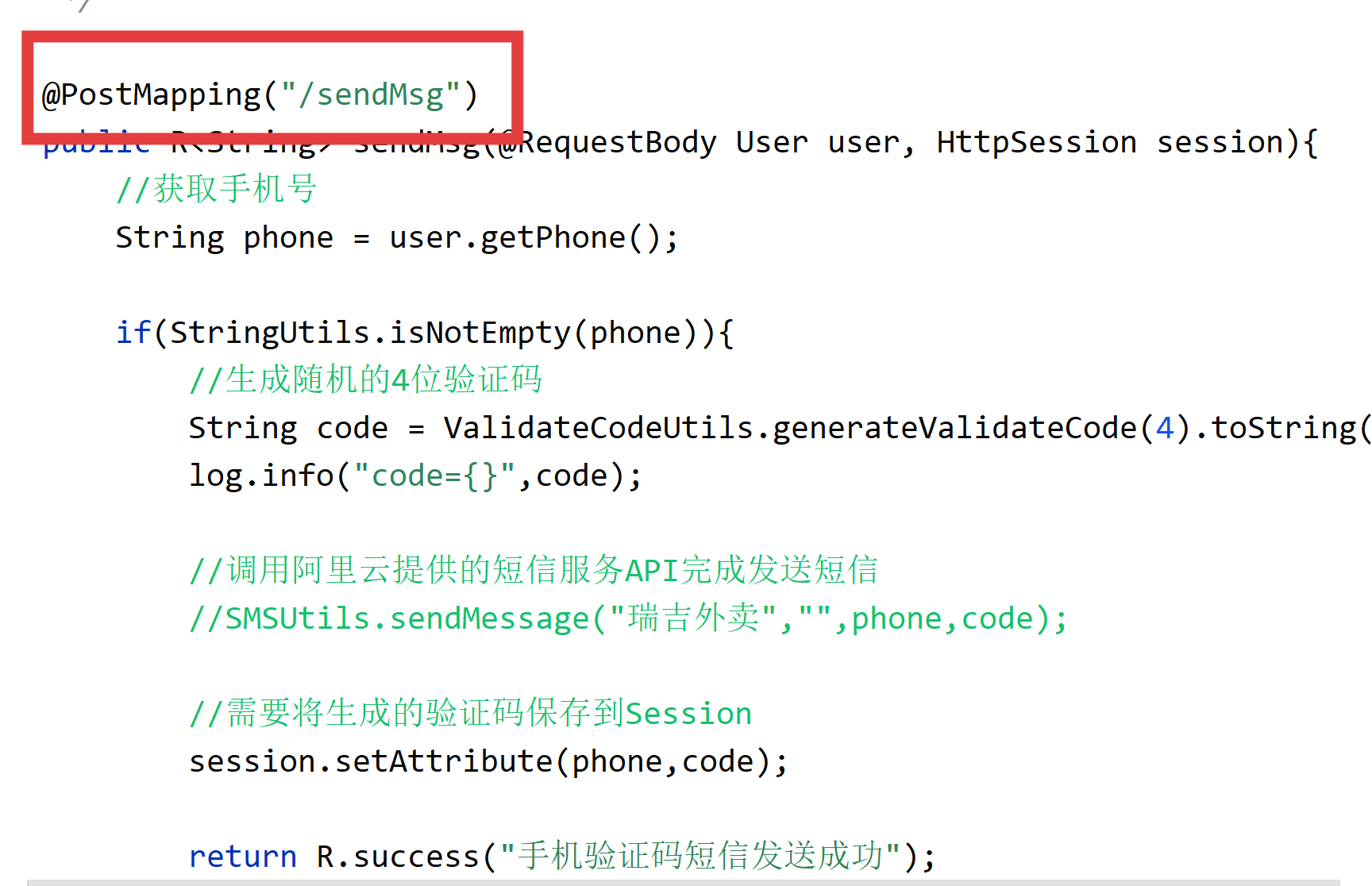
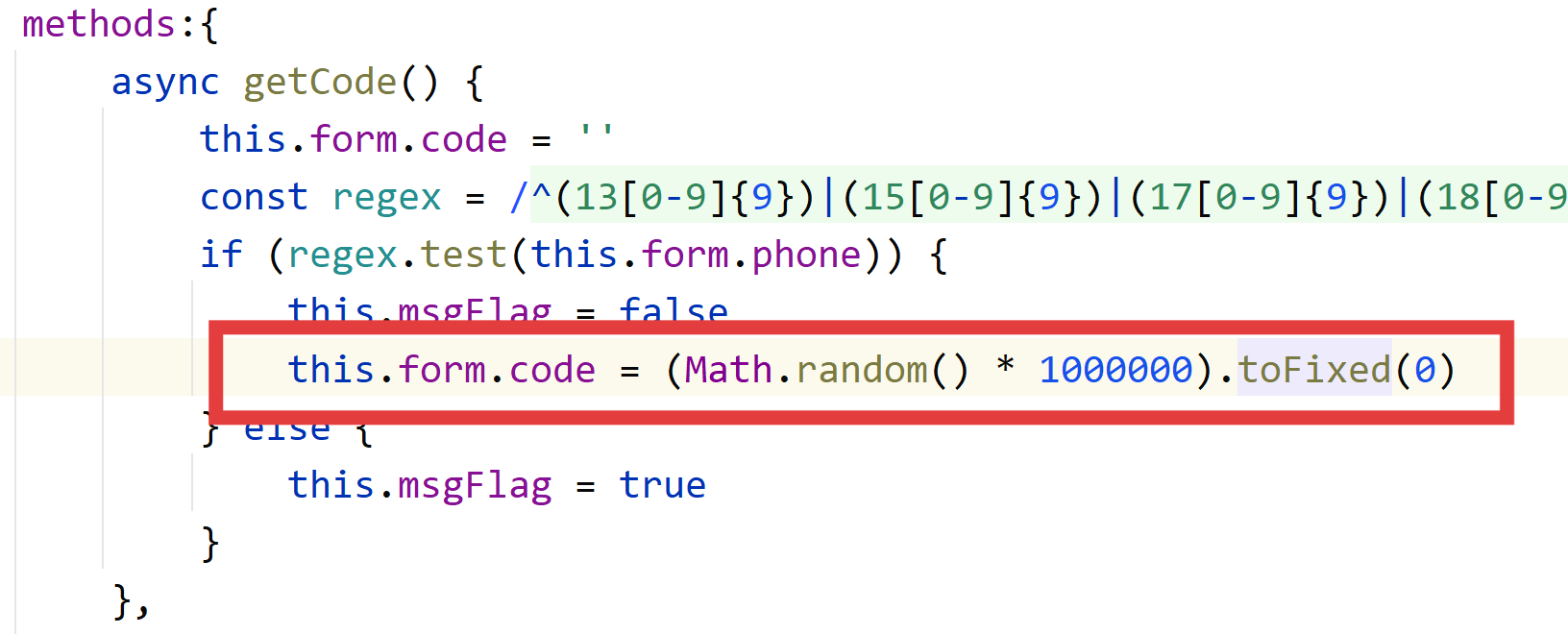
2.在前端程序中,写入了自动生成六位验证码
3.我们可以修改后端过滤器代码,并修改Controller层代码条件,也要添加数据库来保证用户的隐私性
我们在过滤器filter中将check方法中多加了条件,表示点击登入后不会拦截
public boolean check(String[] urls,String requestURI){
        for (String url : urls) {
            boolean match=PATH_MATCHER.match(url,requestURI);
            if(url.equals("/user/login")){
                return true;
            }
            if(match){
                return true;
            }
        }
        return false;
    }
同时修改Controller层代码,用手机号来作为登录凭证
@PostMapping("/login")
    public R<User> login(@RequestBody Map map, HttpSession session){
        log.info(map.toString());

        //获取手机号
        String phone = map.get("phone").toString();
        LambdaQueryWrapper<User> queryWrapper = new LambdaQueryWrapper<>();
        queryWrapper.eq(User::getPhone,phone);
        User user = userService.getOne(queryWrapper);
        if(user == null){
            //判断当前手机号对应的用户是否为新用户,如果是新用户就自动完成注册
            return R.error("输入的账号还未注册");
        }
        return R.success(user);

    }
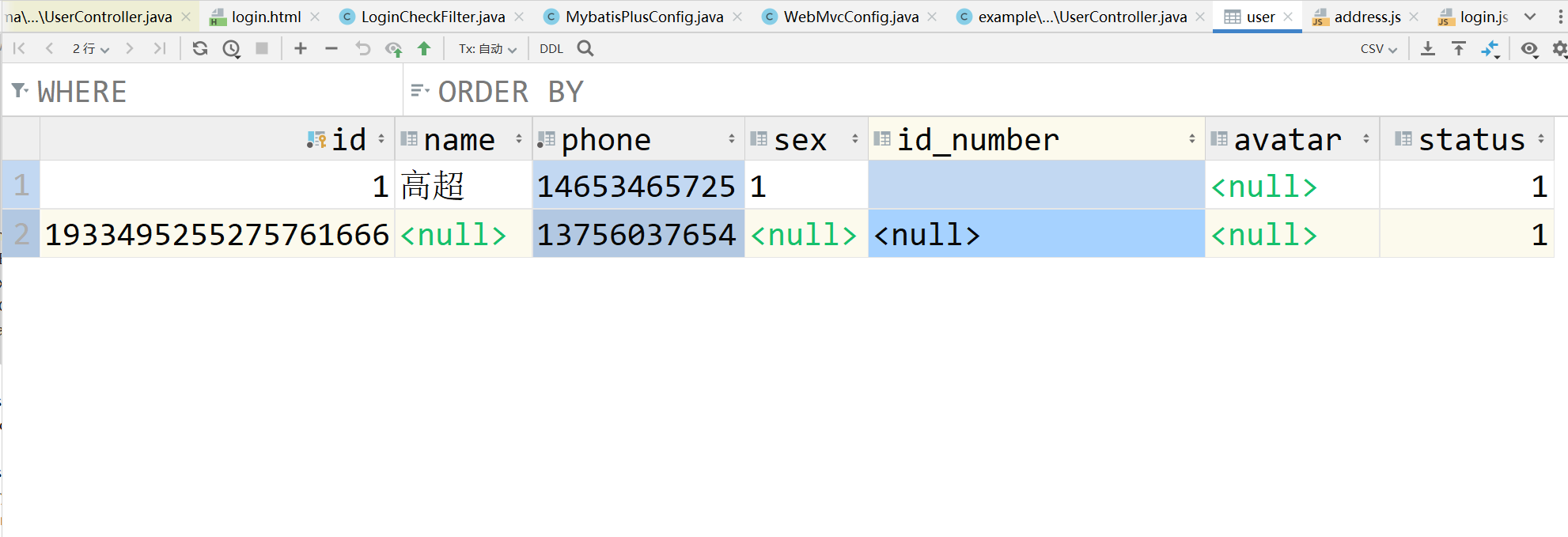
添加数据库手机号信息
3.全部代码展示
前端:
package org.example.reggie.filter;

import com.alibaba.fastjson.JSON;
import lombok.extern.slf4j.Slf4j;
import org.example.reggie.common.BaseContext;
import org.example.reggie.common.R;
import org.springframework.util.AntPathMatcher;

import javax.servlet.*;
import javax.servlet.annotation.WebFilter;
import javax.servlet.http.HttpServletRequest;
import javax.servlet.http.HttpServletResponse;
import java.io.IOException;

/*
检查用户是否完成登录
 */
//配置过滤器 并将所有请求路径都拦截
@WebFilter(filterName = "LoginCheckFilter",urlPatterns = "/*")
@Slf4j
public class LoginCheckFilter implements Filter {
    //路径匹配器,支持通配符
    public static final AntPathMatcher PATH_MATCHER=new AntPathMatcher();
    @Override
    public void doFilter(ServletRequest servletRequest, ServletResponse servletResponse, FilterChain filterChain) throws IOException, ServletException {
        HttpServletRequest request=(HttpServletRequest) servletRequest;//访问需求
        HttpServletResponse response=(HttpServletResponse) servletResponse;

        //1.获取本次请求的URI
        String requestURI=request.getRequestURI();
        log.info("拦截到请求:{}",requestURI);
        //定义不需要处理的请求路径
        String[] urls=new String[]{
                "/employee/login",
                "/employee/logout",
                "/backend/**",
                "/front/**",
                "/common/**",
                "/user/sendMsg",//移动端发送信息
                "/user/login"//移动端登入
        };

        //2.判断本次需求是否需要处理
        boolean check=check(urls,requestURI);

        //3.如果不需要处理,直接放行

        if(check){
            log.info("本次请求{}不需要处理",requestURI);
            filterChain.doFilter(request,response);
            return;
        }

        //4.1判断登录状态,如果已登录,则直接放行
        //登入上去之后代表将该用户id存储到doFilter中
        if(request.getSession().getAttribute("employee")!=null){
            log.info("用户已登录,用户id为{}",request.getSession().getAttribute("employee"));
            Long empId=(Long)request.getSession().getAttribute("employee");
            BaseContext.setCurrentId(empId);
            filterChain.doFilter(request,response);
            return;
        }
        //4.2判断登录状态,如果已登录,则直接放行
        //登入上去之后代表将该用户id存储到doFilter中
        if(request.getSession().getAttribute("user")!=null){
            log.info("用户已登录,用户id为{}",request.getSession().getAttribute("user"));
            Long userId=(Long)request.getSession().getAttribute("user");
            BaseContext.setCurrentId(userId);
            filterChain.doFilter(request,response);
            return;
        }

        //5.如果未登录则返回未登录结果,通过输出流方式向客户端页面响应数据
        log.info("用户未登录");
        response.getWriter().write(JSON.toJSONString(R.error("NOTLOGIN")));
        return;
    }
    //检查本次请求是否需要放行
    public boolean check(String[] urls,String requestURI){
        for (String url : urls) {
            boolean match=PATH_MATCHER.match(url,requestURI);
            if(url.equals("/user/login")){
                return true;
            }
            if(match){
                return true;
            }
        }
        return false;
    }
}
后端Controller层
package org.example.reggie.controller;

import com.baomidou.mybatisplus.core.conditions.query.LambdaQueryWrapper;
import lombok.extern.slf4j.Slf4j;
import org.apache.commons.lang.StringUtils;
import org.example.reggie.common.R;
import org.example.reggie.entity.User;
import org.example.reggie.service.UserService;
import org.example.reggie.utils.ValidateCodeUtils;
import org.springframework.beans.factory.annotation.Autowired;
import org.springframework.web.bind.annotation.PostMapping;
import org.springframework.web.bind.annotation.RequestBody;
import org.springframework.web.bind.annotation.RequestMapping;
import org.springframework.web.bind.annotation.RestController;

import javax.servlet.http.HttpSession;
import java.util.Map;

@RestController
@RequestMapping("/user")
@Slf4j
public class UserController {
    @Autowired
    private UserService userService;

    /**
     * 发送手机短信验证码
     * @param user
     * @return
     */
    @PostMapping("/sendMsg")
    public R<String> sendMsg(@RequestBody User user, HttpSession session){
        //获取手机号
        String phone = user.getPhone();

        if(StringUtils.isNotEmpty(phone)){
            //生成随机的4位验证码
            String code = ValidateCodeUtils.generateValidateCode(4).toString();
            log.info("code={}",code);

            //调用阿里云提供的短信服务API完成发送短信
            //SMSUtils.sendMessage("瑞吉外卖","",phone,code);

            //需要将生成的验证码保存到Session
            session.setAttribute(phone,code);

            return R.success("手机验证码短信发送成功");
        }

        return R.error("短信发送失败");
    }

    /**
     * 移动端用户登录
     * @param map
     * @param session
     * @return
     */
    @PostMapping("/login")
    public R<User> login(@RequestBody Map map, HttpSession session){
        log.info(map.toString());

        //获取手机号
        String phone = map.get("phone").toString();
        LambdaQueryWrapper<User> queryWrapper = new LambdaQueryWrapper<>();
        queryWrapper.eq(User::getPhone,phone);
        User user = userService.getOne(queryWrapper);
        if(user == null){
            //判断当前手机号对应的用户是否为新用户,如果是新用户就自动完成注册
            return R.error("输入的账号还未注册");
        }
        return R.success(user);

    }
}
二.修改前端代码
运行效果为日志能接收到前端所发送的验证码
前端front/api/login.js
 function sendCodeApi(data) {
    return $axios({
        url: '/user/sendCode',  // 确保后端有对应的接口
        method: 'post',
        data
    })
}

// 登录
 function loginApi(data) {
    return $axios({
        url: '/user/login',
        method: 'post',
        data
    })
}
前端 front/page/login.html
<!DOCTYPE html>
<html lang="en">
<head>
    <meta charset="utf-8">
    <meta http-equiv="X-UA-Compatible" content="IE=edge">
    <!-- 上述3个meta标签*必须*放在最前面,任何其他内容都*必须*跟随其后! -->
    <meta name="viewport" content="width=device-width, initial-scale=1.0, maximum-scale=1.0,user-scalable=no,minimal-ui">
    <title>菩提阁</title>
    <link rel="icon" href="./../images/favico.ico">
    <!--不同屏幕尺寸根字体设置-->
    <script src="./../js/base.js"></script>
    <!--element-ui的样式-->
    <link rel="stylesheet" href="../../backend/plugins/element-ui/index.css" />
    <!--引入vant样式-->
    <link rel="stylesheet" href="../styles/vant.min.css"/>
    <!-- 引入样式  -->
    <link rel="stylesheet" href="../styles/index.css" />
    <!--本页面内容的样式-->
    <link rel="stylesheet" href="./../styles/login.css" />
</head>
<body>
<div id="login" v-loading="loading">
    <div class="divHead">登录</div>
    <div class="divContainer">
        <el-input placeholder=" 请输入手机号码" v-model="form.phone"  maxlength='20'/></el-input>
        <div class="divSplit"></div>
        <el-input placeholder=" 请输入验证码" v-model="form.code"  maxlength='20'/></el-input>
        <span @click='getCode'>获取验证码</span>
    </div>
    <div class="divMsg" v-if="msgFlag">手机号输入不正确,请重新输入</div>
    <el-button type="primary" :class="{btnSubmit:1===1,btnNoPhone:!form.phone,btnPhone:form.phone}" @click="btnLogin">登录</el-button>
</div>
<!-- 开发环境版本,包含了有帮助的命令行警告 -->
<script src="../../backend/plugins/vue/vue.js"></script>
<!-- 引入组件库 -->
<script src="../../backend/plugins/element-ui/index.js"></script>
<!-- 引入vant样式 -->
<script src="./../js/vant.min.js"></script>
<!-- 引入axios -->
<script src="../../backend/plugins/axios/axios.min.js"></script>
<script src="./../js/request.js"></script>
<script src="./../api/login.js"></script>
</body>
<script>
    new Vue({
        el:"#login",
        data(){
            return {
                form:{
                    phone:'',
                    code:''
                },
                msgFlag:false,
                loading:false
            }
        },
        computed:{},
        created(){},
        mounted(){},
        methods:{
            async getCode() {
                // 清空现有验证码
                this.form.code = '';

                // 验证手机号格式
                const regex = /^(13[0-9]{9})|(15[0-9]{9})|(17[0-9]{9})|(18[0-9]{9})|(19[0-9]{9})$/;
                if (!regex.test(this.form.phone)) {
                    this.msgFlag = true;
                    return;
                }

                this.msgFlag = false;
                this.loading = true;

                try {
                    // 调用后端API获取验证码
                    const res = await sendCodeApi({ phone: this.form.phone });

                    if (res.code === 1) {
                        this.$notify({ type: 'success', message: '验证码已发送' });
                    } else {
                        this.$notify({ type: 'error', message: res.msg || '发送失败' });
                    }
                } catch (error) {
                    console.error('发送验证码失败', error);
                    this.$notify({ type: 'error', message: '网络错误,请重试' });
                } finally {
                    this.loading = false;
                }
            },
            async btnLogin() {
                // 验证必填项
                if (!this.form.phone) {
                    this.$notify({ type: 'warning', message: '请输入手机号码' });
                    return;
                }

                if (!this.form.code) {
                    this.$notify({ type: 'warning', message: '请输入验证码' });
                    return;
                }

                this.loading = true;

                try {
                    // 调用登录API,同时传递手机号和验证码
                    const res = await loginApi({
                        phone: this.form.phone,
                        code: this.form.code
                    });

                    if (res.code === 1) {
                        // 登录成功,存储用户信息
                        sessionStorage.setItem("userPhone", this.form.phone);

                        // 跳转到首页(建议改用Vue Router)
                        window.requestAnimationFrame(() => {
                            window.location.href = '/front/index.html';
                        });
                    } else {
                        // 登录失败,显示错误信息
                        this.$notify({ type: 'warning', message: res.msg || '登录失败' });
                    }
                } catch (error) {
                    console.error('登录失败', error);
                    this.$notify({ type: 'error', message: '网络错误,请重试' });
                } finally {
                    this.loading = false;
                }
            }


          /*  async getCode() {
                this.form.code = ''
                const regex = /^(13[0-9]{9})|(15[0-9]{9})|(17[0-9]{9})|(18[0-9]{9})|(19[0-9]{9})$/;
                if (regex.test(this.form.phone)) {
                    this.msgFlag = false
                    this.form.code = (Math.random() * 1000000).toFixed(0)
                } else {
                    this.msgFlag = true
                }
            },
            async btnLogin(){
                if(this.form.phone && this.form.code){
                    this.loading = true
                    const res = await loginApi({phone:this.form.phone})

                    this.loading = false
                    if(res.code === 1){
                        sessionStorage.setItem("userPhone",this.form.phone)
                        window.requestAnimationFrame(()=>{
                            window.location.href= '/front/index.html'
                        })
                    }else{
                        this.$notify({ type:'warning', message:res.msg});
                    }
                }else{
                    this.$notify({ type:'warning', message:'请输入手机号码'});
                }
            }*/
        }
    })
</script>
</html>
后端 UserController
package com.itheima.reggie.controller;

import com.baomidou.mybatisplus.core.conditions.query.LambdaQueryWrapper;
import com.baomidou.mybatisplus.core.conditions.query.QueryWrapper;
import com.itheima.reggie.common.R;
import com.itheima.reggie.entity.User;
import com.itheima.reggie.service.UserService;
import com.itheima.reggie.utils.SMSUtils;
import com.itheima.reggie.utils.ValidateCodeUtils;
import lombok.extern.slf4j.Slf4j;
import org.apache.commons.lang.StringUtils;
import org.springframework.beans.factory.annotation.Autowired;
import org.springframework.web.bind.annotation.PostMapping;
import org.springframework.web.bind.annotation.RequestBody;
import org.springframework.web.bind.annotation.RequestMapping;
import org.springframework.web.bind.annotation.RestController;

import javax.servlet.http.HttpSession;
import java.util.Map;

@RestController
@RequestMapping("/user")
@Slf4j
public class UserController {

    @Autowired
    private UserService userService;

    /**
     * 发送手机短信验证码
     * @param user
     * @return
     */
    /*@PostMapping("/sendMsg")
    public R<String> sendMsg(@RequestBody User user, HttpSession session){
        //获取手机号
        String phone = user.getPhone();

        if(StringUtils.isNotEmpty(phone)){
            //生成随机的4位验证码
            String code = ValidateCodeUtils.generateValidateCode(4).toString();
            log.info("code={}",code);

            //调用阿里云提供的短信服务API完成发送短信
            //SMSUtils.sendMessage("瑞吉外卖","",phone,code);

            //需要将生成的验证码保存到Session
            session.setAttribute(phone,code);

            return R.success("手机验证码短信发送成功");
        }

        return R.error("短信发送失败");
    }*/

    /**
     * 移动端用户登录
     * @param map
     * @param session
     * @return
     */
    /*@PostMapping("/login")
    public R<User> login(@RequestBody Map map, HttpSession session){
        log.info(map.toString());

        //获取手机号
        String phone = map.get("phone").toString();
        LambdaQueryWrapper<User> lambdaQueryWrapper=new LambdaQueryWrapper<>();
        lambdaQueryWrapper.eq(User::getPhone,phone);
        User user=userService.getOne(lambdaQueryWrapper);*/
       /* if(user==null){
            user=new User();
            user.setPhone(phone);
            user.setStatus(1);
            userService.save(user);
            return R.success(user);
        }*/

        /*if(user == null){
            return R.error("该用户未注册,请先注册");
        }else{
            return R.success(user);
        }
}*/


    /**
     * 发送验证码
     * @param map
     * @param session
     * @return
     */
    @PostMapping("/sendCode")
    public R<String> sendCode(@RequestBody Map<String, String> map, HttpSession session) {
        // 获取手机号
        String phone = map.get("phone");

        if (StringUtils.isNotEmpty(phone)) {
            // 生成随机验证码(如:123456)
            String code = ValidateCodeUtils.generateValidateCode(6).toString();

            session.setAttribute(phone,code);
            // 调用短信API发送验证码(实际项目中需接入短信服务)
            // SMSUtils.sendMessage("阿里云短信签名", "阿里云短信模板", phone, code);

            log.info("验证码: {}", code); // 开发环境打印,生产环境删除
            return R.success("验证码发送成功");
        }

        return R.error("验证码发送失败");
    }


    /**
     * 登录
     * @param map
     * @param session
     * @return
     */
    @PostMapping("/login")
    public R<User> login(@RequestBody Map<String, String> map, HttpSession session) {
        // 获取手机号和验证码
        String phone = map.get("phone");
        String code = map.get("code");

        // 从session获取存储的验证码
        Object cacheCode = session.getAttribute(phone);

        // 验证码比对
        if (cacheCode != null && cacheCode.equals(code)) {
            // 验证通过,查询用户是否存在
            LambdaQueryWrapper<User> queryWrapper = new LambdaQueryWrapper<>();
            queryWrapper.eq(User::getPhone, phone);
            User user = userService.getOne(queryWrapper);

            // 如果是新用户,自动注册
            if (user == null) {
                user = new User();
                user.setPhone(phone);
                user.setStatus(1);
                userService.save(user);
            }

            // 登录成功,将用户ID存入session
            session.setAttribute("user", user.getId());

            // 删除session中的验证码
            session.removeAttribute(phone);

            return R.success(user);
        }

        return R.error("登录失败");
    }


}





 扫一扫
扫一扫


 1102
1102

 被折叠的 条评论
为什么被折叠?
被折叠的 条评论
为什么被折叠?
 到【灌水乐园】发言





