






表
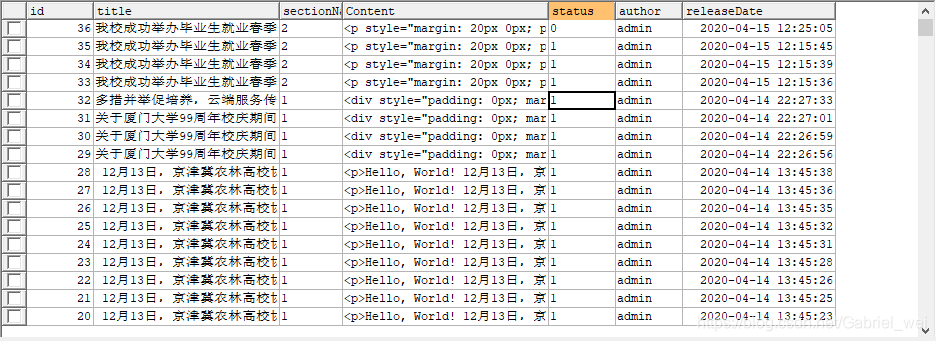
添加/更新
insert into user values(null,'admin','123')
UPDATE user SET PASSWORD=MD5('123');
删除
如果不加where语句的话,将会把全表删除
DELETE FROM table_name
WHERE some_column=some_value;
您可以在不删除表的情况下,删除表中所有的行。这意味着表结构、属性、索引将保持不变:
DELETE FROM table_name;
或
DELETE * FROM table_name;
查询
limit
select * from Customer LIMIT 10;--检索前10行数据,显示1-10条数据
select * from Customer LIMIT 1,10;--检索从第2行开始,累加10条id记录,共显示id为2....11
select * from Customer limit 5,10;--检索从第6行开始向前加10条数据,共显示id为6,7....15
select * from Customer limit 6,10;--检索从第7行开始向前加10条记录,显示id为7,8...16
select * from article where sectionName = 1 and status = 1 limit 10
select * from tableName limit i,n
# tableName:表名
# i:为查询结果的索引值(默认从0开始),当i=0时可省略i
# n:为查询结果返回的数量
# i与n之间使用英文逗号","隔开

#
limit n 等同于 limit 0,n
# 查询10条数据,索引从0到9,第1条记录到第10条记录
select * from t_user limit 10;
select * from t_user limit 0,10;

# 查询8条数据,索引从5到12,第6条记录到第13条记录
select * from t_user limit 5,8;
order by/desc/limit
select id,title,releaseDate from article where sectionName = 1 and status = 1 order by releaseDate desc limit 7
select * from article where sectionName="1" order by releaseDate desc limit 1,10;
in
SELECT column_name(s)
FROM table_name
WHERE column_name IN (value1,value2,...);
select * from 表 where 编号 in (1,2,3,4)
或者
select * from 表 where 编号=1 or 编号=2 or 编号=3 or 编号=4
这两个是同样的道理
select * from article where sectionName in(1,2);
like
like '%%'默认为查询所有
Like的运用场合主要在模糊查询的时候,一般以查询字符串居多,这里据一些例子来说他的一般用法:
select * from article where title like '%我校%' and releaseDate between '2020-04-14 13:44:59' AND '2020-04-14 13:45:38'
查询name字段中包含有“明”字的。
select * from table1 where name like ‘%明%’
这里不要使用*来代替,一般在使用0个或者任意个字符构成的字符串的时候最好使用%
不过在首或尾使用可以相互替换,如果在头尾同时使用的话,就必须要使用%
查询name字段中以“李”字开头。
select * from table1 where name like ‘李*’

或者

select * from table1 where name like ‘李%’
查询name字段中含有数字的。
select * from table1 where name like ‘%[0-9]%’
查询name字段中含有小写字母的。
select * from table1 where name like ‘%[a-z]%’
查询name字段中不含有数字的。
select * from table1 where name like ‘%[!0-9]%’
申明一个变量,变量放在SQL like 后面。想给变量加上通配符,应该怎么用?
左右通配 like '%" (这里是你的变量百,用相应度的连接符连接即可) "%'
以变知量开头 like '" (这里是你的变量,用相应道的连接符连接即可) "%'
以变量结尾内 like '%" (这里是你的变量,用相应的连接符连接即可) "'
使用正则模糊查询
MySQL 中使用 REGEXP 或 NOT REGEXP 运算符 (或 RLIKE 和 NOT RLIKE) 来操作正则表达式。
下面的 SQL 语句选取 name 以 “G”、“F” 或 “s” 开始的所有网站:
SELECT * FROM Websites
WHERE name REGEXP '^[GFs]';
下面的 SQL 语句选取 name 以 A 到 H 字母开头的网站:
SELECT * FROM Websites
WHERE name REGEXP '^[A-H]';
between…and…
select * from article where releaseDate between '2020-04-14 13:44:59' AND '2020-04-14 13:45:38'
select * from article where releaseDate between '0' AND '2020-04-14 13:45:18'
注意,下面的语句由于没有时分秒,与数据库不匹配,将查询不到任何数据
select * from article where releaseDate between '0' AND '2020-04-14'
count(1)
select count(1) from article where sectionName="1";
MD5加密
UPDATE customer SET PASSWORD=MD5('123');
总和
select * from article where sectionName !='' and title like '%%' and releaseDate between '2020-04-14 13:44:59' AND '2020-04-14 13:45:38' order by releaseDate desc
常用示例
查询某个字段下面都有哪几个值
有时候可能某个字段下面的值是固定的几个,比如代表状态的status,可能我们预设只有1,2,3
select sectionName from article group by sectionName





 扫一扫
扫一扫


 被折叠的 条评论
为什么被折叠?
被折叠的 条评论
为什么被折叠?
 到【灌水乐园】发言





