



 本文介绍了在Android Studio中实现页面切换的方法。通过Intent作为组件间通信的媒介,详细阐述了如何创建和启动新的Activity以实现页面跳转,并提供了创建两个页面(activity_main.xml和second.xml)以及相关控制文件(MainActivity.java和secondActivity.java)的步骤,最终实现了页面之间的相互切换功能。
(一)页面的切换
1.传递参数组件Intent:
在Android的应用程序中不管是页面切换还是传递数据或是调用外部程序都可能要用到Intent。Intent负责对应用中某次操作的动作,动作涉及的数据、附加数据进行描述,Android则根据此Intent的描述负责找到对应的组件,将Intent传递给调用的组件,并完成组件的调用。因此,可以将Intent理解为不同组建之间通信的“媒介”,其专门提供租间相互调用的相关信息。
2.Activity页面的切换
Activity跳转与传递参数值主要通过Intent类协助实现。
(1)创建一个Intent对象 。
Intent intent = new Intent(当前Activity.this,另一Activity.class);(2)调用Activity的startActivity(intent)方法,切换另一个Activity页面。
【例子】
设计一个具有两个页面的程序,第一个页面像是一张封面的图片,第二个页面显示“欢迎进入本系统,这两个页面之间能相互切换。
创建名称为homeworkch3_1的新项目。在本项目中要建立两个页面文件及两个控制文件,第一个页面的界面布局文件为activity_main.xml、控制文件为MainActicity.java,第二个页面的界面布局文件为second.xml、控制文件为secondActivity.java,还要修改配置文件AndroidMainifest.xml。
(1)设计第一个页面。
①修改第一个页面控制文件MainActivity.java,源代码如下。
package com.example.guosjia.homeworkch3_1;

import android.app.Activity;
import android.content.Intent;
import android.os.Bundle;
import android.view.View;
import android.widget.ImageView;

public class MainActivity extends Activity {
    ImageView img;  //声明对象
    public void onCreate(Bundle savedInstanceState){ //重写onCreate方法
        super.onCreate(savedInstanceState);      //调用父类Activity的onCreate()方法
        setContentView(R.layout.activity_main);  //在屏幕上显示内容的方法
        img=(ImageView)findViewById(R.id.img);   //与布局文件的相关组建关联
        img.setOnClickListener(new click());     //注册监听接口
    }
    class click implements View.OnClickListener{   //定义一个类实现监听的接口
        public void onClick(View v){
            Intent intent=new Intent(MainActivity.this,second.class);
            //创建好之后就可以通过它启动新的Activity
            startActivity(intent);
        }
    }
}
②第一个页面布局文件activity_main.xml如下。
<?xml version="1.0" encoding="utf-8"?>
<RelativeLayout xmlns:android="http://schemas.android.com/apk/res/android"
    xmlns:tools="http://schemas.android.com/tools"
    android:layout_width="match_parent"
    android:layout_height="match_parent"
    android:paddingBottom="@dimen/activity_vertical_margin"
    android:paddingLeft="@dimen/activity_horizontal_margin"
    android:paddingRight="@dimen/activity_horizontal_margin"
    android:paddingTop="@dimen/activity_vertical_margin"
    tools:context="com.example.guosjia.homeworkch3_1.MainActivity">

    <ImageView
        android:id="@+id/img"
        android:layout_width="fill_parent"
        android:layout_height="fill_parent"
        android:src="@drawable/bizhi" />
</RelativeLayout>
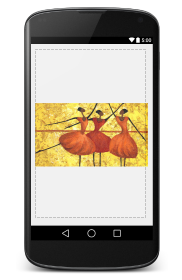
(2)设计第二个页面。
①在项目中新建第2个页面的控制文件second.java。新建如下。文件名输入second.java!!!

package com.example.guosjia.homeworkch3_1;

import android.app.Activity;
import android.content.Intent;
import android.os.Bundle;
import android.view.View;
import android.widget.TextView;

public class second extends Activity {
    TextView welcome;

    public void onCreate(Bundle savedInstanceState){
        super.onCreate(savedInstanceState);
        setContentView(R.layout.second);
        welcome=(TextView)findViewById(R.id.welcome);
        //Bundle bundle=this.getIntent().getExtras();
        welcome.setClickable(true);     //因为用TextView点击,将属性改为true,点击后返回封面
        welcome.setOnClickListener(new onclick());
    }
    class onclick implements View.OnClickListener {
        public void onClick(View v){
            Intent intent2 =new Intent(); //新建Intent对象
            intent2.setClass(second.this,MainActivity.class);
            startActivityForResult(intent2,0);   //返回前一页
        }
    }
}
②新建第二个页面的布局文件second.xml。新建如下。文件名输入second.xml!!!
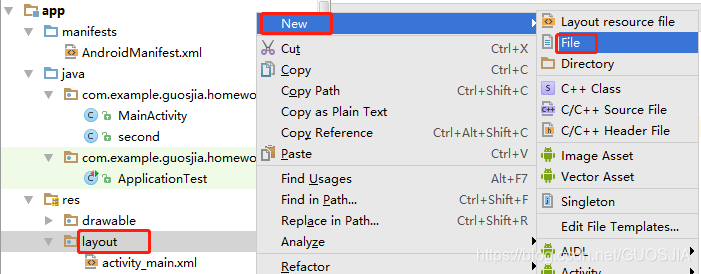
<?xml version="1.0" encoding="utf-8"?>
<LinearLayout xmlns:android="http://schemas.android.com/apk/res/android"
    android:orientation="vertical" android:layout_width="match_parent"
    android:layout_height="match_parent">

    <TextView
        android:id="@+id/welcome"
        android:layout_height="fill_parent"
        android:layout_width="fill_parent"
        android:textSize="30sp"
        android:text="@string/welcome"
        />
</LinearLayout>
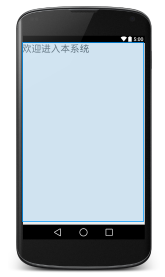
(3)修改strings.xml和配置文件AndroidManifest.xml。
①strings.xml文件代码如下。
<resources>
    <string name="app_name">homeworkch3_1</string>
    <string name="action_settings">第3章课后习题1</string>
    <string name="welcome">欢迎进入本系统</string>
</resources>
②修改AndroidMainifest.配置文件。打开项目中的AndroidManifest.xml文件,向其注册第二个Activity页面,其代码如下。
<?xml version="1.0" encoding="utf-8"?>
<manifest xmlns:android="http://schemas.android.com/apk/res/android"
    package="com.example.guosjia.homeworkch3_1">

    <application
        android:allowBackup="true"
        android:icon="@mipmap/ic_launcher"
        android:label="@string/app_name"
        android:supportsRtl="true"
        android:theme="@style/AppTheme">
        <activity
            android:name=".MainActivity"
            android:label="@string/app_name">
            <intent-filter>
                <action android:name="android.intent.action.MAIN" />

                <category android:name="android.intent.category.LAUNCHER" />
            </intent-filter>
        </activity>
        <activity
            android:name=".second"/>  //新增第二个Activity的注册
    </application>

</manifest>
程序运行结果:可实现两个页面来回切换。






 扫一扫
扫一扫


 8854
8854

 被折叠的 条评论
为什么被折叠?
被折叠的 条评论
为什么被折叠?
 到【灌水乐园】发言





