



 本文详细介绍了SSM(Spring、SpringMVC、Mybatis)开发的重点,包括web.xml的配置作用、静态资源访问、过滤器防止POST乱码、配置文件的用途、Maven模块化工程的配置以及SpringMVC中常用的注解和标签。重点讨论了SpringMVC的拦截器、静态资源处理和参数绑定,强调了配置文件在不同层的作用以及解决乱码问题的方法。
一、ssm开发重点
(1)web.xml配置全局初始化参数是为了帮我们创建IOC容器?
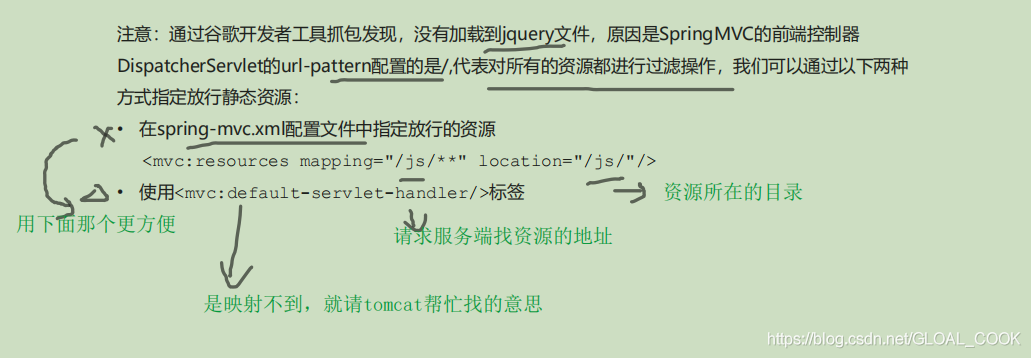
(2)/拦截的都以为是控制器,以为都要通过前端控制器的,所以我们的静态资源就获取不到了,要开启静态资源访问:
springmvc里面的前端控制器的拦截/是拦截所以的控制器请求,若是控制器(浏览器输入的controller的某个映射)都要被前端控制器拦截,如果我们在浏览器访问的是静态资源如.jpg或者.git。这时我们就要开启静态资源访问权限,让默认servlet来专门处理这些静态资源jpg。
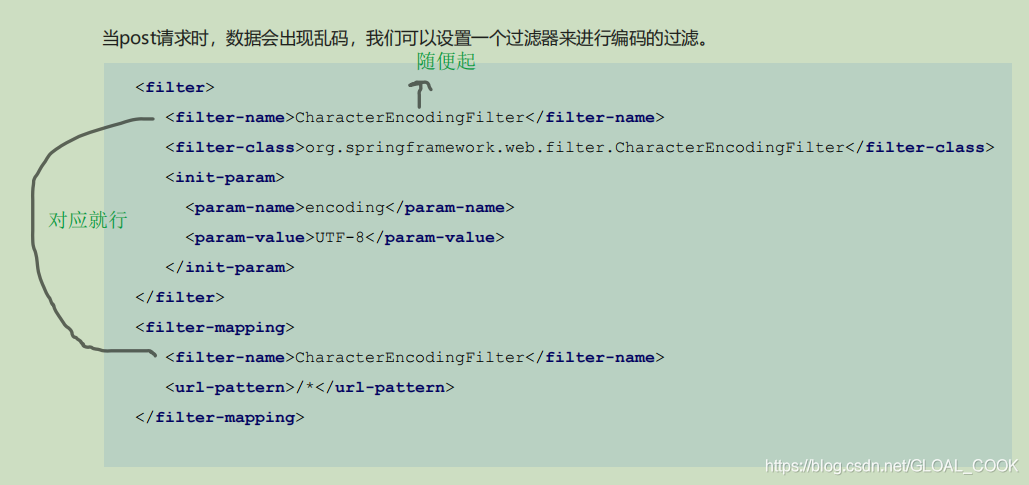
(3)spring-mvc.xml配置过滤器是防止post请求乱码的
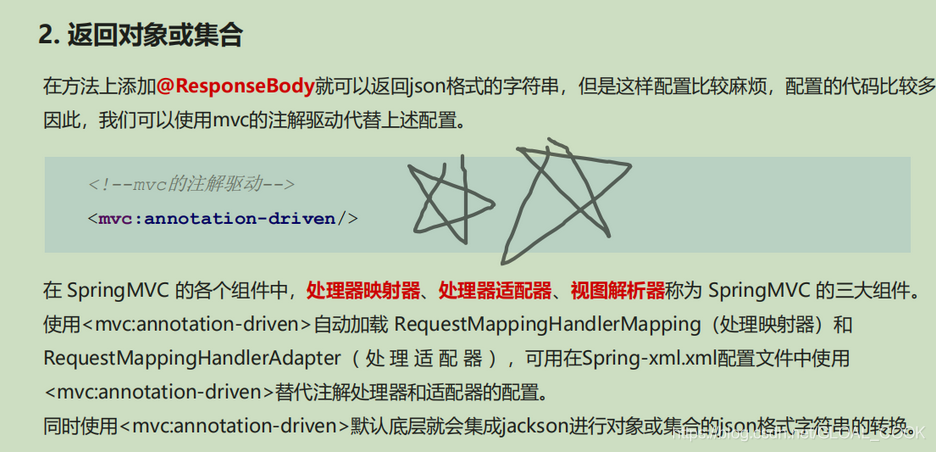
1.直接回显数据要用的(注解驱动,必须加,不然回写对象和集合会很麻烦
):

2.form不要name(你写也可以),表单项才要name(input为summit可不要name):

3.ajax返回类型:


6.一般是在Controller调用service的方法,而service是调用dao的方法。
7.在sqlMapConfig.xml加载xxxMapper.xml文件,UserMapper.xml写的是对应mapper层(dao)接口的sql语句。mybatis就是省略了(mapper)dao的impl而已,但是mapper的接口还是得写的。然后spring可以简化创建多态的实现类,一般在service使用。而Springmvc是负责Controller层,jsp请求给Controller,然后Controller调用Service层,Service调用mapper层。
8.一般spring-mvc只负责controller的包,而applicationContext.xml是负责业务的包如dao、service等包,就是分几个xml把业务和逻辑控制分开来。
9.在Controller类中注入service(不是写ServiceImpl哦)。在ServiceImpl类中注入mapper接口。mapper接口与xxxMapper.xml组合起来了,它不用注入其mapper的实现类的(其中applicationContext.xml会扫描mapper层自动创建其实现类的),因为mapper层没有impl,xxxMapper.Xml会在sqlMapConfig.xml加载被加载的,相当于impl了。
 (接口要和放接口的xml的包名要一样才被扫描到,否则报错,困扰我好几天了)
10.在resources建包得用/分隔,在java建包就可以用点分隔

二、各自配置文件用途
 applicationContext.xml:
<?xml version="1.0" encoding="UTF-8" ?>
<beans xmlns="http://www.springframework.org/schema/beans"
       xmlns:xsi="http://www.w3.org/2001/XMLSchema-instance"
       xmlns:aop="http://www.springframework.org/schema/aop"
       xmlns:tx="http://www.springframework.org/schema/tx"
       xmlns:context="http://www.springframework.org/schema/context"
       xsi:schemaLocation="http://www.springframework.org/schema/beans
http://www.springframework.org/schema/beans/spring-beans.xsd
http://www.springframework.org/schema/tx
http://www.springframework.org/schema/tx/spring-tx.xsd
http://www.springframework.org/schema/aop
http://www.springframework.org/schema/aop/spring-aop.xsd
http://www.springframework.org/schema/context
http://www.springframework.org/schema/context/spring-context.xsd">

    <!--组件扫描 扫描service和mapper-->
    <context:component-scan base-package="com.itheima">
        <!--排除controller的扫描-->
        <context:exclude-filter type="annotation" expression="org.springframework.stereotype.Controller"></context:exclude-filter>
    </context:component-scan>

    <!--加载propeties文件-->
    <context:property-placeholder location="classpath:jdbc.properties"></context:property-placeholder>

    <!--配置数据源信息-->
    <bean id="dataSource" class="com.mchange.v2.c3p0.ComboPooledDataSource">
        <property name="driverClass" value="${jdbc.driver}"></property>
        <property name="jdbcUrl" value="${jdbc.url}"></property>
        <property name="user" value="${jdbc.username}"></property>
        <property name="password" value="${jdbc.password}"></property>
    </bean>

    <!--配置sessionFactory-->
    <bean id="sqlSessionFactory" class="org.mybatis.spring.SqlSessionFactoryBean">
        <property name="dataSource" ref="dataSource"></property>
        <!--加载mybatis核心文件-->
        <property name="configLocation" value="classpath:sqlMapConfig.xml"></property>
    </bean>

    <!--扫描mapper.xml(也要和接口的包名一致才行,也可以说是扫接口)所在的包 为mapper创建实现类-->
    <bean class="org.mybatis.spring.mapper.MapperScannerConfigurer">
        <!--<mapper resource="com/itheima/mapper/AccountMapper.xml"></mapper>-->
        <!--这是扫对应mapper.xml(也要和接口的包名一致才行,也可以说是扫接口)那个包-->
        <property name="basePackage" value="com.itheima.mapper"></property>
    </bean>


    <!--声明式事务控制-->
    <!--平台事务管理器-->
    <bean id="transactionManager" class="org.springframework.jdbc.datasource.DataSourceTransactionManager">
        <property name="dataSource" ref="dataSource"></property>
    </bean>

    <!--配置事务增强-->
    <tx:advice id="txAdvice">
        <tx:attributes>
            <tx:method name="*"/>
        </tx:attributes>
    </tx:advice>

    <!--事务的aop织入-->
    <aop:config>
        <aop:advisor advice-ref="txAdvice" pointcut="execution(* com.itheima.service.impl.*.*(..))"></aop:advisor>
    </aop:config>

</beans>
spring-mvc.xml:
<?xml version="1.0" encoding="UTF-8" ?>
<beans xmlns="http://www.springframework.org/schema/beans"
       xmlns:mvc="http://www.springframework.org/schema/mvc"
       xmlns:context="http://www.springframework.org/schema/context"
       xmlns:xsi="http://www.w3.org/2001/XMLSchema-instance"
       xsi:schemaLocation="http://www.springframework.org/schema/beans
http://www.springframework.org/schema/beans/spring-beans.xsd
http://www.springframework.org/schema/mvc
http://www.springframework.org/schema/mvc/spring-mvc.xsd
http://www.springframework.org/schema/context
http://www.springframework.org/schema/context/spring-context.xsd">

    <!--组件扫描  主要扫描controller-->
    <context:component-scan base-package="com.itheima.controller"></context:component-scan>
    <!--配置mvc注解驱动-->
    <mvc:annotation-driven></mvc:annotation-driven>
    <!--内部资源视图解析器-->
    <bean id="resourceViewResolver" class="org.springframework.web.servlet.view.InternalResourceViewResolver">
        <property name="prefix" value="/WEB-INF/pages/"></property>
        <property name="suffix" value=".jsp"></property>
    </bean>
    <!--开发静态资源访问权限-->
    <mvc:default-servlet-handler></mvc:default-servlet-handler>


</beans>
sqlMapConfig.xml:
<?xml version="1.0" encoding="UTF-8" ?>
<!DOCTYPE configuration
        PUBLIC "-//mybatis.org//DTD Config 3.0//EN"
        "http://mybatis.org/dtd/mybatis-3-config.dtd">
<configuration>

    <!--定义别名-->
    <typeAliases>
        <!--<typeAlias type="com.itheima.domain.Account" alias="account"></typeAlias>-->
        <package name="com.itheima.domain"></package>
    </typeAliases>

</configuration>
com/itheima/mapper/AccountMapper.xml:
<?xml version="1.0" encoding="UTF-8" ?>
<!DOCTYPE mapper
        PUBLIC "-//mybatis.org//DTD Mapper 3.0//EN"
        "http://mybatis.org/dtd/mybatis-3-mapper.dtd">
<mapper namespace="com.itheima.mapper.AccountMapper">
    <insert id="save" parameterType="account">
        insert into account values(#{id},#{name},#{money})
    </insert>
    <select id="findAll" resultType="account">
        select * from account
    </select>
</mapper>
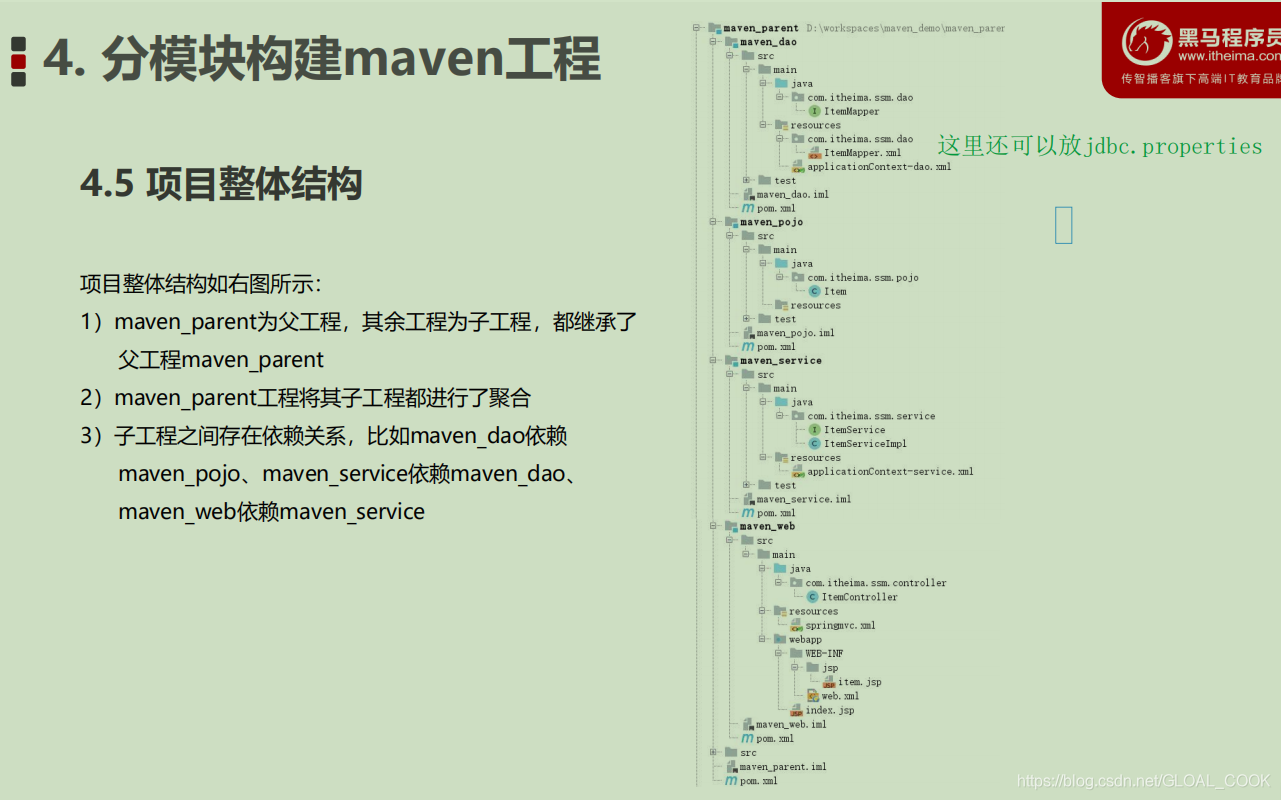
三、maven分模块工程和配置文件
之前的配置文件是这样的:
现在我们一般是细分成这样就行:
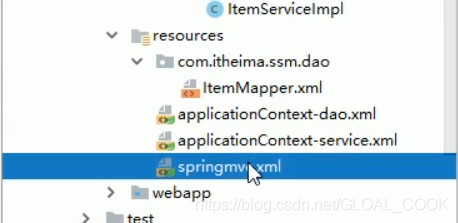 把applicationContext.xml细分成applicationContext-dao/service.xml了。
mybatis的核心配置文件(springConfig.xml)不要了,已经放在applicationContext-dao里面了
applicationContext-dao.xml:
<?xml version="1.0" encoding="UTF-8"?>
<beans xmlns="http://www.springframework.org/schema/beans"
       xmlns:context="http://www.springframework.org/schema/context"
       xmlns:p="http://www.springframework.org/schema/p"
       xmlns:aop="http://www.springframework.org/schema/aop"
       xmlns:tx="http://www.springframework.org/schema/tx"
       xmlns:xsi="http://www.w3.org/2001/XMLSchema-instance"
       xsi:schemaLocation="http://www.springframework.org/schema/beans
						   http://www.springframework.org/schema/beans/spring-beans.xsd
						   http://www.springframework.org/schema/context
						   http://www.springframework.org/schema/context/spring-context.xsd
						   http://www.springframework.org/schema/aop
						   http://www.springframework.org/schema/aop/spring-aop.xsd
						   http://www.springframework.org/schema/tx
						   http://www.springframework.org/schema/tx/spring-tx.xsd">

    <!--配置数据源信息,使用druid连接池-->
    <bean id="dataSource" class="com.alibaba.druid.pool.DruidDataSource">
        <property name="driverClassName" value="com.mysql.jdbc.Driver"/>
        <property name="url" value="jdbc:mysql://localhost:3306/ssmtest"/>
        <property name="username" value="root"/>
        <property name="password" value="root"/>
    </bean>
    <!--配置spring整合mybatis框架的SQLSessionFactoryBean-->
    <bean id="sqlSessionFactory" class="org.mybatis.spring.SqlSessionFactoryBean">
        <property name="dataSource" ref="dataSource"/>
        <!--扫描pojo包,为实体类创建别名-->
        <property name="typeAliasesPackage" value="com.itheima.ssm.pojo"/>
    </bean>

    <!--mapper扫描器,用于产生代理对象-->
    <bean class="org.mybatis.spring.mapper.MapperScannerConfigurer">
        <property name="basePackage" value="com.itheima.ssm.dao"/>
    </bean>
</beans>
applicationContext-service.xml:
<?xml version="1.0" encoding="UTF-8"?>
<beans xmlns="http://www.springframework.org/schema/beans"
       xmlns:context="http://www.springframework.org/schema/context"
       xmlns:p="http://www.springframework.org/schema/p"
       xmlns:aop="http://www.springframework.org/schema/aop"
       xmlns:tx="http://www.springframework.org/schema/tx"
       xmlns:xsi="http://www.w3.org/2001/XMLSchema-instance"
       xsi:schemaLocation="http://www.springframework.org/schema/beans
						   http://www.springframework.org/schema/beans/spring-beans.xsd
						   http://www.springframework.org/schema/context
						   http://www.springframework.org/schema/context/spring-context.xsd
						   http://www.springframework.org/schema/aop
						   http://www.springframework.org/schema/aop/spring-aop.xsd
						   http://www.springframework.org/schema/tx
						   http://www.springframework.org/schema/tx/spring-tx.xsd">

    <!--配置扫描器,扫描Service-->
    <context:component-scan base-package="com.itheima.ssm.service"/>

    <!--事务管理器-->
    <bean id="transactionManager" class="org.springframework.jdbc.datasource.DataSourceTransactionManager">
        <property name="dataSource" ref="dataSource"/>
    </bean>

    <!--事物注解驱动-->
    <tx:annotation-driven transaction-manager="transactionManager"/>
</beans>
springmvc.xml:
<?xml version="1.0" encoding="UTF-8"?>
<beans xmlns="http://www.springframework.org/schema/beans"
       xmlns:context="http://www.springframework.org/schema/context"
       xmlns:p="http://www.springframework.org/schema/p"
       xmlns:aop="http://www.springframework.org/schema/aop"
       xmlns:tx="http://www.springframework.org/schema/tx"
       xmlns:xsi="http://www.w3.org/2001/XMLSchema-instance"
       xsi:schemaLocation="http://www.springframework.org/schema/beans
						   http://www.springframework.org/schema/beans/spring-beans.xsd
						   http://www.springframework.org/schema/context
						   http://www.springframework.org/schema/context/spring-context.xsd
						   http://www.springframework.org/schema/aop
						   http://www.springframework.org/schema/aop/spring-aop.xsd
						   http://www.springframework.org/schema/tx
						   http://www.springframework.org/schema/tx/spring-tx.xsd">

    <!--配置扫描器,扫描Controller-->
    <context:component-scan base-package="com.itheima.ssm.controller"/>

    <!--视图解析器-->
    <bean class="org.springframework.web.servlet.view.InternalResourceViewResolver">
        <property name="prefix" value="/WEB-INF/jsp"/>
        <property name="suffix" value=".jsp"/>
    </bean>
</beans>
com/itheima/dao/ItemMapper.xml:
<?xml version="1.0" encoding="UTF-8" ?>
<!DOCTYPE mapper PUBLIC "-//mybatis.org//DTD Mapper 3.0//EN"
        "http://mybatis.org/dtd/mybatis-3-mapper.dtd">
<mapper namespace="com.itheima.ssm.dao.ItemMapper">
    <select id="findById" parameterType="int" resultType="Item">
        select * from item where id = #{id}
    </select>
</mapper>
四、常用的标签
1.SpringMVC在方法前要加RequestMapping("/query")或者GetMapping。在Controller类上面加@Controller或者RestController(“以json返回”)
2.Controller返回视图: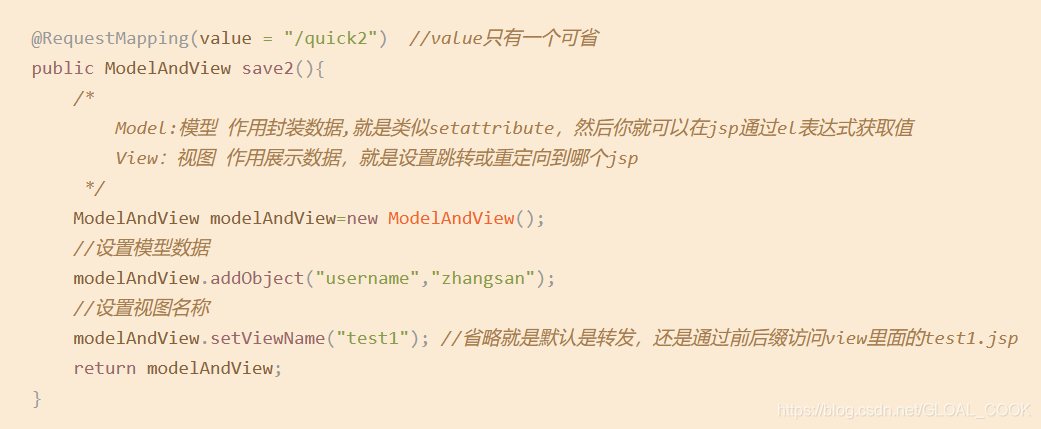 3.@ResponseBoby: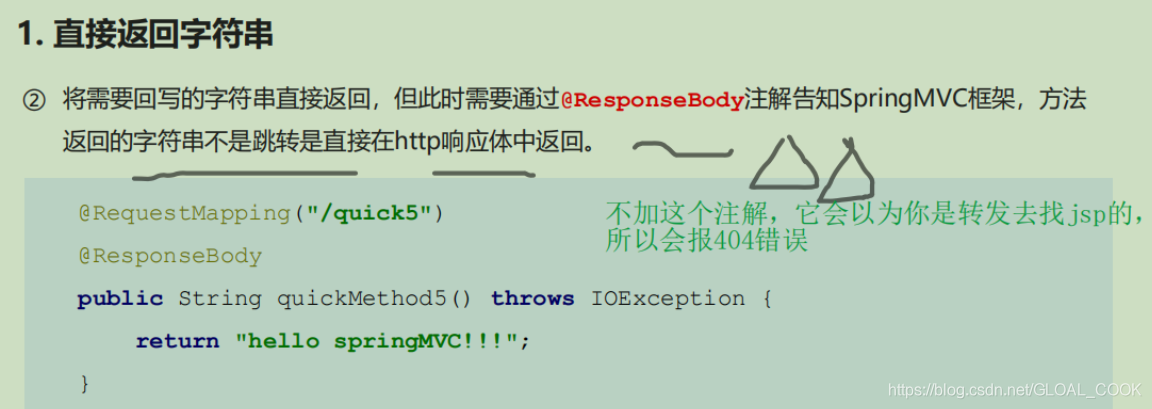
4.mvc注解驱动mvc:annotation-driven/:
5.回写数据给浏览器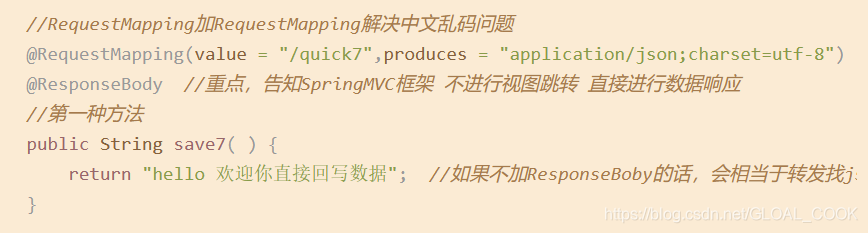
6.回写数据给浏览器:返回json:
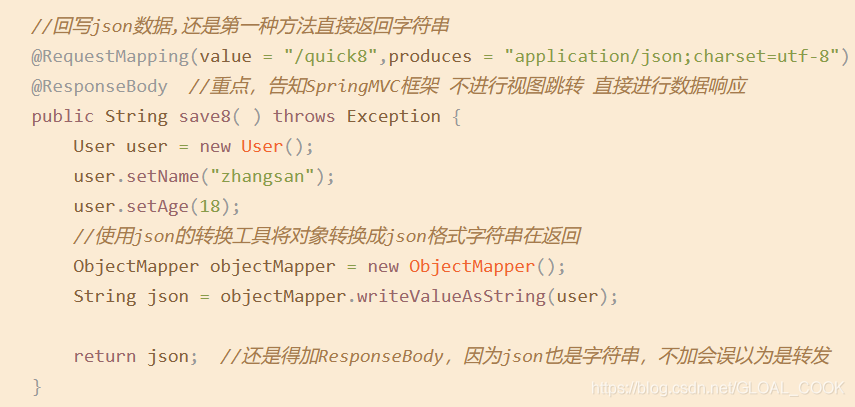
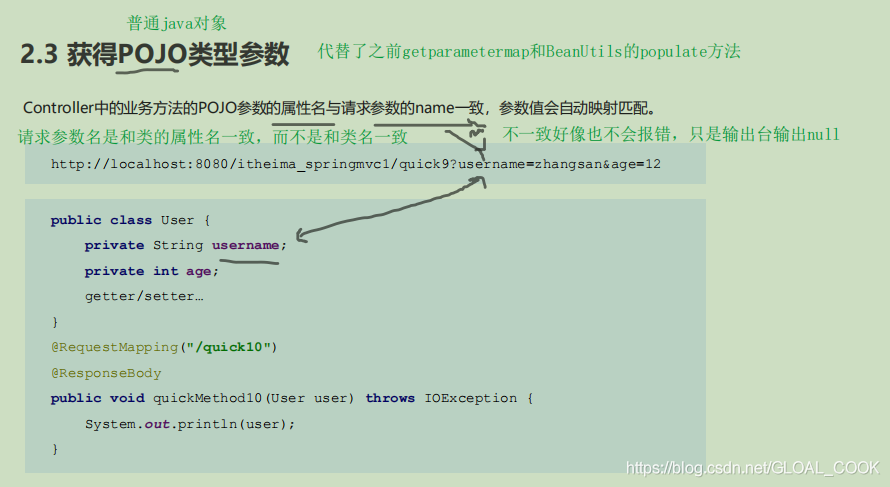
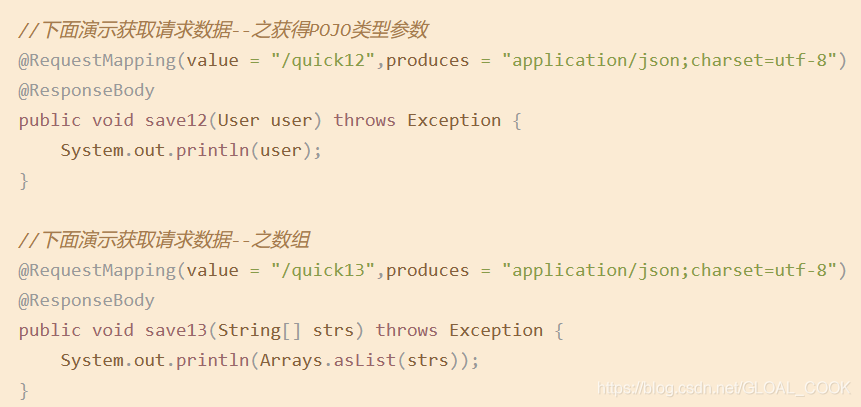
7.获得请求数据如对象和Arrays.asList:
(请求为对象的话,请求是写对象里面的属性而不是对象名)
8.SpringMVC放行静态资源mvc:default-servlet-handler:
9.在web.xml配置过滤器解决乱码:
CharacterEncodingFilter
10.参数松绑定@RequestParam:

11.Restful里的@PathVariable:
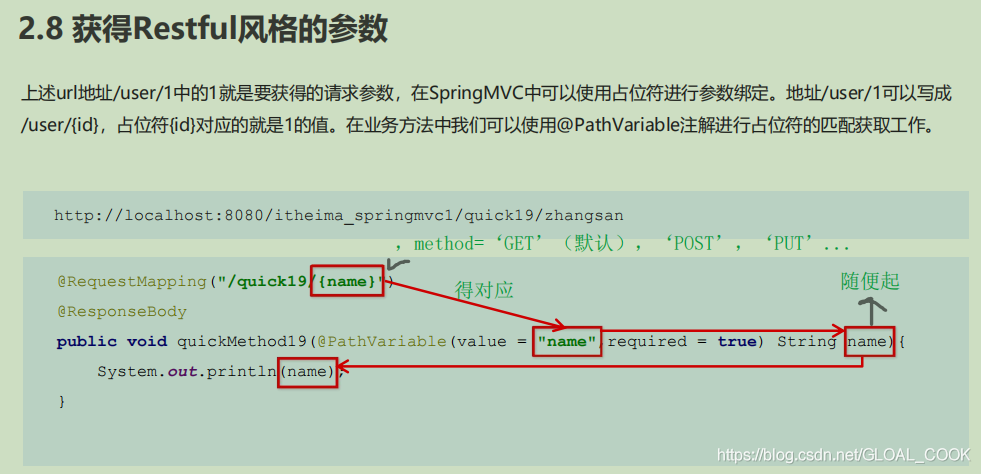
浏览器输入:(这里直接用/而不是用?了):
http://localhost:8080/user/quick17/zhangsan17
12.拦截器
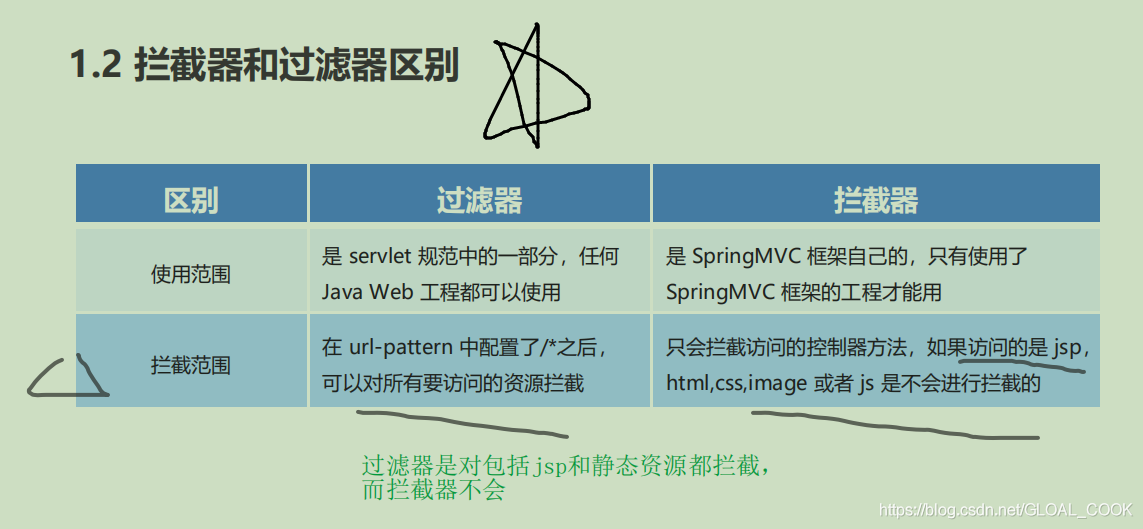
配置文件web.xml中的/和/*:
参考:https://www.cnblogs.com/niceyoo/p/8764584.html
先来上段常见的代码:
 1     <!-- MVC Servlet -->
 2     <servlet>
 3         <servlet-name>springServlet</servlet-name>
 4         <servlet-class>org.springframework.web.servlet.DispatcherServlet</servlet-class>
 5         <init-param>
 6             <param-name>contextConfigLocation</param-name>
 7             <param-value>classpath*:/spring-mvc*.xml</param-value>
 8         </init-param>
 9         <load-on-startup>1</load-on-startup>
10     </servlet>
11     <servlet-mapping>
12         <servlet-name>springServlet</servlet-name>
13         <url-pattern>/</url-pattern>
14     </servlet-mapping>
15
16     <filter>
17         <filter-name>encodingFilter</filter-name>
18         <filter-class>org.springframework.web.filter.CharacterEncodingFilter</filter-class>
19         <init-param>
20             <param-name>encoding</param-name>
21             <param-value>UTF-8</param-value>
22         </init-param>
23         <init-param>
24             <param-name>forceEncoding</param-name>
25             <param-value>true</param-value>
26         </init-param>
27     </filter>
28     <filter-mapping>
29         <filter-name>encodingFilter</filter-name>
30         <url-pattern>/*</url-pattern>
31     </filter-mapping>
1 url-pattern>/</url-pattern:
会匹配到/login这样的路径型的url,不会匹配到模式为*.jsp这样的后缀型url,言外之意就是不拦截jsp文件。
故经过视图解析器后返回jsp视图时不会再进入DispatcherServlet。
说到为什么JSP页面的请求并不会命中这个Servlet,那是因为servlet容器内建的JSP Servlet将会被调用,而这个容器内建的JSP Servlet已经默认地映射在了*.jsp上。但还是能拦截到静态资源,如*.js,*.css。
2 url-pattern>/*</url-pattern:
会匹配所有的url:路径型的和后缀型的url(包括/login,.jsp,.js和*.html等)。
故经过视图解析器后返回jsp视图时会再进入DispatcherServlet,导致找不到对应的controller所以报404错。(解决:开启静态资源访问权限)
No mapping found for HTTP request with URI [/Shiro-Spring/WEB-INF/jsp/login.jsp] in DispatcherServlet with name ‘springmvc’
3 /和/*的区别总结
先说一种问题,假设你方法请求后想返回index.jsp界面:return “index”;
如果配置成< url-pattern > /* </ url-pattern >这样,即使你配置了如下这些同样会报错。
<!-- 配置视图解析器 -->
<bean class="org.springframework.web.servlet.view.InternalResourceViewResolver">
     <!-- 前缀 -->
     <property name="prefix" value="/WEB-INF/jsp/" />
     <!-- 后缀 -->
     <property name="suffix" value=".jsp" />
</bean>
错误提示:
org.springframework.web.servlet.DispatcherServlet noHandlerFound
警告: No mapping found for HTTP request with URI [/myspring/WEB-INF/jsp/index.jsp] in DispatcherServlet with name ‘spring’ 错误,
也就是找不到 index.jsp
通过这种错误配置再来看一下两者区别吧: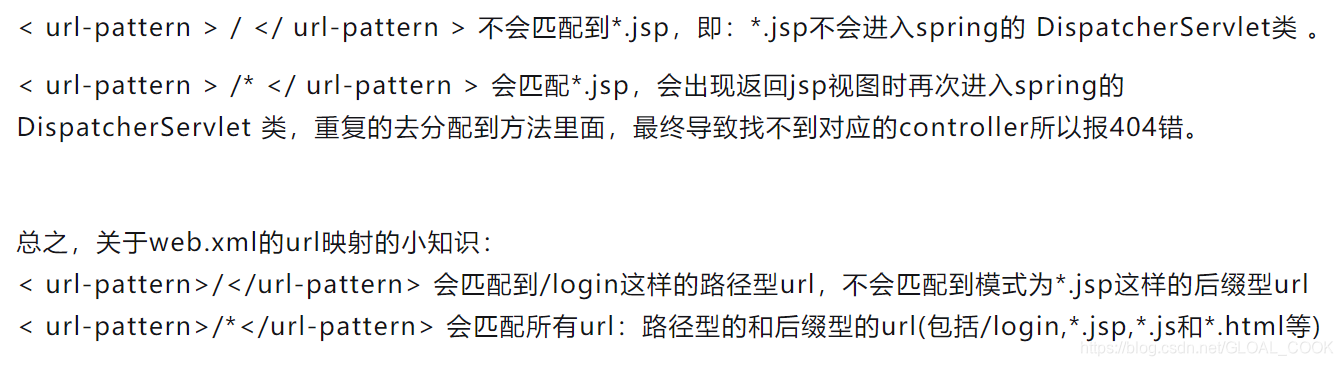
参考:https://blog.youkuaiyun.com/qq_42073385/article/details/110570513
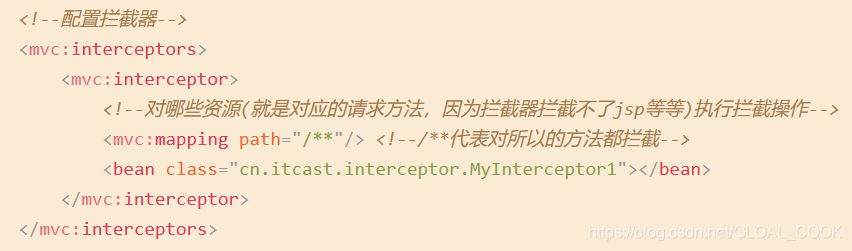
/* 是拦截所有的文件夹(不包子文件夹)
/** 是拦截所有的文件夹(和里面的子文件夹)
13.
14.





 扫一扫
扫一扫


 2112
2112

 被折叠的 条评论
为什么被折叠?
被折叠的 条评论
为什么被折叠?
 到【灌水乐园】发言





