



 本文详细介绍如何在Unity中使用CustomEditor特性为自定义组件ShowArea创建可视化编辑器,实现场景中直观显示游戏对象的侦测范围。通过具体代码示例,展示如何绘制和交互编辑GameObject的属性。
当我们需要为一个组件添加自己自定义的编辑器内容时,需要用到这个特性:CustomEditor,语法如下:
1、public CustomEditor(Type inspectedType);
2、public CustomEditor(Type inspectedType, bool editorForChildClasses); bool editorForChildClasses可以让我们定义此编辑器内容在子类中是否有效,默认为false;
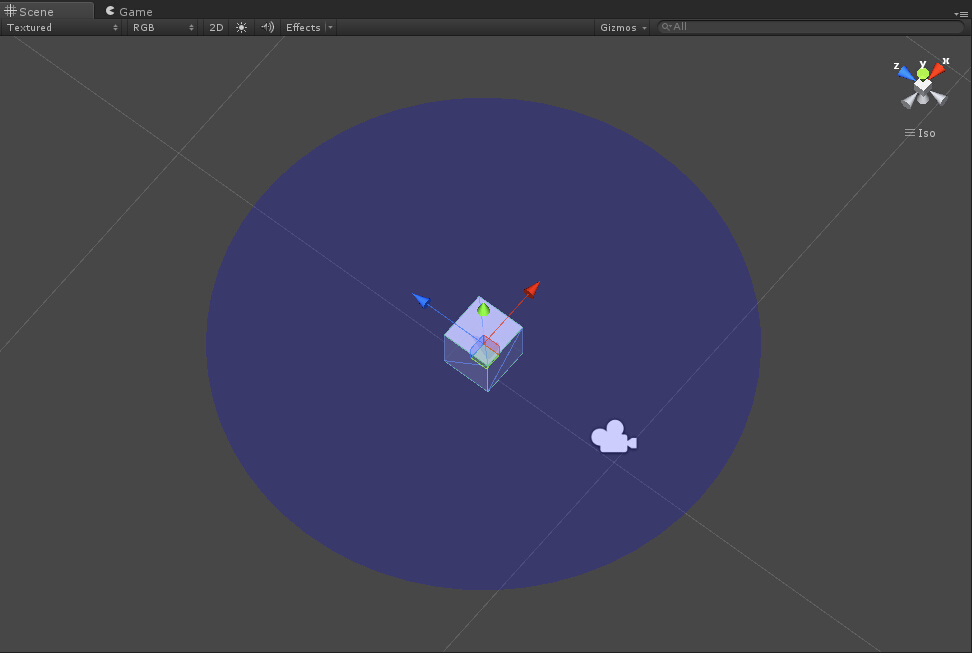
下面是一个示例代码,效果是在Scene视图的三维空间中为附加了ShowArea脚本组件的GameObject显示一个区域范围。例如,我们在开发游戏时,为一个AI游戏对象添加侦测范围,这样的方式非常直观,也非常有用。

1 using UnityEngine;
2 using System.Collections;
3
4 public class ShowArea : MonoBehaviour
5 {
6     public float radius;
7 }
 1 using UnityEngine;
 2 using System.Collections;
 3 using UnityEditor;
 4
 5 [CustomEditor(typeof(ShowArea))]
 6 public class ShowAreaEditor : Editor
 7 {
 8     void OnSceneGUI()
 9     {
10         ShowArea area = target as ShowArea;
11
12         Handles.color = new Color(0.0f, 0.0f, 1.0f, 0.1f);
13         Handles.DrawSolidDisc(area.transform.position, Vector3.up, area.radius);
14         area.radius = Handles.ScaleValueHandle(area.radius, area.transform.position, Quaternion.identity, 1, Handles.ConeCap, 1);
15     }
16 }
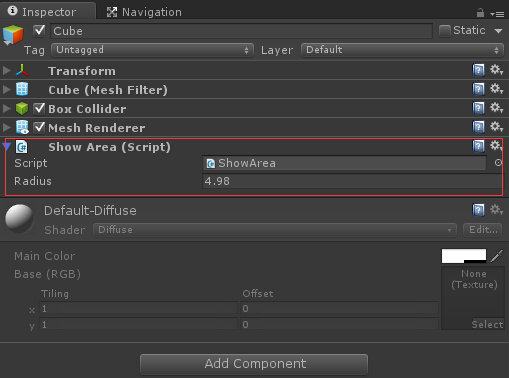
效果如图:





 扫一扫
扫一扫


 6万+
6万+

 被折叠的 条评论
为什么被折叠?
被折叠的 条评论
为什么被折叠?
 到【灌水乐园】发言





