



一、FreeMarker的使用方法
- FreeMarkerTest .java 测试类
package cn.e3mall.freemarker;

import freemarker.template.Configuration;
import freemarker.template.Template;
import org.junit.Test;

import java.io.File;
import java.io.FileWriter;
import java.io.Writer;
import java.util.HashMap;
import java.util.Map;

/**
 * @author Mr.Li
 * @version 1.0
 * @Description:
 * @Modified By:
 * @date 2018/12/15 20:08
 */
public class FreeMarkerTest {

    @Test
    public void testFreeMarker() throws Exception{
        //创建一个模板文件
        //创建一个Configuration对象,并设置当前FreeMarker的版本号
        Configuration configuration=new Configuration(Configuration.getVersion());
        //设置模板文件保存的目录
        configuration.setDirectoryForTemplateLoading(new File("F:\\IDEA\\WestosShopping\\e3-item-web\\src\\main\\webapp\\WEB-INF\\ftl"));
        //模板文件的编码格式,一般是UTF-8
        configuration.setDefaultEncoding("utf-8");
        //加载模板文件,创建一个模板对象
        Template template = configuration.getTemplate("student.ftl");
        //创建一个数据集,可以使Pojo也可以是Map,推荐使用Map
        Map data=new HashMap<>();
        //创建一个pojo对象
        Student student=new Student(1,"小明",18,"回龙观");
        data.put("student",student);
        //创建一个Writer对象,指定输出文件的路径以及文件名
        Writer out=new FileWriter(new File("F:\\JavaEE32\\freemarker\\student.html"));
        //生成静态页面
        template.process(data,out);
        //关闭流
        out.close();
    }
}
- Student.java 模板的pojo
package cn.e3mall.freemarker;

/**
 * @author Mr.Li
 * @version 1.0
 * @Description: FreeMarker的模板pojo
 * @Modified By:
 * @date 2018/12/17 20:55
 */
public class Student {

    private int id;
    private String name;
    private int age;
    private String address;

    public int getId() {
        return id;
    }

    public void setId(int id) {
        this.id = id;
    }

    public String getName() {
        return name;
    }

    public void setName(String name) {
        this.name = name;
    }

    public int getAge() {
        return age;
    }

    public void setAge(int age) {
        this.age = age;
    }

    public String getAddress() {
        return address;
    }

    public void setAddress(String address) {
        this.address = address;
    }

    public Student(int id, String name, int age, String address) {
        super();
        this.id = id;
        this.name = name;
        this.age = age;
        this.address = address;
    }

    public Student(){

    }
}
- student.ftl 模板
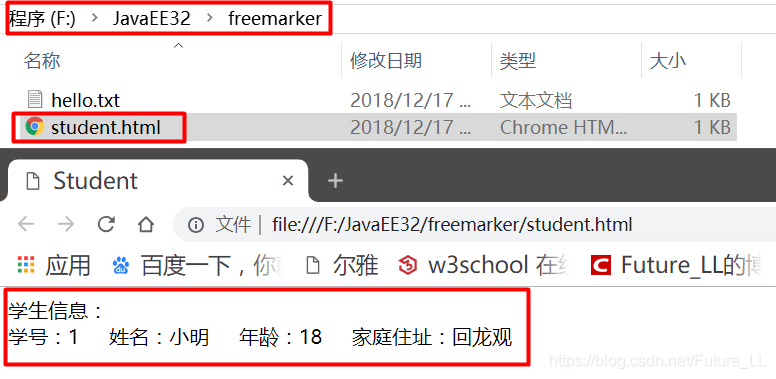
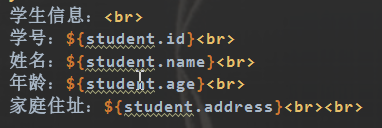
<!DOCTYPE html> <html lang="zh-CN"> <head> <title>Student</title> </head> <body> 学生信息:<br> 学号:${student.id} 姓名:${student.name} 年龄:${student.age} 家庭住址:${student.address}<br> </body> </html>
- 运行测试类
二、FreeMarker的模板语法
- 访问pojo中的属性
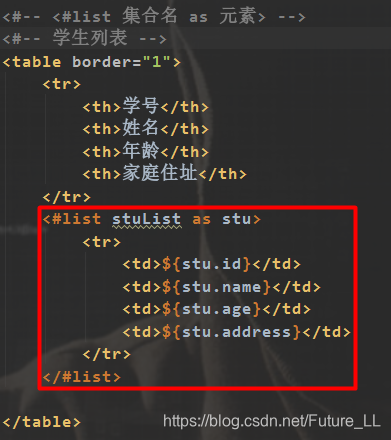
- 取集合中的数据
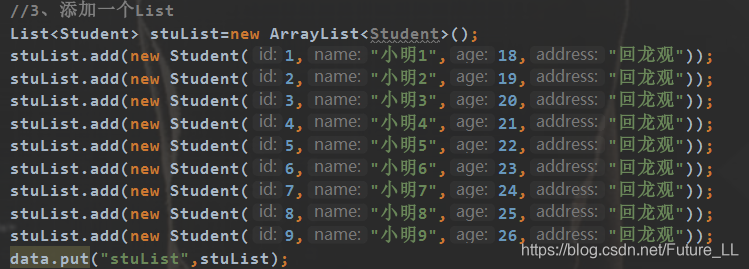
- 给测试类中的集合添加数据
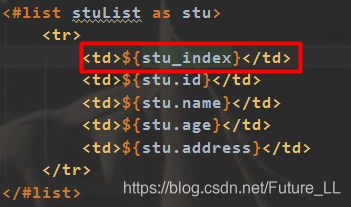
- 取循环中的下标
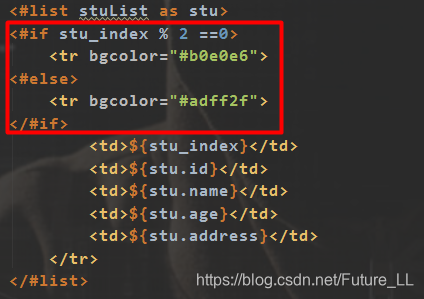
- 判断
- 日期类型格式化
-
- 给测试类中的添加Date对象
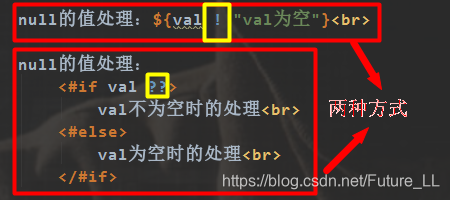
- Null值的处理
- 后边也可以什么也没有输出空串,例如:${val !}
-
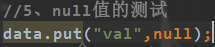
- 给测试类中的添加null值
-
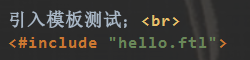
- Include标签
-
- 这里要在测试类中添加要引入的模板
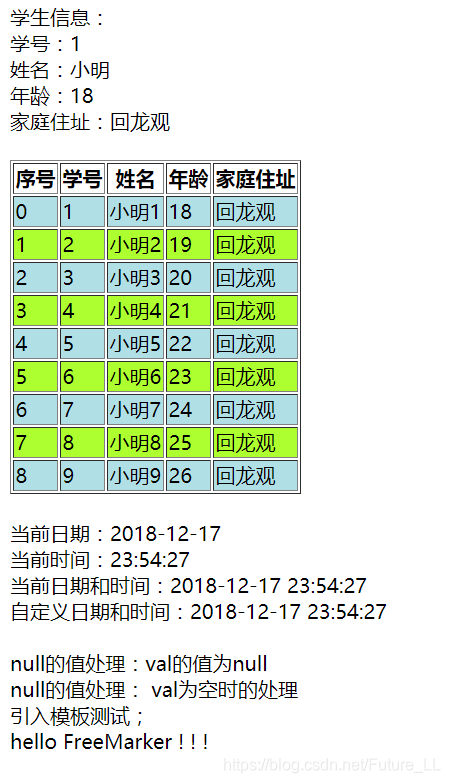
- 运行测试:
- 测试测试类的代码:
package cn.e3mall.freemarker;

import freemarker.template.Configuration;
import freemarker.template.Template;
import org.junit.Test;

import java.io.File;
import java.io.FileWriter;
import java.io.Writer;
import java.util.*;

/**
 * @author Mr.Li
 * @version 1.0
 * @Description:
 * @Modified By:
 * @date 2018/12/15 20:08
 */
public class FreeMarkerTest {

    @Test
    public void testFreeMarker() throws Exception{
        //创建一个模板文件
        //创建一个Configuration对象,并设置当前FreeMarker的版本号
        Configuration configuration=new Configuration(Configuration.getVersion());
        //设置模板文件保存的目录
        configuration.setDirectoryForTemplateLoading(new File("F:\\IDEA\\WestosShopping\\e3-item-web\\src\\main\\webapp\\WEB-INF\\ftl"));
        //模板文件的编码格式,一般是UTF-8
        configuration.setDefaultEncoding("utf-8");
        //加载模板文件,创建一个模板对象
        Template template = configuration.getTemplate("student.ftl");
        //创建一个数据集,可以使Pojo也可以是Map,推荐使用Map
        Map data=new HashMap<>();

        /**
         * FreeMarker的模板语法:
         */
        //1、文本形式【.txt】
        data.put("hello","hello FreeMarker ! ! !");

        //2、访问pojo对象中的属性
        Student student=new Student(1,"小明",18,"回龙观");
        data.put("student",student);

        //3、添加一个List
        List<Student> stuList=new ArrayList<Student>();
        stuList.add(new Student(1,"小明1",18,"回龙观"));
        stuList.add(new Student(2,"小明2",19,"回龙观"));
        stuList.add(new Student(3,"小明3",20,"回龙观"));
        stuList.add(new Student(4,"小明4",21,"回龙观"));
        stuList.add(new Student(5,"小明5",22,"回龙观"));
        stuList.add(new Student(6,"小明6",23,"回龙观"));
        stuList.add(new Student(7,"小明7",24,"回龙观"));
        stuList.add(new Student(8,"小明8",25,"回龙观"));
        stuList.add(new Student(9,"小明9",26,"回龙观"));
        data.put("stuList",stuList);

        //4、添加日期类型
        data.put("date",new Date());

        //5、null值的测试
        data.put("val",null);

        // 创建一个Writer对象,指定输出文件的路径以及文件名
        Writer out=new FileWriter(new File("F:\\JavaEE32\\freemarker\\student.html"));
        //生成静态页面
        template.process(data,out);
        //关闭流
        out.close();
    }
}


三、FreeMarker整合SpringMVC
引Freemarker的jar包
<!-- FreeMarker整合springMVC -->
<dependency>
    <groupId>org.springframework</groupId>
    <artifactId>spring-context-support</artifactId>
    <version>4.2.4.RELEASE</version>
</dependency>
- 整合到SpringMVC
<?xml version="1.0" encoding="UTF-8"?>
<beans xmlns="http://www.springframework.org/schema/beans"
	xmlns:xsi="http://www.w3.org/2001/XMLSchema-instance" xmlns:p="http://www.springframework.org/schema/p"
	xmlns:context="http://www.springframework.org/schema/context"
	xmlns:dubbo="http://code.alibabatech.com/schema/dubbo" xmlns:mvc="http://www.springframework.org/schema/mvc"
	xsi:schemaLocation="http://www.springframework.org/schema/beans http://www.springframework.org/schema/beans/spring-beans.xsd
        http://www.springframework.org/schema/mvc http://www.springframework.org/schema/mvc/spring-mvc-4.2.xsd
        http://code.alibabatech.com/schema/dubbo http://code.alibabatech.com/schema/dubbo/dubbo.xsd
        http://www.springframework.org/schema/context http://www.springframework.org/schema/context/spring-context.xsd">

        <!--配置FreeMarker-->
	<bean id="freemarkerConfig" class="org.springframework.web.servlet.view.freemarker.FreeMarkerConfigurer">
		<property name="templateLoaderPath" value="/WEB-INF/ftl/" />
		<property name="defaultEncoding" value="UTF-8" />
	</bean>


</beans>
- 测试Controller
package cn.e3mall.item.controller;

import freemarker.template.Configuration;
import freemarker.template.Template;
import org.springframework.beans.factory.annotation.Autowired;
import org.springframework.stereotype.Controller;
import org.springframework.web.bind.annotation.RequestMapping;
import org.springframework.web.bind.annotation.ResponseBody;
import org.springframework.web.servlet.view.freemarker.FreeMarkerConfigurer;

import java.io.File;
import java.io.FileWriter;
import java.io.Writer;
import java.util.HashMap;
import java.util.Map;

/**
 * @author Mr.Li
 * @version 1.0
 * @Description: 生成静态页面测试Controller
 * @Modified By:
 * @date 2018/12/18 0:20
 */

@Controller
public class HtmlGenController {

    @Autowired
    private FreeMarkerConfigurer freeMarkerConfigurer;

    @RequestMapping("/genhtml")
    @ResponseBody
    public String genHtml() throws Exception{
        Configuration configuration = freeMarkerConfigurer.getConfiguration();
        //加载模板对象
        Template template = configuration.getTemplate("hello.ftl");
        //创建一个数据集
        Map data=new HashMap<>();
        data.put("hello",123456);
        //指定文件输出的路径及文件名
        Writer out=new FileWriter(new File("F:\\JavaEE32\\freemarker\\hello2.html"));
        //输出文件
        template.process(data,out);
        //关闭流
        out.close();

        return "ok";
    }
}
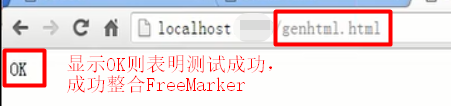
- 结果
- 打开hello2.html





 扫一扫
扫一扫


 5951
5951

 被折叠的 条评论
为什么被折叠?
被折叠的 条评论
为什么被折叠?
 到【灌水乐园】发言





