



 本文介绍如何使用Python的os模块进行路径操作,包括获取当前文件路径、父目录及上级目录,以及如何读取YAML配置文件并解析为字典。通过代码示例详细解释了os.path和yaml模块的使用方法。
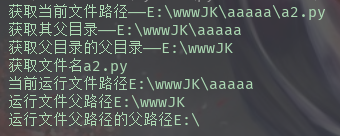
print("获取当前文件路径——" + os.path.realpath(__file__))  # 获取当前文件路径

parent = os.path.dirname(os.path.realpath(__file__))
print("获取其父目录——" + parent)  # 从当前文件路径中获取目录

garder = os.path.dirname(parent)
print("获取父目录的父目录——" + garder)
print("获取文件名" + os.path.basename(os.path.realpath(__file__)))  # 获取文件名

# 当前文件的路径
pwd = os.getcwd()
print("当前运行文件路径" + pwd)

# 当前文件的父路径
father_path = os.path.abspath(os.path.dirname(pwd) + os.path.sep + ".")
print("运行文件父路径" + father_path)

# 当前文件的前两级目录
grader_father = os.path.abspath(os.path.dirname(pwd) + os.path.sep + "..")
print("运行文件父路径的父路径" + grader_father)
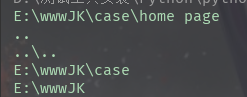
print(os.path.dirname(os.path.abspath("__file__")))
print(os.path.pardir)
print(os.path.join(os.path.dirname("__file__"), os.path.pardir))
print(os.path.abspath(os.path.join(os.path.dirname("__file__"),os.path.pardir)))
print(os.path.abspath(os.path.join(os.path.dirname("__file__"),os.path.pardir,os.path.pardir)))
curPath = os.path.abspath(os.path.join(os.path.dirname("__file__"), os.path.pardir, os.path.pardir))
print(curPath)
yamlPath = os.path.join(curPath, "common", "token.yaml")
print(yamlPath)
f = open(yamlPath, 'r', encoding='utf-8')
cfg = f.read()
print(type(cfg))  # 读出来是字符串
print(cfg)
d = yaml.load(cfg)  # 用load方法转字典
print(d)

import os

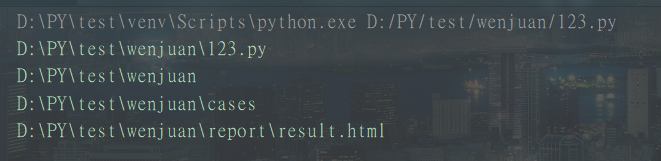
curpath = os.path.realpath(__file__)        # 获取当前文件绝对路径
print(curpath)

dirpath = os.path.dirname(curpath)          # 获取当前文件的文件夹路径
print(dirpath)

casespath = os.path.join(dirpath, "cases")      # 拼接文件路径
print(casespath)

report = os.path.join(dirpath, "report", "result.html")         # 拼接文件夹路径
print(report)

os.pardir相当于linux中的…/上一级。






 扫一扫
扫一扫


 被折叠的 条评论
为什么被折叠?
被折叠的 条评论
为什么被折叠?
 到【灌水乐园】发言





