



概要
使用Java实现树形Json长字串转excel文件功能。
整体架构流程
- 读取json文件的内容;
- 反序列化成集合对象;
- 创建excel操作对象;
- 根据输出格式要求,填充数据;
- 创建文件对象,将数据写入文件对象,输出文件。
技术名词解释
- json
- java
- fastJson
- excel-poi
- file
技术细节
<dependency>
   <groupId>com.alibaba</groupId>
   <artifactId>fastjson</artifactId>
   <version>2.0.18</version>
</dependency>
<dependency>
   <groupId>org.apache.poi</groupId>
   <artifactId>poi</artifactId>
   <version>5.2.3</version>
</dependency>
<dependency>
   <groupId>org.apache.poi</groupId>
   <artifactId>poi-ooxml</artifactId>
   <version>5.2.3</version>
</dependency>
创建Node节点类
/**
 * @author yuyanze
 * @create 2024-10-28-9:17
 * @description
 */
@Data
public class Node {

    Integer id;
    String name;
    List<Node> children;

}
创建工具类 Tree2ExcelUtil
import org.apache.poi.ss.usermodel.Cell;
import org.apache.poi.ss.usermodel.Row;
import org.apache.poi.ss.usermodel.Sheet;
import org.apache.poi.ss.usermodel.Workbook;
import org.apache.poi.xssf.usermodel.XSSFWorkbook;

import java.io.Closeable;
import java.io.FileOutputStream;
import java.io.IOException;
import java.util.List;

/**
 * 树形结构数据导出excel工具
 */
@SuppressWarnings("ALL")
public class Tree2ExcelUtil {


    public static void exportExcel(List<Node> nodeList, String filePath, Integer mode) throws IOException {
        Workbook workbook = new XSSFWorkbook();
        Sheet sheet = workbook.createSheet();
        int rowNum = 0;

        for (Node node : nodeList) {
            int num = 0;
            if (mode == 1) {
                rowNum = writeNodeToExcel1(sheet, node, rowNum, 0);
            } else {
                rowNum = writeNodeToExcel2(sheet, node, rowNum, 0);
            }
        }

        FileOutputStream fileOutputStream = new FileOutputStream(filePath);
        workbook.write(fileOutputStream);
        closeStream(fileOutputStream);
    }

    private static boolean flag = true;

    private static int writeNodeToExcel1(Sheet sheet, Node node, int rowNum, int i) {
        Row row;
        if (flag) {
            row = sheet.createRow(rowNum++);
        } else {
            int lastRowNum = sheet.getLastRowNum();
            row = sheet.getRow(lastRowNum);
            flag = true;
        }
        Cell cell = row.createCell(i);
        cell.setCellValue(node.getId());
        Cell cell1 = row.createCell(i + 1);
        cell1.setCellValue(node.getName());

        List<Node> children = node.getChildren();
        if (children != null && children.size() > 0) {
            flag = false;
            for (Node child : children) {
                rowNum = writeNodeToExcel1(sheet, child, rowNum, i + 2);
            }
        }
        return rowNum;
    }

    private static int writeNodeToExcel2(Sheet sheet, Node node, int rowNum, int i) {
        Row row = sheet.createRow(rowNum++);
        Cell cell = row.createCell(i);
        cell.setCellValue(node.getId());
        Cell cell1 = row.createCell(i + 1);
        cell1.setCellValue(node.getName());
        List<Node> children = node.getChildren();
        if (children != null && children.size() > 0) {
            for (Node child : children) {
                rowNum = writeNodeToExcel2(sheet, child, rowNum, i + 2);
            }
        }
        return rowNum;
    }

    public static void closeStream(Closeable... closeables) {
        for (Closeable closeable : closeables) {
            if (closeable != null) {
                try {
                    closeable.close();
                } catch (IOException e) {
                    e.printStackTrace();
                }
            }
        }
    }
}
创建Client类验证
import com.alibaba.fastjson.JSONArray;
import com.alibaba.fastjson.TypeReference;
import org.springframework.util.ResourceUtils;

import java.io.File;
import java.io.FileInputStream;
import java.io.IOException;
import java.util.List;

/**
 * @author yuyanze
 * @create 2024-10-28-10:13
 * @description
 */
public class Client {
    public static void main(String[] args) throws IOException {
        File file = ResourceUtils.getFile(ResourceUtils.CLASSPATH_URL_PREFIX + "industryJson.json");
        FileInputStream inputStreamReader = new FileInputStream(file);
        int len = 0;
        byte[] buf = new byte[1024];
        StringBuilder stringBuilder = new StringBuilder();
        while ((len = inputStreamReader.read(buf)) != -1) {
            String s = new String(buf, 0, len);
            stringBuilder.append(s);
        }

        String jsonStr = stringBuilder.toString();
        List<Node> tree = JSONArray.parseObject(jsonStr, new TypeReference<List<Node>>() {
        });
        tree.forEach(System.out::println);
        Tree2ExcelUtil.exportExcel(tree, "E:\\" + System.currentTimeMillis() + 1 +".xls", 1);
        Tree2ExcelUtil.exportExcel(tree, "E:\\" + System.currentTimeMillis() + 2 + ".xls", 2);
        inputStreamReader.close();
    }
}
小结
提供明确任务,在梳理实现步骤,完成更多的创造力。
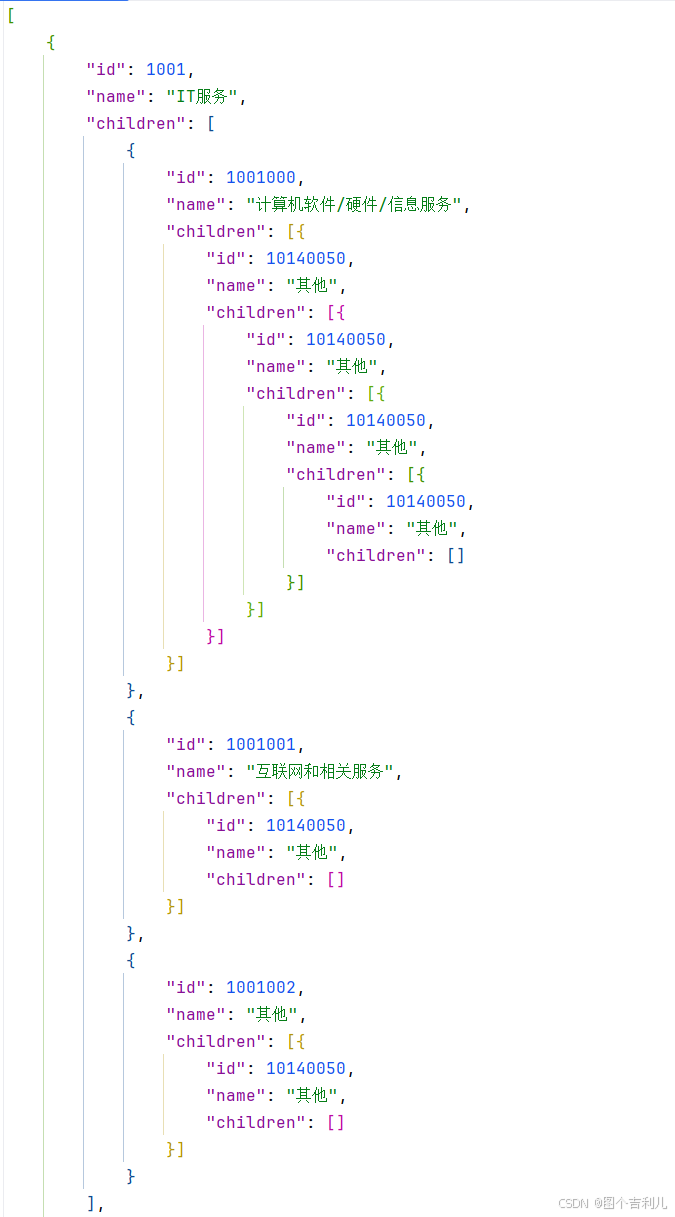
json数据:
生成文件:

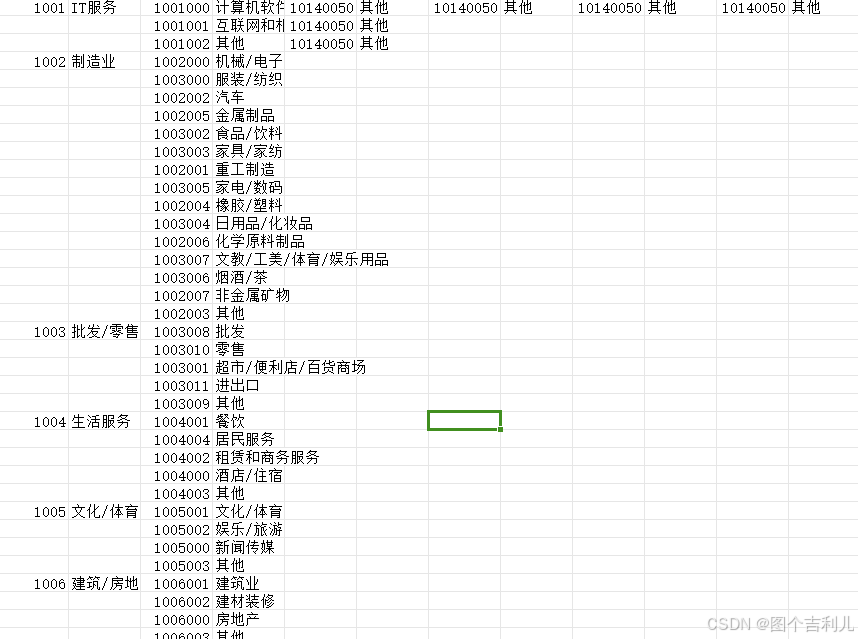
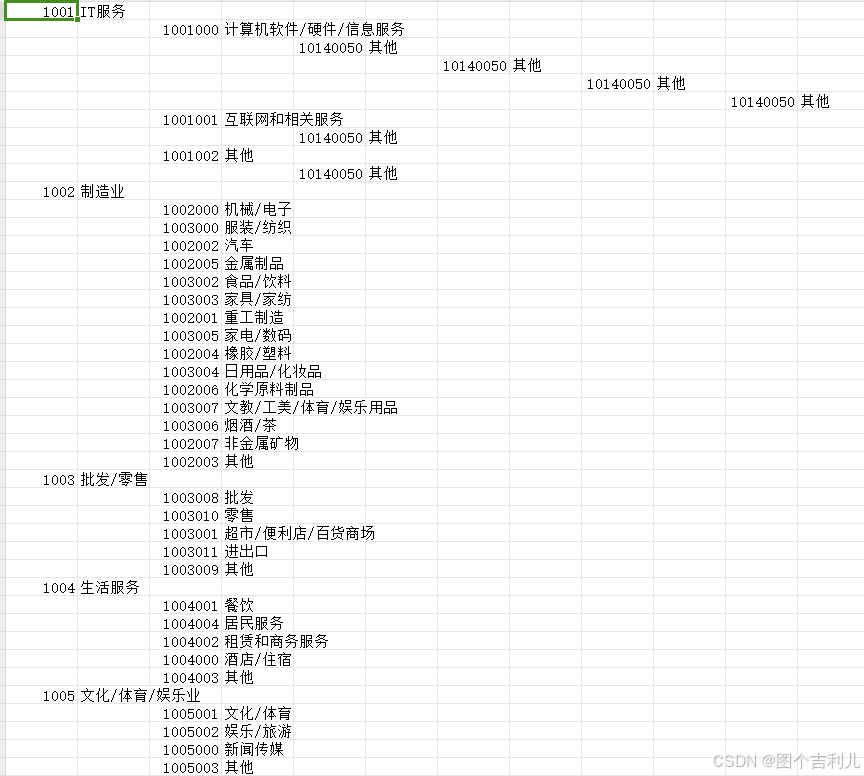
文件内容:
mode1
mode2





 扫一扫
扫一扫


 被折叠的 条评论
为什么被折叠?
被折叠的 条评论
为什么被折叠?
 到【灌水乐园】发言





