



IO流的概述
概念:存储和读取数据的解决方案
作用:用于读写数据(本地、网络文件)
内存的特点:不能修改数据
按流向分:输入流(程序→文件)、输出流(文件→程序)
按操作文件的类型分:字节流(可操作所有类型的文件)、字符流(只可操作纯文本文件)
纯文本文件:Windows自带的记事本能打开并读得懂的文件(txt,md)
与File类的区别:File类只能对文件本身进行操作,不能读取文件里面储存的数据
IO流的体系和字节输出流的基本用法
IO流体系
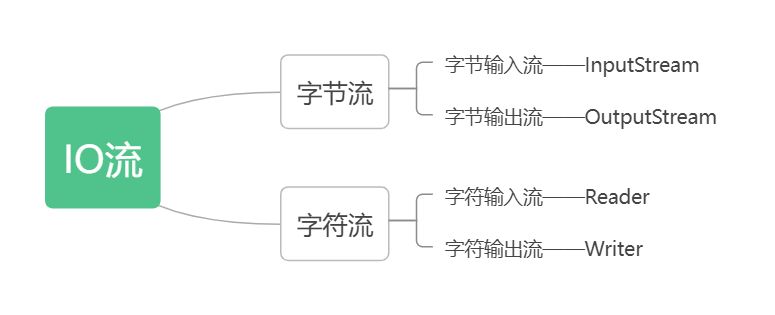
字节流
FileOutputStream(字节输出流)
作用
可以把程序中的数据写到本地文件中,是字节流的基本流
书写步骤
创建对象
参数可以为字符串表示的路径或文件对象
如果文件不存在会创建一个新的空文件,但父级路径一定要存在
如果文件已存在,会清空文件
写出数据
write方法中写的是整数,但写到本地文件中的是ASCII表中对应的字符
释放资源
每次写完流后都要释放资源,作用为解除资源的占用(如不解除,则无法对文件进行操作,如修改、删除)
写出一段文字到本地文件中(暂时不写中文)
//出现异常原因是可能不存在此文件
        FileOutputStream fileOutputStream = new FileOutputStream("aaa");
        fileOutputStream.write(10);
        //释放资源
        fileOutputStream.close();
写数据的形式
方法名称 | 作用 |
void write(int b) | 一次写一个字节数据 |
void write(byte [ ] b) | 一次写一个字节数组数据 |
void write(byte [ ] b, int off, int len) | 一次写一个字节数组的部分数据 |
方法演示
//void write(int b) 一次写一个
        FileOutputStream f = new FileOutputStream("a.txt");
        f.write(97);//写入本地文件的为 “a”
        f.close();

        //void write(byte[] b) 一次写一个数组
        byte [] a = {1, 2, 3};
        f.write(a);

       // void write(byte [ ] b, int off, int len)一次写一个数组的一部分
        /*
        * 参数含义:
        *   参数一:数组名称
        *   参数二:起始索引
        *   参数三:个数
        * */
        f.write(a, 1, 3);
换行和续写
换行
在两个输入方法之间加一个换行符
换行符:
Windows:\r\n
Linux:\n
Mac:\r
\r\n的由来:在Windows系统早期,\r表示回车(鼠标光标回到行首),\n表示换行
在Java中对换行符进行了优化,换行可以只写\r或\n,Java会自动补全,但还是建议写全,不要省略
续写
如果想要续写的话,需要打开续写开关,是FileOutputStream对象的第二个参数,默认是关闭的(false),这时创建对象会清空文件,当我们手动打开时,创建对象时就 不会清空文件
FileOutputStream f = new FileOutputStream("a.txt");
        //换行
        String str1 = "zxvcxzzxcv";
        String str2 = "\r\n";
        String str3 = "dafhdfhidhg";
        byte[] b1 = str1.getBytes();
        byte[] b2 = str2.getBytes();
        byte[] b3 = str3.getBytes();
        f.write(b1);
        f.write(b2);
        f.write(b3);
        f.close();

        //续写
        FileOutputStream fos = new FileOutputStream("a.txt", true);
FileInputStream(字节输入流)
作用
操作对象为本地文件,将本地文件的数据读取到程序之中
书写步骤
创建字节输入流对象
如果文件不存在,Java会报错
读出数据
调用一次read方法只会读取一个数据,读出来的数据是在ASCII上对应的数字,默认的返回值为int型。
如果读到文件末尾没有数据了则返回-1
如果要读取的数据为-1,会把它分开来读
释放资源
每次使用完必须释放,解除占道
读取文件中的数据(暂时不写中文)
FileInputStream f = new FileInputStream("a.txt");
        int read = f.read();
        f.close();
循环读取
创建局部变量b的原因:read方法是读取一次变量移动一次指针,如果不创建会造成数据丢失,还可能使最后一个数据的打印结果为-1
FileInputStream fis = new FileInputStream("a.txt");
        int b;
        while ((b = fis.read()) != -1) {
            System.out.println((char) b);
        }
        fis.close();
最基本的拷贝文件
FileInputStream fis = new FileInputStream("a.txt");
        FileOutputStream fos = new FileOutputStream("copy.txt");
        int b;
        while((b = fis.read()) != -1) {
            fos.write(b);
        }
        fos.close();
        fis.close();
核心思想:边读边写
释放资源规则:最先开的流最后释放
弊端:read方法一次只能读取一个字节,如果文件稍大速度就会大幅下降
一次读取多个数据的方法
方法名称 | 作用 |
public int read(byte [ ] buffer) | 一次读取一个字节数组中的数据 |
注意:设定的数组越大,内存越大。要平衡内存与速度,最好数组可以读完全部字节不读取空字节,所以一般设定的大小为1024的倍数
读取完一次,数组中的数据就更新一次,如果到最后没有读取到数据,数组中的数据仍是上一次读取的残留数据。如果不想读取出残留数据,需要在创建对象的时候写上第二和第三个参数
byte [] b = new byte[2];
        FileInputStream fis = new FileInputStream("a.txt");
        int len = fis.read(b);
        String str = new String(b, 0, len);
        System.out.println(str);
拷贝文件改写
FileInputStream fis = new FileInputStream("a.txt");
        FileOutputStream fos = new FileOutputStream("b.txt");

        int len;
        byte[] b = new byte[1024 * 1024];//一次拷贝1MB
        while ((len = fis.read()) != -1) {
            fos.write(b, 0, len);
        }
        fos.close();
        fis.close();
捕获异常
try...catch异常处理
finally里面的代码一定会执行,除非JVM退出
基本处理,但释放资源代码太繁琐
FileInputStream fis = null;
        FileOutputStream fos = null;
        try {
            fis = new FileInputStream("a.txt");
            fos = new FileOutputStream("b.txt");
            int b;
            while((b = fis.read()) != -1) {
                fos.write(b);
            }
        } catch (IOException e) {
            e.printStackTrace();
        }finally {
        //释放资源
            if (fos != null) {
                try {
                    fos.close();
                } catch (IOException e) {
                    e.printStackTrace();
                }
            }
            if (fis != null) {
                try {
                    fis.close();
                } catch (IOException e) {
                    e.printStackTrace();
                }
            }
        }
不同JDK版本捕获异常的方式
JDK7
try后面的小括号中写创建对象的代码
只有实现了AutoCloseable接口的类,才能在小括号中创建对象
try (FileInputStream fis = new FileInputStream("a.txt");
             FileOutputStream fos = new FileOutputStream("b.txt")){
            int len;
            byte[] b = new byte[2];
            while((len = fis.read()) != -1) {
                fos.write(b, 0, len);
            }
        } catch (IOException e) {
            e.printStackTrace();
        }
JDK9
创建对象在小括号外面,括号中写流的名称
public class Test {
    public static void main(String[] args) throws FileNotFoundException {
        FileInputStream fis = new FileInputStream("a.txt");
        FileOutputStream fos = new FileOutputStream("b.txt");
        try (fis; fos){
            int len;
            byte[] b = new byte[2];
            while((len = fis.read()) != -1) {
                fos.write(b, 0, len);
            }
        } catch (IOException e) {
            e.printStackTrace();
        }
    }
}
字符集
ASCII,GBK
在计算机中,所有数据都是以二进制的形式来存储的,最小的存储单元是一个字节
在简体中文版的Windows中,默认使用GBK字符集,其完全兼容ASCII字符集
一个英文占一个字节,二进制中第一位是零
一个中文占两个字节,二进制中第一位是一(如果只占一个字节就只能存储256个汉字,数量太少)
Unicode
一个英文占一个字符,默认以零开头(0xxxxxxx)
一个中文占三个字符,第一个字符前是1110,其他字符前为10(1110xxxx 10xxxxxx 10xxxxxx)
出现乱码的原因
读取数据是未读完整个汉字
字节流一次只能读取一个字节,负数在ASCII中无对应的值
编码和解码的方式不一样
拷贝文件没有出现乱码的原因
字节流虽然是一次拷贝一个字节,但在拷贝的过程中没有数据的丢失,只要你选择的打开文件的方式和原来的解码方式相同,就不会出现乱码
字符流
字符流的底层就是字节流,它等于字节流加字符集
特点:能根据读取数据类型的不同确定一次读取几个数据
目的:有效解决了因读取数据不全而出现的乱码现象
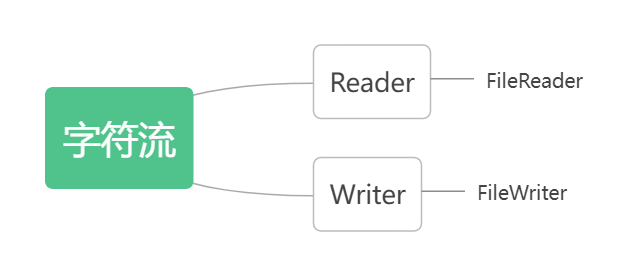
FileReader
创建字符输入流对象
构造方法 | 作用 |
public FileReader (File file) | 创建字符输入流关联本地文件 |
public FileReader (String pathname) | 创建字符输入流关联本地文件 |
如果文件不存在则直接报错
读取数据
成员方法 | 作用 |
public int read ( ) | 读取一个数据,读到末尾返回-1 |
public int read (char [ ] buffer) | 读取多个数据,读到末尾返回-1 |
释放资源
FileReader fr = new FileReader("a.txt");
        int ch;
        while ((ch = fr.read()) != -1) {
            System.out.println((char)ch);
        }
        fr.close();
空参read方法读取数据默认是以十进制的数据返回的
带参的read构造
FileReader fr = new FileReader("a.txt");
       char [] c = new char[2];
       int len;
       while ((len = fr.read()) != -1) {
           System.out.println(new String(c, 0, len));
       }
       fr.close();
有参的read方法是将数据读取、解码并进行强转储存在插入数组中
FileWriter
FileWriter fw = new FileWriter("a.txt");
       fw.write(23132);//数字随便乱写的
       fw.close();
当文件不存在是,会自动创建一个新的文件,但要保证父级路径一定存在
当文件已经存在时,默认清空文件中的内容,如不想清空,在创建对象的时候将第二个参数改为true(续写,默认是false)
FileWriter fw = new FileWriter("a.txt",true);
       fw.write(23132);//数字随便乱写的
       fw.close();
练习
拷贝文件
将一个文件夹里的内容拷贝到另一个文件夹当中(需要考虑子文件夹)
public static void copy (File in, File out) throws IOException {
        out.mkdirs();
        File[] files = in.listFiles();
        for (File file : files) {
            if (file.isFile()) {
                FileInputStream fis = new FileInputStream(in);
                FileOutputStream fos = new FileOutputStream(new File(out, file.getName()));
                int len;
                byte [] bytes = new byte[2];
                while ((len = fis.read()) != -1) {
                    fos.write(bytes, 0, len);
                }
                fos.close();
                fis.close();
            } else {
                copy(file, new File(out, file.getName()));
            }
        }
    }
文件加密
为了保证文件的安全性,对原始文件进行加密存储,使用时进行解密
加密原理:对原始文件中的每一个字节数据进行更改,然后储存到新文件中
解密原理:对加密后的文件进行反向操作,使之变为原始文件
public static void key(File in, File out) throws IOException {
        FileInputStream fis = new FileInputStream(in);
        FileOutputStream fos = new FileOutputStream(out);
        int len;
        while ((len = fis.read()) != -1) {
            fos.write(len ^ 2);//2是随便写的,这里可以写任何数
        }
        fos.close();
        fis.close();
    }
“^”表示异或,相同为false,不同为true。一个二进制数异或同一个数两次,得到的还是原来的数
修改文件中的数据
将文本文件中的数据进行排序
public static void sort (File file) throws IOException {
        FileReader fr = new FileReader(file);
        StringBuilder sb = new StringBuilder();
        int len;
        while ((len = fr.read()) != -1) {
            sb.append((char)len);
        }
        fr.close();
        String str = sb.toString();
        ArrayList<Integer> list = new ArrayList<>();
        for (int i = 0; i < str.length(); i ++ ) {
            list.add(Integer.parseInt(str.substring(0, 1)));
            str = str.substring(1);
        }
        Collections.sort(list);
        System.out.println(list);

        FileWriter fw = new FileWriter("a.txt");
        for (Integer integer : list) {
            fw.write(integer);
        }
        fw.close();
    }





 扫一扫
扫一扫


 1460
1460

 被折叠的 条评论
为什么被折叠?
被折叠的 条评论
为什么被折叠?
 到【灌水乐园】发言





