


 本文介绍了JavaScript中的UrlDecode函数,展示了如何使用内置函数和自定义函数进行URL解码,并给出了生成UUID和GUID的示例。同时,还展示了如何将阿拉伯数字转换为中文数字的函数,以及作者作为前端开发者的分享和教学内容。
UrlDecode解码:
UrlDecode 是一个 JavaScript 函数,用于将经过 URL 编码的字符串转换为普通字符串。
URL 编码是将特殊字符转换为它们的百分比编码表示形式的过程。这些特殊字符包括空格、斜线、井号(#)等。UrlDecode 函数将这些百分比编码转换回相应的特殊字符。
UrlDecode 函数接受一个参数,即需要解码的字符串。它返回解码后的字符串。
JavaScript 自带的解码函数: decodeURIComponent ('url')
// JavaScript 自带的解码函数: decodeURIComponent
console.log(decodeURIComponent(`https://open.weixin.qq.com/connect/oauth2/authorize?id=123&redirect_uri=https%3a%2f%2fmy.test.cn%2fxui%3fAppKey%3daka`));

// 自己实现一个解码函数
function UrlDecode(zipStr) {
  var uzipStr="";
  for(var i=0;i<zipStr.length;i++){
    var chr = zipStr.charAt(i);
    if(chr == "+"){
      uzipStr+=" ";
    }else if(chr=="%"){
      var asc = zipStr.substring(i+1,i+3);
      if(parseInt("0x"+asc)>0x7f){
        uzipStr+=decodeURI("%"+asc.toString()+zipStr.substring(i+3,i+9).toString());
        i+=8;
      }else{
        uzipStr+=AsciiToString(parseInt("0x"+asc));
        i+=2;
      }
    }else{
      uzipStr+= chr;
    }
  }

  return uzipStr;
}
function AsciiToString(asccode) {
  return String.fromCharCode(asccode);
}
// 测试 解码
console.log(UrlDecode(`https://open.weixin.qq.com/connect/oauth2/authorize?id=123&redirect_uri=https%3a%2f%2fmy.test.cn%2fxui%3fAppKey%3daka`));
打印出解码后的url:

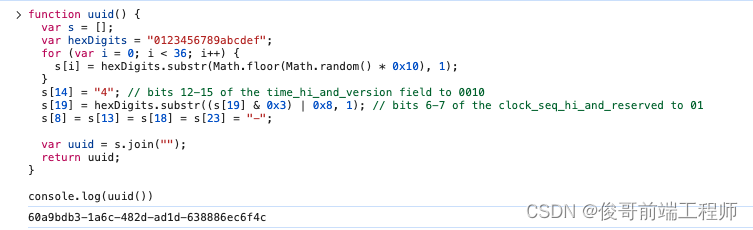
用js写函数生成UUID 和 GUID:
function guid() {
  function S8() {
    return (((1 + Math.random()) * 0x10000) | 0).toString(16).substring(1);
  }
  return (S8() + S8() + "-" + S8() + "-" + S8() + "-" + S8() + "-" + S8() + S8() + S8());
}

console.log(guid())

function uuid() {
  var s = [];
  var hexDigits = "0123456789abcdef";
  for (var i = 0; i < 36; i++) {
    s[i] = hexDigits.substr(Math.floor(Math.random() * 0x10), 1);
  }
  s[14] = "4"; // bits 12-15 of the time_hi_and_version field to 0010
  s[19] = hexDigits.substr((s[19] & 0x3) | 0x8, 1); // bits 6-7 of the clock_seq_hi_and_reserved to 01
  s[8] = s[13] = s[18] = s[23] = "-";

  var uuid = s.join("");
  return uuid;
}

console.log(uuid())

阿拉伯数字转换为中文数字:
function numberToChinese(num) { const chineseNumber = [ "零", "一", "二", "三", "四", "五", "六", "七", "八", "九" ];
 const chineseUnit = ["", "十", "百", "千", "万", "亿"]; let result = ""; let unitIndex = 0; // 处理特殊情况:零 if (num === 0) { return chineseNumber[num]; }
// 处理负数 if (num < 0) { result += "负"; num = Math.abs(num); }
// 转换为字符串,便于逐位处理 const numString = num.toString();
for (let i = numString.length - 1; i >= 0; i--) { const digit = parseInt(numString[i]);
let digitResult = "";
 if (digit > 0) {
	digitResult += chineseNumber[digit];
	digitResult += chineseUnit[unitIndex];
}
 result = digitResult + result; unitIndex++; }
 return result;
}
console.log(numberToChinese(12345)); // 输出 "一万二千三百四十五"
console.log(numberToChinese(7890)); // 输出 "七千八百九十"
console.log(numberToChinese(11)); // 输出 "十一"
console.log(numberToChinese(0)); // 输出 "零"
console.log(numberToChinese(-123)); // 输出 "负一百二十三"
欢迎关注我的原创文章:小伙伴们!我是一名热衷于前端开发的作者,致力于分享我的知识和经验,帮助其他学习前端的小伙伴们。在我的文章中,你将会找到大量关于前端开发的精彩内容。
学习前端技术是现代互联网时代中非常重要的一项技能。无论你是想成为一名专业的前端工程师,还是仅仅对前端开发感兴趣,我的文章将能为你提供宝贵的指导和知识。
在我的文章中,你将会学到如何使用HTML、CSS和JavaScript创建精美的网页。我将深入讲解每个语言的基础知识,并提供一些实用技巧和最佳实践。无论你是初学者还是有一定经验的开发者,我的文章都能够满足你的学习需求。
此外,我还会分享一些关于前端开发的最新动态和行业趋势。互联网技术在不断发展,新的框架和工具层出不穷。通过我的文章,你将会了解到最新的前端技术趋势,并了解如何应对这些变化。
我深知学习前端不易,因此我将尽力以简洁明了的方式解释复杂的概念,并提供一些易于理解的实例和案例。我希望我的文章能够帮助你更快地理解前端开发,并提升你的技能。
如果你想了解更多关于前端开发的内容,不妨关注我的原创文章。我会不定期更新,为你带来最新的前端技术和知识。感谢你的关注和支持,我们一起探讨交流技术共同进步,期待与你一同探索前端开发的奇妙世界!





 扫一扫
扫一扫


 607
607

 被折叠的 条评论
为什么被折叠?
被折叠的 条评论
为什么被折叠?
 到【灌水乐园】发言





