


 本文介绍了一种在WPF中为各种ItemsControl如ListBox、ComboBox等设置交替背景颜色的方法。通过使用附加依赖属性,该方案避免了显式刷新项的需求,并提供了一种通用的实现方式。
Actually implementing alternate background can be treated as an behavior extension to the existing controls, and the best practice to extend existing controls to add behaviors is to use attached property as much as possible, you may argue that we can add behaviors using inheritance, but can you respectively subclass the existing ItemsControls say ListBox, ComboBox, MenuItem, TreeView, and ListView etc to just merely add a simple behavior say alternate background? enter ItemsControlBehavior.
The following code is the implementation for the ItemsControlBehavior:
public class ItemsControlBehavior
{
public static readonly DependencyProperty AlternateItemContainerStyleProperty = DependencyProperty.RegisterAttached(
"AlternateItemContainerStyle",
typeof(Style),
typeof(ItemsControlBehavior),
new FrameworkPropertyMetadata(
null,
FrameworkPropertyMetadataOptions.Inherits,
new PropertyChangedCallback(OnAlternateItemContainerStyleChanged)));
public static void SetAlternateItemContainerStyle(DependencyObject element, Brush value)
{
element.SetValue(AlternateItemContainerStyleProperty, value);
}
public static Style GetAlternateItemContainerStyle(DependencyObject element)
{
return (Style)element.GetValue(AlternateItemContainerStyleProperty);
}
private static void OnAlternateItemContainerStyleChanged(DependencyObject sender, DependencyPropertyChangedEventArgs e)
{
ItemsControl control = sender as ItemsControl;
if (e.NewValue != null && control != null)
{
if (control.ItemContainerGenerator.Status == GeneratorStatus.ContainersGenerated)
{
SetAlternateItemContainerStyle(control, (Style)e.NewValue);
}
else
{
control.ItemContainerGenerator.StatusChanged += delegate
{
if (control.ItemContainerGenerator.Status == GeneratorStatus.ContainersGenerated)
{
SetAlternateItemContainerStyle(control, (Style)e.NewValue);
}
};
}
}
}
private static void SetAlternateItemContainerStyle(ItemsControl control, Style alternateStyle)
{
if (control.Items != null && control.Items.Count > 0)
{
for (Int32 i = 0; i < control.Items.Count; i++)
{
if (i % 2 != 0)
{
FrameworkElement container = control.ItemContainerGenerator.ContainerFromIndex(i) as FrameworkElement;
if (container != null) container.Style = alternateStyle;
}
}
}
}
}
You can see from the above code I just create an AlternateItemContainerStyle attached dependency property, in the property changed callback, I just apply the AlternateItemContainerStyle to the container which has an odd numbered index, then how to use the behavior, the following code demonstrates:
<Window x:Class="ItemsControlBehaviorDemo.Window1"
xmlns="http://schemas.microsoft.com/winfx/2006/xaml/presentation"
xmlns:x="http://schemas.microsoft.com/winfx/2006/xaml"
xmlns:sys="clr-namespace:System;assembly=mscorlib"
xmlns:cc="clr-namespace:ItemsControlBehaviorDemo"
Title="ItemsControlBehaviorDemo" SizeToContent="WidthAndHeight"
>
<Window.Resources>
<x:Array Type="{x:Type sys:String}" x:Key="data">
<sys:String>Paviel Dedved</sys:String>
<sys:String>Andriy Shevchenko</sys:String>
<sys:String>Paolo Maldini</sys:String>
<sys:String>Robert Baggio</sys:String>
<sys:String>Alessandro Del Piero</sys:String>
</x:Array>
<Style x:Key="itemStyle">
<Setter Property="Control.Background" Value="Beige"/>
</Style>
<Style x:Key="alternateItemStyle">
<Setter Property="Control.Background" Value="LightBlue"/>
</Style>
</Window.Resources>
<StackPanel cc:ItemsControlBehavior.AlternateItemContainerStyle="{StaticResource alternateItemStyle}" Orientation="Horizontal">
<ListBox
ItemsSource="{StaticResource data}"
Margin="10"
ItemContainerStyle="{StaticResource itemStyle}"/>
<Menu Margin="10" VerticalAlignment="Top">
<MenuItem
Header="Player Name"
ItemsSource="{StaticResource data}"
ItemContainerStyle="{StaticResource itemStyle}"/>
</Menu>
<ComboBox
Height="20"
Width="120"
ItemsSource="{StaticResource data}"
Margin="10"
VerticalAlignment="Top"
ItemContainerStyle="{StaticResource itemStyle}"/>
<ListView
ItemsSource="{StaticResource data}"
Margin="10"
ItemContainerStyle="{StaticResource itemStyle}">
<ListView.View>
<GridView>
<GridViewColumn Header="Player Name"/>
</GridView>
</ListView.View>
</ListView>
</StackPanel>
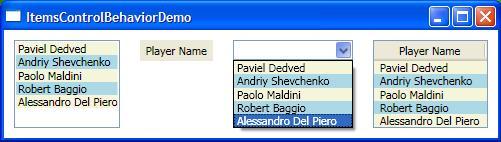
</Window> You can see that the AlternateItemContainerStyle attached DP is inheritable, so I just specify this property on the parent element aka StackPanel, and this property value will propagate to its containing children elements.
Here is the screenshot for this demo app:
出处:http://shevaspace.spaces.live.com/blog/cns!fd9a0f1f8dd06954!472.entry





 扫一扫
扫一扫


 被折叠的 条评论
为什么被折叠?
被折叠的 条评论
为什么被折叠?
 到【灌水乐园】发言





