



 本文介绍如何使用Jedis实现Redis的发布与订阅功能。通过创建自定义类继承JedisPubSub并重写方法,实现消息的接收处理。示例代码展示了如何发布与订阅消息。
1.使用jedis的publish(String channel, String message)方法向通道发布消息;
2.使用jedis的subscribe(JedisPubSub jedisPubSub, String... channels)方法订阅通道;
3.jedisPubSub参数使用自定义类继承JedisPubSub类,重写onMessage(String channel, String message)方法即可处理接收的消息;
4.JedisPubSub类的方法可以按照需求重写:
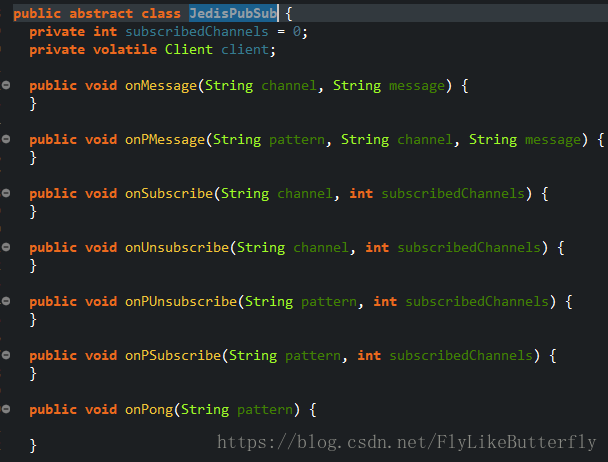
demo:(maven、spring、jedis)
/**
 * createtime : 2018年9月28日 下午5:29:42
 */
package testRedis.redis;

import org.springframework.beans.factory.annotation.Autowired;
import org.springframework.context.support.AbstractXmlApplicationContext;
import org.springframework.context.support.ClassPathXmlApplicationContext;
import org.springframework.stereotype.Component;

import redis.clients.jedis.Jedis;
import redis.clients.jedis.JedisPool;
import redis.clients.jedis.JedisPubSub;

/**
 * TODO
 * @author XWF
 */
@Component
public class TestPubSub {

	@Autowired
	private JedisPool jedisPool;

	/**
	 * @param args
	 */
	public static void main(String[] args) {
		@SuppressWarnings("resource")
		AbstractXmlApplicationContext ac = new ClassPathXmlApplicationContext("classpath:spring/spring-testRedis.xml");
		TestPubSub testPubSub = ac.getBean(TestPubSub.class);
		testPubSub.testPubSub();
	}

	public void testPubSub() {
		new Thread(new Runnable() {

			@Override
			public void run() {
				while (true) {
					Jedis jedis = jedisPool.getResource();
					try {
						Thread.sleep(2000);
					} catch (InterruptedException e) {
						e.printStackTrace();
					}
					System.out.println("发布消息");
					jedis.publish("ch", "hello");//发布消息
					jedis.close();
				}
			}
		}).start();

		MyPubSub mypubsub = new MyPubSub();
		new Thread(new Runnable() {
			@Override
			public void run() {
				Jedis jedis = jedisPool.getResource();
				jedis.subscribe(mypubsub, "ch");//订阅消息
				jedis.close();
			}
		}).start();

		try {
			Thread.sleep(10000);
		} catch (InterruptedException e) {
			e.printStackTrace();
		}
		mypubsub.unsubscribe();// 取消所有订阅
	}

}

class MyPubSub extends JedisPubSub {
	@Override
	public void onSubscribe(String channel, int subscribedChannels) {
		System.out.println("订阅了:" + channel);
		super.onSubscribe(channel, subscribedChannels);
	}

	@Override
	public void onMessage(String channel, String message) {
		System.out.println("收到通道" + channel + "消息:" + message);
		super.onMessage(channel, message);
	}

	@Override
	public void onUnsubscribe(String channel, int subscribedChannels) {
		System.out.println("取消订阅:" + channel);
		super.onUnsubscribe(channel, subscribedChannels);
	}
}
结果:
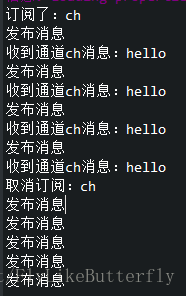
命令行发送订阅消息:
运行:./redis-cli -h 127.0.0.1 -p 6379
密码验证:auth passwordpassword
订阅消息:SUBSCRIBE channel
发布消息:PUBLISH channel messagemessagemessagemessage





 扫一扫
扫一扫


 1929
1929

 被折叠的 条评论
为什么被折叠?
被折叠的 条评论
为什么被折叠?
 到【灌水乐园】发言





