



 本文介绍如何使用Apache POI库创建和读取Excel文件。包括使用HSSFWorkbook处理2003版Excel(xls)和使用XSSFWorkbook处理2007版及以上Excel(xlsx)的方法。演示了如何设置单元格样式、填充数据以及读取Excel的内容。
maven添加:
	<dependency>
	    <groupId>org.apache.poi</groupId>
	    <artifactId>poi</artifactId>
	    <version>3.17</version>
	</dependency>
测试Demo:
/**
 * createtime : 2018年3月8日 下午4:06:33
 */
package candel.javatest;


import java.io.FileOutputStream;
import java.io.IOException;


import org.apache.poi.hssf.usermodel.HSSFCell;
import org.apache.poi.hssf.usermodel.HSSFCellStyle;
import org.apache.poi.hssf.usermodel.HSSFFont;
import org.apache.poi.hssf.usermodel.HSSFRow;
import org.apache.poi.hssf.usermodel.HSSFSheet;
import org.apache.poi.hssf.usermodel.HSSFWorkbook;
import org.apache.poi.hssf.util.HSSFColor.HSSFColorPredefined;
import org.apache.poi.ss.usermodel.FillPatternType;


/**
 * TODO
 * @author XWF
 */
public class POItest {


	/**
	 * @param args
	 * @throws IOException
	 */
	public static void main(String[] args) throws IOException {
		HSSFWorkbook wb = new HSSFWorkbook();
		HSSFSheet sheet = wb.createSheet("helloworld");//Sheet名称
		for(int i=0;i<10;i++) {
			HSSFRow row = sheet.createRow(i);//行
			for(int j=0;j<10;j++) {
				HSSFCell cell = row.createCell(j);//单元格
				String val = createString(i,j);
				setCellStyle(i,j,cell,wb);//设置样式
				cell.setCellValue(val);//设置值
			}
		}

		FileOutputStream fos = new FileOutputStream("E:\\Temp\\exceltest.xls");//写入文件
		wb.write(fos);
		fos.flush();
		fos.close();
		System.out.println("xls finished.");
	}


	private static void setCellStyle(int i, int j, HSSFCell cell,HSSFWorkbook wb) {
		HSSFFont font1 = wb.createFont();
		HSSFCellStyle style1 = wb.createCellStyle();
		font1.setColor(HSSFColorPredefined.BLUE.getIndex());//字体格式
		font1.setBold(true);
		style1.setFillPattern(FillPatternType.SOLID_FOREGROUND);//单元格格式
		style1.setFillForegroundColor(HSSFColorPredefined.LIGHT_YELLOW.getIndex());
		style1.setFont(font1);
		HSSFFont font2 = wb.createFont();
		HSSFCellStyle style2 = wb.createCellStyle();
		font2.setColor(HSSFColorPredefined.GREY_80_PERCENT.getIndex());
		style2.setFont(font2);
		if(0==i && 0==j) {
			cell.setCellStyle(style1);
		}else if(0==i) {
			cell.setCellStyle(style1);
		}else if(0==j){
			cell.setCellStyle(style1);
		}else if(j>i){
		}else {
			cell.setCellStyle(style2);
		}
	}


	private static String createString(int i, int j) {
		if(0==i && 0==j) {
			return "九九乘法";
		}else if(0==i) {
			return j+"";
		}else if(0==j){
			return i+"";
		}else if(j>i){
			return "";
		}else {
			return j+"*"+i+"="+(i*j);
		}
	}


}
生成的Excel:
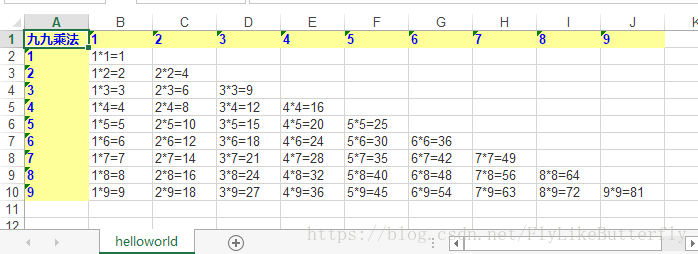
如果用POI读取Excel,抛出异常:The supplied data appears to be in the Office 2007+ XML. You are calling the part of POI that deals with OLE2 Office Documents. You need to call a different part of POI to process this data (eg XSSF instead of HSSF)

请使用XSSFWorkbook和XSSFSheet处理Excel,maven导入:
    <dependency>
	    <groupId>org.apache.poi</groupId>
	    <artifactId>poi-ooxml</artifactId>
	    <version>5.2.0</version>
	</dependency>
POI提供了两套处理Excel的工具:
- 对2003版本的Excel使用HSSFWorkbook;(xls后缀Excel导入poi)
- 对2007版本或更高版本Excel使用XSSFWorkbook;(xlsx后缀Excel导入poi-ooxml)
读取xlsx的Demo:
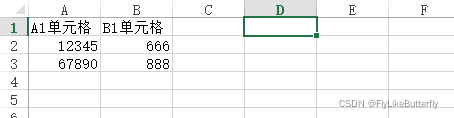
@Test
	public void test1() {
		try (FileInputStream ins = new FileInputStream(new File("test.xlsx"));) {
			XSSFWorkbook wb = new XSSFWorkbook(ins);
			XSSFSheet sheet0 = wb.getSheetAt(0);
			int firstRowNum = sheet0.getFirstRowNum();
			int lastRowNum = sheet0.getLastRowNum();
			System.out.println(wb);
			System.out.println(sheet0);
			System.out.println("firstRowNum=" + firstRowNum);
			System.out.println("lastRowNum=" + lastRowNum);
			XSSFRow row0 = sheet0.getRow(0);
			System.out.println("row0.firstCellNum=" + row0.getFirstCellNum());
			System.out.println("row0.LastCellNum=" + row0.getLastCellNum());
			XSSFCell row0Cell0 = row0.getCell(0);
			System.out.println("row0cell0.value=" + row0Cell0.getStringCellValue());
			System.out.println("row0cell1.value=" + row0.getCell(1).getStringCellValue());
			System.out.println("row1cell1=" + sheet0.getRow(1).getCell(1).getNumericCellValue());
		} catch(Exception e) {
			System.out.println(e);
		}
	}

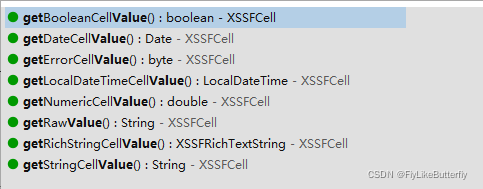
XSSFCell获得各种类型value的几个方法:





 扫一扫
扫一扫


 9907
9907

 被折叠的 条评论
为什么被折叠?
被折叠的 条评论
为什么被折叠?
 到【灌水乐园】发言





