


 本文介绍了Linux系统中的whatis命令用于查看命令作用,help选项展示命令用法,以及man命令查阅手册。特别提到使用root权限运行mandb解决whatis问题,并展示了ls命令的-a选项。还提及了查看passwd文件的手册页操作。
目录
1.whatis命令。
(1)查看ls命令的作用。
[root@rhel1 ~]# whatis ls
ls:没有 appropriate。(2)如果遇到这个问题,只要使用root用户执行mandb命令即可。
[root@rhel1 ~]# mandb
正在处理 /usr/share/man/overrides 下的手册页...
正在为路径 /usr/share/man/overrides/man8 更新索引缓存。请等待...完成。
正在 /usr/share/man/overrides 下查找流浪猫...
正在 /var/cache/man/overrides 下查找流浪猫...
正在处理 /usr/share/man 下的手册页...
(3)然后再次支持whatis命令。
[root@rhel1 ~]# whatis ls
ls (1)               - list directory contents
ls (1p) - list directory contents-
在结果的第二列中,我们只要关注小括号中是纯数字的那行就可以了。从上面的结果中可以看到,ls的作用是列出目录中的内容。
2.help选项。
(1)命令格式如下。
[root@rhel1 ~]# 命令 --help(2)查看ls的具体用法。
[root@rhel1 ~]# ls --help

必选参数对长短选项同时适用。
  -a, --all			不隐藏任何以. 开始的项目
-A, --almost-all 列出除. 及.. 以外的任何项目(3)-a选项列出包括隐藏文件在内的所有文件。
[root@rhel1 ~]# ls -a

.     图片  anaconda-ks.cfg  .cache     .ICEauthority         .viminfo
..    文档  .bash_history    .config    initial-setup-ks.cfg  .Xauthority
公共  下载  .bash_logout     .cshrc     .local
模板  音乐  .bash_profile    .dbus      .pki
视频  桌面  .bashrc          .esd_auth  .tcshrc
3.man命令。
(1)如果要查看passwd作为密码文件的解释,可以man命令。
[root@rhel1 ~]# man 5 passwd
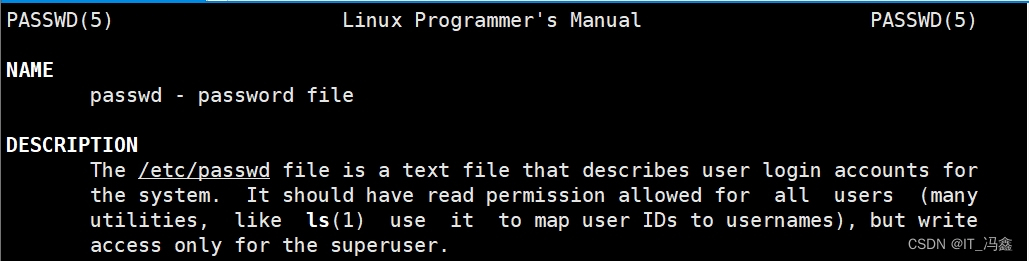
- 按【q】键退出





 扫一扫
扫一扫


 被折叠的 条评论
为什么被折叠?
被折叠的 条评论
为什么被折叠?
 到【灌水乐园】发言





