


在微信开发中,忘记密码时可进行设置和更改。
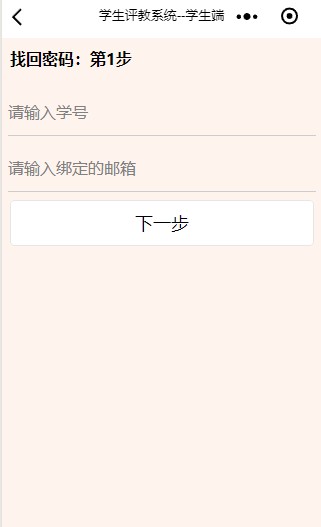
首先第一步:根据自己的学号和个人信息中绑定的邮箱,输入信息之后,进行第二步。
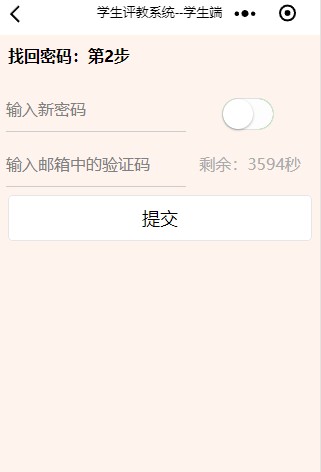
第二步:输入自己的密码,系统会往绑定的邮箱中发送验证码,将发送的验证码写入输入邮箱验证码中,并且或有时间限制。
页面的代码如下:
<view class='contain'>
  <form bindsubmit='submit_email' wx:if="{{form_index == 0}}">
  <view class="header">
    <text>找回密码:第1步</text>
  </view>
    <view class='first'>
      <input name="no" type='number'placeholder='请输入学号' />
    </view>
    <view class='first'>
      <input  name="email" placeholder='请输入绑定的邮箱'/>
    </view>
    <button formType="submit"bindtap="next">下一步</button>
  </form>

  <form bindsubmit='submit_password'  wx:else>
    <view class="header">
     <text>找回密码:第2步</text>
    </view>
      <view class='section'>
        <view class='left'>
           <input password="{{mask}}" name="pwd"  placeholder='输入新密码'/>
        </view>
        <view class='right'>
           <switch  bindchange="switchChange"/>
        </view>
      </view>
      <view class='section'>
        <view class='left'>
           <input  name="validcode" placeholder='输入邮箱中的验证码'/>
        </view>
        <view class='right'>
           <text style="color:#aaa">剩余:{{second}}秒</text>
        </view>
      </view>
      <button formType="submit" disabled="{{disabled}}" >提交</button>
  </form>
</view> submit_email: function (e) {
var no = e.detail.value.no;
var email = e.detail.value.email;
if (email == null || email == '') {
wx.showToast({
title: '请输入邮箱',
icon: 'none',
duration: 2000
})
return;
}
// 显示 loading 提示框, 需主动调用 wx.hideLoading 才能关闭提示框
wx.showLoading({
title: '网络请求中...',
})
// 发起请求
wx.request({
url: app.globalData.url.forgotpwd,
data: {
no: no,
email: email
},
method: "POST",
header: {
'content-type': 'application/x-www-form-urlencoded'
},
success: (res) => {
// 隐藏 loading 提示框
wx.hideLoading();
// console.log(res.data);
if (res.data.error) {
wx.showToast({
title: res.data.msg,
icon: 'none',
duration: 2000
})
} else {
this.setData({ no: no, second: res.data.expire });
countdown(this);
wx.showToast({
title: res.data.msg,
icon: 'none',
duration: 2000
})
setTimeout(() => {
this.setData({ form_index: 1 });
}, 2000)
}
}
})
},第二步:重设密码,首先验证密码是否为空,不为空时,以POST方式提交,为空时提醒不能为空。最后使用Timeout来关闭当前页面,返回上一页面或多级页面。
  //第二步:重设密码
  submit_password: function (e) {
    console.log(e);

    var validcode = e.detail.value.validcode;
    var pwd = e.detail.value.pwd;

    if (validcode == '' || validcode == null || pwd == '' || pwd == null) {
      wx.showToast({
        title: '验证码和密码不能为空',
        icon: 'none',
        duration: 2000
      })
    } else {
      wx.request({
        url: app.globalData.url.initpassword,
        method: 'POST',
        data: {
          no: this.data.no,
          validcode: validcode,
          pwd: pwd
        },
        header: {
          'content-type': 'application/x-www-form-urlencoded'
        },
        success: (res) => {
          // console.log(res.data);
          if (res.data.error) {
            wx.showToast({
              title: res.data.msg,
              icon: 'none',
              duration: 2000
            })
          } else {
            // 显示消息提示框
            wx.showToast({
              title: res.data.msg,
              icon: 'success',
              duration: 2000
            })
            setTimeout(() => {
              // 关闭当前页面,返回上一页面或多级页面
              wx.navigateBack({
                delta: 1
              })
            }, 2000)
          }
        }
      })
    }

  },





 扫一扫
扫一扫


 1万+
1万+

 被折叠的 条评论
为什么被折叠?
被折叠的 条评论
为什么被折叠?
 到【灌水乐园】发言





