


 该博客介绍了如何在Vue.js中利用动态样式和v-for指令实现组件间的交互。通过示例代码展示了如何根据条件改变元素背景色、过渡效果以及设置z-index,同时结合触摸事件处理函数实现触摸操作。内容着重于前端开发中的动态样式控制和列表渲染。
:style="{'text-align': 'center','margin-bottom': '20rpx','padding-top':padding_top}"

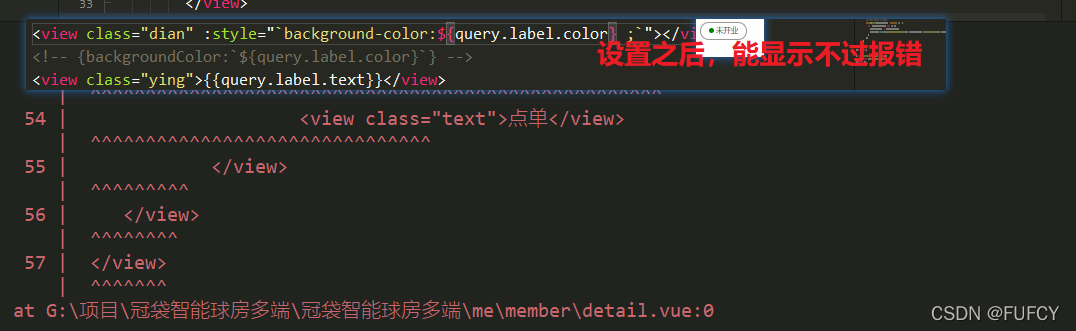
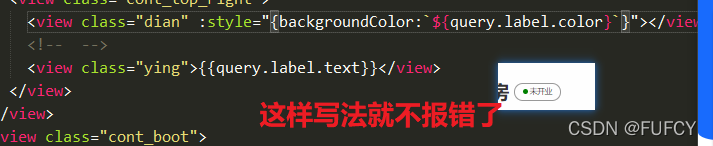
:style="{backgroundColor:`${query.label.color}`}"

v-for遍历写法
<template>
	<view class="app-movable-area" :style="[containerSize]">
		<template v-if="controlsPositionArray.length !== 0">
			<view v-for="(item, index) in controlsArray" :key="index" class="_item"
				:style="{'background': item, 'transition': (curretnControlsIndex === index ? 'initial' : '.3s'), 'z-index': (curretnControlsIndex === index ? 1 : 0), 'width': controlsSize.width + 'px', 'height': controlsSize.height + 'px', 'top': controlsPositionArray[index].top + 'px',  'left': controlsPositionArray[index].left + 'px'}">
				<view @touchstart="handleTouchstart($event, index)" @touchmove="handleTouchmove" @touchend="handleTouchend" :style="{'background': item}" style="width: 100%; height: 100%;">
					<!-- 自定义内容 -->
					<view style="display: flex; align-items: center; justify-content: center; width: 100%; height: 100%;">
						{{index + 1}}
					</view>
				</view>
			</view>
		</template>
	</view>
</template>





 扫一扫
扫一扫


 到【灌水乐园】发言




