





 本文详细介绍libsamplerate和speex库在音频重采样中的应用,包括48KHz到8KHz的采样率转换,以及单双通道PCM音频的处理。涵盖libsamplerate的SRC_DATA结构解析、API使用、示例代码,以及speex的重采样API调用流程和示例。
记录libsamplerate及speex库进行音频重采样的使用。主要是将 48K HZ 16bit采样率,双通道PCM音频转为8K HZ,16bit采样率单通道PCM音频。
一、libsamplerate
1、SRC_DATA数据结构
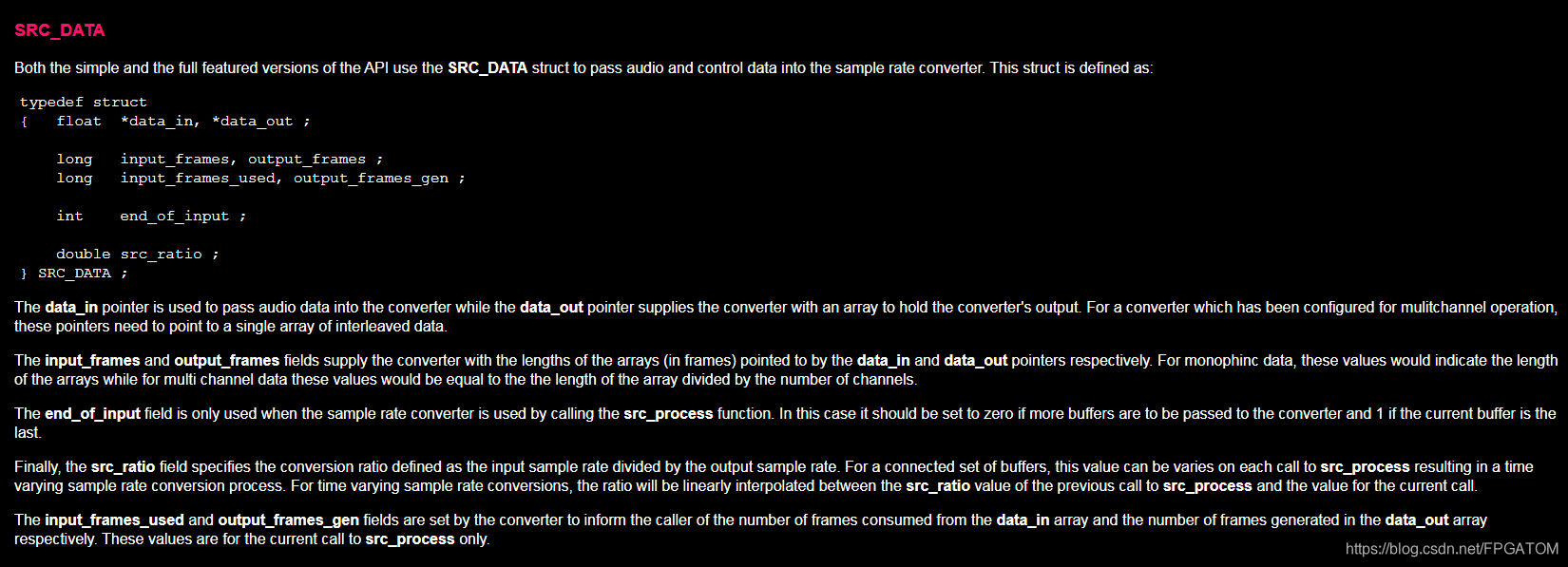
该数据结构用于将音频数据及控制参数传递给精简版及标准的API函数。
data_in: 指向传递给转换器的音频数据buffer,交错模式存放
data_out: 指向提供给转换器输出音频的buffer,交错模式存放
input_frames 和output_frames给转换器提供data_in,data_out的数组长度(帧数)。对于单通道音频,这两个参数的值等于数组的长度,对于多通道音频,这两个参数的值等于(数组长度/通道数)
end_of_input:只在调用src_process函数时有效。如果有持续的音频输入则该值必须设置为0,设置为1表示此次输入的buffer是最后一个。(实际上并不是,调用两种API时都起效)
src_ratio: 该参数值等于(待输出音频采样率/输入音频采样率)
input_frames_used和output_frames_gen由转换器设置,用于输出转换结果参数。input_frames_used用于指示data_in中被消费的的帧数,output_frames_gen用于指示存储在data_out的输出数据帧数。这两个参数仅在调用src_process中有效。
2、简版API
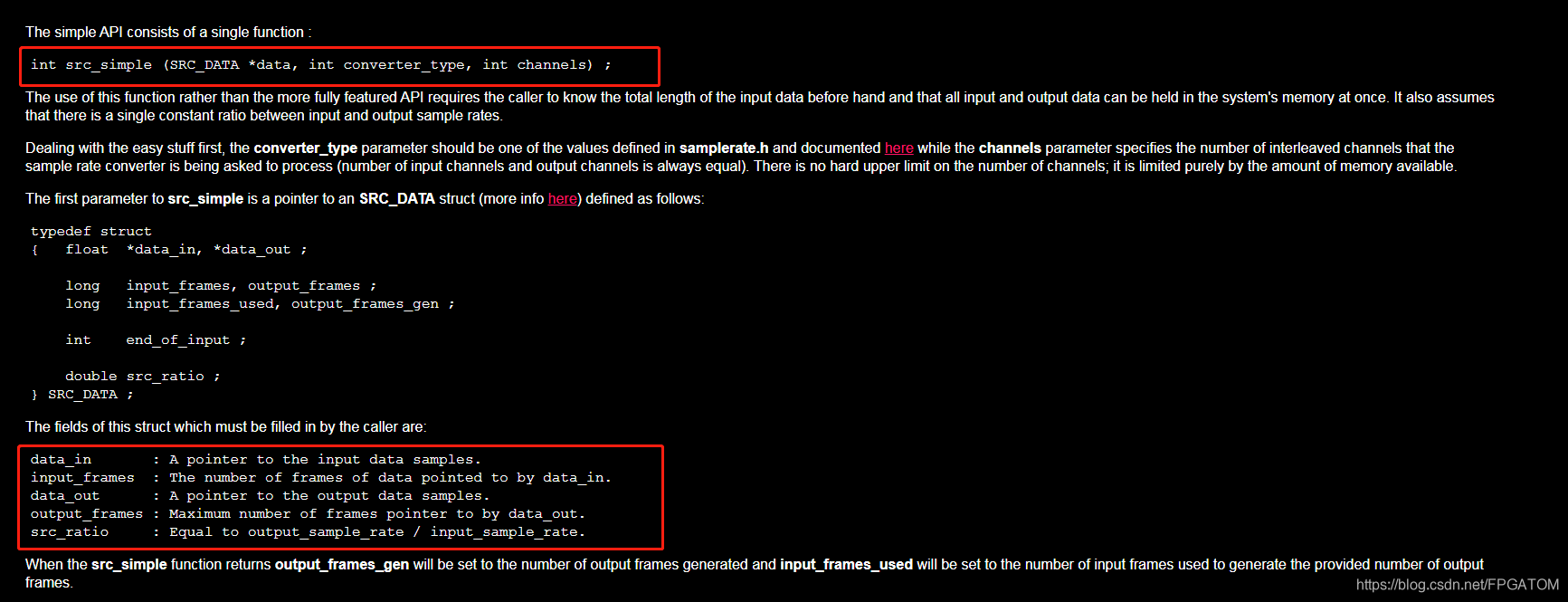
调用该函数要求调用者知道输入数据的长度,该函数还要求所有输入及输出数据能同时保存在系统中。单一采样率输入单一采样率输出才能调用该函数来处理。
当src_simple返回是out_frames_gen会被设置为输出帧数,in_frames_used被设置为用于产生输出的输入音频数据的帧数。
3、demo
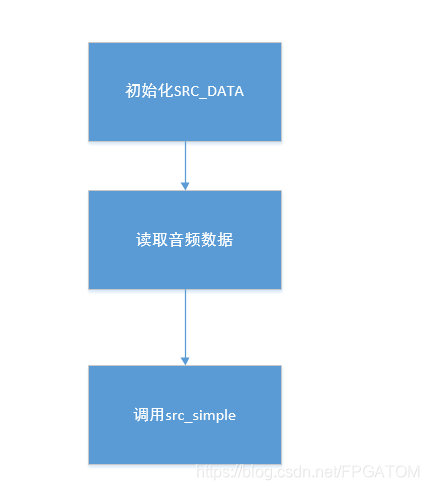
src_simple函数流程:
src_process流程:

    SRC_DATA m_DataResample;

    float in[4096]={0};
    float out[4096]={0};

    int samples = 2048;
    int channel = 2;


    m_DataResample.data_in       = in;
    m_DataResample.input_frames  = samples ;
    m_DataResample.data_out      = out;
    m_DataResample.output_frames = samples ;
    m_DataResample.src_ratio     = 8000.0/48000;  /* 输出采样率/输入采样率 */
   /*........*/
   while(fread(pcmbuffer, buffer_size,1 ,pcmfd) != 0)
    {
        if(frame % 10 == 0)
            printf("processing the %d frame \n", frame);


        memcpy(out_buffer, pcmbuffer, buffer_size);


        memset(in , 0 , 4096 * sizeof(float));
        memset(out , 0 , 4096 * sizeof(float));

        for(int j = 0; j < 4096 && j < buffer_size; j++)
        {
            in[j] = pcmbuffer[j];
        }


        RetResample = src_simple(&m_DataResample, SRC_LINEAR, 2);
        if(RetResample != 0)
        {
            printf("src_simple error: %s", src_strerror(RetResample));
            break;
        }


        printf("input_frame_used[%d], out_frame_gen[%d]\n", m_DataResample.input_frames_used , m_DataResample.output_frames_gen);


        int i = 0, j = 0;
        int buf_sizePCM = m_DataResample.output_frames_gen * channel;


         /* 交错存放的,只提取右声道数据 */
        for (; i < 4096 && i < buf_sizePCM && j<2048; i += 4, j += 2)
        {
            out_buffer[j]     = (unsigned char)(out[i]);
            out_buffer[j + 1] = (unsigned char)(out[i + 1]);
        }
        buf_sizePCM = buf_sizePCM / 2;


        if(frame == 2)
            printf("i = %d, j = %d \n", i, j);


        frame++;


        fwrite(out_buffer, 1, buf_sizePCM, outfd);
        fflush(outfd);


        memset(out_buffer, 0, buffer_size);
        memset(pcmbuffer, 0, buffer_size);
    }

    /* src_process的demo */
    /* src_process的demo */
    /* src_process的demo */
    int samples = 2048; /* AAC格式(一帧的一个通道有1024个样本)转换为PCM的,故一帧内有样本数为1024*2 */
    int channel = 2;


    m_DataResample.data_in       = in;
    m_DataResample.input_frames  = samples ;
    m_DataResample.data_out      = out;
    m_DataResample.output_frames = samples ;
    m_DataResample.src_ratio     = 8000.0/48000;  /* 输出采样率/输入采样率 */
    m_DataResample.end_of_input  = 1;

    while(fread(pcmbuffer, buffer_size,1 ,pcmfd) != 0)
    {
        if(frame % 10 == 0)
            printf("processing the %d frame \n", frame);


        //memcpy(out_buffer, pcmbuffer, buffer_size);


        memset(in , 0 , 4096 * sizeof(float));
        memset(out , 0 , 4096 * sizeof(float));

        for(int j = 0; j < 4096 && j < buffer_size; j++)
        {
            in[j] = pcmbuffer[j];
        }


        //while(1)
        {
            src_reset(src_state); /* 不调用这个出来效果很差,但是网上看到别人写的是没有调用的,后来查官网FAQ试这调用一下出来效果才好的 */
            int ret = src_process(src_state, &m_DataResample);
            if(0 == ret)
            {
                int buf_sizePCM = m_DataResample.output_frames_gen * channel;
                int i = 0, j = 0;
                for (; i < 4096 && i < buf_sizePCM && j<2048; i += 4, j += 2)
                {
                    out_buffer[j]     = (unsigned char)(out[i]);
                    out_buffer[j + 1] = (unsigned char)(out[i + 1]);
                }
                buf_sizePCM = buf_sizePCM / 2;


                fwrite(out_buffer, 1, buf_sizePCM, outfd_process);
                fflush(outfd_process);

                memset(out_buffer, 0, buffer_size);
                memset(out , 0 , 4096 * sizeof(float));
                printf("-------- output_frames_gen[%d], in_used_frame[%d] end_of_input[%d] src_ratio[%f]------ \n",
                    m_DataResample.output_frames_gen, m_DataResample.input_frames_used,
                    m_DataResample.end_of_input, m_DataResample.src_ratio);
            }
            else
            {
                printf("src_simple error: %s \n", src_strerror(ret));
                printf("111-------- output_frames_gen[%d], in_used_frame[%d] end_of_input[%d]------\n",
                    m_DataResample.output_frames_gen, m_DataResample.input_frames_used, m_DataResample.end_of_input);
                //break;
            }


            //if(m_DataResample.input_frames_used == samples)
            //{
                //m_DataResample.end_of_input = 1;
                //break;
            //}

           // m_DataResample.data_in          += m_DataResample.input_frames_used;
           // m_DataResample.input_frames     -= m_DataResample.input_frames_used;
           // m_DataResample.output_frames_gen = 0;

        }


        frame++;
        memset(out_buffer, 0, buffer_size);
        memset(pcmbuffer, 0, buffer_size);
    }
demo中调用src_process之前调用了src_reset是因为不调用src_reset出来效果很差,但是网上 别人的demo 是没有调用的。看官网FAQ后才加上去的。
4、使用高质量模式设置时其输出比SRC_LINEAR模式还要糟糕原因
导致这个问题的原因可能如下:
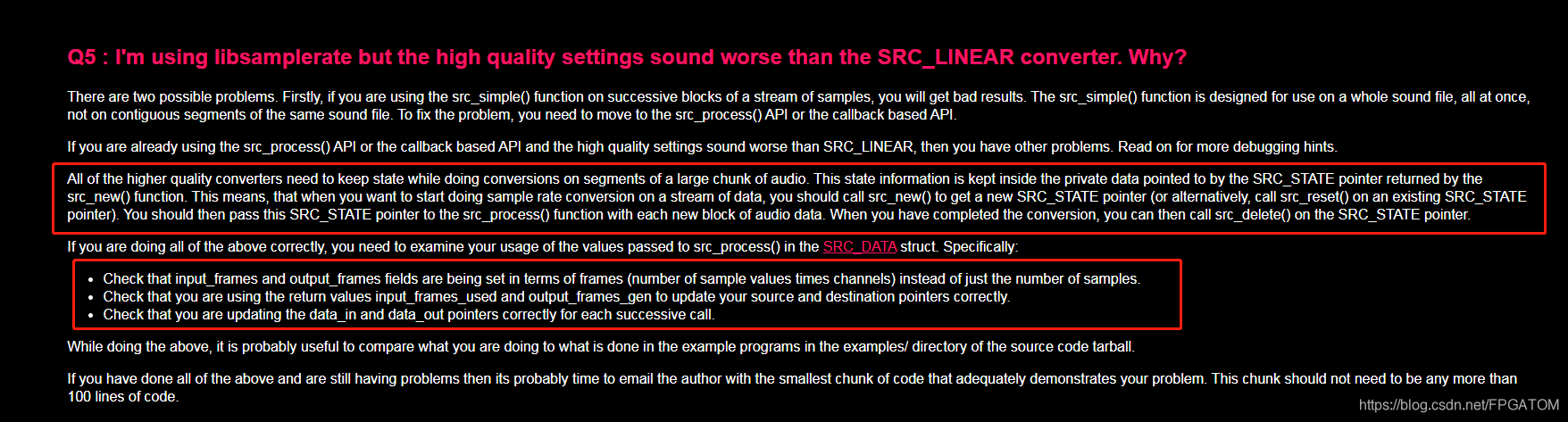
《1》、如果使用src_simple函数来连续处理音频流样本中的某一小部分,结果会不理想。因为src_simple函数的设计初衷是一次处理一整个声音文件。所以处理这类场景时应当使用src_process或基于API的回调函数。
《2》、如果已经使用了src_process函数,则需要通过debug提示来查找问题。
所有的高质量转换都需要在处理声音样本时保存转换器的状态。这些状态信息保存在SRC_DATE指向的私有数据域。这意味着当你想进行转换时你需要调用src_new函数去获取SRC_STATE指针(或者使用现有的SRC_STATE指针调用src_reset函数)。
如果保证上面提及的都已注意到,则需要检验你传给src_process的参数:
- 检查input_frames和out_frames成员,这两个参数应当被设置为(样本数量*通道数)而不是样本数量;
- 检查是否使用返回的input_frames_used及out_frames_gen来更新你的输入、输出buffer的偏移;
- 检查在连续调用中是否正确更新data_in及data_out;
5、完整demo
二、speexdsp
1、speex
speex是用来进行音频的编码和解码,speexdsp是用来进行回音抑制,噪音消除,重采样等附加功能,两个可独立使用。Speex是为网络音频包传输及视频会议(VoIp)而设计的。
2、重采样API调用流程
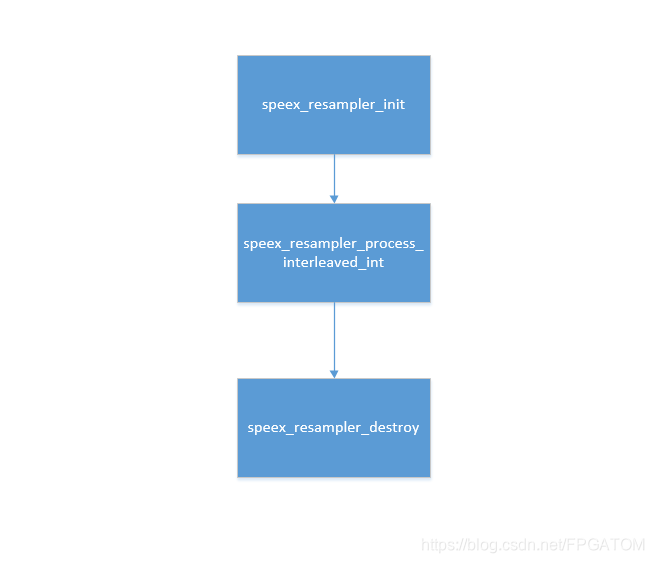
3、demo
SpeexResamplerState *resampler = NULL;
    int err = 0;


    /* 48khz ---> 8khz */
    resampler = speex_resampler_init(2,48000,8000,6,&err);
    speex_resampler_set_rate(resampler, 48000, 8000);

    FILE* pcmfd = fopen ("test.pcm", "rb+");
    if(!pcmfd)
    {
        //cout << "open test.cpm faile" << endl;
        printf("open test.cpm faile \n");
        return -1;
    }


    FILE* outfd = fopen("8k.pcm", "wb+");
    if(!outfd)
    {
        fclose(pcmfd);
        printf("open test.cpm faile \n");
        return -1;
    }

    int samples = 2048;  /* AAC格式(一帧的一个通道有1024个样本)转换为PCM的,故一帧内有样本数为1024*2 */
    int channel = 2;

    int buffer_size = samples * channel;
    char* pcmbuffer = new char[buffer_size];
    memset(pcmbuffer, 0, buffer_size);


    unsigned char* out_buffer = new unsigned char[buffer_size*2];
    memset(out_buffer, 0, buffer_size*2);

    unsigned char* last_buffer = new unsigned char[buffer_size];
    memset(last_buffer, 0, buffer_size);

    int frame = 0;
    int ret   = 0;


    while(fread(pcmbuffer, buffer_size,1 ,pcmfd) != 0)
    {
        memset(out_buffer, 0, buffer_size*2);
        memset(last_buffer, 0, buffer_size);

        unsigned int inlen  = buffer_size/2 ;
        unsigned int outlen = buffer_size ;

        ret = speex_resampler_process_interleaved_int(resampler, (short*)pcmbuffer,&inlen, (short*)out_buffer, &outlen );
        if(ret == RESAMPLER_ERR_SUCCESS)
        {
            int i = 0 , j = 0;
            for(; i< outlen*2; i+=4,j+=2)
            {
                last_buffer[j]   = out_buffer[i];
                last_buffer[j+1] = out_buffer[i+1];
            }
            //fwrite(out_buffer, sizeof(short), outlen, outfd);  /* 输出双声道 */
            fwrite(last_buffer, sizeof(short), outlen/2, outfd);


            printf("processed[%d] outlen = %d \n", inlen, outlen);
        }
        else
        {
            printf("error: %d\n", ret);
        }
    }


    speex_resampler_destroy(resampler);
因为我使用的音频是交错存储的所以调用interleaved相关的API进行。
4、完整demo
三、参考
- libsamplerate音频重采样参考:
《1》、 http://www.mega-nerd.com/SRC/api_simple.html
《2》、 https://blog.youkuaiyun.com/byxdaz/article/details/53892826
《3》、 https://blog.youkuaiyun.com/twd_1991/article/details/80349286 - speex参考
《1》、 https://blog.youkuaiyun.com/u013286409/article/details/47026343
《2》、 https://www.speex.org/docs/manual/speex-manual/node7.html#SECTION00760000000000000000
《3》、 https://blog.youkuaiyun.com/weixin_34220623/article/details/90336248
《4》、中文文档: https://blog.youkuaiyun.com/dreamsparkc/article/details/80418244





 扫一扫
扫一扫


 5019
5019

 被折叠的 条评论
为什么被折叠?
被折叠的 条评论
为什么被折叠?
 到【灌水乐园】发言





