plsql提示
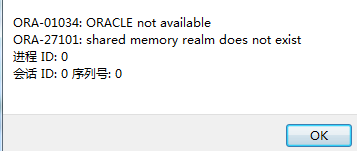
解决方法:
1、
C:\Documents and Settings\Administrator>sqlplus /nolog

SQL*Plus: Release 11.2.0.1.0 Production on Thu Nov 7 17:16:47 2013

Copyright (c) 1982, 2010, Oracle.  All rights reserved.

SQL> conn / as sysdba
Connected to an idle instance.
SQL> startup
ORACLE instance started.

Total System Global Area  778387456 bytes
Fixed Size                  1374808 bytes
Variable Size             503317928 bytes
Database Buffers          268435456 bytes
Redo Buffers                5259264 bytes
Database mounted.
Database opened.

2、上述方法启动oracle时,默认实例是orcl,非此实例需要提前设置后启动才能用

C:\Windows\System32>SET ORACLE_SID=实例名
C:\Windows\System32>sqlplus /nolog
SQL*Plus:Release 11.2.0.3.0 Production on ...
Copyright ....
SQL> conn / as sysdba
Connected to an idle instance.
SQL> startup
ORACLE instance started.


此时可能会报出ORA-03113这样的错误,如下所示

SQL> startup
ORACLE instance started.

Total System Global Area 3423965184 bytes
Fixed Size                  2180544 bytes
Variable Size            2550139456 bytes
Database Buffers          855638016 bytes
Redo Buffers               16007168 bytes
Database mounted.
ORA-03113: end-of-file on communication channel
Process ID: 9116
Session ID: 191 Serial number: 3


针对ORA-03113: end-of-file on communication channel错误

sysdba身份连接oracle

C:\Documents and Settings\Administrator>sqlplus /nolog
SQL> conn / as sysdba
Connected to an idle instance.
SQL> startup
ORACLE instance started.

接入到mount状态:

startup mount;



 本文详细介绍了如何使用PLSQL通过sysdba身份连接并启动Oracle数据库实例,包括默认实例和指定实例的启动过程,以及遇到ORA-03113错误时的解决方案。





 扫一扫
扫一扫


 2980
2980


 到【灌水乐园】发言



