



以下是完整的可拖动悬浮窗菜单实现代码,包含动画表情和边缘吸附功能:
悬浮窗菜单
实现可拖动悬浮按钮,带6种动画表情自动轮换
点击按钮展开立体感菜单,包含4个分类项(首页/搜索/收藏/设置)
拖动释放后自动吸附到最近屏幕边缘(左/右/上/下)
完美响应式设计,适配移动端和桌面端
包含平滑过渡动画和交互反馈效果
支持鼠标和触摸屏两种操作方式
采用现代化UI设计,包含阴影、圆角和渐变色彩
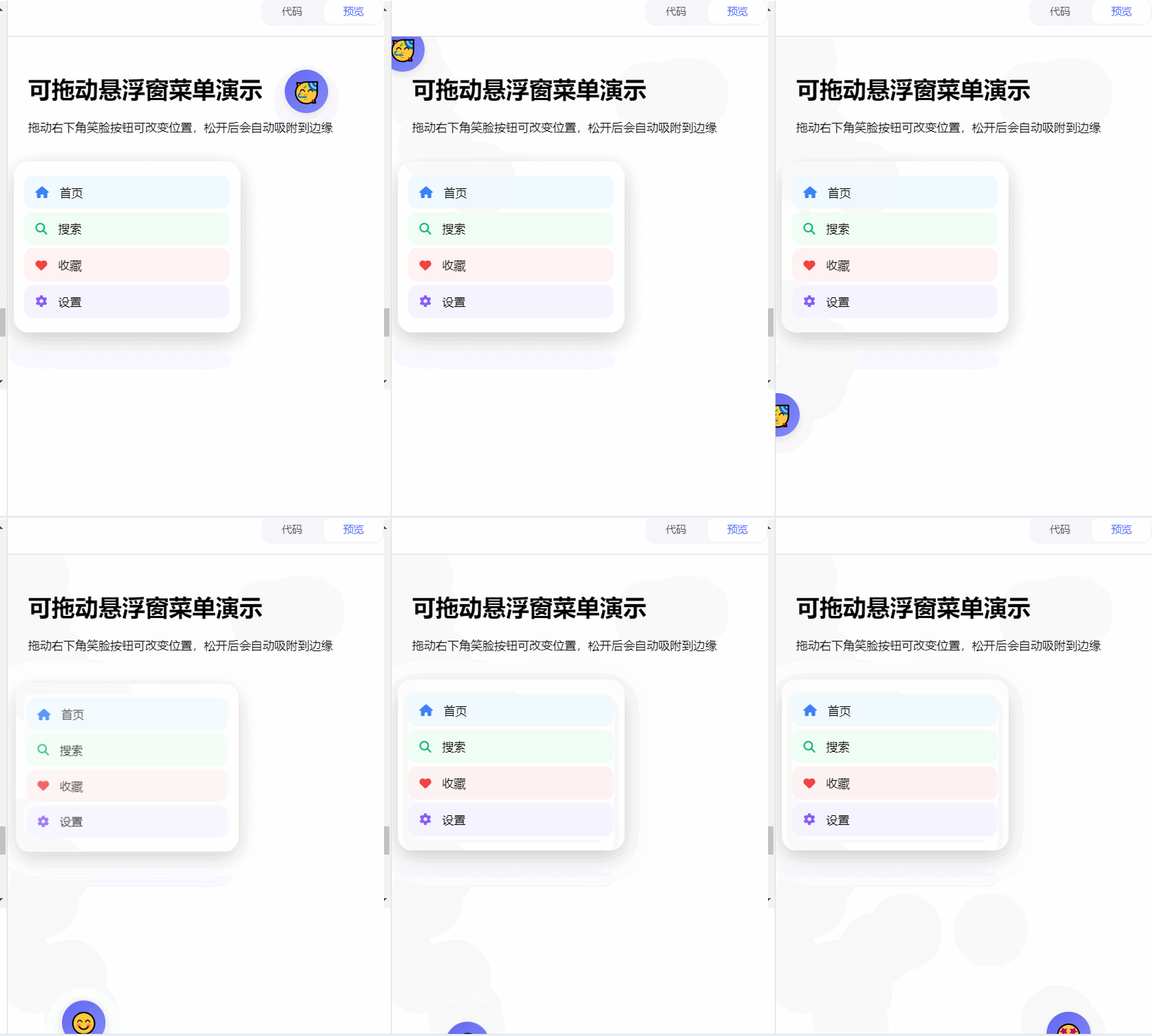
以下是改进后的可拖动悬浮窗菜单实现,新增点击空白处关闭菜单和定时边缘吸附功能:
悬浮窗菜单
新增点击页面空白处关闭菜单功能,提升操作便利性
添加5秒无操作自动吸附边缘功能,保持界面整洁
保留原有所有特性:可拖动悬浮按钮、6种动画表情、4分类菜单
改进边缘吸附动画效果,增加平滑过渡
优化移动端触摸事件处理,提升触屏体验
保持现代化UI设计,包含阴影、圆角和渐变色彩
<!DOCTYPE html>
<html lang="zh-CN">
<head>
    <meta charset="UTF-8">
    <meta name="viewport" content="width=device-width, initial-scale=1.0">
    <title>可拖动悬浮窗菜单</title>
    <link rel="stylesheet" href="https://cdnjs.cloudflare.com/ajax/libs/font-awesome/6.4.0/css/all.min.css">
    <style>
        :root {
            --primary: #6366f1;
            --primary-light: #818cf8;
            --dark: #1e293b;
            --light: #f8fafc;
            --shadow: 0 4px 20px rgba(0, 0, 0, 0.15);
            --transition: all 0.3s cubic-bezier(0.25, 0.8, 0.25, 1);
        }

        .floating-btn {
            position: fixed;
            width: 60px;
            height: 60px;
            background: linear-gradient(135deg, var(--primary), var(--primary-light));
            border-radius: 50%;
            display: flex;
            align-items: center;
            justify-content: center;
            cursor: grab;
            box-shadow: var(--shadow);
            z-index: 1000;
            transition: var(--transition);
            user-select: none;
            touch-action: none;
        }

        .emoji {
            font-size: 28px;
            transition: transform 0.3s ease;
        }

        .menu-container {
            position: fixed;
            width: 280px;
            background: white;
            border-radius: 20px;
            box-shadow: 0 10px 30px rgba(0, 0, 0, 0.2);
            z-index: 999;
            transform: translateY(20px) scale(0.9);
            opacity: 0;
            visibility: hidden;
            transition: var(--transition);
            padding: 15px;
            pointer-events: none;
        }

        .menu-item {
            display: flex;
            align-items: center;
            padding: 12px 15px;
            margin: 5px 0;
            border-radius: 12px;
            cursor: pointer;
            transition: var(--transition);
            pointer-events: auto;
        }

        @media (max-width: 768px) {
            .menu-container {
                width: calc(100vw - 40px);
            }
        }
    </style>
</head>
<body>
    <div class="content">
        <h1>可拖动悬浮窗菜单演示</h1>
        <p>拖动笑脸按钮可改变位置,5秒无操作自动吸附边缘</p>
    </div>

    <div class="floating-btn" id="floatingBtn">
        <div class="emoji" id="emoji">😊</div>
    </div>

    <div class="menu-container" id="menuContainer">
        <div class="menu-item" style="background: #f0f9ff;">
            <i class="fas fa-home" style="color: #3b82f6;"></i>
            <span style="margin-left: 15px;">首页</span>
        </div>
        <div class="menu-item" style="background: #f0fdf4;">
            <i class="fas fa-search" style="color: #10b981;"></i>
            <span style="margin-left: 15px;">搜索</span>
        </div>
        <div class="menu-item" style="background: #fef2f2;">
            <i class="fas fa-heart" style="color: #ef4444;"></i>
            <span style="margin-left: 15px;">收藏</span>
        </div>
        <div class="menu-item" style="background: #f5f3ff;">
            <i class="fas fa-cog" style="color: #8b5cf6;"></i>
            <span style="margin-left: 15px;">设置</span>
        </div>
    </div>

    <script>
        const floatingBtn = document.getElementById('floatingBtn');
        const menuContainer = document.getElementById('menuContainer');
        const emoji = document.getElementById('emoji');
        let isDragging = false;
        let isMenuOpen = false;
        let startX, startY, offsetX, offsetY;
        let inactivityTimer;
        const emojis = ['😊', '😍', '🤩', '😎', '🥳', '🤗'];
        let currentEmojiIndex = 0;

        // 初始化位置
        function initPosition() {
            floatingBtn.style.right = '30px';
            floatingBtn.style.bottom = '30px';
        }

        // 表情动画
        function changeEmoji() {
            currentEmojiIndex = (currentEmojiIndex + 1) % emojis.length;
            emoji.textContent = emojis[currentEmojiIndex];
            emoji.style.transform = 'scale(1.2)';
            setTimeout(() => emoji.style.transform = 'scale(1)', 300);
        }

        // 边缘吸附逻辑
        function snapToEdge() {
            const rect = floatingBtn.getBoundingClientRect();
            const windowWidth = window.innerWidth;
            const windowHeight = window.innerHeight;

            const distances = {
                left: rect.left,
                right: windowWidth - rect.right,
                top: rect.top,
                bottom: windowHeight - rect.bottom
            };

            const minEdge = Object.keys(distances).reduce((a, b) =>
                distances[a] < distances[b] ? a : b);

            floatingBtn.style.transition = 'all 0.5s ease';

            switch(minEdge) {
                case 'left':
                    floatingBtn.style.left = '0px';
                    floatingBtn.style.right = '';
                    floatingBtn.style.transform = 'translateX(-50%)';
                    break;
                case 'right':
                    floatingBtn.style.right = '0px';
                    floatingBtn.style.left = '';
                    floatingBtn.style.transform = 'translateX(50%)';
                    break;
                case 'top':
                    floatingBtn.style.top = '0px';
                    floatingBtn.style.bottom = '';
                    floatingBtn.style.transform = 'translateY(-50%)';
                    break;
                default:
                    floatingBtn.style.bottom = '0px';
                    floatingBtn.style.top = '';
                    floatingBtn.style.transform = 'translateY(50%)';
            }

            setTimeout(() => {
                floatingBtn.style.transition = 'var(--transition)';
            }, 500);
        }

        // 重置不活动计时器
        function resetInactivityTimer() {
            clearTimeout(inactivityTimer);
            inactivityTimer = setTimeout(() => {
                if (!isMenuOpen && !isDragging) snapToEdge();
            }, 5000); // 5秒无操作自动吸附
        }

        // 切换菜单
        function toggleMenu(open) {
            isMenuOpen = open !== undefined ? open : !isMenuOpen;

            menuContainer.style.transform = isMenuOpen ?
                'translateY(0) scale(1)' : 'translateY(20px) scale(0.9)';
            menuContainer.style.opacity = isMenuOpen ? '1' : '0';
            menuContainer.style.visibility = isMenuOpen ? 'visible' : 'hidden';
            menuContainer.style.pointerEvents = isMenuOpen ? 'auto' : 'none';
            emoji.textContent = isMenuOpen ? '😋' : emojis[currentEmojiIndex];

            if (isMenuOpen) resetInactivityTimer();
        }

        // 事件监听
        floatingBtn.addEventListener('mousedown', startDrag);
        floatingBtn.addEventListener('touchstart', startDrag);
        document.addEventListener('mousemove', drag);
        document.addEventListener('touchmove', drag);
        document.addEventListener('mouseup', endDrag);
        document.addEventListener('touchend', endDrag);
        document.addEventListener('click', handleDocumentClick);

        // 点击空白处关闭菜单
        function handleDocumentClick(e) {
            if (isMenuOpen && !menuContainer.contains(e.target) &&
                !floatingBtn.contains(e.target)) {
                toggleMenu(false);
            }
        }

        // 拖动相关函数
        function startDrag(e) {
            isDragging = true;
            floatingBtn.style.cursor = 'grabbing';
            const rect = floatingBtn.getBoundingClientRect();
            offsetX = (e.clientX || e.touches[0].clientX) - rect.left;
            offsetY = (e.clientY || e.touches[0].clientY) - rect.top;
            floatingBtn.style.transform = 'none';
            e.preventDefault();
        }

        function drag(e) {
            if (!isDragging) return;
            floatingBtn.style.left = (e.clientX || e.touches[0].clientX) - offsetX + 'px';
            floatingBtn.style.top = (e.clientY || e.touches[0].clientY) - offsetY + 'px';
            floatingBtn.style.right = '';
            floatingBtn.style.bottom = '';
            resetInactivityTimer();
        }

        function endDrag() {
            if (isDragging) {
                isDragging = false;
                floatingBtn.style.cursor = 'grab';
                resetInactivityTimer();
            }
        }

        // 初始化
        initPosition();
        setInterval(changeEmoji, 3000);
        resetInactivityTimer();

        // 菜单项点击
        document.querySelectorAll('.menu-item').forEach(item => {
            item.addEventListener('click', () => {
                alert('您点击了: ' + item.querySelector('span').textContent);
                toggleMenu(false);
            });
        });

        // 主按钮点击
        floatingBtn.addEventListener('click', function(e) {
            if (!isDragging) {
                toggleMenu();
                changeEmoji();
            }
        });
    </script>
</body>
</html>





 扫一扫
扫一扫


 1万+
1万+

 被折叠的 条评论
为什么被折叠?
被折叠的 条评论
为什么被折叠?
 到【灌水乐园】发言





