



以下是实现自适应页面全局字符搜索功能的完整代码,包含悬浮窗设计和关键词高亮跳转功能:
全局文本搜索
实现悬浮式搜索按钮,点击展开搜索面板,不占用页面布局空间
支持多关键词搜索(空格分隔),实时显示匹配结果
点击搜索结果平滑滚动到页面相应位置并高亮显示匹配文本
响应式设计,适配不同屏幕尺寸,移动端友好
美观的UI设计,包含动画过渡效果和视觉反馈
纯前端实现,无需后端支持,可直接集成到任何网页
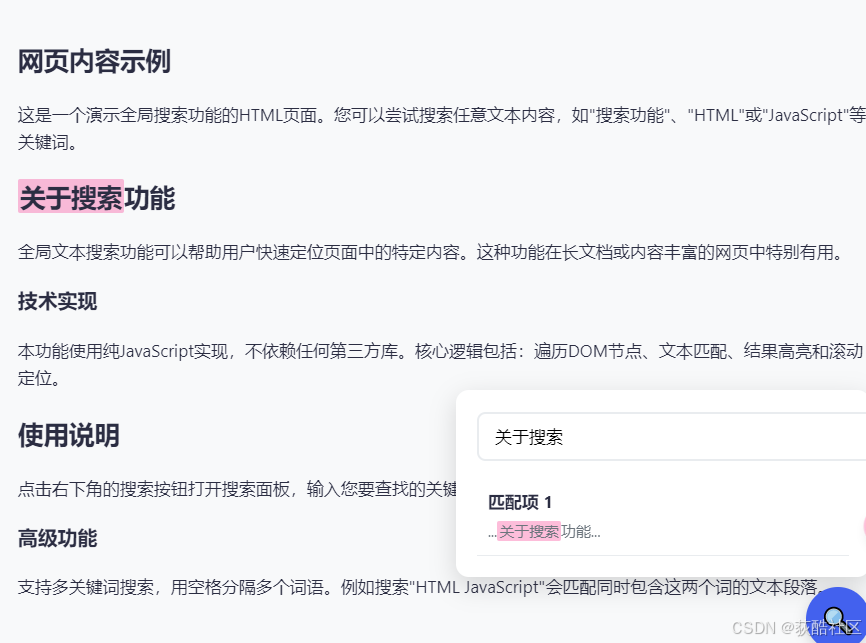
<!DOCTYPE html>
<html lang="zh-CN">
<head>
    <meta charset="UTF-8">
    <meta name="viewport" content="width=device-width, initial-scale=1.0">
    <title>全局文本搜索</title>
    <style>
        /* 基础样式 */
        :root {
            --primary-color: #4361ee;
            --secondary-color: #3f37c9;
            --highlight-color: #f72585;
            --text-color: #2b2d42;
            --bg-color: #f8f9fa;
        }

        body {
            font-family: 'Segoe UI', system-ui, sans-serif;
            color: var(--text-color);
            background-color: var(--bg-color);
            line-height: 1.6;
            padding: 20px;
        }

        /* 搜索按钮样式 */
        .search-btn {
            position: fixed;
            bottom: 30px;
            right: 30px;
            width: 60px;
            height: 60px;
            border-radius: 50%;
            background: var(--primary-color);
            color: white;
            border: none;
            box-shadow: 0 4px 12px rgba(0, 0, 0, 0.15);
            cursor: pointer;
            display: flex;
            align-items: center;
            justify-content: center;
            font-size: 24px;
            z-index: 1000;
            transition: all 0.3s ease;
        }

        .search-btn:hover {
            background: var(--secondary-color);
            transform: scale(1.1);
        }

        /* 搜索面板样式 */
        .search-panel {
            position: fixed;
            bottom: 100px;
            right: 30px;
            width: 350px;
            max-width: 90vw;
            background: white;
            border-radius: 12px;
            box-shadow: 0 8px 24px rgba(0, 0, 0, 0.15);
            padding: 20px;
            z-index: 999;
            transform: translateY(20px);
            opacity: 0;
            visibility: hidden;
            transition: all 0.3s ease;
        }

        .search-panel.active {
            transform: translateY(0);
            opacity: 1;
            visibility: visible;
        }

        /* 搜索输入框样式 */
        .search-input {
            width: 100%;
            padding: 12px 15px;
            border: 2px solid #e9ecef;
            border-radius: 8px;
            font-size: 16px;
            margin-bottom: 15px;
            transition: border 0.3s ease;
        }

        .search-input:focus {
            outline: none;
            border-color: var(--primary-color);
        }

        /* 搜索结果列表样式 */
        .search-results {
            max-height: 300px;
            overflow-y: auto;
        }

        .result-item {
            padding: 10px;
            border-bottom: 1px solid #e9ecef;
            cursor: pointer;
            transition: background 0.2s ease;
        }

        .result-item:hover {
            background: #f1f3f5;
        }

        .result-item .context {
            color: #6c757d;
            font-size: 14px;
            margin-top: 5px;
        }

        /* 高亮样式 */
        .highlight {
            background-color: rgba(247, 37, 133, 0.3);
            padding: 0 2px;
            border-radius: 2px;
        }

        /* 响应式调整 */
        @media (max-width: 768px) {
            .search-panel {
                width: 280px;
            }
        }
    </style>
</head>
<body>
    <!-- 示例内容用于演示搜索功能 -->
    <article>
        <h1>网页内容示例</h1>
        <p>这是一个演示全局搜索功能的HTML页面。您可以尝试搜索任意文本内容,如"搜索功能"、"HTML"或"JavaScript"等关键词。</p>

        <h2>关于搜索功能</h2>
        <p>全局文本搜索功能可以帮助用户快速定位页面中的特定内容。这种功能在长文档或内容丰富的网页中特别有用。</p>

        <h3>技术实现</h3>
        <p>本功能使用纯JavaScript实现,不依赖任何第三方库。核心逻辑包括:遍历DOM节点、文本匹配、结果高亮和滚动定位。</p>

        <h2>使用说明</h2>
        <p>点击右下角的搜索按钮打开搜索面板,输入您要查找的关键词,然后从结果列表中选择匹配项跳转到相应位置。</p>

        <h3>高级功能</h3>
        <p>支持多关键词搜索,用空格分隔多个词语。例如搜索"HTML JavaScript"会匹配同时包含这两个词的文本段落。</p>
    </article>

    <!-- 搜索按钮 -->
    <button class="search-btn" id="searchToggle">🔍</button>

    <!-- 搜索面板 -->
    <div class="search-panel" id="searchPanel">
        <input type="text" class="search-input" id="searchInput" placeholder="输入搜索内容...">
        <div class="search-results" id="searchResults"></div>
    </div>

    <script>
        // 等待DOM加载完成
        document.addEventListener('DOMContentLoaded', function() {
            // 获取DOM元素
            const searchToggle = document.getElementById('searchToggle');
            const searchPanel = document.getElementById('searchPanel');
            const searchInput = document.getElementById('searchInput');
            const searchResults = document.getElementById('searchResults');

            // 当前高亮元素集合
            let currentHighlights = [];

            // 切换搜索面板显示状态
            searchToggle.addEventListener('click', function() {
                searchPanel.classList.toggle('active');
                if (searchPanel.classList.contains('active')) {
                    searchInput.focus();
                } else {
                    clearHighlights();
                }
            });

            // 监听输入变化,延迟执行搜索
            let searchTimeout;
            searchInput.addEventListener('input', function() {
                clearTimeout(searchTimeout);
                searchTimeout = setTimeout(performSearch, 300);
            });

            // 执行搜索功能
            function performSearch() {
                const query = searchInput.value.trim();

                // 清除之前的高亮和结果
                clearHighlights();
                searchResults.innerHTML = '';

                if (query === '') return;

                // 分割多个搜索词
                const terms = query.split(/\s+/).filter(term => term.length > 0);
                if (terms.length === 0) return;

                // 创建正则表达式用于匹配
                const regex = new RegExp(terms.map(term =>
                    term.replace(/[.*+?^${}()|[\]\\]/g, '\\$&')).join('|'), 'gi');

                // 遍历所有文本节点
                const walker = document.createTreeWalker(
                    document.body,
                    NodeFilter.SHOW_TEXT,
                    null,
                    false
                );

                const results = [];
                let node;

                while (node = walker.nextNode()) {
                    const text = node.nodeValue;
                    const matches = [...text.matchAll(regex)];

                    if (matches.length > 0) {
                        // 获取包含文本的父元素(通常是段落或标题)
                        let parent = node.parentNode;
                        while (parent && !['P', 'H1', 'H2', 'H3', 'H4', 'H5', 'H6', 'LI', 'DIV', 'SPAN', 'ARTICLE'].includes(parent.tagName)) {
                            parent = parent.parentNode;
                        }

                        if (parent) {
                            // 为每个匹配项创建结果条目
                            matches.forEach(match => {
                                const matchText = match[0];
                                const offset = match.index;

                                // 获取上下文文本
                                const start = Math.max(0, offset - 20);
                                const end = Math.min(text.length, offset + matchText.length + 20);
                                const context = text.substring(start, end).replace(/\s+/g, ' ');

                                results.push({
                                    element: parent,
                                    text: matchText,
                                    context: '...' + context + '...',
                                    offset: offset
                                });
                            });
                        }
                    }
                }

                // 显示搜索结果
                if (results.length > 0) {
                    results.forEach((result, index) => {
                        const resultItem = document.createElement('div');
                        resultItem.className = 'result-item';
                        resultItem.innerHTML = `
                            <strong>匹配项 ${index + 1}</strong>
                            <div class="context">${highlightText(result.context, terms)}</div>
                        `;

                        // 点击结果跳转到对应位置并高亮
                        resultItem.addEventListener('click', function() {
                            highlightMatch(result.element, result.text, result.offset);
                            result.element.scrollIntoView({
                                behavior: 'smooth',
                                block: 'center'
                            });
                        });

                        searchResults.appendChild(resultItem);
                    });
                } else {
                    searchResults.innerHTML = '<div style="padding: 15px; text-align: center;">未找到匹配结果</div>';
                }
            }

            // 高亮匹配文本
            function highlightMatch(element, text, offset) {
                clearHighlights();

                // 创建范围对象
                const range = document.createRange();
                const node = findTextNode(element, text, offset);

                if (node) {
                    const startOffset = node.nodeValue.indexOf(text, offset);
                    if (startOffset !== -1) {
                        range.setStart(node, startOffset);
                        range.setEnd(node, startOffset + text.length);

                        // 创建高亮元素
                        const highlight = document.createElement('span');
                        highlight.className = 'highlight';
                        range.surroundContents(highlight);

                        currentHighlights.push(highlight);
                    }
                }
            }

            // 查找包含特定文本的节点
            function findTextNode(element, text, offset) {
                const walker = document.createTreeWalker(
                    element,
                    NodeFilter.SHOW_TEXT,
                    null,
                    false
                );

                let node;
                while (node = walker.nextNode()) {
                    const nodeText = node.nodeValue;
                    if (nodeText.includes(text) &&
                        (offset === undefined || nodeText.indexOf(text) <= offset)) {
                        return node;
                    }
                }
                return null;
            }

            // 清除所有高亮
            function clearHighlights() {
                currentHighlights.forEach(highlight => {
                    const parent = highlight.parentNode;
                    if (parent) {
                        parent.replaceChild(document.createTextNode(highlight.textContent), highlight);
                        parent.normalize();
                    }
                });
                currentHighlights = [];
            }

            // 在上下文中高亮搜索词
            function highlightText(text, terms) {
                return text.replace(new RegExp(terms.join('|'), 'gi'),
                    match => `<span class="highlight">${match}</span>`);
            }
        });
    </script>
</body>
</html>






 扫一扫
扫一扫


 3万+
3万+

 被折叠的 条评论
为什么被折叠?
被折叠的 条评论
为什么被折叠?
 到【灌水乐园】发言





