前言:准备所需要的环境
python环境
accelerate==1.8.0
aimet-onnx @ file:///home/xt/%E4%B8%8B%E8%BD%BD/aimet_onnx-2.10.0%2Bcu121-cp310-cp310-manylinux_2_34_x86_64.whl
aiohappyeyeballs==2.6.1
aiohttp==3.12.14
aiosignal==1.4.0
annotated-types==0.7.0
asttokens==3.0.0
async-timeout==5.0.1
attrs==25.3.0
backcall==0.2.0
backoff==2.2.1
beautifulsoup4==4.13.4
bitsandbytes==0.41.1
bleach==6.2.0
bokeh==3.2.2
botocore==1.39.14
certifi==2025.7.14
cffi==1.17.1
charset-normalizer==3.4.2
clarabel==0.11.1
colorcet==3.1.0
coloredlogs==15.0.1
contextlib2==21.6.0
contourpy==1.3.2
cvxpy==1.6.0
cycler==0.12.1
dataclasses==0.6
datasets==2.14.5
decorator==5.2.1
deprecation==2.1.0
dill==0.3.7
executing==2.2.0
filelock==3.18.0
flatbuffers==25.2.10
fonttools==4.59.0
frozenlist==1.7.0
fsspec==2023.6.0
gdown==4.7.1
gitdb==4.0.12
GitPython==3.1.42
h5py==3.14.0
hf-xet==1.1.5
holoviews==1.18.3
huggingface-hub==0.33.5
humanfriendly==10.0
hvplot==0.9.2
idna==3.10
ipython==8.12.3
jedi==0.19.2
Jinja2==3.1.6
jmespath==1.0.1
joblib==1.5.1
jsonschema==4.25.0
jsonschema-specifications==2025.4.1
kiwisolver==1.4.8
linkify-it-py==2.0.3
Markdown==3.8.2
markdown-it-py==3.0.0
MarkupSafe==3.0.2
matplotlib==3.10.3
matplotlib-inline==0.1.7
mdit-py-plugins==0.4.2
mdurl==0.1.2
ml_dtypes==0.5.3
mpmath==1.3.0
multidict==6.6.3
multiprocess==0.70.15
networkx==3.4.2
numpy==1.24.4
nvidia-cublas-cu12==12.1.3.1
nvidia-cuda-cupti-cu12==12.1.105
nvidia-cuda-nvrtc-cu12==12.1.105
nvidia-cuda-runtime-cu12==12.1.105
nvidia-cudnn-cu12==9.1.0.70
nvidia-cufft-cu12==11.0.2.54
nvidia-curand-cu12==10.3.2.106
nvidia-cusolver-cu12==11.4.5.107
nvidia-cusparse-cu12==12.1.0.106
nvidia-nccl-cu12==2.20.5
nvidia-nvjitlink-cu12==12.9.86
nvidia-nvtx-cu12==12.1.105
onnx==1.17.0
onnx-ir==0.1.4
onnxruntime==1.22.1
onnxruntime-genai==0.8.3
onnxruntime-gpu==1.22.0
onnxruntime_extensions==0.14.0
onnxscript==0.3.2
onnxsim==0.4.36
onnxslim==0.1.61
opencv-python==4.11.0.86
optimum==1.26.1
osqp==1.0.4
packaging==25.0
pandas==2.2.3
panel==1.3.8
param==2.2.1
parso==0.8.4
pexpect==4.9.0
pickleshare==0.7.5
pillow==11.3.0
prettytable==3.11.0
prompt_toolkit==3.0.51
propcache==0.3.2
protobuf==3.20.3
psutil==7.0.0
ptyprocess==0.7.0
pure_eval==0.2.3
pyarrow==21.0.0
pybind11==3.0.0
pycparser==2.22
pydantic==2.11.7
pydantic_core==2.33.2
pydantic_yaml==1.4.0
Pygments==2.19.2
pyparsing==3.2.3
PySocks==1.7.1
python-dateutil==2.9.0.post0
pytz==2025.2
pyviz_comms==3.0.6
PyYAML==6.0.2
qai-hub==0.31.0
qai-hub-models==0.32.0
referencing==0.36.2
regex==2024.11.6
requests==2.32.4
requests-toolbelt==1.0.0
rich==14.1.0
rpds-py==0.26.0
ruamel.yaml==0.18.10
ruamel.yaml.clib==0.2.12
s3transfer==0.10.4
safetensors==0.5.3
schema==0.7.5
scikit-learn==1.7.1
scipy==1.8.1
scs==3.2.7.post2
semver==3.0.4
sentencepiece==0.2.0
six==1.17.0
smmap==5.0.2
soupsieve==2.7
stack-data==0.6.3
sympy==1.14.0
tabulate==0.9.0
threadpoolctl==3.6.0
timm==1.0.19
tokenizers==0.20.3
torch==2.4.0
torchaudio==2.4.0
torchvision==0.19.0
tornado==6.5.1
tqdm==4.67.1
traitlets==5.14.3
transformers==4.45.0
triton==3.0.0
typing-inspection==0.4.1
typing_extensions==4.14.1
tzdata==2025.2
uc-micro-py==1.0.3
urllib3==2.5.0
wcwidth==0.2.13
webencodings==0.5.1
xformers==0.0.27.post2
xxhash==3.5.0
xyzservices==2025.4.0
yarl==1.20.1
硬件环境:
Arch:X86_64
CPU:Intel® Core™ i7-14700KF 28核 32GB
GPU:NVIDIA RTX A5000 24GB (实际转换模型时用不上)
系统环境:
OS:Ubuntu
Version: 24.04.2 LTS (Noble Numbat)
Kernel:6.11.0-29-generic
1.准备模型
modelscope download --model Qwen/Qwen2.5-7B-Instruct --local_dir ./
2.转换模型
python -m qai_hub_models.models.qwen2_5_7b_instruct.export --target-runtime qnn_context_binary --huggingface-model-name ./Qwen2.5-7B-Instruct/ --precision w8a16 --skip-inferencing --output-dir ./qwen2.5_7b_instruct_qnn_w4a16/ --chipset qualcomm-qcs8550-proxy
此处为语雀卡片,点击链接查看
2.1参数说明
**一、基础配置参数**
| 参数 | 类型/选项 | 默认值 | 作用 |
|---|
--huggingface-model-name | 字符串 | Qwen/Qwen2.5-7B-Instruct | 指定 Hugging Face 上的模型名称或本地路径 |
--precision | {w8a16} | w8a16 | 量化精度:仅支持 8 位权重 + 16 位激活混合精度(适用于移动端部署) |
--sequence-length | 整数 | 128 | 输入序列长度(影响推理效率) |
--context-length | 整数 | 4096 | 模型上下文窗口长度(不可超过 max_position_embeddings=32768) |
二、**设备与运行时参数**
| 参数 | 类型/选项 | 默认值 | 作用 |
|---|
--target-runtime | {qnn_context_binary} | qnn_context_binary | 强制选项:导出为 Qualcomm 神经处理 SDK(SNPE)支持的二进制格式(后续可能会支持onnx,使用onnxruntime-qnn或者onnxruntime-genai部署) |
--device | 字符串 | Snapdragon 8 Elite QRD | 指定目标设备(如手机/开发板),一般使用chipset即可 |
--chipset | 芯片型号列表 | - | 按芯片型号随机选择设备(如 qualcomm-snapdragon-8gen3) |
--device-os | 字符串 | - | 设备操作系统(需与 --device或 --chipset配合使用) |
三、**流程控制参数**
| 参数 | 作用 | 默认值 |
|---|
--skip-compiling | 跳过模型编译步骤 | False |
--skip-profiling | 跳过性能分析步骤 | False |
--skip-inferencing | 跳过本地 CPU 与设备输出验证 | False |
--skip-downloading | 跳过编译后模型下载 | False |
--skip-summary | 跳过结果摘要输出 | False |
--synchronous | 串行执行任务(每一步完成后再继续) | False |
四、**高级优化参数**
| 参数 | 作用 | 默认值 |
|---|
--num-calibration-samples | 量化校准数据量(影响量化精度) | 未设置 |
--compile-options | 编译时额外参数(传递至 SNPE 工具链) | 空 |
--profile-options | 性能分析时额外参数 | 空 |
--fetch-static-assets | 从 Hugging Face 直接获取预编译资源(跳过本地编译) | False |
--model-cache-mode | {enable,disable,overwrite} | 控制模型缓存策略(加速重复导出) |
五、**输出与存储参数**
| 参数 | 作用 | 默认值 |
|---|
--output-dir | 自定义输出目录(编译模型、日志等) | <cwd>/build/<model_name> |
3.转换结果
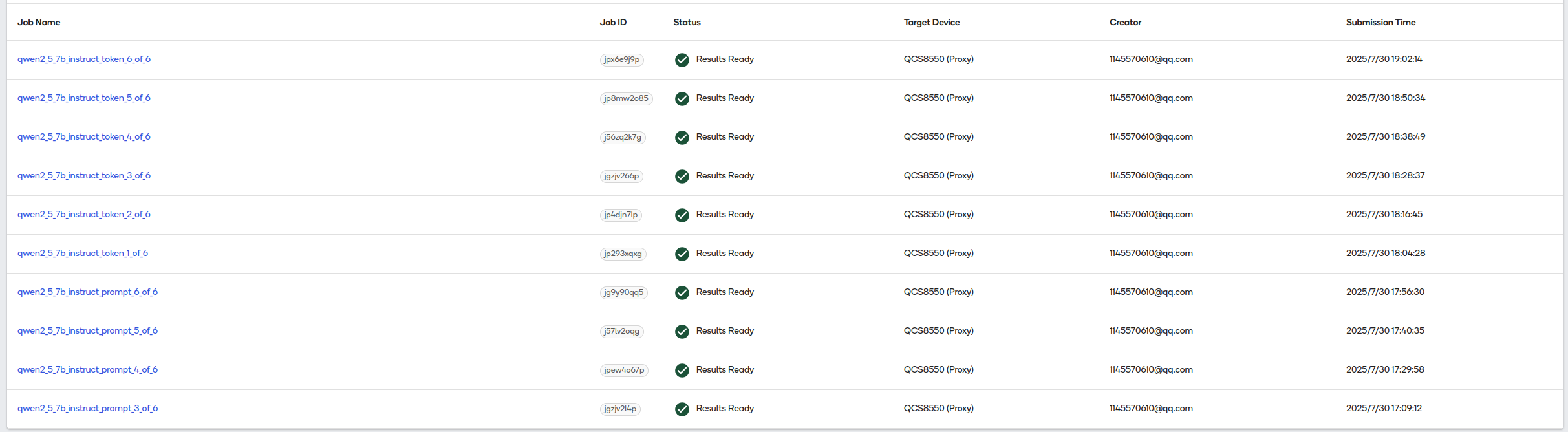
转换完成后可以选择token和prompt两个版本中的其中一种即可。官网没有介绍这两个版本有何区别(如果有知道的小伙伴可以下方编辑大家一起分享讨论),小编猜测token版本可能区别如下:
一、核心区别
| 特性 | token版本 | prompt版本 |
|---|
| 优化目标 | 单次解码(Token-by-Token)延迟优化 | 完整输入序列(Prompt)推理效率优化 |
| 适用阶段 | 解码(Decode)阶段 | 预填充(Prefill)阶段 |
| 延迟敏感度 | 极低的首Token生成延迟 | 较低的首次响应延迟(首Token生成后加速) |
| 资源占用 | 更低的内存峰值 | 更高的计算并行度 |
| 典型场景 | 流式对话(逐字输出)、输入法预测 | 长文本生成、批量推理任务 |
二、性能对比
| 指标 | token版本优势 | prompt版本优势 |
|---|
| 首Token延迟 | ⭐️⭐️⭐️(<20ms) | ⭐️(50-100ms) |
| 后续Token延迟 | ⭐️⭐️(稳定低延迟) | ⭐️⭐️⭐️(显著加速) |
| 长Prompt处理速度 | ⚠️ 效率较低(需逐Token) | ⭐️⭐️⭐️(并行一次完成) |
| 内存占用 | ⭐️⭐️⭐️(增量缓存更省内存) | ⚠️ 较高(需存储完整KV矩阵) |
想要获取转换后的模型文件或者模型部署样例代码的请关注公众号"CrazyNET"。回复"qwen257b-qnn"。








 扫一扫
扫一扫


 1692
1692

 被折叠的 条评论
为什么被折叠?
被折叠的 条评论
为什么被折叠?
 到【灌水乐园】发言





