Enable audio in Windows Server

If you are not getting any audio on your server, try to connect through Microsoft's Remote Desktop Connection.
 

If you require more help on how to use Microsoft's Remote Desktop Connection, we have a guide here
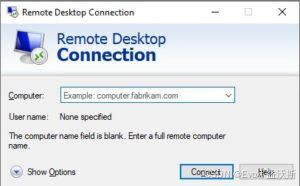
Microsoft's Remote Desktop Connection supports remote audio.
 

If you are still not getting any audio after connecting with Microsoft's Remote Desktop Connection,
 

Go to the bottom right of your screen, right-click on the audio icon and click Sounds.
 

You will be prompted with an option to enable remote audio in your server, click Yes to enable audio in your Windows server.


E:\PythonProject1\.venv\Scripts\python.exe E:\PythonProject1\main.py ffmpeg version 7.1.1-essentials_build-www.gyan.dev Copyright (c) 2000-2025 the FFmpeg developers built with gcc 14.2.0 (Rev1, Built by MSYS2 project) configuration: --enable-gpl --enable-version3 --enable-static --disable-w32threads --disable-autodetect --enable-fontconfig --enable-iconv --enable-gnutls --enable-libxml2 --enable-gmp --enable-bzlib --enable-lzma --enable-zlib --enable-libsrt --enable-libssh --enable-libzmq --enable-avisynth --enable-sdl2 --enable-libwebp --enable-libx264 --enable-libx265 --enable-libxvid --enable-libaom --enable-libopenjpeg --enable-libvpx --enable-mediafoundation --enable-libass --enable-libfreetype --enable-libfribidi --enable-libharfbuzz --enable-libvidstab --enable-libvmaf --enable-libzimg --enable-amf --enable-cuda-llvm --enable-cuvid --enable-dxva2 --enable-d3d11va --enable-d3d12va --enable-ffnvcodec --enable-libvpl --enable-nvdec --enable-nvenc --enable-vaapi --enable-libgme --enable-libopenmpt --enable-libopencore-amrwb --enable-libmp3lame --enable-libtheora --enable-libvo-amrwbenc --enable-libgsm --enable-libopencore-amrnb --enable-libopus --enable-libspeex --enable-libvorbis --enable-librubberband libavutil 59. 39.100 / 59. 39.100 libavcodec 61. 19.101 / 61. 19.101 libavformat 61. 7.100 / 61. 7.100 libavdevice 61. 3.100 / 61. 3.100 libavfilter 10. 4.100 / 10. 4.100 libswscale 8. 3.100 / 8. 3.100 libswresample 5. 3.100 / 5. 3.100 libpostproc 58. 3.100 / 58. 3.100 [in#0 @ 0000027ce22b4a00] Error opening input: No such file or directory Error opening input file video.mp4. Error opening input files: No such file or directory Traceback (most recent call last): File "E:\PythonProject1\main.py", line 25, in <module> audio_path = video_to_audio("video.mp4") ^^^^^^^^^^^^^^^^^^^^^^^^^^^ File "E:\PythonProject1\main.py", line 7, in video_to_audio ffmpeg.run(stream, overwrite_output=True) File "E:\PythonProject1\.venv\Lib\site-packages\ffmpeg\_run.py", line 325, in run raise Error('ffmpeg', out, err) ffmpeg._run.Error: ffmpeg error (see stderr output for detail) 进程已结束,退出代码为 1
06-02
评论
成就一亿技术人!
拼手气红包6.0元
还能输入1000个字符
 
红包 添加红包
表情包 插入表情
 条评论被折叠 查看
添加红包

请填写红包祝福语或标题

红包个数最小为10个

红包金额最低5元

当前余额3.43前往充值 >
需支付:10.00
成就一亿技术人!
领取后你会自动成为博主和红包主的粉丝 规则
hope_wisdom
发出的红包
实付
使用余额支付
点击重新获取
扫码支付
钱包余额 0

抵扣说明:

1.余额是钱包充值的虚拟货币,按照1:1的比例进行支付金额的抵扣。
2.余额无法直接购买下载,可以购买VIP、付费专栏及课程。

余额充值


