



 本文详细介绍了如何在Linux环境下安装C语言编程所需的gcc编译器、build-essential软件包及vim编辑器,并提供了从新建C源文件到编译运行的完整流程。
一、环境安装
①安装gcc编译器
使用命令 sudo apt install gcc
如果有如下报错信息
Reading package lists… Done
Building dependency tree
Reading state information… Done
Package gcc is not available, but is referred to by another package.
This may mean that the package is missing, has been obsoleted, or
is only available from another source
However the following packages replace it:
gcc-9-doc gcc-10-doc
E: Package ‘gcc’ has no installation candidate
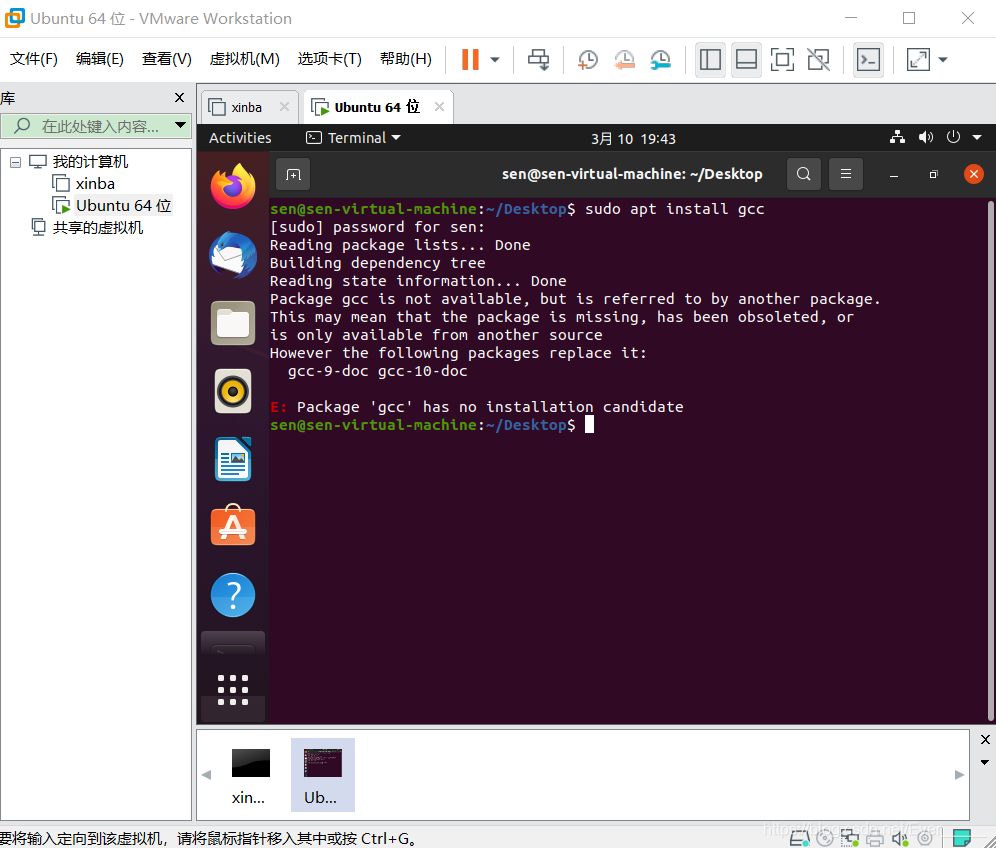
解决: 使用如下指令 先升级软件再安装gcc
sudo apt-get update
sudo apt-get upgrade
sudo apt install gcc
检查gcc是否安装好 输入gcc --version
②安装build-essential软件包
sudo apt install build-essential
③安装vim 编辑器
sudo apt-get install vim
检查是否安装好vim 输入 vi
二、 编译并运行C语言程序
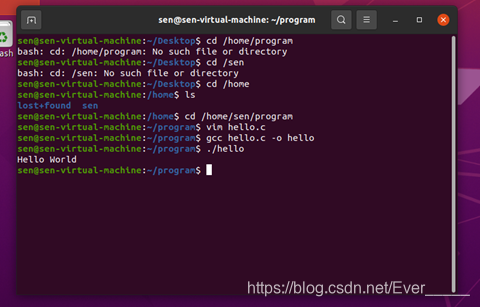
① 进入存储文件目录 cd /home/sen(虚拟机名字)/program(已创建好的存放c文件的文件夹)
② 新建文件名为hello.c的源文件:输入vim hello.c
按i开始输入 输完后按Esc,再输入:wq保存退出,
③ 编译hello.c
gcc hello.c -o hello
④ 运行程序hello
./hello





 扫一扫
扫一扫


 925
925

 被折叠的 条评论
为什么被折叠?
被折叠的 条评论
为什么被折叠?
 到【灌水乐园】发言





