


 本文详细介绍了WebLogic 12c和11g的安装过程,包括环境准备、安装步骤、域创建及常见问题解决方法,并提供了Windows 10环境下WebLogic 12.1.3的安装流程。
weblogic12c和11g安装
一、Weblogic12c安装
1. 卸载自带jdk
2. 安装sun jdk
解压包,放到相应的位置(如:/usr/java)
设置环境变量
创建weblogic用户组
useradd weblogic

passwd weblogic
创建安装相关文件
su - weblogic

cd /home/weblogic
创建oraInst.loc文件
vim oraInst.loc

#产品安装清单目录,方便后来人员升级维护时查看
inventory_loc=/home/weblogic/oraInventory
#用户的组名称,谨慎,一旦确定,安装后读写都将以此为基准
inst_group=weblogic
创建wls.rsp文件
vim wls.rsp

[ENGINE]
Response File Version=1.0.0.0.0
[GENERIC]
ORACLE_HOME=/home/weblogic/Oracle/Middleware
INSTALL_TYPE=WebLogic Server

MYORACLESUPPORT_USERNAME=
MYORACLESUPPORT_PASSWORD=
DECLINE_SECURITY_UPDATES=true
注意不能带中午注释 另外ORACLE_HOME必须是一个空的目录。inventory_loc目录与ORACLE_HOME不能在同一个目录。不然报错。
安装weblogic
cd /software

java -jar fmw_12.1.3.0.0_wls.jar -silent -responseFile /home/weblogic/wls.rsp -invPtrLoc /home/weblogic/oraInst.loc
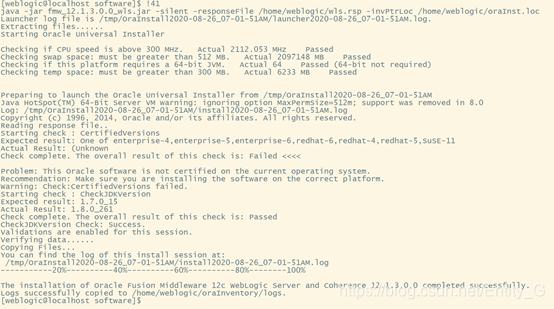
具体内容如下:
Extracting files......
Starting Oracle Universal Installer

Checking if CPU speed is above 300 MHz.   Actual 2112.053 MHz    Passed
Checking swap space: must be greater than 512 MB.   Actual 2097148 MB    Passed
Checking if this platform requires a 64-bit JVM.   Actual 64    Passed (64-bit not required)
Checking temp space: must be greater than 300 MB.   Actual 6233 MB    Passed


Preparing to launch the Oracle Universal Installer from /tmp/OraInstall2020-08-26_07-01-51AM
Java HotSpot(TM) 64-Bit Server VM warning: ignoring option MaxPermSize=512m; support was removed in 8.0
Log: /tmp/OraInstall2020-08-26_07-01-51AM/install2020-08-26_07-01-51AM.log
Copyright (c) 1996, 2014, Oracle and/or its affiliates. All rights reserved.
Reading response file..
Starting check : CertifiedVersions
Expected result: One of enterprise-4,enterprise-5,enterprise-6,redhat-6,redhat-4,redhat-5,SuSE-11
Actual Result: (Unknown
Check complete. The overall result of this check is: Failed <<<<

Problem: This Oracle software is not certified on the current operating system.
Recommendation: Make sure you are installing the software on the correct platform.
Warning: Check:CertifiedVersions failed.
Starting check : CheckJDKVersion
Expected result: 1.7.0_15
Actual Result: 1.8.0_261
Check complete. The overall result of this check is: Passed
CheckJDKVersion Check: Success.
Validations are enabled for this session.
Verifying data......
Copying Files...
You can find the log of this install session at:
 /tmp/OraInstall2020-08-26_07-01-51AM/install2020-08-26_07-01-51AM.log
-----------20%----------40%----------60%----------80%--------100%

The installation of Oracle Fusion Middleware 12c WebLogic Server and Coherence 12.1.3.0.0 completed successfully.
Logs successfully copied to /home/weblogic/oraInventory/logs.
 最低0.47元/天 解锁文章






 扫一扫
扫一扫


 512
512

 被折叠的 条评论
为什么被折叠?
被折叠的 条评论
为什么被折叠?
 到【灌水乐园】发言





