



 前端开发中,对于长文本的处理,移动端往往需要实现‘展开/收起’功能以解决兼容性问题。本文介绍了通过JavaScript截取文本并动态计算高度,优雅地实现这一功能,参考了antdMobile的ellipsis组件,详细阐述了实现思路和完整代码。
文本超出行数限制显示‘展开/收起’+移动端兼容
前端文本内容展示,无论是在web端还是移动端,都是最基础的内容之一。对于成百上千字数的文本,web端可以使用css简单操作,将超出行数部分进行截断显示成‘…‘,然后在hover/click时弹出全部内容即可勉强满足要求,但对移动端来说这种操作就行不通了。css操作美不美观先不说,不同的手机型号、不同的浏览器及版本光是兼容问题就能使人头皮发麻,那么怎么在移动端文本较多时巧妙而优雅的实现展开/收起功能呢?
思路(参考借鉴antdMobile中的ellipsis组件):
前面说到使用css控制行数截断会有兼容问题,且展开/收起按钮很难做到紧挨着结束文本。那么想要做到高贵而优雅,通过js截取的方式来实现效果就是一个很不错的思路了:
-
拿到要展示文本区域的dom元素,通过 getComputedStyle 获取该dom的所有样式;
-
创建一个额外的不在可视范围内的div,让div的样式与获取的dom元素样式完全一样(用于获取实际截断后的文本);
-
页面展示文本的最大高度 maxHeight 为 行高*行数 (行高是1中拿到的 lineHeight,行数由实际需求而定)有 padding-top 或 padding- bottom 时加上;
-
遍历文本,逐个将文本中的文字放到2中的div内,每放一次获取当前div的高度与 maxHeight 进行比较,当放置最后一个文字,div当前高度大于maxHeight 时,前面的截断部分就是行数限制内需要展示的全部文字(逐字计算高度性能很差,此处使用二分法效果绝佳);
-
获取到目标截断文本后,将2中的工具人div删除,此时将前面得到的文本展示在页面中即可。
纸上得来终觉浅,此时应该上硬菜~:
<div ref={ref => this.domRef = ref}>{ellipsised}
  <a>{expended?'收起':'展开'}</a>
</div>
calcEllipsis = (cntxt, rows) => {
	// 获取目标元素,创建工具人
	const originStyle = window.getComputedStyle(this.domRef),
		container = document.createElement('div'),
		styleNames = Array.prototype.slice.apply(originStyle);

	// 将目标dom的样式复制到工具人上
	styleNames.forEach(name => {
		container.style.setProperty(name, originStyle.getPropertyValue(name));
	});

	//  将工具人div放在可视范围之外
	container.style.position = 'fixed';
	container.style.left = '20222222px';
	container.style.top = '20222222px';
	container.style.zIndex = '-2022';
	container.style.height = 'auto';
	container.style.minHeight = 'auto';
	container.style.maxHeight = 'auto';
	container.style.textOverflow = 'clip';
	container.style.whiteSpace = 'normal';
	container.style.webkitLineClamp = 'unset';
	container.style.display = 'block';
	const lineHeight = this.pxToNumber(originStyle.lineHeight),
		paddingTop = this.pxToNumber(originStyle.paddingTop),
		paddingBottom = this.pxToNumber(originStyle.paddingBottom),
		maxHeight = Math.floor(lineHeight * (rows + 0.5) + paddingTop + paddingBottom);
	container.innerText = cntxt;
	document.body.appendChild(container);

	// 使用二分法获取行数限制下的所有文本
	if (container.offsetHeight <= maxHeight) {
	  	this.setState({ellipsisBtnShow: false});
	} else {
	 	this.setState({ellipsisBtnShow: true});
	 	const end = cntxt.length,
	  	btnText = expended ? '收起' : '展开';

		function check(left, right) {
	 		if (right - left <= 1) {
				return cntxt.slice(0, left) + '...';
			}
			const middle = Math.round((left + right) / 2);

			container.innerText = cntxt.slice(0, middle) + '...' + btnText;
			if (container.offsetHeight <= maxHeight) {
				return check(middle, right);
			} else {
				return check(left, middle);
			}
		}

		// 得到符合要求的文本
		const ellipsised = check(0, end);

		console.log('ellipsised', ellipsised);
		this.setState({ellipsised});
	}

	document.body.removeChild(container);
}

pxToNumber = (value) => {
  if (!value) return 0;
  const match = value.match(/^\d*(\.\d*)?/);

  return match ? Number(match[0]) : 0;
}
完整代码:
import React, {Component} from 'react'

const contentText = `国务院联防联控机制近日印发通知,要求进一步推动新冠病毒核酸检测结果全国互认。通知要求:

高度重视核酸检测结果全国互认的重要性。各地区各有关部门要充分认识进一步科学精准做好疫情防控工作的重要性和紧迫性,坚持以人民为中心的发展思想,站在疫情防控“全国一盘棋”的高度,将核酸检测结果全国互认作为高效统筹疫情防控和经济社会发展、切实维护正常生产生活秩序的“关键小事”抓紧抓实,切实便利人员安全有序出行。

不同渠道展示的核酸检测结果具有同等效力。群众通过国务院客户端、国家政务服务平台、各省份健康码、核酸检测机构网站或APP查询到的核酸检测结果及群众持有的纸质核酸检测结果,凡在当地防控政策有效时间内的(以出具报告时间为准),具有同等效力,各地在查验时都应当予以认可,严禁以本地健康码未能查询、未在本地开展核酸检测等为由拒绝通行,拒绝群众进入公共场所、乘坐公共交通工具,不得要求群众重复进行核酸检测。`;

export default class Home extends Component {

  state = {
    ellipsisBtnShow: false,
    expended: false,
    ellipsised: ''
  }

   domRef = null

  componentDidMount() {
    this.calcEllipsis(contentText, 6);

    window.addEventListener('resize', () => {
      this.calcEllipsis(contentText, 6);
    });
  }

  componentWillMount() {
    window.removeEventListener('resize',  () => {
      this.calcEllipsis(contentText, 6);
    });
  }

  calcEllipsis = (cntxt, rows) => {
    // 展开/收起 demo
    const {expended} = this.state;
    const originStyle = window.getComputedStyle(this.domRef);
    const container = document.createElement('div');
    const styleNames = Array.prototype.slice.apply(originStyle);

    styleNames.forEach(name => {
      container.style.setProperty(name, originStyle.getPropertyValue(name));
    });
    container.style.position = 'fixed';
    container.style.left = '202222px';
    container.style.top = '202222px';
    container.style.zIndex = '-2022';
    container.style.height = 'auto';
    container.style.minHeight = 'auto';
    container.style.maxHeight = 'auto';
    container.style.whiteSpace = 'pre-wrap';
    container.style.textOverflow = 'clip';
    container.style.webkitLineClamp = 'unset';
    container.style.display = 'block';
    const lineHeight = this.pxToNumber(originStyle.lineHeight),
      paddingTop = this.pxToNumber(originStyle.paddingTop),
      paddingBottom = this.pxToNumber(originStyle.paddingBottom),
      maxHeight = Math.floor(lineHeight * (rows + 0.5) + paddingTop + paddingBottom);
    container.innerText = cntxt;
    document.body.appendChild(container);
    if (container.offsetHeight <= maxHeight) {
      this.setState({ellipsisBtnShow: false});
    } else {
      this.setState({ellipsisBtnShow: true});
      const end = cntxt.length,
        btnText = expended ? '收起' : '展开';
      function check(left, right) {
        if (right - left <= 1) {
            return cntxt.slice(0, left) + '...';
        }

        const middle = Math.round((left + right) / 2);
        console.log('middle', middle);

        container.innerText = cntxt.slice(0, middle) + '...' + btnText;
        if (container.offsetHeight <= maxHeight) {
            return check(middle, right);
        } else {
            return check(left, middle);
        }
      }

      const ellipsised = check(0, end);
      console.log('ellipsised', ellipsised);
      this.setState({ellipsised});
    }

    document.body.removeChild(container);
  }

  pxToNumber =(value) => {
    console.log('value', value);
    if (!value) return 0;
    if (value === 'normal') return 22;
    const match = value.match(/^\d*(\.\d*)?/);
    return match ? Number(match[0]) : 0;
  }

  expendedFunc = () => {
    const {expended} = this.state;

    this.setState({
      expended: !expended
    });
  }

  render() {
    const { expended, ellipsised, ellipsisBtnShow } = this.state;
    return (
      <div style={{padding: '20px'}}>
        <h2 style={{textAlign: 'center'}}>文本限制行数截断 demo</h2>
        <div ref={ref => this.domRef = ref} style={{whiteSpace: 'pre-wrap', fontSize: '12px'}}>
          {expended ? contentText : ellipsised}
          {
            ellipsisBtnShow
            ? <a onClick={this.expendedFunc} style={{color: '#1890ff'}}>
                {expended ? ' 收起' : '展开'}
              </a>
            : null
          }
        </div>
      </div>
    )
  }
}
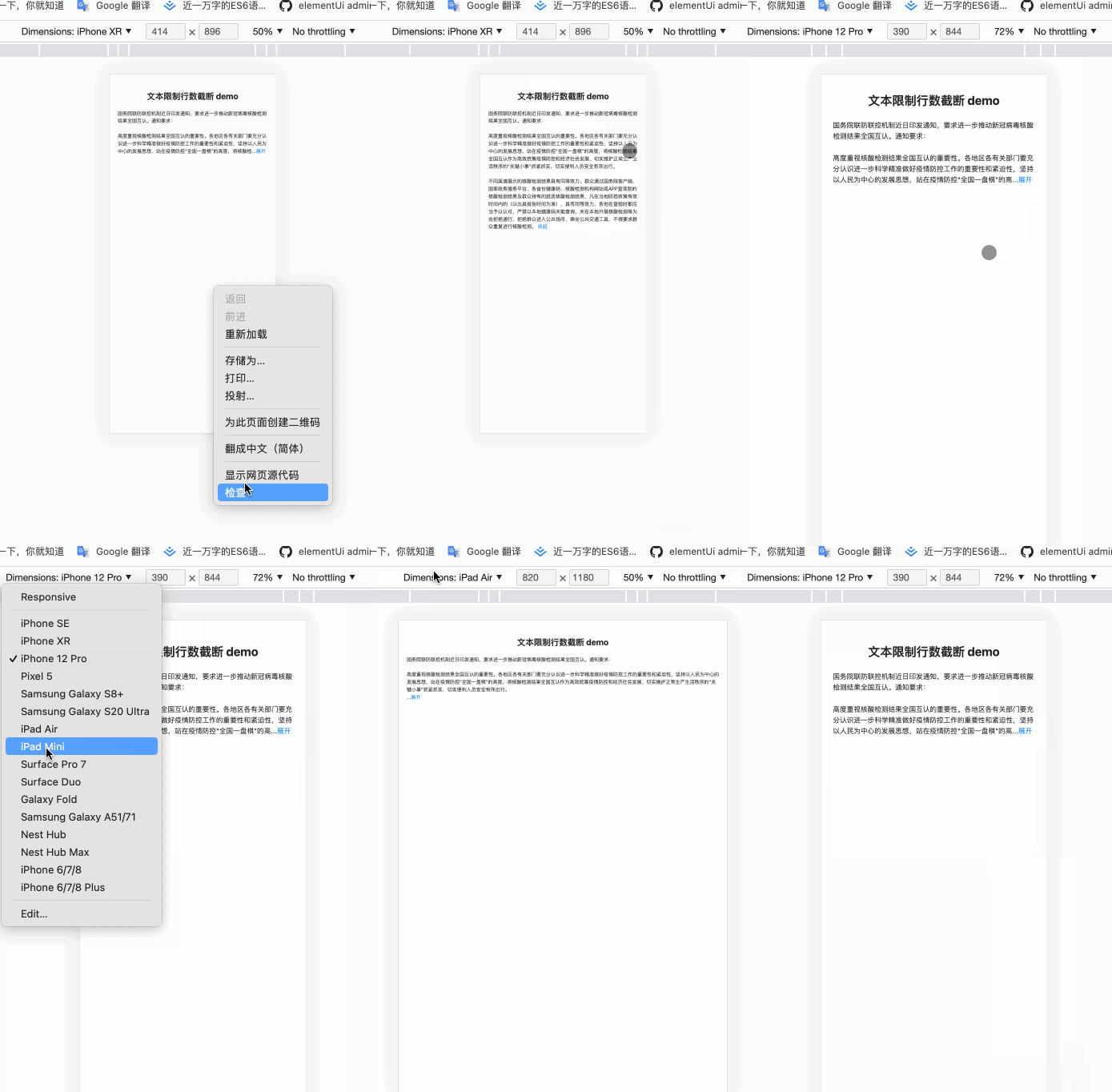
实现效果如下:
THE END~





 扫一扫
扫一扫


 5322
5322


 被折叠的 条评论
为什么被折叠?
被折叠的 条评论
为什么被折叠?
 到【灌水乐园】发言




