



0. Redux的安装
npm install --save redux
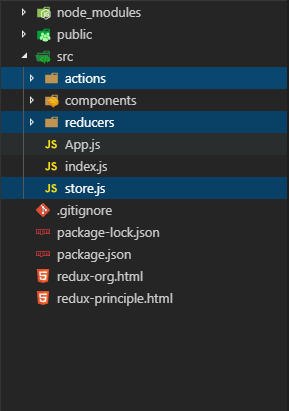
1. Redux的目录结构
src
actions
reducers
store.js
2. Redux的使用
-
2.1 引入redux和reducers
在
src/store.js下引入redux和reducersimport { createStore } from 'redux' import rootReducer from './reducers' export default createStore(rootReducer) -
2.2 建立reducers
在
src/reducers中新建reducer,并在里面写reducer方法eg:
src/reducers/cart.js中一个关于cart的reducerconst initState = [{ id: 1, title: 'Apple', price: 8888.66, amount: 10 }] // initState为state的初始值,如果还没有传入就等于initState export default (state = initState, action) => { switch(action.type) { case ...: break; default: return state; } } -
2.3 导出reducers
在
src/reducers/index.js中导出reducers注: 因为
src/store.js中的createStore(rootReducer)只能接受一个reducer参数,所以需要将多个reducers进行合并再导出(使用combineReducers())// 合并多个reducers import { combineReducers } from 'redux' import cart from './cart' // 因为createStore只能接受一个reducer,所以需要将多个reducers合并再导出(即使只有一个reducer也需要合并) // 这边导出的combineReducers就相当于store.js里面的rootReducer export default combineReducers({ cart }) -
2.4 将store传递到组件层面进行渲染
getState = () => { this.setState({ cartList: this.props.store.getState().cart }) } // 也可以使用static getDerivedStateFromProps() componentDidMount () { this.getState() this.props.store.subscribe(this.getState) } -
2.5 使用Action来进行更改
为了避免
actionType重复,也为了避免写错actionType,所以将actionType写在一个文件下统一管理-
创建
scr/action/actionType.js来存放和管理各种action typeeg: 存放购物车增减的action type
export default { // 购物车增加的action CART_AMOUNT_INCREMENT: 'CART_AMOUNT_INCREMENT', // 购物车减少的action CART_AMOUNT_DECREMENT: 'CART_AMOUNT_DECREMENT' } -
在
src/action下创建对应的actioneg: 存放购物车增减的action–(
scr/action/cart.js)import actionType from './actionType' // action有两种写法 // 第一种写成一个对象,这是标准的action, 但是,问题是不方便传递动态参数 // export const increment = { // type: actionType.CART_AMOUNT_INCREMENT, // payload: { // id: 123 // } // } // 在工作中,常用的一种方式是使用actionCreator, 它是一个方法,返回一个对象,这个对象才是真正的action export const increment = (id) => { return { type: actionType.CART_AMOUNT_INCREMENT, payload: { id } } } export const decrement = (id) => { return { type: actionType.CART_AMOUNT_DECREMENT, payload: { id } } } -
在
src/reducers里面添加对应的actionType的处理eg: 购物车增减–(
scr/reducers/cart.js)export default (state = initState, action) => { switch(action.type) { case actionType.CART_AMOUNT_INCREMENT: // 判断当前id和action里面指定的id是否相等,相等就做对应操作 return state.map(item => { if (item.id === action.payload.id) { item.amount += 1 } return item }) case actionType.CART_AMOUNT_DECREMENT: return state.map(item => { if (item.id === action.payload.id) { item.amount -= 1 } return item }) default: return state } } -
在对应的组件的dom元素中使用
store.dispatch(action())来绑定action,并将对应的更新熏染的方法subscribe()(1)dom绑定action
eg: 控制购物车增减的
button<button onClick={ () => { this.props.store.dispatch(decrement(item.id)) } }>-</button> <span>{item.amount}</span> <button onClick={ () => { this.props.store.dispatch(increment(item.id)) } }>+</button>(2)订阅渲染视图的方法
eg: 刷新购物车的数量
  getState = () => {
    this.setState({
      cartList: this.props.store.getState().cart
    })
  }
  componentDidMount () {
    this.getState()
    this.props.store.subscribe(this.getState)
  }
action、reducers和store通过组件的绑定就联系起来了,每次action触发,都会去执行reducers中的对应内容来更新数据
-





 扫一扫
扫一扫


 1479
1479

 被折叠的 条评论
为什么被折叠?
被折叠的 条评论
为什么被折叠?
 到【灌水乐园】发言





