


 本文探讨了Java中的对象概念,如何通过类实例化并调用方法,包括匿名对象的使用。还深入讲解了Java的封装性,展示了如何通过权限修饰符控制类的属性和方法的访问性。此外,还涵盖了构造器、方法重载、值传递以及JavaBean的特性。文章以实际代码示例为基础,解释了如何在不同场景下应用这些概念。
万物皆可对象
一、理解“万事万物皆对象”
1.在Java语言范畴中,我们都将功能、结构等封装到类中,通过类的实例化,来调用具体的功能结构
>Scanner,String等
>文件:File
>网络资源:URL
2.涉及到Java语言与前端Html、后端的数据库交互时,前后端的结构在Java层面交互时,都体现为类、对象。
内存解析的说明
1.引用类型的变量,只可能存储两类值:null 或 地址值(含变量的类型)
匿名对象的使用
1.理解:我们创建的对象,没有显式的赋给一个变量名。即为匿名对象
2.特征:匿名对象只能调用一次。
3.使用:如下
public class InstanceTest {
	public static void main(String[] args) {
		Phone p = new Phone();
//		p = null;
		System.out.println(p);

		p.sendEmail();
		p.playGame();


		//匿名对象
//		new Phone().sendEmail();
//		new Phone().playGame();

		new Phone().price = 1999;
		new Phone().showPrice();//0.0

		//**********************************
		PhoneMall mall = new PhoneMall();
//		mall.show(p);
		//匿名对象的使用
		mall.show(new Phone());

	}
}

class PhoneMall{


	public void show(Phone phone){
		phone.sendEmail();
		phone.playGame();
	}

}


class Phone{
	double price;//价格

	public void sendEmail(){
		System.out.println("发送邮件");
	}

	public void playGame(){
		System.out.println("玩游戏");
	}

	public void showPrice(){
		System.out.println("手机价格为:" + price);
	}

}
工具类的自定义

工具类的定义
package com.atguigu.java;

/*
 * 自定义数组的工具类
 *
 */
public class ArrayUtil {

	// 求数组的最大值
	public int getMax(int[] arr) {
		int maxValue = arr[0];
		for (int i = 1; i < arr.length; i++) {
			if (maxValue < arr[i]) {
				maxValue = arr[i];
			}
		}
		return maxValue;
	}

	// 求数组的最小值
	public int getMin(int[] arr) {
		int minValue = arr[0];
		for (int i = 1; i < arr.length; i++) {
			if (minValue > arr[i]) {
				minValue = arr[i];
			}
		}
		return minValue;
	}

	// 求数组的总和
	public int getSum(int[] arr) {

		int sum = 0;
		for (int i = 0; i < arr.length; i++) {
			sum += arr[i];
		}
		return sum;
	}

	// 求数组的平均值
	public int getAvg(int[] arr) {

		return getSum(arr) / arr.length;
	}

	//如下的两个同名方法构成了重载
	// 反转数组
	public void reverse(int[] arr) {
		for (int i = 0; i < arr.length / 2; i++) {
			int temp = arr[i];
			arr[i] = arr[arr.length - i - 1];
			arr[arr.length - i - 1] = temp;
		}
	}

	public void reverse(String[] arr){

	}

	// 复制数组
	public int[] copy(int[] arr) {
		int[] arr1 = new int[arr.length];
		for (int i = 0; i < arr1.length; i++) {
			arr1[i] = arr[i];
		}
		return arr1;
	}

	// 数组排序
	public void sort(int[] arr) {
		// 冒泡排序
		for (int i = 0; i < arr.length - 1; i++) {

			for (int j = 0; j < arr.length - 1 - i; j++) {

				if (arr[j] > arr[j + 1]) {
//					int temp = arr[j];
//					arr[j] = arr[j + 1];
//					arr[j + 1] = temp;
					//错误的:
//					swap(arr[j],arr[j + 1]);
					//正确的:
					swap(arr,j,j + 1);
				}

			}

		}
	}

	//错误的:交换数组中指定两个位置元素的值
//	public void swap(int i,int j){
//		int temp = i;
//		i = j;
//		j = temp;
//	}
	//正确的:交换数组中指定两个位置元素的值
	public void swap(int[] arr,int i,int j){
		int temp = arr[i];
		arr[i] = arr[j];
		arr[j] = temp;
	}


	// 遍历数组
	public void print(int[] arr) {
		for (int i = 0; i < arr.length; i++) {
			System.out.print(arr[i] + "\t");
		}
		System.out.println();
	}

	// 查找指定元素
	public int getIndex(int[] arr, int dest) {
		// 线性查找:

		for (int i = 0; i < arr.length; i++) {

			if (dest == arr[i]) {
				return i;
			}

		}

		return -1;//返回一个负数,表示没有找到
	}

}
工具类的测试
package com.atguigu.java;

public class ArrayUtilTest {
	public static void main(String[] args) {

		ArrayUtil util = new ArrayUtil();
		int[] arr = new int[]{32,34,32,5,3,54,654,-98,0,-53,5};
		int max = util.getMax(arr);
		System.out.println("最大值为:" + max);

		System.out.println("排序前:");
		util.print(arr);


		util.sort(arr);
		System.out.println("排序后:");
		util.print(arr);

//		System.out.println("查找:");
//		int index = util.getIndex(arr, -5);
//		if(index >= 0){
//			System.out.println("找到了,索引地址为:" + index);
//		}else{
//			System.out.println("未找到");
//		}


//		util.reverse(arr);
	}
}
方法的重载
public void getSum(int i,int j);
public void getSum(double d1,double d2);
public void getSum(String s ,int i);
public void getSum(int i,String s);
public class OverLoadTest {
	public static void main(String[] args) {

		OverLoadTest test = new OverLoadTest();
		test.getSum(1,2);


	}

	//如下的4个方法构成了重载
	public void getSum(int i,int j){
		System.out.println("1");
	}

	public void getSum(double d1,double d2){
		System.out.println("2");
	}

	public void getSum(String s ,int i){
		System.out.println("3");
	}

	public void getSum(int i,String s){
		System.out.println("4");
	}

	//如下的3个方法不能与上述4个方法构成重载
//	public int getSum(int i,int j){
//		return 0;
//	}

//	public void getSum(int m,int n){
//
//	}

//	private void getSum(int i,int j){
//
//	}


}
可变个数的形参
public void show(int i,String …strs);
public void show(String … strs);
/*
 * 可变个数形参的方法
 *
 * 1.jdk 5.0新增的内容
 * 2.具体使用:
 *   2.1 可变个数形参的格式:数据类型 ... 变量名
 *   2.2 当调用可变个数形参的方法时,传入的参数个数可以是:0个,1个,2个,。。。
 *   2.3 可变个数形参的方法与本类中方法名相同,形参不同的方法之间构成重载
 *   2.4 可变个数形参的方法与本类中方法名相同,形参类型也相同的数组之间不构成重载。换句话说,二者不能共存。
 *   2.5 可变个数形参在方法的形参中,必须声明在末尾
 * 	 2.6  可变个数形参在方法的形参中,最多只能声明一个可变形参。
 *
 */
public class MethodArgsTest {

	public static void main(String[] args) {

		MethodArgsTest test = new MethodArgsTest();
		test.show(12);
//		test.show("hello");
//		test.show("hello","world");
//		test.show();

		test.show(new String[]{"AA","BB","CC"});

	}


	public void show(int i){

	}

	public void show(String s){
		System.out.println("show(String)");
	}

	public void show(String ... strs){
		System.out.println("show(String ... strs)");

		for(int i = 0;i < strs.length;i++){
			System.out.println(strs[i]);
		}
	}
	//不能与上一个方法同时存在
//	public void show(String[] strs){
//
//	}

	//The variable argument type String of the method
	//show must be the last parameter
//	public void show(String ...strs,int i){
//
//	}

}
值传递
package com.atguigu.java;
/*
 *
 * 关于变量的赋值:
 *
 *  如果变量是基本数据类型,此时赋值的是变量所保存的数据值。
 *  如果变量是引用数据类型,此时赋值的是变量所保存的数据的地址值。
 *
 */
public class ValueTransferTest {

	public static void main(String[] args) {

		System.out.println("***********基本数据类型:****************");
		int m = 10;
		int n = m;

		System.out.println("m = " + m + ", n = " + n);

		n = 20;

		System.out.println("m = " + m + ", n = " + n);

		System.out.println("***********引用数据类型:****************");

		Order o1 = new Order();
		o1.orderId = 1001;

		Order o2 = o1;//赋值以后,o1和o2的地址值相同,都指向了堆空间中同一个对象实体。

		System.out.println("o1.orderId = " + o1.orderId + ",o2.orderId = " +o2.orderId);

		o2.orderId = 1002;

		System.out.println("o1.orderId = " + o1.orderId + ",o2.orderId = " +o2.orderId);

	}

}

class Order{

	int orderId;

}
基本数据类型:*****
m = 10, n = 10
m = 10, n = 20
引用数据类型:*****
o1.orderId = 1001,o2.orderId = 1001
o1.orderId = 1002,o2.orderId = 1002
第二个说明代码
package com.atguigu.java;
/*
 * 方法的形参的传递机制:值传递
 *
 * 1.形参:方法定义时,声明的小括号内的参数
 *   实参:方法调用时,实际传递给形参的数据
 *
 * 2.值传递机制:
 * 如果参数是基本数据类型,此时实参赋给形参的是实参真实存储的数据值。
 * 如果参数是引用数据类型,此时实参赋给形参的是实参存储数据的地址值。
 *
 */
public class ValueTransferTest1 {
	public static void main(String[] args) {

		int m = 10;
		int n = 20;

		System.out.println("m = " + m + ", n = " + n);
		//交换两个变量的值的操作
//		int temp = m ;
//		m = n;
//		n = temp;

		ValueTransferTest1 test = new ValueTransferTest1();
		test.swap(m, n);

		System.out.println("m = " + m + ", n = " + n);


	}


	public void swap(int m,int n){
		int temp = m ;
		m = n;
		n = temp;
	}
}
m = 10, n = 20
m = 10, n = 20
第三个说明代码:想要改变两个值,必须使用引用型变量
package com.atguigu.java;

public class ValueTransferTest2 {

	public static void main(String[] args) {

		Data data = new Data();

		data.m = 10;
		data.n = 20;

		System.out.println("m = " + data.m + ", n = " + data.n);

		//交换m和n的值
//		int temp = data.m;
//		data.m = data.n;
//		data.n = temp;

		ValueTransferTest2 test = new ValueTransferTest2();
		test.swap(data);


		System.out.println("m = " + data.m + ", n = " + data.n);

	}

	public void swap(Data data){
		int temp = data.m;
		data.m = data.n;
		data.n = temp;
	}

}

class Data{

	int m;
	int n;

}
m = 10, n = 20
m = 20, n = 10
封装性的说明
封装性的体现:需要权限修饰符的配合
- Java的四种权限修饰符的权限(从小到大):private、缺省、protected、public。
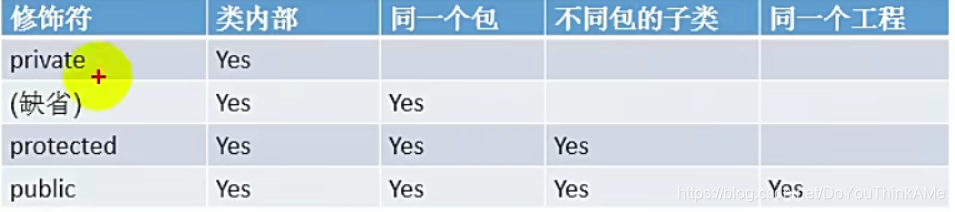
- 四种权限修饰符可以用来修饰类和类的内部结构:属性、 方法 、 构造器 、 内部类。
- 具体的,四种都可以用来修饰内部结构:属性,构造器 、 构造器 、 内部类。
- 修饰类的话,只能使用:缺省 、 public 。
代码测试:
Order
package com.atguigu.java;

public class Order {

	private int orderPrivate;
	int orderDefault;
	public int orderPublic;


	private void methodPrivate(){
		orderPrivate = 1;
		orderDefault = 2;
		orderPublic = 3;
	}
	void methodDefault(){
		orderPrivate = 1;
		orderDefault = 2;
		orderPublic = 3;
	}
	public void methodPublic(){
		orderPrivate = 1;
		orderDefault = 2;
		orderPublic = 3;
	}

}
Ordertest
package com.atguigu.java;

public class OrderTest {
	public static void main(String[] args) {
		//首先要创建Order的对象
		Order order = new Order();

		order.orderDefault = 1;
		order.orderPublic = 2;
		//出了Order类之后,私有的结构就不可以调用了
//		order.orderPrivate = 3;//The field Order.orderPrivate is not visible


		order.methodDefault();
		order.methodPublic();
		//出了Order类之后,私有的结构就不可以调用了
//		order.methodPrivate();//The method methodPrivate() from the type Order is not visible
	}
}
另外一个包内:只有public能用
package java1;

import com.atguigu.java.Order;

public class OrderTest {
	public static void main(String[] args) {
		Order order = new Order();

		order.orderPublic = 2;
		// 出了Order类所属的包之后,私有的结构、缺省声明的结构就不可以调用了
//		order.orderDefault = 1;
		// order.orderPrivate = 3;//The field Order.orderPrivate is not visible

		order.methodPublic();
		// 出了Order类所属的包之后,私有的结构、缺省声明的结构就不可以调用了
//		order.methodDefault();
		// order.methodPrivate();//The method methodPrivate() from the type Order is not visible
	}
}
总结封装性:Java提供了四种权限修饰符来修饰类及类的内部结构,体现了类及类的内部结构的可见性的大小;
封装性的练习:
Person:
package com.atguigu.exer;
/*
 * 1.创建程序,在其中定义两个类:Person和PersonTest类。定义如下:
 * 用setAge()设置人的合法年龄(0~130),用getAge()返回人的年龄。
 *
 * 2.练习2:
 * 2.1. 在前面定义的Person类中添加构造器,利用构造器设置所有人的age属性初始值都为18。
 * 2.2. 修改上题中类和构造器,增加name属性,使得每次创建Person对象的同时初始化对象的age属性值和name属性值。

 *
 */
public class Person {

	private int age;
	private String name;

	public Person(){
		age = 18;
	}

	public Person(String n,int a){
		name = n;
		age = a;
	}


	public void setAge(int a){
		if(a < 0 || a > 130){
//			throw new RuntimeException("传入的数据非法!");
			System.out.println("传入的数据非法!");
			return;
		}

		age = a;

	}

	public int getAge(){
		return age;
	}

	//绝对不要这样写!!
//	public int doAge(int a){
//		age = a;
//		return age;
//	}

	public void setName(String n){
		name = n;
	}
	public String getName(){
		return name;
	}

}
PersonTest:
package com.atguigu.exer;
/*
 * 在PersonTest类中实例化Person类的对象b,
 * 调用setAge()和getAge()方法,体会Java的封装性。
 *
 */
public class PersonTest {
	public static void main(String[] args) {

		Person p1 = new Person();
//		p1.age = 1;编译不通过

		p1.setAge(12);

		System.out.println("年龄为:" + p1.getAge());

//		p1.doAge(122);


		Person p2 = new Person("Tom", 21);
		System.out.println("name = " + p2.getName() + ",age = " + p2.getAge());

	}
}
构造器(或构造方法)
类的结构之三:
构造器(或构造方法、constructor)的使用
construct:建设、建造。 construction:CCB constructor:建设者一、构造器的作用:
1.创建对象
2.初始化对象的信息二、说明:
1.如果没有显式的定义类的构造器的话,则系统默认提供一个空参的构造器
2.定义构造器的格式:权限修饰符 类名(形参列表){}
3.一个类中定义的多个构造器,彼此构成重载
4.一旦我们显式的定义了类的构造器之后,系统就不再提供默认的空参构造器
5.一个类中,至少会有一个构造器。
public class PersonTest {
	public static void main(String[] args) {
		//创建类的对象:new + 构造器
		Person p = new Person();

		p.eat();

		Person p1 = new Person("Tom");

		System.out.println(p1.name);


	}
}

class Person{
	//属性
	String name;
	int age;

	//构造器
	public Person(){
		System.out.println("Person().....");
	}
	//主要的地方
	//如果这个功能是固定的话直接在创造构造器的时候直接赋给
	public Person(String n){
		name = n;

	}
//
	public Person(String n,int a){
		name = n;
		age = a;
	}


	//方法
	public void eat(){
		System.out.println("人吃饭");
	}

	public void study(){
		System.out.println("人可以学习");
	}

}
Person()…
人吃饭
Tom
构造器的练习
2.练习2:
2.1. 在前面定义的Person类中添加构造器,利用构造器设置所有人的age属性初始值都为18。
2.2. 修改上题中类和构造器,增加name属性,使得每次创建Person对象的同时初始化对象的age属性值和name属性值。
public class Person {

	private int age;
	private String name;

	public Person(){
		age = 18;
	}

	public Person(String n,int a){
		name = n;
		age = a;
	}
	public void setName(String n){
		name = n;
	}
	public String getName(){
		return name;
	}
}
public class PersonTest {
	public static void main(String[] args) {

		Person p2 = new Person("Tom", 21);
		System.out.println("name = " + p2.getName() + ",age = " + p2.getAge());

	}
}
练习二
package com.atguigu.exer;
/*
 * 编写两个类,TriAngle和TriAngleTest,其中TriAngle类中声明私有的底边长base和高height,同时声明公共方法访问私有变量。
 * 此外,提供类必要的构造器。另一个类中使用这些公共方法,计算三角形的面积。
 */
public class TriAngle { //angle:角    angel:天使

	private double base;//底边长
	private double height;//高

	public TriAngle(){

	}

	public TriAngle(double b,double h){
		base = b;
		height = h;
	}


	public void setBase(double b){
		base = b;
	}
	public double getBase(){
		return base;
	}
	public void setHeight(double h){
		height = h;
	}
	public double getHeight(){
		return height;
	}

}
package com.atguigu.exer;

public class TriAngleTest {
	public static void main(String[] args) {

		TriAngle t1 = new TriAngle();
		t1.setBase(2.0);
		t1.setHeight(2.4);
//		t1.base = 2.5;//The field TriAngle.base is not visible
//		t1.height = 4.3;
		System.out.println("base : " + t1.getBase() + ",height : " + t1.getHeight());

		TriAngle t2 = new TriAngle(5.1,5.6);
		System.out.println("base : " + t2.getBase() + ",height : " + t2.getHeight());
	}
}
总结:属性赋值的先后顺序
① 默认初始化
② 显式初始化
③ 构造器中初始化
④ 通过"对象.方法" 或 "对象.属性"的方式,赋值
以上操作的先后顺序:① - ② - ③ - ④
JavaBean
JavaBean是一种Java语言写成的可重用组件。
所谓JavaBean,是指符合如下标准的Java类:
1 类是公共的
2 有一个无参的公共的构造器
3 有属性,且有对应的get、set方法
//构造器的权限和类的权限相同
public class Customer {

	private int id;
	private String name;

	public Customer(){

	}

	public void setId(int i){
		id = i;
	}
	public int getId(){
		return id;
	}
	public void setName(String n){
		name = n;
	}
	public String getName(){
		return name;
	}

}
this
- this关键字的使用:
- 1.this可以用来修饰、调用:属性、方法、构造器
- 2.this修饰属性和方法:
this理解为:当前对象 或 当前正在创建的对象- 2.1 在类的方法中,我们可以使用"this.属性"或"this.方法"的方式,调用当前对象属性或方法。但是,
通常情况下,我们都选择省略"this."。特殊情况下,如果方法的形参和类的属性同名时,我们必须显式
的使用"this.变量"的方式,表明此变量是属性,而非形参。- 2.2 在类的构造器中,我们可以使用"this.属性"或"this.方法"的方式,调用当前正在创建的对象属性或方法。
但是,通常情况下,我们都选择省略"this."。特殊情况下,如果构造器的形参和类的属性同名时,我们必须显式
的使用"this.变量"的方式,表明此变量是属性,而非形参。- 3 this调用构造器
① 我们在类的构造器中,可以显式的使用"this(形参列表)"方式,调用本类中指定的其他构造器
② 构造器中不能通过"this(形参列表)“方式调用自己
③ 如果一个类中有n个构造器,则最多有 n - 1构造器中使用了"this(形参列表)”
④ ※规定:"this(形参列表)“必须声明在当前构造器的首行
⑤ ※构造器内部,最多只能声明一个"this(形参列表)”,用来调用其他的构造器
public class PersonTest {
	public static void main(String[] args) {

		Person p1 = new Person();

		p1.setAge(1);
		System.out.println(p1.getAge());

		p1.eat();

		System.out.println();

		Person p2 = new Person("Jerry",20);
		System.out.println(p2.getAge());

	}
}

class Person{

	private String name;
	private int age;


	public Person(){

//		this.eat();
		String info = "Person初始化时,需要考虑如下的1,2,3,4...(共40行代码)";
		System.out.println(info);
	}

	public Person(String name){
		//this调构造器必须在首行
		this();//调用构造器Person();
		//this表示方法或者属性
		this.name = name;

	}

	public Person(int age){
		this();//调用构造器Person();
		this.age = age;

	}

	public Person(String name,int age){
		this(age);//调用构造器Person(int age);
		this.name = name;
		//this.age = age;
		//Person初始化时,需要考虑如下的1,2,3,4...(共40行代码)
	}

	public void setName(String name){
		this.name = name;
	}
	public String getName(){
		return this.name;//this可以省略
	}
	public void setAge(int age){
		this.age = age;
	}
	public int getAge(){
		return this.age;//this可以省略
	}

	public void eat(){
		System.out.println("人吃饭");
		this.study();//this可以省略
	}
	public void study(){
		System.out.println("人学习");
	}

}
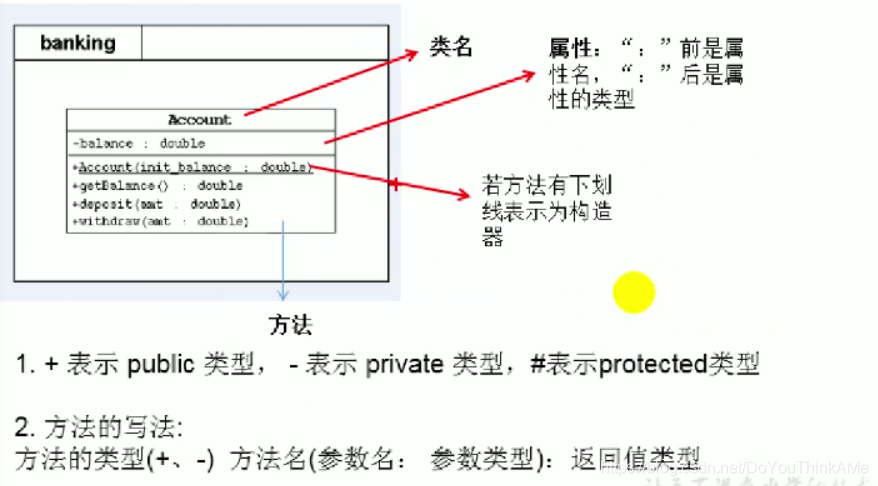
UMR类图
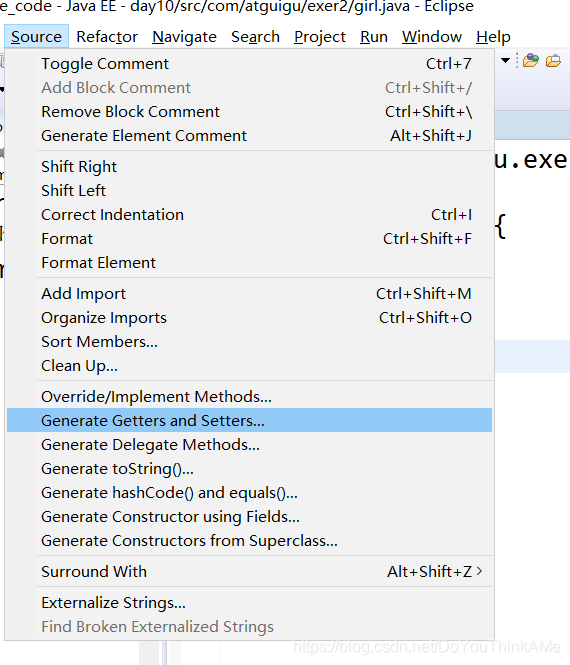
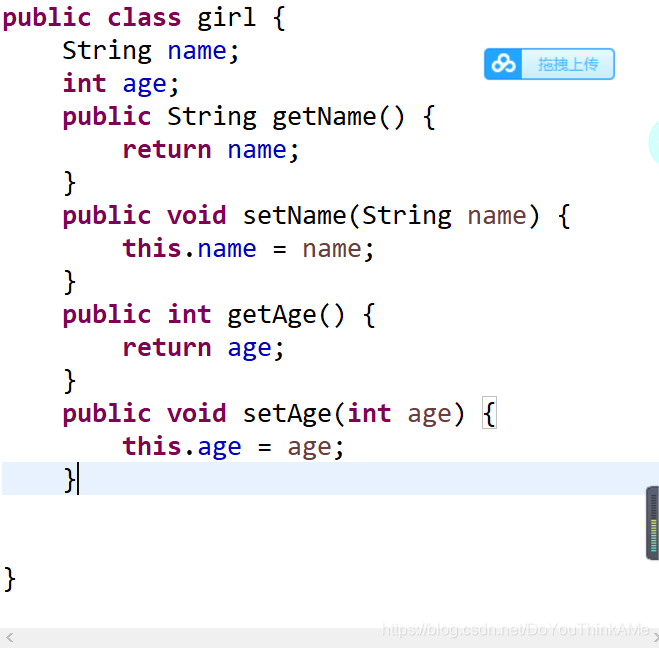
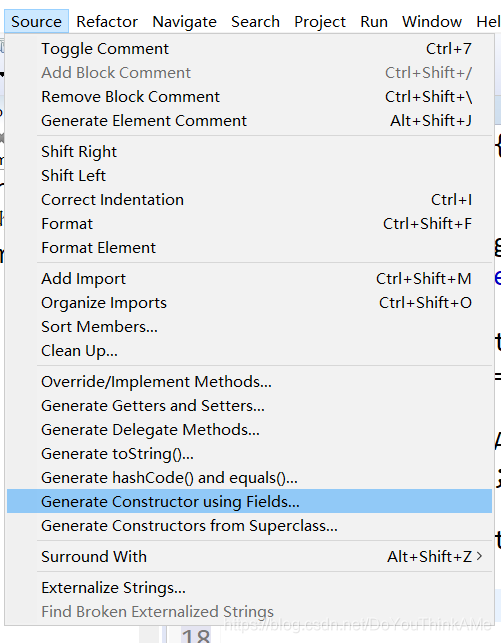
class中快速添加get 和 set

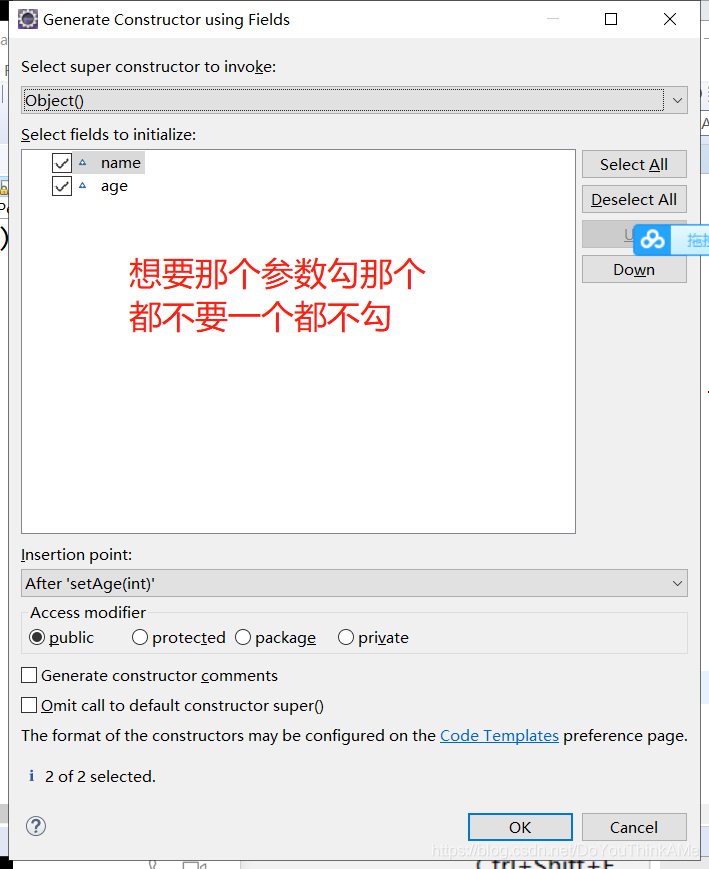
class中快速添加构造器
this的练习
package com.atguigu.java2;

public class Girl {

	private String name;
	private int age;

	public Girl() {

	}
	public Girl(String name, int age) {
		this.name = name;
		this.age = age;
	}

	public String getName() {
		return name;
	}
	public void setName(String name) {
		this.name = name;
	}
	public void marry(Boy boy){
		System.out.println("我想嫁给" + boy.getName());
		boy.marry(this);
	}

	/**
	 *
	 * @Description 比较两个对象的大小
	 * @author shkstart
	 * @date 2019年1月18日下午4:02:09
	 * @param girl
	 * @return  正数:当前对象大;  负数:当前对象小  ; 0:当前对象与形参对象相等
	 */
	public int compare(Girl girl){
//		if(this.age > girl.age){
//			return 1;
//		}else if(this.age < girl.age){
//			return -1;
//		}else{
//			return 0;
//		}

		return this.age - girl.age;

	}

}
package com.atguigu.java2;

public class Boy {
	private String name;
	private int age;

	public Boy() {

	}

	public Boy(String name) {
		this.name = name;
	}

	public Boy(String name, int age) {
		this.name = name;
		this.age = age;
	}

	public String getName() {
		return name;
	}
	public void setName(String name) {
		this.name = name;
	}
	public int getAge() {
		return age;
	}
	public void setAge(int age) {
		this.age = age;
	}

	public void marry(Girl girl){
		System.out.println("我想娶" + girl.getName());
	}

	public void shout(){
		if(this.age >= 22){
			System.out.println("你可以去合法登记结婚了!");
		}else{
			System.out.println("先多谈谈恋爱~~");
		}

	}
}
package com.atguigu.java2;

public class BoyGirlTest {
	public static void main(String[] args) {

		Boy boy = new Boy("罗密欧", 21);
		boy.shout();

		Girl girl = new Girl("朱丽叶", 18);
		girl.marry(boy);

		Girl girl1 = new Girl("祝英台",19);
		int compare = girl.compare(girl1);
		if(compare > 0){
			System.out.println(girl.getName() + "大");
		}else if(compare < 0){
			System.out.println(girl1.getName() + "大");
		}else{
			System.out.println("一样大");
		}

	}
}
重要练习
package com.atguigu.exer;
/*
 * 写一个测试程序。
(1)	创建一个Customer ,名字叫 Jane Smith,
他有一个账号为1000,余额为2000元,年利率为 1.23% 的账户。
(2)	对Jane Smith操作。
存入 100 元,再取出960元。再取出2000元。
打印出Jane Smith 的基本信息

成功存入 :100.0
成功取出:960.0
余额不足,取款失败
Customer [Smith, Jane] has a account: id is 1000,
annualInterestRate is 1.23%, balance is 1140.0


 */
public class CustomerTest {
	public static void main(String[] args) {
		Customer cust = new Customer("Jane", "Smith");

		Account acct = new Account(1000, 2000, 0.0123);

		cust.setAccount(acct);

		cust.getAccount().deposit(100);
		cust.getAccount().withdraw(960);
		cust.getAccount().withdraw(2000);

		System.out.println("Customer[" + cust.getLastName() + "," + cust.getFirstName() +
				"] has a account: id is " + cust.getAccount().getId() + ",annualInterestRate is "+
		cust.getAccount().getAnnualInterestRate() * 100 + "% ,balance is " + cust.getAccount().getBalance());
	}
}
package com.atguigu.exer;

public class Customer {

	private String firstName;
	private String lastName;
	private Account account;

	public Customer(String f,String l){
		this.firstName = f;
		this.lastName = l;
	}

	public Account getAccount() {
		return account;
	}

	public void setAccount(Account account) {
		this.account = account;
	}

	public String getFirstName() {
		return firstName;
	}

	public String getLastName() {
		return lastName;
	}


}
package com.atguigu.exer;

public class Account {
	private int id;//账号
	private double balance;//余额
	private double annualInterestRate;//年利率

	public Account (int id, double balance, double annualInterestRate ){
		this.id = id;
		this.balance = balance;
		this.annualInterestRate = annualInterestRate;
	}

	public int getId() {
		return id;
	}

	public void setId(int id) {
		this.id = id;
	}

	public double getBalance() {
		return balance;
	}

	public void setBalance(double balance) {
		this.balance = balance;
	}

	public double getAnnualInterestRate() {
		return annualInterestRate;
	}

	public void setAnnualInterestRate(double annualInterestRate) {
		this.annualInterestRate = annualInterestRate;
	}
	//在提款方法withdraw中,需要判断用户余额是否能够满足提款数额的要求,如果不能,应给出提示。
	public void withdraw (double amount){//取钱
		if(balance < amount){
			System.out.println("余额不足,取款失败");
			return;
		}
		balance -= amount;
		System.out.println("成功取出:" + amount);
	}

	public void deposit (double amount){//存钱
		if(amount > 0){
			balance += amount;
			System.out.println("成功存入:" + amount);
		}
	}

}
更重要的练习
package com.atguigu.exer4;

public class BankTest {
	public static void main(String[] args) {

		Bank bank = new Bank();

		bank.addCustomer("Jane", "Smith");

		//连续操作
		bank.getCustomer(0).setAccount(new Account(2000));

		bank.getCustomer(0).getAccount().withdraw(500);

		double balance = bank.getCustomer(0).getAccount().getBalance();
		System.out.println("客户:" + bank.getCustomer(0).getFirstName() + "的账户余额为:" + balance);

		System.out.println("***********************");
		bank.addCustomer("万里", "杨");

		System.out.println("银行客户的个数为:" + bank.getNumOfCustomers());


	}
}
package com.atguigu.exer4;

public class Customer {


	private String firstName;
	private String lastName;
	private Account account;

	public Customer(String f, String l) {
		this.firstName = f;
		this.lastName = l;
	}

	public Account getAccount() {
		return account;
	}

	public void setAccount(Account account) {
		this.account = account;
	}

	public String getFirstName() {
		return firstName;
	}

	public String getLastName() {
		return lastName;
	}


}
package com.atguigu.exer4;

public class Account {

	private double balance;

	public Account(double init_balance){
		this.balance = init_balance;
	}

	public double getBalance(){
		return balance;
	}

	//存钱操作
	public void deposit(double amt){
		if(amt > 0){
			balance += amt;
			System.out.println("存钱成功");
		}
	}
	//取钱操作
	public void withdraw(double amt){
		if(balance >= amt){
			balance -= amt;
			System.out.println("取钱成功");
		}else{
			System.out.println("余额不足");
		}
	}
}
package com.atguigu.exer4;

public class Bank {

	private Customer[] customers;// 存放多个客户的数组
	private int numberOfCustomers;// 记录客户的个数

	public Bank() {
		customers = new Customer[10];
	}

	// 添加客户
	public void addCustomer(String f, String l) {
		Customer cust = new Customer(f, l);
		// customers[numberOfCustomers] = cust;
		// numberOfCustomers++;
		// 或
		customers[numberOfCustomers++] = cust;
	}

	// 获取客户的个数
	public int getNumOfCustomers() {
		return numberOfCustomers;
	}

	// 获取指定位置上的客户
	public Customer getCustomer(int index) {
		// return customers[index];//可能报异常
		if (index >= 0 && index < numberOfCustomers) {
			return customers[index];
		}

		return null;
	}

}
package关键字 和 import关键字
一、package关键字的使用
1.为了更好的实现项目中类的管理,提供包的概念
2.使用package声明类或接口所属的包,声明在源文件的首行
3.包,属于标识符,遵循标识符的命名规则、规范(xxxyyyzzz)、“见名知意”
4.每"."一次,就代表一层文件目录。
补充:同一个包下,不能命名同名的接口、类。
不同的包下,可以命名同名的接口、类。
二、import关键字的使用
import:导入
- 在源文件中显式的使用import结构导入指定包下的类、接口
- 声明在包的声明和类的声明之间
- 如果需要导入多个结构,则并列写出即可
- 可以使用"xxx.*"的方式,表示可以导入xxx包下的所有结构
- 如果使用的类或接口是java.lang包下定义的,则可以省略import结构
- 如果使用的类或接口是本包下定义的,则可以省略import结构
- 如果在源文件中,使用了不同包下的同名的类,则必须至少有一个类需要以全类名的方式显示。
com.atguigu.exer3.Account acct1 = new com.atguigu.exer3.Account(1000,2000,0.0123);- 使用"xxx.*"方式表明可以调用xxx包下的所有结构。但是如果使用的是xxx子包下的结构,则仍需要显式导入
- import static:导入指定类或接口中的静态结构:属性或方法
package com.atguigu.java;

import java.lang.reflect.Field;
import java.util.*;

import com.atguigu.exer4.Account;
import com.atguigu.exer4.Bank;
import com.atguigu.java2.java3.Dog;

import static java.lang.System.*;
import static java.lang.Math.*;


public class PackageImportTest {
	public static void main(String[] args) {

		String info = Arrays.toString(new int[]{1,2,3});

		Bank bank = new Bank();

		ArrayList list = new ArrayList();
		HashMap map = new HashMap();

		Scanner s = null;

		System.out.println("hello!");

		Person p = new Person();

		Account acct = new Account(1000);
		//全类名的方式显示
		com.atguigu.exer3.Account acct1 = new com.atguigu.exer3.Account(1000,2000,0.0123);

		Date date = new Date();
		java.sql.Date date1 = new java.sql.Date(5243523532535L);

		Dog dog = new Dog();

		Field field = null;

		out.println("hello");

		long num = round(123.434);
	}
}





 扫一扫
扫一扫


 208
208

 被折叠的 条评论
为什么被折叠?
被折叠的 条评论
为什么被折叠?
 到【灌水乐园】发言





