


 本文介绍了一个包含IP地址查询、天气预报、简繁体转换、身份证归属地及手机号码归属查询等功能的生活百宝箱Java应用程序。利用API接口实现了IP地址的精确查询,并通过身份证号直接查询归属地。
1、功能界面
package com.company;

import com.alibaba.fastjson.JSONObject;

import java.io.BufferedReader;
import java.io.IOException;
import java.io.InputStreamReader;
import java.net.HttpURLConnection;
import java.net.URL;
import java.util.Scanner;

public class Main {

    //菜单
    public static String menu(){
        return "\t===========生活百宝箱===========\n" +
                "1、ip地址来源查询\n"+
                "2、天气预报查询\n"+
                "3、中文简繁体双向转换\n"+
                "4、身份证归属查询\n"+
                "5、手机号码归属查询\n" +
                "6、退出";
    }


    public static void main(String[] args) {
	// write your code here
        Scanner sc=new Scanner(System.in);
        int choice=-1;
        while (true){
            System.out.println(menu());
            System.out.print("请选择操作:");

            //用户输入数字选择操作,如果输入操作不符合规范,提示错误信息后让用户继续选择
            try {
                choice = sc.nextInt();
                //如果输入为6则退出
                if (choice==6)
                    break;
                else if(choice==1) {
                    System.out.print("请输入ip地址");
                    String ip=sc.next();
                    IpUtil.getIp(ip);
                    continue;
                }
                else if(choice==2){
                    System.out.print("请输入城市名称:");
                    String city=sc.next();
                    System.out.println(WeatherUtil.getWeather(city));
                    continue;
                }
                else if(choice==3){
                    jianfanConvert.jianfan();
                    continue;
                }
                else if(choice==4){
                    System.out.print("请输入身份证号:");
                    String cardNum=sc.next();
                    IdCardUtil.idCard(cardNum);
                    continue;
                }
                else if(choice==5){
                    System.out.print("请输入手机号:");
                    String phone=sc.next();
                    System.out.println(MobileLocationUtil.getMobileNoTrack(phone));
                }
            }
            catch (Exception e){
                continue;
            }
        }
    }
}
2、ip地址查询
通过java实现ip地址查询的方法主要就是通过接口的调用。
这里使用的地址为太平洋网提供的api,该api调用能精确到区县。
先看实现的效果

ip地址查询函数。接口返回的数据是json格式,所以这里应用的是阿里的fastjson的jar包来解析返回的数据。
package com.company;


import com.alibaba.fastjson.JSON;
import com.alibaba.fastjson.JSONArray;
import com.alibaba.fastjson.JSONObject;

import java.util.regex.*;
import java.io.BufferedReader;
import java.io.IOException;
import java.io.InputStreamReader;
import java.net.HttpURLConnection;
import java.net.URL;

/**
 * @Author: jack
 */
public class IpUtil {

    public static void getIp(String ip) {

//     //接口连接地址
        String urlStr="http://whois.pconline.com.cn/ipJson.jsp?ip="+ip+"&json=true";
        //调用getResult获取接口返回值
        String result =  getResult(urlStr, "gbk");
        //解析json获取地址
        JSONObject jsonObject=JSONObject.parseObject(result);
        System.out.println(jsonObject.getString("addr"));

    }


    private static String getResult(String urlStr, String encoding) {
        URL url = null;
        HttpURLConnection connection = null;
        try {
            url = new URL(urlStr);
            connection = (HttpURLConnection) url.openConnection(); // 新建连接实例
            connection.setConnectTimeout(20000); // 设置连接超时时间,单位毫秒
            connection.setReadTimeout(20000); // 设置读取数据超时时间,单位毫秒
            connection.setDoOutput(true); // 是否打开输出流 true|false
            connection.setDoInput(true); // 是否打开输入流true|false
            connection.setRequestMethod("GET"); // 提交方法POST|GET
            connection.setUseCaches(false); // 是否缓存true|false
            connection.connect(); // 打开连接端口
            BufferedReader reader = new BufferedReader(new InputStreamReader(connection.getInputStream(), encoding));// 往对端写完数据对端服务器返回数据// ,以BufferedReader流来读取

            String text="";
            String line = "";
            while ((line = reader.readLine()) != null) {
                text+=line+"\n";
            }
            reader.close();
            return text;
        } catch (IOException e) {
            e.printStackTrace();
        } finally {
            if (connection != null) {
                connection.disconnect(); // 关闭连接
            }
        }
        return null;
    }

}
3、身份证归属地查询
身份证归属地查询这个的处理方法就相对简单粗暴了一些。直接将每个城市或者区县对应的编码找到之后读取,或者直接放进代码当中即可。比如下图这样
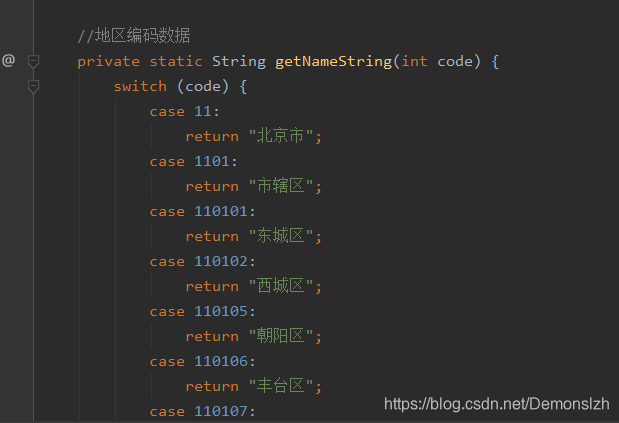
以下省略nnnn行代码…
4、更多查询
完整源码以及其他更多查询可以关注一下公众弄号回复"0006"获取源码






 扫一扫
扫一扫


 4034
4034

 被折叠的 条评论
为什么被折叠?
被折叠的 条评论
为什么被折叠?
 到【灌水乐园】发言





