


 本文介绍如何在SpringBoot应用中配置阿里云日志服务,包括application.yml配置、log4j2.xml示例及启动类事件监听的实现。
阿里云日志服务与log4j lookup配置springboot
阿里云日志服务
文档:https://help.aliyun.com/product/28958.html
材料准备:project、logstore、accessKeyId、accessKeySecret、endpoint
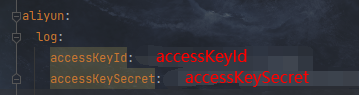
配置application.yml
将准备好的accessKeyId、accessKeySecret配置到application.yml
配置log4j2.xml
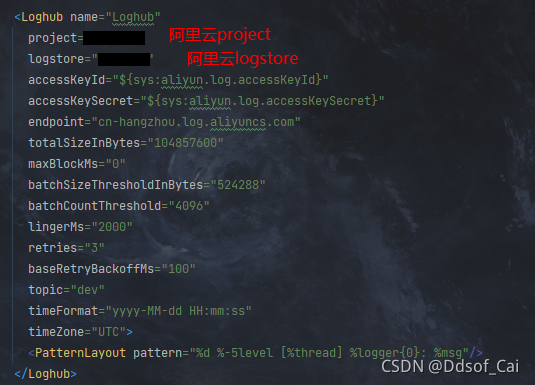
代码示例:
<Appenders>
	<Loghub name="Loghub"
	      project="ow-sys"
	      logstore="app_log"
	      accessKeyId="${sys:aliyun.log.accessKeyId}"
	      accessKeySecret="${sys:aliyun.log.accessKeySecret}"
	      endpoint="cn-hangzhou.log.aliyuncs.com"
	      totalSizeInBytes="104857600"
	      maxBlockMs="0"
	      batchSizeThresholdInBytes="524288"
	      batchCountThreshold="4096"
	      lingerMs="2000"
	      retries="3"
	      baseRetryBackoffMs="100"
	      topic="dev"
	      timeFormat="yyyy-MM-dd HH:mm:ss"
	      timeZone="UTC">
	      <PatternLayout pattern="%d %-5level [%thread] %logger{0}: %msg"/>
	    </Loghub>
	<Loggers>
	    <AsyncLogger name="xxx" level="WARN" includeLocation="true">
	      <AppenderRef ref="Loghub"/>
	    </AsyncLogger>
	</Loggers>
</Appenders>
配置springboot启动程序
1.创建事件监听类
public class LoggingListener implements ApplicationListener, Ordered {

    @Override
    public int getOrder() {
        return LoggingApplicationListener.DEFAULT_ORDER - 1;
    }

    @Override
    public void onApplicationEvent(ApplicationEvent event) {
        if (event instanceof ApplicationEnvironmentPreparedEvent) {
            ConfigurableEnvironment environment = ((ApplicationEnvironmentPreparedEvent) event)
                .getEnvironment();

            String accessKeyId = Optional.ofNullable(environment.getProperty("aliyun.log.accessKeyId"))
                               .orElse("");
            String accessKeySecret = Optional.ofNullable(environment.getProperty("aliyun.log.accessKeySecret"))
                                         .orElse("");
            System.setProperty("aliyun.log.accessKeyId", accessKeyId);
            System.setProperty("aliyun.log.accessKeySecret", accessKeySecret);
        }
    }
}
- 添加到SpringApplication
    public static void main(String[] args) {
        SpringApplication application = new SpringApplication(MyApplication.class);
        application.addListeners(new LoggingListener());
        application.run(args);
    }






 扫一扫
扫一扫


 3015
3015

 被折叠的 条评论
为什么被折叠?
被折叠的 条评论
为什么被折叠?
 到【灌水乐园】发言





