


 本文档介绍了HBase的基本概念,包括其起源和应用案例,并详细阐述了在虚拟机上安装HBase 1.6.0的步骤,包括伪分布式模式的配置与启动。此外,还提供了使用JAVA API进行HBase编程的实践,包括创建表、添加、获取和删除数据的操作。
HBase运行实验
前言
本文章来自在关于分布式文件存储系统的学习,内容仅供参考
一、HBase是什么?
HBase作为一个开源数据库,最初来源于论文“Bigtable:一个结构化数据的分布式存储系统”( Fay Chang撰写)。HBase作为一个可实时读写的分布式数据库,其优点突出在具有高可靠性、高性能、面向列、可伸缩。
HBase在Hadoop之上提供了类似于Bigtable的能力,但也有很多不同之处。
(比如:Google Bigtable使用GFS,而HBASE则利用Hadoop HDFS
Google Bigtable利用Chubby,而HBASE利用Zookeeper)
3.HBase已经应用于许多成型的国际企业。例如我们熟悉的阿里(淘宝、天猫、蚂蚁金服)、小米米聊、小米云、小米推送服务)、京东、滴滴内部都有数千、上万台的HBase集群。
二、使用步骤
1.安装HBase
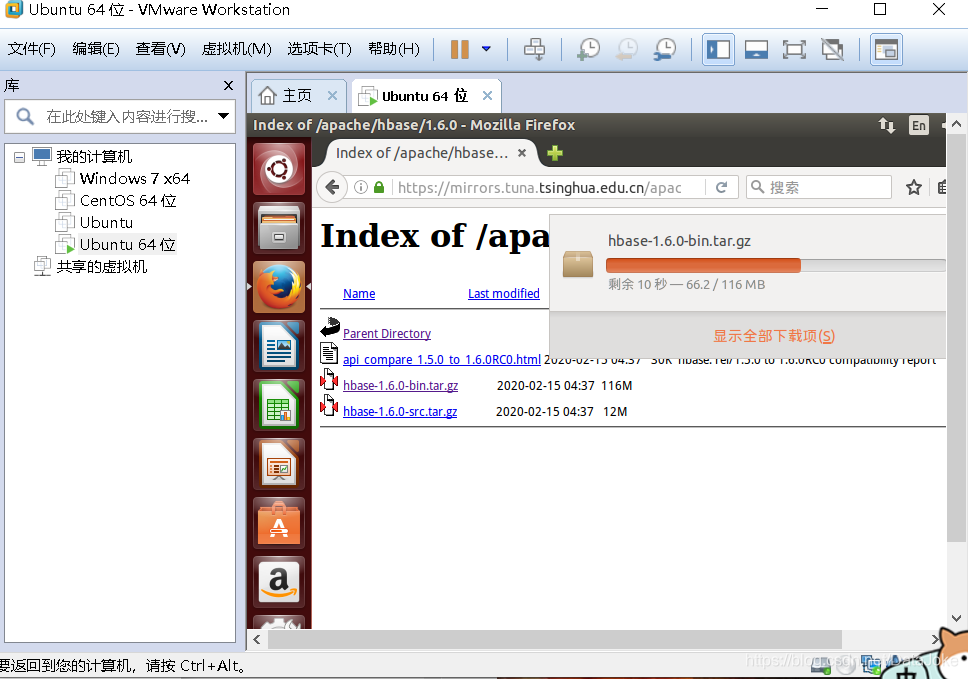
打开虚拟机,从https://mirrors.tuna.tsinghua.edu.cn/apache/hbase/中下载1.6.0版本的HBase安装文件( jdk1.7对应的下载hbase1.6.0版本,系统不匹配,或者下载高于系统版本hbase会无法安装或无法正常运行)
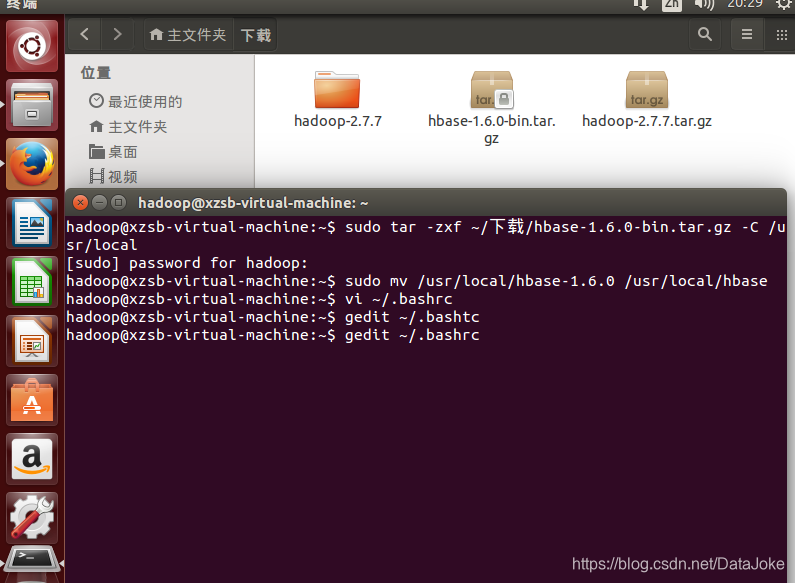
对hbase-1.6.0-bin.tar.gz进行解压操作并配置环境变量

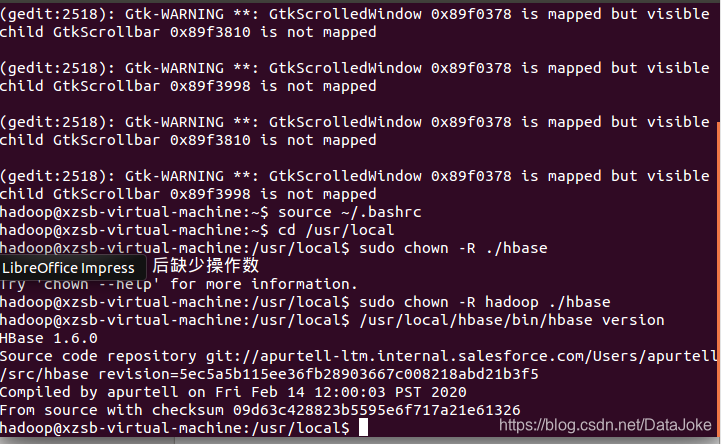
使环境变量生效后,添加HBase权限
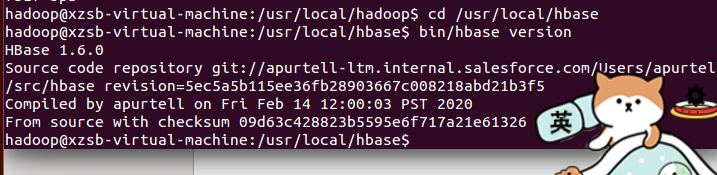
确认hbase已经安装成功
2.关于伪分布式模式的相关配置与命令

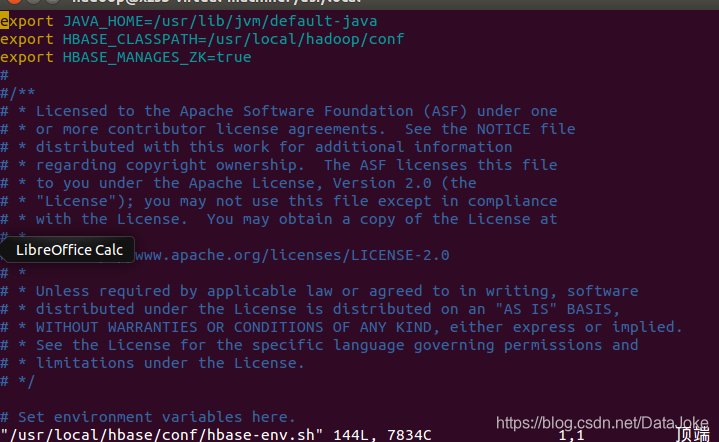
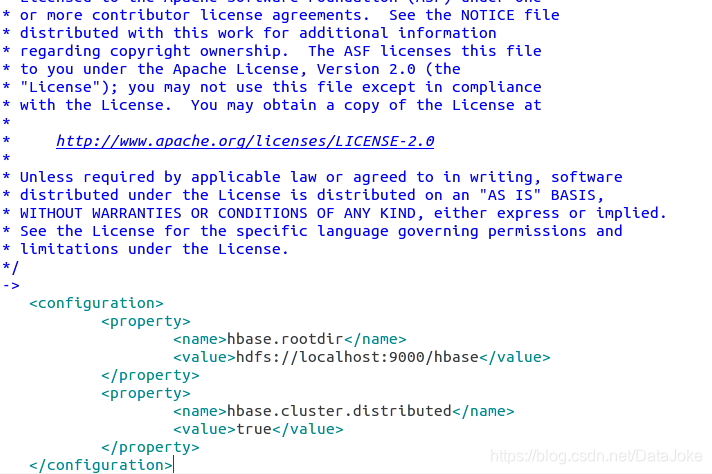
<configuration>
        <property>
                        <name>hbase.rootdir</name>
                        <value>hdfs://localhost:9000/hbase</value>
        </property>
        <property>
                        <name>hbase.cluster.distributed</name>
                        <value>true</value>
        </property>
</configuration>
接下来测试运行HBase先运行hadoop命令如下:
cd /usr/local/hadoop./sbin/start-dfs.sh
在通过jps 查看是否运行成功 若是 DataNode 没有启动,可尝试如下的方法(注意这会删除 HDFS 中原有的所有数据,如果原有的数据很重要请不要这样做):
针对 DataNode 没法启动的解决方法
cd /usr/local/hadoop./sbin/stop-dfs.sh # 关闭
rm -r ./tmp # 删除 tmp 文件,注意这会删除 HDFS 中原有的所有数据
./bin/hdfs namenode -format # 重新格式化NameNode
./sbin/start-dfs.sh # 重启
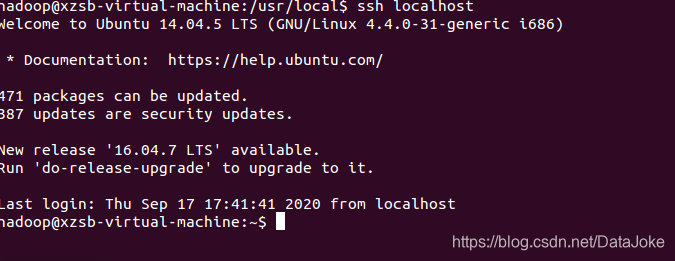
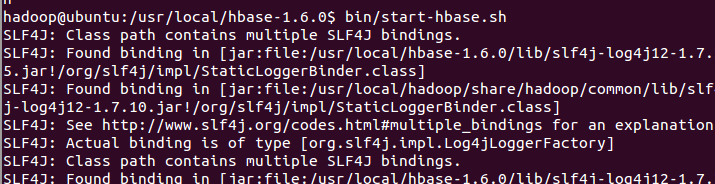
切换目录至/usr/local/hbase-1.6.0;再启动HBase
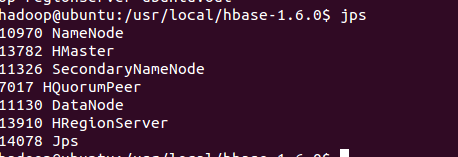
进入shell界面:
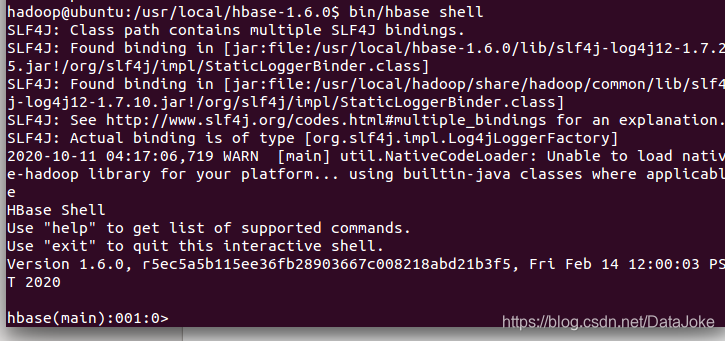
三、编程与实践
创建了“student”表,属性有:Sname,Ssex,Sage,Sdept,course

查看“student”表
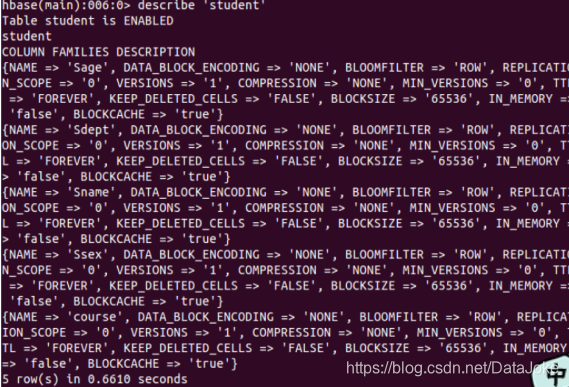
put添加数据

get命令查看

用delete、deleteall命令进行删除
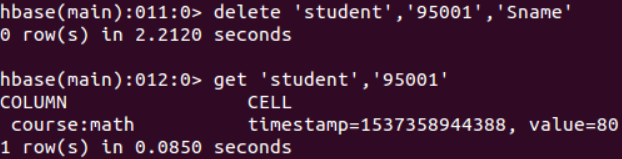
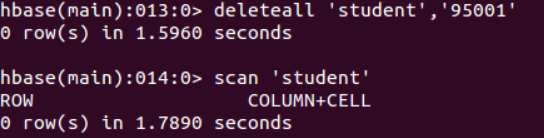
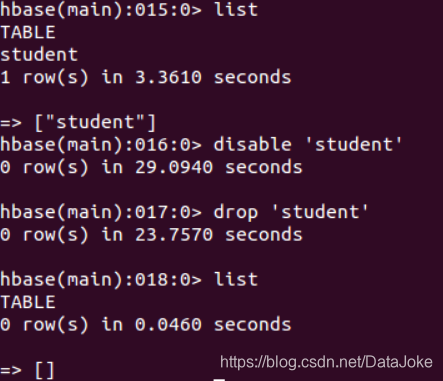
JAVA API编程实例
新建Java Project新建Class(按图中圈出位置操作即可)
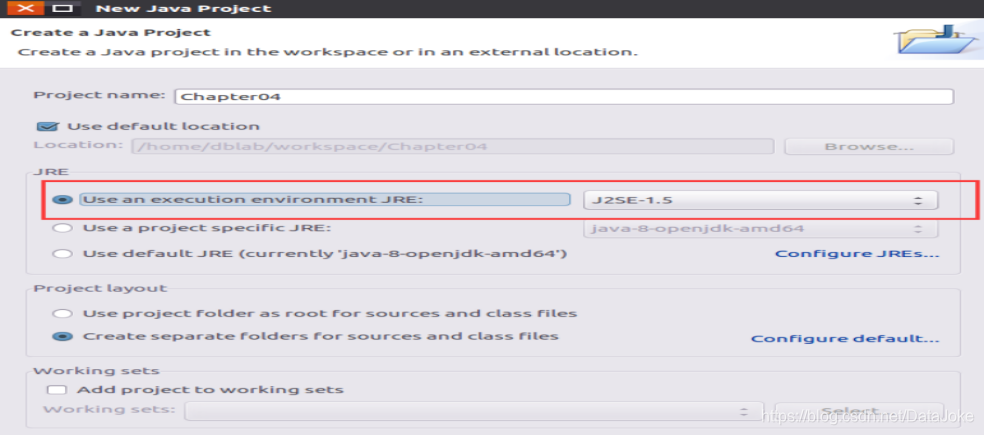
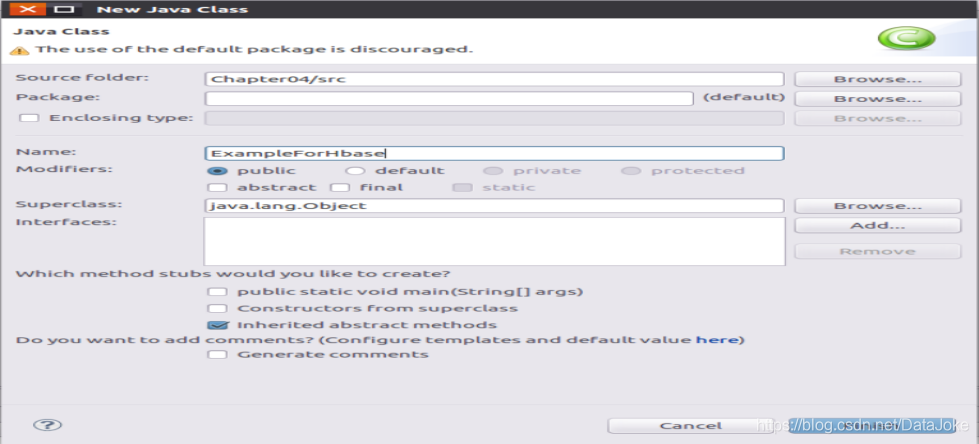
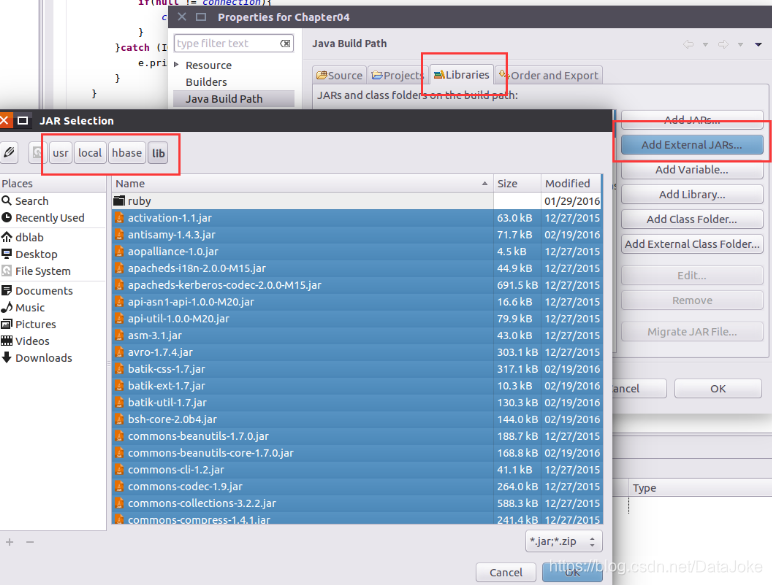
代码如下:
import org.apache.hadoop.conf.Configuration;
import org.apache.hadoop.hbase.*;
import org.apache.hadoop.hbase.client.*;
import java.io.IOException;

public class ExampleForHbase {
    public static Configuration configuration;
    public static Connection connection;
    public static Admin admin;
    public static void main(String[] args)throws IOException{
           createTable("Score",new String[]{"sname","course"});
           insertRow("Score", "95001", "sname", "", "Mary");
           insertRow("Score", "95001", "course", "Math", "88");
           insertRow("Score", "95001", "course", "English", "85");
           deleteRow("Score", "95001", "course", "Math");
           deleteRow("Score", "95001", "course", "");
           deleteRow("Score", "95001", "", "");
           getData("Score", "95001", "sname", "");
           deleteTable("Score");
     }

	public static void init(){
        	configuration  = HBaseConfiguration.create();
        	configuration.set("hbase.rootdir","hdfs://localhost:9000/hbase");
        	try{
             		connection = ConnectionFactory.createConnection(configuration);
             		admin = connection.getAdmin();
       		}catch (IOException e){
             		e.printStackTrace();
        	}
 	}
 	public static void close(){
 	        try{
 	        	if(admin != null){
 	        		admin.close();
 	        	}
 	        	if(null != connection){
 	        		connection.close();
 	        	}
 	        }catch (IOException e){
 	                e.printStackTrace();
 	        }
 	}
 	public static void createTable(String myTableName,String[] colFamily) throws IOException {
 		init();
 		TableName tableName = TableName.valueOf(myTableName);
 		if(admin.tableExists(tableName)){
 			System.out.println("talbe is exists!");
 		}else {
 			HTableDescriptor hTableDescriptor = new HTableDescriptor(tableName);
 			for(String str:colFamily){
 				HColumnDescriptor hColumnDescriptor = new HColumnDescriptor(str);
 				hTableDescriptor.addFamily(hColumnDescriptor);
 			}
 			admin.createTable(hTableDescriptor);
 			System.out.println("create table success");
 		}
 		close();
 	}
 	public static void deleteTable(String tableName) throws IOException {
 		init();
 		TableName tn = TableName.valueOf(tableName);
 		if (admin.tableExists(tn)) {
 			admin.disableTable(tn);
 			admin.deleteTable(tn);
 		}
 		close();
 	}
 	public static void listTables() throws IOException {
 		init();
 		HTableDescriptor hTableDescriptors[] = admin.listTables();
 		for(HTableDescriptor hTableDescriptor :hTableDescriptors){
 			System.out.println(hTableDescriptor.getNameAsString());
 		}
 		close();
 	}
 	public static void insertRow(String tableName,String rowKey,String colFamily,String col,String val) throws IOException {
 		init();
 		Table table = connection.getTable(TableName.valueOf(tableName));
 		Put put = new Put(rowKey.getBytes());
		put.addColumn(colFamily.getBytes(), col.getBytes(), val.getBytes());
		table.put(put);
		table.close();
		close();
	}
	public static void deleteRow(String tableName,String rowKey,String colFamily,String col) throws IOException {
		init();
		Table table = connection.getTable(TableName.valueOf(tableName));
		Delete delete = new Delete(rowKey.getBytes());
		delete.addFamily(colFamily.getBytes());
		delete.addColumn(colFamily.getBytes(), col.getBytes());
		table.delete(delete);
		table.close();
		close();
	}
	public static void getData(String tableName,String rowKey,String colFamily,String col)throws  IOException{
		init();
		Table table = connection.getTable(TableName.valueOf(tableName));
		Get get = new Get(rowKey.getBytes());
		get.addColumn(colFamily.getBytes(),col.getBytes());
		Result result = table.get(get);
		showCell(result);
		table.close();
		close();
	}
	public static void showCell(Result result){
		Cell[] cells = result.rawCells();
		for(Cell cell:cells){
			System.out.println("RowName:"+new String(CellUtil.cloneRow(cell))+" ");
			System.out.println("Timetamp:"+cell.getTimestamp()+" ");
			System.out.println("column Family:"+new String(CellUtil.cloneFamily(cell))+" ");
			System.out.println("row Name:"+new String(CellUtil.cloneQualifier(cell))+" ");
			System.out.println("value:"+new String(CellUtil.cloneValue(cell))+" ");
		}
	}
}





 扫一扫
扫一扫


 649
649

 被折叠的 条评论
为什么被折叠?
被折叠的 条评论
为什么被折叠?
 到【灌水乐园】发言





