


Gitlab CI流程设计与思考
repo添加ci完整流程
新增Repo CI注册需要开发者提供的信息和我们这边需要反馈的信息。
CI注册需要提供的信息:
1. Repo url
2. 需要注册哪些CI服务器:Linux CI服务器、Windows CI服务器、rk3399性能测试CI服务、rk3399内存检测CI服务器、单元测试CI服务器
3. 需要支持哪些功能:编译测试、静态分析、CodeCoverage、单元测试、性能测试、动态内存检测、SDK打包发布。

CI负责人需要:
1. 提供注册好的CI服务器tags给项目维护者。
2. 协助提供docker镜像和确认镜像版本。
3. 提供同样功能的CI脚本样例给项目维护者。
流程设计如下
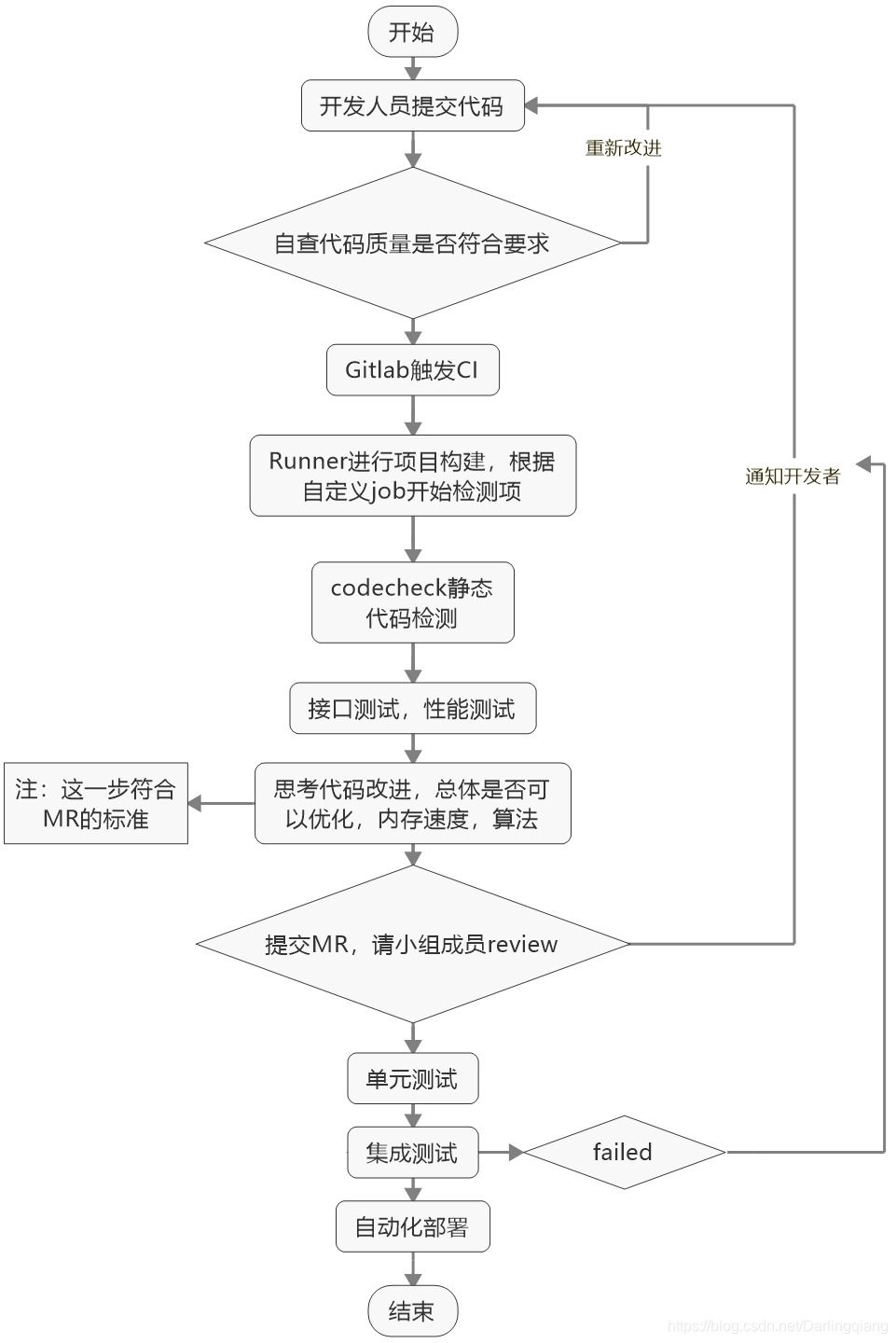
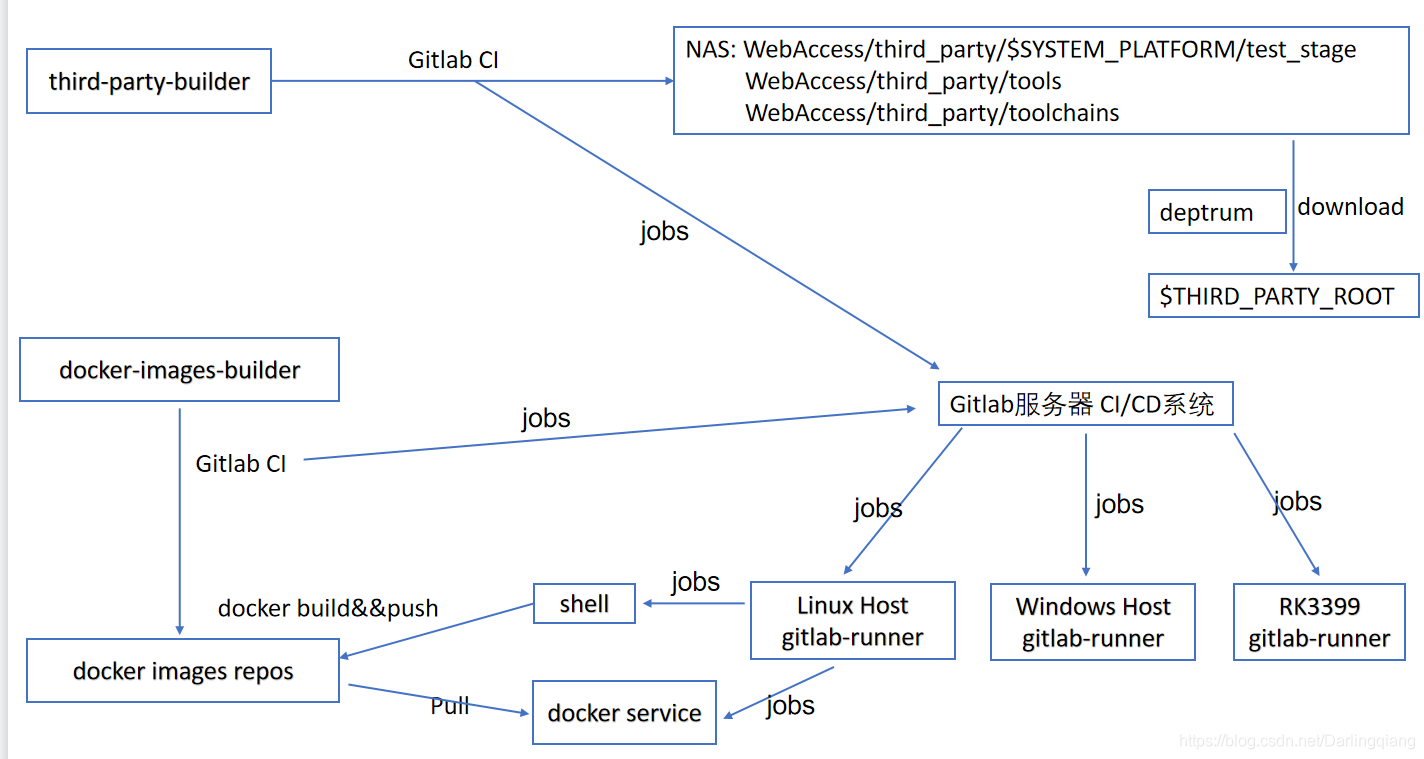
Gitlab CI介绍
文章目录
1. reference
https://meigit.readthedocs.io/en/latest/gitlab_ci_.gitlab-ci.yml_detail.html#gitlab-ci-yml
https://docs.gitlab.com/ee/ci/yaml/index.html
https://zhuanlan.zhihu.com/p/122313251
2. pipeline设计实例:
2.1整体pipeline设计:整个流程分为以下四个阶段
stages:
    - build
    - test
    - release
    - deploy
2.2 CI build pipeline 设计
depth_linux-x86_64-build:
  image: 192.168.xxx.xxx:12345/ubuntu16.04-x86_64:v2
  stage: build
  script:
    - chmod a+x script/depth_build/build_x86_64.sh
    - ./script/depth_build/build_x86_64.sh
  rules:
    - if: '$CI_PIPELINE_SOURCE == "merge_request_event"'
      when: always
  artifacts:
    name:  "$CI_COMMIT_REF_NAME"
    expire_in: 1 week
    paths:
     - build
     - linux-x86_64
  tags:
    - linux-x86_64
以上工作对应的解释如下
job:整个项目的驱动从这里开始
  image: docker镜像及其版本与位置
  stage: 当前job所属阶段
  script:
   		当前job驱动脚本,可以简化job复杂度
  rules:
    - if: rules触发条件
      when: rules触发状态
  artifacts:
    name:  "$CI_COMMIT_REF_NAME"//artifacts:name
name指令允许你对artifacts压缩包重命名,你可以为每个artifect压缩包都指定一个特别的名字,这样对你在gitlab上下载artifect的压缩包有用
    expire_in: 1 week //artifacts:expire_in 用于设置 artifacts 上传包的失效时间. 如果不设置,artifacts 的打包是永远存在于 gitlab上 的。当指定 artifacts 过期时间的时候, 在该期间内,artifacts 包将储存在 gitLab 上。并且你可以在 job 页面找到一个 keep 按钮,按了以后可以覆盖过期时间,让 artifacts 永远存在。过期之后,用户将无法访问到 artifacts 包。时间的例子如下:
'2h20min'        '6 mos 1 day'          '3 weeks and 2 days'
    paths:
     - linux-x86_64 //path位置位于${CI_PROJECT_DIR},位于gitlab自己部署的服务器上
  tags:
    - linux-x86_64 //这里是该job运行的平台,比如可以是RK3399等,根据实际需要设置
2.3 CI test pipeline 设计:接口测试
depth_linux-x86_64-interface:
  image: 192.168.xxx.xxx:12345/ubuntu16.04-x86_64:v1
  stage: test
  needs: ["depth_linux-x86_64-build"]
  script:
    - chmod a+x script/depth_test/interface_x86_64.sh
    - ./script/depth_test/interface_x86_64.sh
  rules:
    - if: '$CI_PIPELINE_SOURCE == "merge_request_event"'
      when: always
  artifacts:
    name:  "$CI_COMMIT_REF_NAME"
    expire_in: 1 week
    paths:
    - DepthMagicTest.json
  tags:
    - linux-x86_64
以上工作对应的解释如下
job:测试job名称。可以根据实际起名字
  image: docker——image
  stage: 当前阶段
  needs:依赖。一般是对前一个stage的依赖,当依赖job完成时候,开始启动当前job
  script:
		简化当前job
  rules:
    - if: rules触发条件
      when: rules触发状态
  artifacts:
    name:  "$CI_COMMIT_REF_NAME"
    expire_in: 1 week
    paths:
    - 具体测试项
  tags:
    - 测试平台
2.4 CI release pipeline 设计:打包发布
depth_release_linux-x86_64:
  image: 192.168.xxx.xxx:12345/ubuntu16.04-x86_64:v5
  stage: release
  needs: ["depth_linux-x86_64-build"]
  script:
    - chmod a+x script/depth_release/pack_linux-x86_64.sh
    - ./script/depth_release/pack_linux-x86_64.sh
    - curl --upload-file depth-xxx-sdk-linux-x86_64-*.tar.gz -u $NAS_LOGIN smb://$nas_ip/$release_x_path/depth-xxx-sdk/release/linux-x86_64/
  rules:
    - if: '$CI_PIPELINE_SOURCE == "merge_request_event"'
      when: manual
  tags:
    - linux-x86_64
以上工作对应的解释如下
release job:
  image: docker——image运行环境
  stage: release阶段
  needs: ["depth_linux-x86_64-build"]//依赖job
  script:
		具体执行美容
  rules:
		rules遵循规则
  tags:
    - linux-x86_64






 扫一扫
扫一扫


 3529
3529

 被折叠的 条评论
为什么被折叠?
被折叠的 条评论
为什么被折叠?
 到【灌水乐园】发言





