


学习Java IO,不得不提到的就是JavaIO流。
流是一组有顺序的,有起点和终点的字节集合,是对数据传输的总称或抽象。即数据在两设备间的传输称为流,流的本质是数据传输,根据数据传输特性将流抽象为各种类,方便更直观的进行数据操作。
IO流的分类
根据处理数据类型的不同分为:字符流和字节流
根据数据流向不同分为:输入流和输出流
字符流和字节流
字符流的由来: 因为数据编码的不同,而有了对字符进行高效操作的流对象。本质其实就是基于字节流读取时,去查了指定的码表。字节流和字符流的区别:
(1)读写单位不同:字节流以字节(8bit)为单位,字符流以字符为单位,根据码表映射字符,一次可能读多个字节。
(2)处理对象不同:字节流能处理所有类型的数据(如图片、avi等),而字符流只能处理字符类型的数据。
(3)字节流在操作的时候本身是不会用到缓冲区的,是文件本身的直接操作的;而字符流在操作的时候下后是会用到缓冲区的,是通过缓冲区来操作文件,我们将在下面验证这一点。
结论:优先选用字节流。首先因为硬盘上的所有文件都是以字节的形式进行传输或者保存的,包括图片等内容。但是字符只是在内存中才会形成的,所以在开发中,字节流使用广泛。
输入流和输出流
对输入流只能进行读操作,对输出流只能进行写操作,程序中需要根据待传输数据的不同特性而使用不同的流。
Java流类图结构:
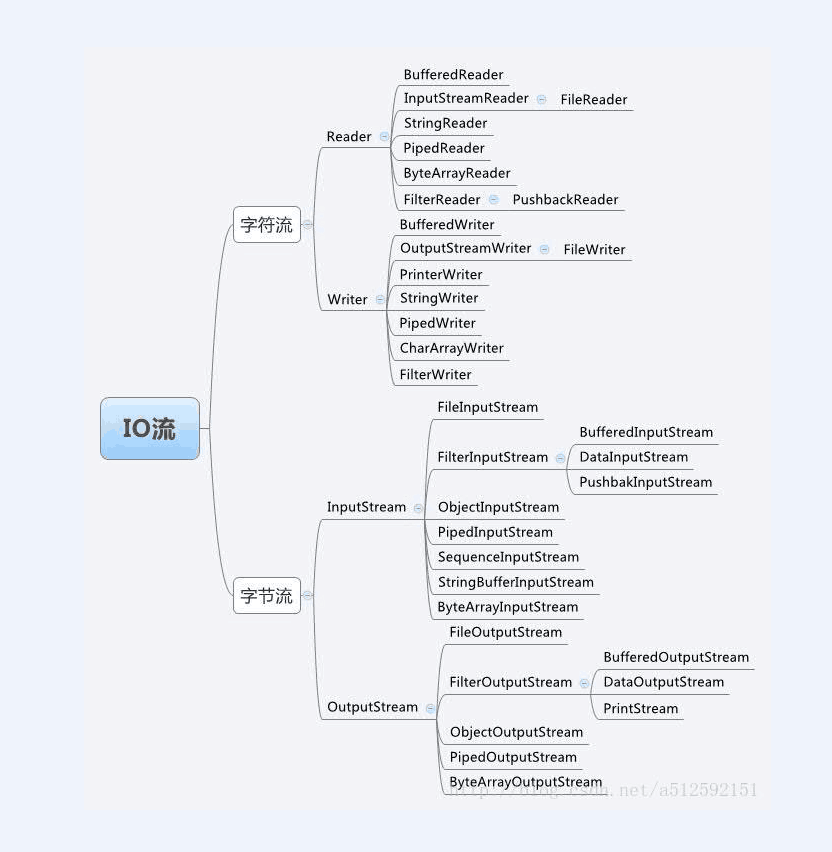
Java IO流对象
1. 输入字节流InputStream
定义和结构说明:
从输入字节流的继承图可以看出:
InputStream 是所有的输入字节流的父类,它是一个抽象类。
ByteArrayInputStream、StringBufferInputStream、FileInputStream 是三种基本的介质流,它们分别从Byte 数组、StringBuffer、和本地文件中读取数据。PipedInputStream 是从与其它线程共用的管道中读取数据,与Piped 相关的知识后续单独介绍。
ObjectInputStream 和所有FilterInputStream的子类都是装饰流(装饰器模式的主角)。意思是FileInputStream类可以通过一个String路径名创建一个对象,FileInputStream(String name)。而DataInputStream必须装饰一个类才能返回一个对象,DataInputStream(InputStream in)。如下图示:

实例操作演示:
【案例 】读取文件内容
1 2 3 4 5 6 7 8 9 10 11 12 13 14 15 16 | /** * 字节流 * 读文件内容 * */import java.io.*;class hello{ public static void main(String[] args) throws IOException { String fileName="D:"+File.separator+"hello.txt"; File f=new File(fileName); InputStream in=new FileInputStream(f); byte[] b=new byte[1024]; in.read(b); in.close(); System.out.println(new String(b)); }} |
注意:该示例中由于b字节数组长度为1024,如果文件较小,则会有大量填充空格。我们可以利用in.read(b);的返回值来设计程序,如下案例:
【案例】读取文件内容
1 2 3 4 5 6 7 8 9 10 11 12 13 14 15 16 17 | /** * 字节流 * 读文件内容 * */import java.io.*;class hello{ public static void main(String[] args) throws IOException { String fileName="D:"+File.separator+"hello.txt"; File f=new File(fileName); InputStream in=new FileInputStream(f); byte[] b=new byte[1024]; int len=in.read(b); in.close(); System.out.println("读入长度为:"+len); System.out.println(new String(b,0,len)); }} |
注意:观察上面的例子可以看出,我们预先申请了一个指定大小的空间,但是有时候这个空间可能太小,有时候可能太大,我们需要准确的大小,这样节省空间,那么我们可以这样做:
【案例】读取文件内容
1 2 3 4 5 6 7 8 9 10 11 12 13 14 15 16 17 | /** * 字节流 * 读文件内容,节省空间 * */import java.io.*;class hello{ public static void main(String[] args) throws IOException { String fileName="D:"+File.separator+"hello.txt"; File f=new File(fileName); InputStream in=new FileInputStream(f); byte[] b=new byte[(int)f.length()]; in.read(b); System.out.println("文件长度为:"+f.length()); in.close(); System.out.println(new String(b)); }} |
【案例】逐字节读
1 2 3 4 5 6 7 8 9 10 11 12 13 14 15 16 17 18 | /** * 字节流 * 读文件内容,节省空间 * */import java.io.*;class hello{ public static void main(String[] args) throws IOException { String fileName="D:"+File.separator+"hello.txt"; File f=new File(fileName); InputStream in=new FileInputStream(f); byte[] b=new byte[(int)f.length()]; for (int i = 0; i < b.length; i++) { b[i]=(byte)in.read(); } in.close(); System.out.println(new String(b)); }} |
注意:上面的几个例子都是在知道文件的内容多大,然后才展开的,有时候我们不知道文件有多大,这种情况下,我们需要判断是否独到文件的末尾。
【案例】字节流读取文件
1 2 3 4 5 6 7 8 9 10 11 12 13 14 15 16 17 18 19 20 | /** * 字节流 *读文件 * */import java.io.*;class hello{ public static void main(String[] args) throws IOException { String fileName="D:"+File.separator+"hello.txt"; File f=new File(fileName); InputStream in=new FileInputStream(f); byte[] b=new byte[1024]; int count =0; int temp=0; while((temp=in.read())!=(-1)){ b[count++]=(byte)temp; } in.close(); System.out.println(new String(b)); }} |
注意:当读到文件末尾的时候会返回-1.正常情况下是不会返回-1的。
【案例】DataInputStream类
1 2 3 4 5 6 7 8 9 10 11 12 13 14 15 16 17 18 | import java.io.DataInputStream;import java.io.File;import java.io.FileInputStream;import java.io.IOException; public class DataOutputStreamDemo{ public static void main(String[] args) throws IOException{ File file = new File("d:" + File.separator +"hello.txt"); DataInputStream input = new DataInputStream(new FileInputStream(file)); char[] ch = new char[10]; int count = 0; char temp; while((temp = input.readChar()) != 'C'){ ch[count++] = temp; } System.out.println(ch); }} |
【案例】PushBackInputStream回退流操作
1 2 3 4 5 6 7 8 9 10 11 12 13 14 15 16 17 18 19 20 21 22 23 24 25 26 | import java.io.ByteArrayInputStream;import java.io.IOException;import java.io.PushbackInputStream; /** * 回退流操作 * */public class PushBackInputStreamDemo{ public static void main(String[] args) throwsIOException{ String str = "hello,rollenholt"; PushbackInputStream push = null; ByteArrayInputStream bat = null; bat = new ByteArrayInputStream(str.getBytes()); push = new PushbackInputStream(bat); int temp = 0; while((temp = push.read()) != -1){ if(temp == ','){ push.unread(temp); temp = push.read(); System.out.print("(回退" +(char) temp + ") "); }else{ System.out.print((char) temp); } } }} |
2. 输出字节流OutputStream
定义和结构说明:
IO 中输出字节流的继承图可见上图,可以看出:
OutputStream 是所有的输出字节流的父类,它是一个抽象类。
ByteArrayOutputStream、FileOutputStream是两种基本的介质流,它们分别向Byte 数组、和本地文件中写入数据。PipedOutputStream 是向与其它线程共用的管道中写入数据,
ObjectOutputStream 和所有FilterOutputStream的子类都是装饰流。具体例子跟InputStream是对应的。
实例操作演示:
【案例】向文件中写入字符串
1 2 3 4 5 6 7 8 9 10 11 12 13 14 15 16 | /** * 字节流 * 向文件中写入字符串 * */import java.io.*;class hello{ public static void main(String[] args) throws IOException { String fileName="D:"+File.separator+"hello.txt"; File f=new File(fileName); OutputStream out =new FileOutputStream(f); String str="Hello World"; byte[] b=str.getBytes(); out.write(b); out.close(); }} |
你也可以一个字节一个字节的写入文件:
【案例】逐字节写入文件
1 2 3 4 5 6 7 8 9 10 11 12 13 14 15 16 17 18 | /** * 字节流 * 向文件中一个字节一个字节的写入字符串 * */import java.io.*;class hello{ public static void main(String[] args) throws IOException { String fileName="D:"+File.separator+"hello.txt"; File f=new File(fileName); OutputStream out =new FileOutputStream(f); String str="Hello World!!"; byte[] b=str.getBytes(); for (int i = 0; i < b.length; i++) { out.write(b[i]); } out.close(); }} |
【案例】向文件中追加新内容
1 2 3 4 5 6 7 8 9 10 11 12 13 14 15 16 17 18 19 | /** * 字节流 * 向文件中追加新内容: * */import java.io.*;class hello{ public static void main(String[] args) throws IOException { String fileName="D:"+File.separator+"hello.txt"; File f=new File(fileName); OutputStream out =new FileOutputStream(f,true);//true表示追加模式,否则为覆盖 String str="Rollen"; //String str="\r\nRollen"; 可以换行 byte[] b=str.getBytes(); for (int i = 0; i < b.length; i++) { out.write(b[i]); } out.close(); }} |
【案例】复制文件
1 2 3 4 5 6 7 8 9 10 11 12 13 14 15 16 17 18 19 20 21 22 23 24 25 26 27 28 29 | /** * 文件的复制 * */import java.io.*;class hello{ public static void main(String[] args) throws IOException { if(args.length!=2){ System.out.println("命令行参数输入有误,请检查"); System.exit(1); } File file1=new File(args[0]); File file2=new File(args[1]); if(!file1.exists()){ System.out.println("被复制的文件不存在"); System.exit(1); } InputStream input=new FileInputStream(file1); OutputStream output=new FileOutputStream(file2); if((input!=null)&&(output!=null)){ int temp=0; while((temp=input.read())!=(-1)){ output.write(temp); } } input.close(); output.close(); }} |
【案例】使用内存操作流将一个大写字母转化为小写字母
1 2 3 4 5 6 7 8 9 10 11 12 13 14 15 16 17 18 19 20 | /** * 使用内存操作流将一个大写字母转化为小写字母 * */import java.io.*;class hello{ public static void main(String[] args) throws IOException { String str="ROLLENHOLT"; ByteArrayInputStream input=new ByteArrayInputStream(str.getBytes()); ByteArrayOutputStream output=new ByteArrayOutputStream(); int temp=0; while((temp=input.read())!=-1){ char ch=(char)temp; output.write(Character.toLowerCase(ch)); } String outStr=output.toString(); input.close(); output.close(); System.out.println(outStr); }} |
【案例】验证管道流:进程间通信
1 2 3 4 5 6 7 8 9 10 11 12 13 14 15 16 17 18 19 20 21 22 23 24 25 26 27 28 29 30 31 32 33 34 35 36 37 38 39 40 41 42 43 44 45 46 47 48 49 50 51 52 53 54 55 56 57 58 59 60 61 62 63 64 65 66 67 68 69 70 71 72 73 | /** * 验证管道流 * */import java.io.*; /** * 消息发送类 * */class Send implements Runnable{ private PipedOutputStream out=null; public Send() { out=new PipedOutputStream(); } public PipedOutputStream getOut(){ return this.out; } public void run(){ String message="hello , Rollen"; try{ out.write(message.getBytes()); }catch (Exception e) { e.printStackTrace(); }try{ out.close(); }catch (Exception e) { e.printStackTrace(); } }} /** * 接受消息类 * */class Recive implements Runnable{ private PipedInputStream input=null; public Recive(){ this.input=new PipedInputStream(); } public PipedInputStream getInput(){ return this.input; } public void run(){ byte[] b=new byte[1000]; int len=0; try{ len=this.input.read(b); }catch (Exception e) { e.printStackTrace(); }try{ input.close(); }catch (Exception e) { e.printStackTrace(); } System.out.println("接受的内容为 "+(new String(b,0,len))); }}/** * 测试类 * */class hello{ public static void main(String[] args) throws IOException { Send send=new Send(); Recive recive=new Recive(); try{//管道连接 send.getOut().connect(recive.getInput()); }catch (Exception e) { e.printStackTrace(); } new Thread(send).start(); new Thread(recive).start(); }} |
【案例】DataOutputStream类示例
1 2 3 4 5 6 7 8 9 10 11 12 13 14 15 16 | import java.io.DataOutputStream;import java.io.File;import java.io.FileOutputStream;import java.io.IOException;public class DataOutputStreamDemo{ public static void main(String[] args) throws IOException{ File file = new File("d:" + File.separator +"hello.txt"); char[] ch = { 'A', 'B', 'C' }; DataOutputStream out = null; out = new DataOutputStream(new FileOutputStream(file)); for(char temp : ch){ out.writeChar(temp); } out.close(); }} |
【案例】ZipOutputStream类
先看一下ZipOutputStream类的继承关系
java.lang.Object
java.io.OutputStream
java.io.FilterOutputStream
java.util.zip.DeflaterOutputStream
java.util.zip.ZipOutputStream
1 2 3 4 5 6 7 8 9 10 11 12 13 14 15 16 17 18 19 20 21 22 23 24 25 26 | import java.io.File;import java.io.FileInputStream;import java.io.FileOutputStream;import java.io.IOException;import java.io.InputStream;import java.util.zip.ZipEntry;import java.util.zip.ZipOutputStream; public class ZipOutputStreamDemo1{ public static void main(String[] args) throws IOException{ File file = new File("d:" + File.separator +"hello.txt"); File zipFile = new File("d:" + File.separator +"hello.zip"); InputStream input = new FileInputStream(file); ZipOutputStream zipOut = new ZipOutputStream(new FileOutputStream( zipFile)); zipOut.putNextEntry(new ZipEntry(file.getName())); // 设置注释 zipOut.setComment("hello"); int temp = 0; while((temp = input.read()) != -1){ zipOut.write(temp); } input.close(); zipOut.close(); }} |
【案例】ZipOutputStream类压缩多个文件
1 2 3 4 5 6 7 8 9 10 11 12 13 14 15 16 17 18 19 20 21 22 23 24 25 26 27 28 29 30 31 32 33 34 35 36 | import java.io.File;import java.io.FileInputStream;import java.io.FileOutputStream;import java.io.IOException;import java.io.InputStream;import java.util.zip.ZipEntry;import java.util.zip.ZipOutputStream; /** * 一次性压缩多个文件 * */public class ZipOutputStreamDemo2{ public static void main(String[] args) throws IOException{ // 要被压缩的文件夹 File file = new File("d:" + File.separator +"temp"); File zipFile = new File("d:" + File.separator + "zipFile.zip"); InputStream input = null; ZipOutputStream zipOut = new ZipOutputStream(new FileOutputStream( zipFile)); zipOut.setComment("hello"); if(file.isDirectory()){ File[] files = file.listFiles(); for(int i = 0; i < files.length; ++i){ input = newFileInputStream(files[i]); zipOut.putNextEntry(newZipEntry(file.getName() + File.separator +files[i].getName())); int temp = 0; while((temp = input.read()) !=-1){ zipOut.write(temp); } input.close(); } } zipOut.close(); }} |
【案例】ZipFile类展示
1 2 3 4 5 6 7 8 9 10 11 12 13 14 | import java.io.File;import java.io.IOException;import java.util.zip.ZipFile; /** *ZipFile演示 * */public class ZipFileDemo{ public static void main(String[] args) throws IOException{ File file = new File("d:" + File.separator +"hello.zip"); ZipFile zipFile = new ZipFile(file); System.out.println("压缩文件的名称为:" + zipFile.getName()); }} |
【案例】解压缩文件(压缩文件中只有一个文件的情况)
1 2 3 4 5 6 7 8 9 10 11 12 13 14 15 16 17 18 19 20 21 22 23 24 25 26 27 | import java.io.File;import java.io.FileOutputStream;import java.io.IOException;import java.io.InputStream;import java.io.OutputStream;import java.util.zip.ZipEntry;import java.util.zip.ZipFile; /** * 解压缩文件(压缩文件中只有一个文件的情况) * */public class ZipFileDemo2{ public static void main(String[] args) throws IOException{ File file = new File("d:" + File.separator +"hello.zip"); File outFile = new File("d:" + File.separator +"unZipFile.txt"); ZipFile zipFile = new ZipFile(file); ZipEntry entry =zipFile.getEntry("hello.txt"); InputStream input = zipFile.getInputStream(entry); OutputStream output = new FileOutputStream(outFile); int temp = 0; while((temp = input.read()) != -1){ output.write(temp); } input.close(); output.close(); }} |
【案例】ZipInputStream类解压缩一个压缩文件中包含多个文件的情况
1 2 3 4 5 6 7 8 9 10 11 12 13 14 15 16 17 18 19 20 21 22 23 24 25 26 27 28 29 30 31 32 33 34 35 36 37 38 39 40 41 42 | import java.io.File;import java.io.FileInputStream;import java.io.FileOutputStream;import java.io.IOException;import java.io.InputStream;import java.io.OutputStream;import java.util.zip.ZipEntry;import java.util.zip.ZipFile;import java.util.zip.ZipInputStream; /** * 解压缩一个压缩文件中包含多个文件的情况 * */public class ZipFileDemo3{ public static void main(String[] args) throws IOException{ File file = new File("d:" +File.separator + "zipFile.zip"); File outFile = null; ZipFile zipFile = new ZipFile(file); ZipInputStream zipInput = new ZipInputStream(new FileInputStream(file)); ZipEntry entry = null; InputStream input = null; OutputStream output = null; while((entry = zipInput.getNextEntry()) != null){ System.out.println("解压缩" + entry.getName() + "文件"); outFile = new File("d:" + File.separator + entry.getName()); if(!outFile.getParentFile().exists()){ outFile.getParentFile().mkdir(); } if(!outFile.exists()){ outFile.createNewFile(); } input = zipFile.getInputStream(entry); output = new FileOutputStream(outFile); int temp = 0; while((temp = input.read()) != -1){ output.write(temp); } input.close(); output.close(); } }} |
3.字节流的输入与输出的对应图示
图中蓝色的为主要的对应部分,红色的部分就是不对应部分。紫色的虚线部分代表这些流一般要搭配使用。从上面的图中可以看出Java IO 中的字节流是极其对称的。哲学上讲“存在及合理”,现在我们看看这些字节流中不太对称的几个类吧!
4.几个特殊的输入流类分析
LineNumberInputStream
主要完成从流中读取数据时,会得到相应的行号,至于什么时候分行、在哪里分行是由改类主动确定的,并不是在原始中有这样一个行号。在输出部分没有对应的部分,我们完全可以自己建立一个LineNumberOutputStream,在最初写入时会有一个基准的行号,以后每次遇到换行时会在下一行添加一个行号,看起来也是可以的。好像更不入流了。
PushbackInputStream
其功能是查看最后一个字节,不满意就放入缓冲区。主要用在编译器的语法、词法分析部分。输出部分的BufferedOutputStream 几乎实现相近的功能。
StringBufferInputStream
已经被Deprecated,本身就不应该出现在InputStream部分,主要因为String 应该属于字符流的范围。已经被废弃了,当然输出部分也没有必要需要它了!还允许它存在只是为了保持版本的向下兼容而已。
SequenceInputStream
可以认为是一个工具类,将两个或者多个输入流当成一个输入流依次读取。完全可以从IO 包中去除,还完全不影响IO 包的结构,却让其更“纯洁”――纯洁的Decorator 模式。
【案例】将两个文本文件合并为另外一个文本文件
1 2 3 4 5 6 7 8 9 10 11 12 13 14 15 16 17 18 19 20 21 22 23 24 25 26 27 28 29 30 31 | import java.io.File;import java.io.FileInputStream;import java.io.FileOutputStream;import java.io.IOException;import java.io.InputStream;import java.io.OutputStream;import java.io.SequenceInputStream; /** * 将两个文本文件合并为另外一个文本文件 * */public class SequenceInputStreamDemo{ public static voidmain(String[] args) throws IOException{ File file1 = newFile("d:" + File.separator + "hello1.txt"); File file2 = newFile("d:" + File.separator + "hello2.txt"); File file3 = newFile("d:" + File.separator + "hello.txt"); InputStream input1 =new FileInputStream(file1); InputStream input2 =new FileInputStream(file2); OutputStream output =new FileOutputStream(file3); // 合并流 SequenceInputStreamsis = new SequenceInputStream(input1, input2); int temp = 0; while((temp =sis.read()) != -1){ output.write(temp); } input1.close(); input2.close(); output.close(); sis.close(); }} |
PrintStream
也可以认为是一个辅助工具。主要可以向其他输出流,或者FileInputStream 写入数据,本身内部实现还是带缓冲的。本质上是对其它流的综合运用的一个工具而已。一样可以踢出IO 包!System.err和System.out 就是PrintStream 的实例!
【案例】使用PrintStream进行输出
1 2 3 4 5 6 7 8 9 10 11 12 13 14 | /** * 使用PrintStream进行输出 * */import java.io.*; class hello { public static void main(String[] args) throws IOException { PrintStream print = new PrintStream(new FileOutputStream(newFile("d:" + File.separator +"hello.txt"))); print.println(true); print.println("Rollen"); print.close(); }} |
【案例】使用PrintStream进行格式化输出
1 2 3 4 5 6 7 8 9 10 11 12 13 14 15 | /** * 使用PrintStream进行输出 * 并进行格式化 * */import java.io.*;class hello { public static void main(String[] args) throws IOException { PrintStream print = new PrintStream(new FileOutputStream(newFile("d:" + File.separator +"hello.txt"))); String name="Rollen"; int age=20; print.printf("姓名:%s. 年龄:%d.",name,age); print.close(); }} |
【案例】使用OutputStream向屏幕上输出内容
1 2 3 4 5 6 7 8 9 10 11 12 13 14 15 16 17 18 19 | /** * 使用OutputStream向屏幕上输出内容 * */import java.io.*;class hello { public static void main(String[] args) throws IOException { OutputStream out=System.out; try{ out.write("hello".getBytes()); }catch (Exception e) { e.printStackTrace(); } try{ out.close(); }catch (Exception e) { e.printStackTrace(); } }} |
【案例】输入输出重定向
1 2 3 4 5 6 7 8 9 10 11 12 13 14 15 16 17 18 19 20 21 | import java.io.File;import java.io.FileNotFoundException;import java.io.FileOutputStream;import java.io.PrintStream; /** * 为System.out.println()重定向输出 * */public class systemDemo{ public static void main(String[] args){ // 此刻直接输出到屏幕 System.out.println("hello"); File file = new File("d:" + File.separator +"hello.txt"); try{ System.setOut(new PrintStream(new FileOutputStream(file))); }catch(FileNotFoundException e){ e.printStackTrace(); } System.out.println("这些内容在文件中才能看到哦!"); }} |
【案例】使用System.err重定向
1 2 3 4 5 6 7 8 9 10 11 12 13 14 15 16 17 18 19 20 | import java.io.File;import java.io.FileNotFoundException;import java.io.FileOutputStream;import java.io.PrintStream; /** *System.err重定向这个例子也提示我们可以使用这种方法保存错误信息 * */public class systemErr{ public static void main(String[] args){ File file = new File("d:" + File.separator +"hello.txt"); System.err.println("这些在控制台输出"); try{ System.setErr(new PrintStream(new FileOutputStream(file))); }catch(FileNotFoundException e){ e.printStackTrace(); } System.err.println("这些在文件中才能看到哦!"); }} |
【案例】System.in重定向
1 2 3 4 5 6 7 8 9 10 11 12 13 14 15 16 17 18 19 20 21 22 23 24 25 26 27 28 29 | import java.io.File;import java.io.FileInputStream;import java.io.FileNotFoundException;import java.io.IOException;/** *System.in重定向 * */public class systemIn{ public static void main(String[] args){ File file = new File("d:" + File.separator +"hello.txt"); if(!file.exists()){ return; }else{ try{ System.setIn(newFileInputStream(file)); }catch(FileNotFoundException e){ e.printStackTrace(); } byte[] bytes = new byte[1024]; int len = 0; try{ len = System.in.read(bytes); }catch(IOException e){ e.printStackTrace(); } System.out.println("读入的内容为:" + new String(bytes, 0, len)); } }} |
5.字符输入流Reader
定义和说明:
在上面的继承关系图中可以看出:
Reader 是所有的输入字符流的父类,它是一个抽象类。
CharReader、StringReader是两种基本的介质流,它们分别将Char 数组、String中读取数据。PipedReader 是从与其它线程共用的管道中读取数据。
BufferedReader 很明显就是一个装饰器,它和其子类负责装饰其它Reader 对象。
FilterReader 是所有自定义具体装饰流的父类,其子类PushbackReader 对Reader 对象进行装饰,会增加一个行号。
InputStreamReader 是一个连接字节流和字符流的桥梁,它将字节流转变为字符流。FileReader可以说是一个达到此功能、常用的工具类,在其源代码中明显使用了将FileInputStream 转变为Reader 的方法。我们可以从这个类中得到一定的技巧。Reader 中各个类的用途和使用方法基本和InputStream 中的类使用一致。后面会有Reader 与InputStream 的对应关系。
实例操作演示:
【案例】从文件中读取内容
1 2 3 4 5 6 7 8 9 10 11 12 13 14 15 16 17 | /** * 字符流 * 从文件中读出内容 * */import java.io.*;class hello{ public static void main(String[] args) throws IOException { String fileName="D:"+File.separator+"hello.txt"; File f=new File(fileName); char[] ch=new char[100]; Reader read=new FileReader(f); int count=read.read(ch); read.close(); System.out.println("读入的长度为:"+count); System.out.println("内容为"+new String(ch,0,count)); }} |
注意:当然最好采用循环读取的方式,因为我们有时候不知道文件到底有多大。
【案例】以循环方式从文件中读取内容
1 2 3 4 5 6 7 8 9 10 11 12 13 14 15 16 17 18 19 20 | /** * 字符流 * 从文件中读出内容 * */import java.io.*;class hello{ public static void main(String[] args) throws IOException { String fileName="D:"+File.separator+"hello.txt"; File f=new File(fileName); char[] ch=new char[100]; Reader read=new FileReader(f); int temp=0; int count=0; while((temp=read.read())!=(-1)){ ch[count++]=(char)temp; } read.close(); System.out.println("内容为"+new String(ch,0,count)); }} |
【案例】BufferedReader的小例子
注意:BufferedReader只能接受字符流的缓冲区,因为每一个中文需要占据两个字节,所以需要将System.in这个字节输入流变为字符输入流,采用:
BufferedReader buf = new BufferedReader(newInputStreamReader(System.in));
下面是一个实例:
1 2 3 4 5 6 7 8 9 10 11 12 13 14 15 16 17 18 19 20 21 | import java.io.BufferedReader;import java.io.IOException;import java.io.InputStreamReader; /** * 使用缓冲区从键盘上读入内容 * */public class BufferedReaderDemo{ public static void main(String[] args){ BufferedReader buf = new BufferedReader( newInputStreamReader(System.in)); String str = null; System.out.println("请输入内容"); try{ str = buf.readLine(); }catch(IOException e){ e.printStackTrace(); } System.out.println("你输入的内容是:" + str); }} |
【案例】Scanner类实例
1 2 3 4 5 6 7 8 9 10 11 12 13 14 15 16 17 | import java.util.Scanner;/** *Scanner的小例子,从键盘读数据 * */public class ScannerDemo{ publicstatic void main(String[] args){ Scanner sca = new Scanner(System.in); // 读一个整数 int temp = sca.nextInt(); System.out.println(temp); //读取浮点数 float flo=sca.nextFloat(); System.out.println(flo); //读取字符 //...等等的,都是一些太基础的,就不师范了。 }} |
【案例】Scanner类从文件中读出内容
1 2 3 4 5 6 7 8 9 10 11 12 13 14 15 16 17 18 19 20 21 | import java.io.File;import java.io.FileNotFoundException;import java.util.Scanner; /** *Scanner的小例子,从文件中读内容 * */public class ScannerDemo{ public static void main(String[] args){ File file = new File("d:" + File.separator +"hello.txt"); Scanner sca = null; try{ sca = new Scanner(file); }catch(FileNotFoundException e){ e.printStackTrace(); } String str = sca.next(); System.out.println("从文件中读取的内容是:" + str); }} |
6.字符输出流Writer
定义和说明:
在上面的关系图中可以看出:
Writer 是所有的输出字符流的父类,它是一个抽象类。
CharArrayWriter、StringWriter 是两种基本的介质流,它们分别向Char 数组、String 中写入数据。
PipedWriter 是向与其它线程共用的管道中写入数据,
BufferedWriter 是一个装饰器为Writer 提供缓冲功能。
PrintWriter 和PrintStream 极其类似,功能和使用也非常相似。
OutputStreamWriter 是OutputStream 到Writer 转换的桥梁,它的子类FileWriter 其实就是一个实现此功能的具体类(具体可以研究一SourceCode)。功能和使用和OutputStream 极其类似,后面会有它们的对应图。
实例操作演示:
【案例】向文件中写入数据
1 2 3 4 5 6 7 8 9 10 11 12 13 14 15 | /** * 字符流 * 写入数据 * */import java.io.*;class hello{ public static void main(String[] args) throws IOException { String fileName="D:"+File.separator+"hello.txt"; File f=new File(fileName); Writer out =new FileWriter(f); String str="hello"; out.write(str); out.close(); }} |
注意:这个例子上之前的例子没什么区别,只是你可以直接输入字符串,而不需要你将字符串转化为字节数组。当你如果想问文件中追加内容的时候,可以使用将上面的声明out的哪一行换为:
Writer out =new FileWriter(f,true);
这样,当你运行程序的时候,会发现文件内容变为:hellohello如果想在文件中换行的话,需要使用“\r\n”比如将str变为String str="\r\nhello";这样文件追加的str的内容就会换行了。
7.字符流的输入与输出的对应
8.字符流与字节流转换
转换流的特点:
(1)其是字符流和字节流之间的桥梁
(2)可对读取到的字节数据经过指定编码转换成字符
(3)可对读取到的字符数据经过指定编码转换成字节
何时使用转换流?
当字节和字符之间有转换动作时;
流操作的数据需要编码或解码时。
具体的对象体现:
InputStreamReader:字节到字符的桥梁
OutputStreamWriter:字符到字节的桥梁
这两个流对象是字符体系中的成员,它们有转换作用,本身又是字符流,所以在构造的时候需要传入字节流对象进来。
字节流和字符流转换实例:
【案例】将字节输出流转化为字符输出流
1 2 3 4 5 6 7 8 9 10 11 12 13 | /** * 将字节输出流转化为字符输出流 * */import java.io.*;class hello{ public static void main(String[] args) throws IOException { String fileName= "d:"+File.separator+"hello.txt"; File file=new File(fileName); Writer out=new OutputStreamWriter(new FileOutputStream(file)); out.write("hello"); out.close(); }} |
【案例】将字节输入流转换为字符输入流
1 2 3 4 5 6 7 8 9 10 11 12 13 14 15 | /** * 将字节输入流变为字符输入流 * */import java.io.*;class hello{ public static void main(String[] args) throws IOException { String fileName= "d:"+File.separator+"hello.txt"; File file=new File(fileName); Reader read=new InputStreamReader(new FileInputStream(file)); char[] b=new char[100]; int len=read.read(b); System.out.println(new String(b,0,len)); read.close(); }} |
9.File类
File类是对文件系统中文件以及文件夹进行封装的对象,可以通过对象的思想来操作文件和文件夹。 File类保存文件或目录的各种元数据信息,包括文件名、文件长度、最后修改时间、是否可读、获取当前文件的路径名,判断指定文件是否存在、获得当前目录中的文件列表,创建、删除文件和目录等方法。
【案例 】创建一个文件
1 2 3 4 5 6 7 8 9 10 11 | import java.io.*;class hello{ public static void main(String[] args) { File f=new File("D:\\hello.txt"); try{ f.createNewFile(); }catch (Exception e) { e.printStackTrace(); } }} |
【案例2】File类的两个常量
1 2 3 4 5 6 7 | import java.io.*;class hello{ public static void main(String[] args) { System.out.println(File.separator); System.out.println(File.pathSeparator); }} |
此处多说几句:有些同学可能认为,我直接在windows下使用\进行分割不行吗?当然是可以的。但是在linux下就不是\了。所以,要想使得我们的代码跨平台,更加健壮,所以,大家都采用这两个常量吧,其实也多写不了几行。
【案例3】File类中的常量改写案例1的代码:
1 2 3 4 5 6 7 8 9 10 11 12 | import java.io.*;class hello{ public static void main(String[] args) { String fileName="D:"+File.separator+"hello.txt"; File f=new File(fileName); try{ f.createNewFile(); }catch (Exception e) { e.printStackTrace(); } }} |
【案例4】删除一个文件(或者文件夹)
1 2 3 4 5 6 7 8 9 10 11 12 13 | import java.io.*;class hello{ public static void main(String[] args) { String fileName="D:"+File.separator+"hello.txt"; File f=new File(fileName); if(f.exists()){ f.delete(); }else{ System.out.println("文件不存在"); } }} |
【案例5】创建一个文件夹
1 2 3 4 5 6 7 8 9 10 11 | /** * 创建一个文件夹 * */import java.io.*;class hello{ public static void main(String[] args) { String fileName="D:"+File.separator+"hello"; File f=new File(fileName); f.mkdir(); }} |
【案例6】列出目录下的所有文件
1 2 3 4 5 6 7 8 9 10 11 12 13 14 | /** * 使用list列出指定目录的全部文件 * */import java.io.*;class hello{ public static void main(String[] args) { String fileName="D:"+File.separator; File f=new File(fileName); String[] str=f.list(); for (int i = 0; i < str.length; i++) { System.out.println(str[i]); } }} |
注意使用list返回的是String数组,。而且列出的不是完整路径,如果想列出完整路径的话,需要使用listFiles.它返回的是File的数组。
【案例7】列出指定目录的全部文件(包括隐藏文件):
1 2 3 4 5 6 7 8 9 10 11 12 13 14 15 | /** * 使用listFiles列出指定目录的全部文件 * listFiles输出的是完整路径 * */import java.io.*;class hello{ public static void main(String[] args) { String fileName="D:"+File.separator; File f=new File(fileName); File[] str=f.listFiles(); for (int i = 0; i < str.length; i++) { System.out.println(str[i]); } }} |
【案例8】判断一个指定的路径是否为目录
1 2 3 4 5 6 7 8 9 10 11 12 13 14 15 | /** * 使用isDirectory判断一个指定的路径是否为目录 * */import java.io.*;class hello{ public static void main(String[] args) { String fileName="D:"+File.separator; File f=new File(fileName); if(f.isDirectory()){ System.out.println("YES"); }else{ System.out.println("NO"); } }} |
【案例9】递归搜索指定目录的全部内容,包括文件和文件夹
1 2 3 4 5 6 7 8 9 10 11 12 13 14 15 | * 列出指定目录的全部内容 * */import java.io.*;class hello{ public static void main(String[] args) { String fileName="D:"+File.separator; File f=new File(fileName); print(f); } public static void print(File f){ if(f!=null){ if(f.isDirectory()){ File[] fileArray=f.listFiles(); if(fileArray!=null){ for (int i = 0; i |
10.RandomAccessFile类
该对象并不是流体系中的一员,其封装了字节流,同时还封装了一个缓冲区(字符数组),通过内部的指针来操作字符数组中的数据。该对象特点:
该对象只能操作文件,所以构造函数接收两种类型的参数:a.字符串文件路径;b.File对象。
该对象既可以对文件进行读操作,也能进行写操作,在进行对象实例化时可指定操作模式(r,rw)
注意:该对象在实例化时,如果要操作的文件不存在,会自动创建;如果文件存在,写数据未指定位置,会从头开始写,即覆盖原有的内容。可以用于多线程下载或多个线程同时写数据到文件。
【案例】使用RandomAccessFile写入文件
1 2 3 4 5 6 7 8 9 10 11 12 13 14 15 16 17 18 | /** * 使用RandomAccessFile写入文件 * */import java.io.*;class hello{ public static void main(String[]args) throws IOException { StringfileName="D:"+File.separator+"hello.txt"; File f=new File(fileName); RandomAccessFile demo=newRandomAccessFile(f,"rw"); demo.writeBytes("asdsad"); demo.writeInt(12); demo.writeBoolean(true); demo.writeChar('A'); demo.writeFloat(1.21f); demo.writeDouble(12.123); demo.close(); }} |
Java IO流的高级概念
编码问题
【案例 】取得本地的默认编码
1 2 3 4 5 6 7 8 | /** * 取得本地的默认编码 * */publicclass CharSetDemo{ public static void main(String[] args){ System.out.println("系统默认编码为:"+ System.getProperty("file.encoding")); }} |
【案例 】乱码的产生
1 2 3 4 5 6 7 8 9 10 11 12 13 14 15 16 17 | import java.io.File;import java.io.FileOutputStream;import java.io.IOException;import java.io.OutputStream; /** * 乱码的产生 * */public class CharSetDemo2{ public static void main(String[] args) throws IOException{ File file = new File("d:" + File.separator + "hello.txt"); OutputStream out = new FileOutputStream(file); byte[] bytes = "你好".getBytes("ISO8859-1"); out.write(bytes); out.close(); }//输出结果为乱码,系统默认编码为GBK,而此处编码为ISO8859-1} |
对象的序列化
对象序列化就是把一个对象变为二进制数据流的一种方法。
一个类要想被序列化,就行必须实现java.io.Serializable接口。虽然这个接口中没有任何方法,就如同之前的cloneable接口一样。实现了这个接口之后,就表示这个类具有被序列化的能力。先让我们实现一个具有序列化能力的类吧:
【案例 】实现具有序列化能力的类
1 2 3 4 5 6 7 8 9 10 11 12 13 14 15 16 17 18 19 | import java.io.*;/** * 实现具有序列化能力的类 * */public class SerializableDemo implements Serializable{ public SerializableDemo(){ } publicSerializableDemo(String name, int age){ this.name=name; this.age=age; } @Override public String toString(){ return "姓名:"+name+" 年龄:"+age; } private String name; private int age;} |
【案例 】序列化一个对象 – ObjectOutputStream
1 2 3 4 5 6 7 8 9 10 11 12 13 14 15 16 17 18 19 20 21 22 23 24 25 26 27 28 29 30 31 32 33 34 | import java.io.Serializable;import java.io.File;import java.io.FileOutputStream;import java.io.IOException;import java.io.ObjectOutputStream;/** * 实现具有序列化能力的类 * */public class Person implements Serializable{ public Person(){ } public Person(String name,int age){ this.name = name; this.age = age; } @Override public String toString(){ return "姓名:" +name + " 年龄:" +age; } private String name; private int age;}/** * 示范ObjectOutputStream * */public class ObjectOutputStreamDemo{ public static voidmain(String[] args) throws IOException{ File file = newFile("d:" + File.separator + "hello.txt"); ObjectOutputStream oos= new ObjectOutputStream(new FileOutputStream( file)); oos.writeObject(newPerson("rollen", 20)); oos.close(); }} |
【案例 】反序列化—ObjectInputStream
1 2 3 4 5 6 7 8 9 10 11 12 13 14 15 16 17 | import java.io.File;import java.io.FileInputStream;import java.io.ObjectInputStream; /** * ObjectInputStream示范 * */public class ObjectInputStreamDemo{ public static voidmain(String[] args) throws Exception{ File file = new File("d:" +File.separator + "hello.txt"); ObjectInputStreaminput = new ObjectInputStream(new FileInputStream( file)); Object obj =input.readObject(); input.close(); System.out.println(obj); }} |
注意:被Serializable接口声明的类的对象的属性都将被序列化,但是如果想自定义序列化的内容的时候,就需要实现Externalizable接口。
当一个类要使用Externalizable这个接口的时候,这个类中必须要有一个无参的构造函数,如果没有的话,在构造的时候会产生异常,这是因为在反序列话的时候会默认调用无参的构造函数。
现在我们来演示一下序列化和反序列话:
【案例 】使用Externalizable来定制序列化和反序列化操作
1 2 3 4 5 6 7 8 9 10 11 12 13 14 15 16 17 18 19 20 21 22 23 24 25 26 27 28 29 30 31 32 33 34 35 36 37 38 39 40 41 42 43 44 45 46 47 48 49 50 51 52 53 54 55 56 57 58 59 60 61 62 63 64 65 66 67 68 69 70 71 72 | package IO; import java.io.Externalizable;import java.io.File;import java.io.FileInputStream;import java.io.FileOutputStream;import java.io.IOException;import java.io.ObjectInput;import java.io.ObjectInputStream;import java.io.ObjectOutput;import java.io.ObjectOutputStream; /** * 序列化和反序列化的操作 * */public class ExternalizableDemo{ public static voidmain(String[] args) throws Exception{ ser(); // 序列化 dser(); // 反序列话 } public static void ser()throws Exception{ File file = newFile("d:" + File.separator + "hello.txt"); ObjectOutputStream out= new ObjectOutputStream(new FileOutputStream( file)); out.writeObject(newPerson("rollen", 20)); out.close(); } public static void dser()throws Exception{ File file = newFile("d:" + File.separator + "hello.txt"); ObjectInputStreaminput = new ObjectInputStream(new FileInputStream( file)); Object obj =input.readObject(); input.close(); System.out.println(obj); }} class Person implements Externalizable{ public Person(){ } public Person(String name,int age){ this.name = name; this.age = age; } @Override public String toString(){ return "姓名:" +name + " 年龄:" +age; } // 复写这个方法,根据需要可以保存的属性或者具体内容,在序列化的时候使用 @Override public voidwriteExternal(ObjectOutput out) throws IOException{ out.writeObject(this.name); out.writeInt(age); } // 复写这个方法,根据需要读取内容 反序列话的时候需要 @Override public voidreadExternal(ObjectInput in) throws IOException, ClassNotFoundException{ this.name = (String)in.readObject(); this.age =in.readInt(); } private String name; private int age;} |
注意:Serializable接口实现的操作其实是吧一个对象中的全部属性进行序列化,当然也可以使用我们上使用是Externalizable接口以实现部分属性的序列化,但是这样的操作比较麻烦,
当我们使用Serializable接口实现序列化操作的时候,如果一个对象的某一个属性不想被序列化保存下来,那么我们可以使用transient关键字进行说明:
【案例 】使用transient关键字定制序列化和反序列化操作
1 2 3 4 5 6 7 8 9 10 11 12 13 14 15 16 17 18 19 20 21 22 23 24 25 26 27 28 29 30 31 32 33 34 35 36 37 38 39 40 41 42 43 44 45 46 47 48 49 50 51 52 53 54 55 | package IO; import java.io.File;import java.io.FileInputStream;import java.io.FileOutputStream;import java.io.ObjectInputStream;import java.io.ObjectOutputStream;import java.io.Serializable; /** * 序列化和反序列化的操作 * */public class serDemo{ public static voidmain(String[] args) throws Exception{ ser(); // 序列化 dser(); // 反序列话 } public static void ser()throws Exception{ File file = newFile("d:" + File.separator + "hello.txt"); ObjectOutputStream out= new ObjectOutputStream(new FileOutputStream( file)); out.writeObject(newPerson1("rollen", 20)); out.close(); } public static void dser()throws Exception{ File file = newFile("d:" + File.separator + "hello.txt"); ObjectInputStreaminput = new ObjectInputStream(new FileInputStream( file)); Object obj =input.readObject(); input.close(); System.out.println(obj); }} class Person1 implements Serializable{ public Person1(){ } public Person1(Stringname, int age){ this.name = name; this.age = age; } @Override public String toString(){ return "姓名:" +name + " 年龄:" +age; } // 注意这里 private transient Stringname; private int age;} |
【运行结果】:
姓名:null 年龄:20
 591


 扫一扫


 被折叠的 条评论
为什么被折叠?
 到【灌水乐园】发言


