





1. 流程图
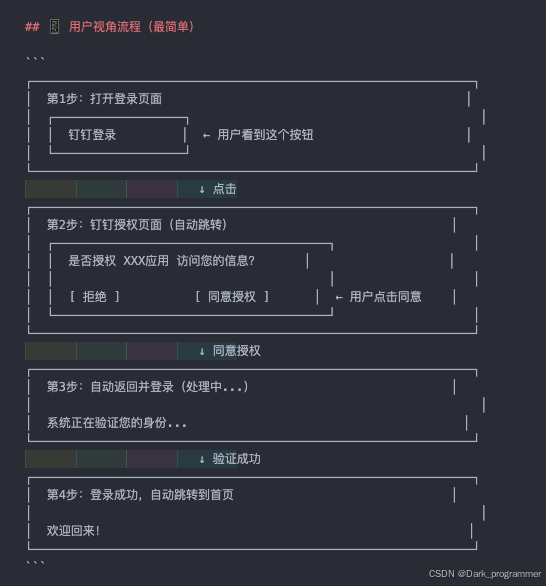
1.1 用户视角
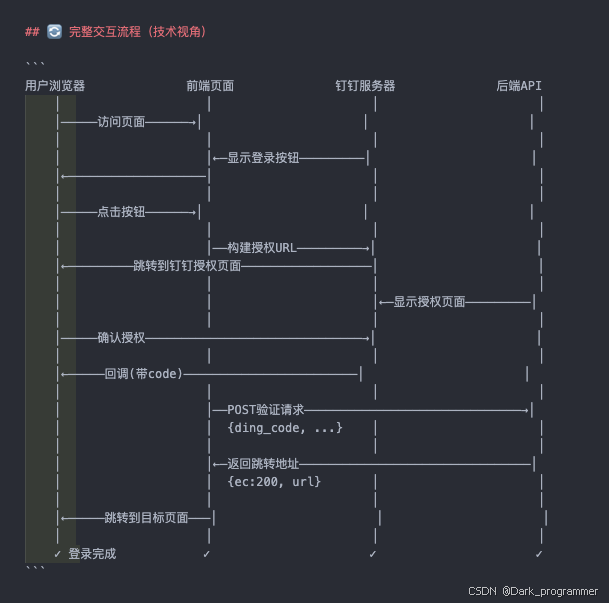
1.2 完整交互流程(技术视角)
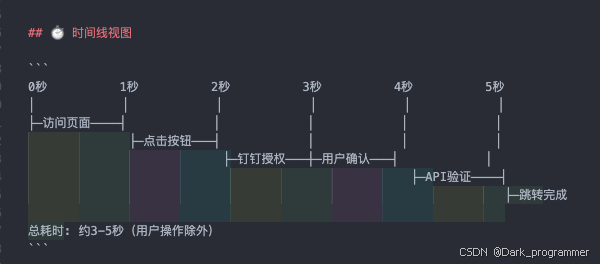
1.3 时间线视图
2. 钉钉后台
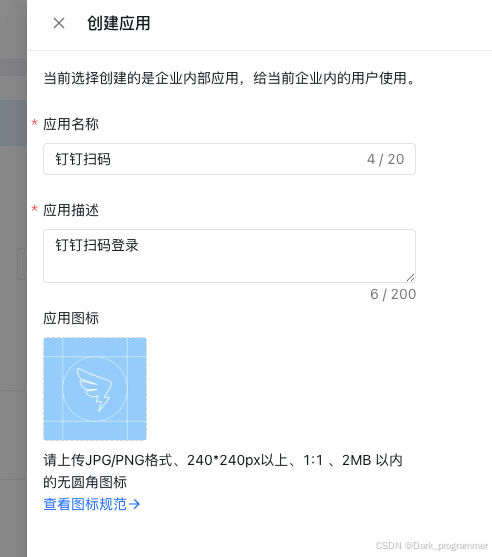
2.1 创建项目
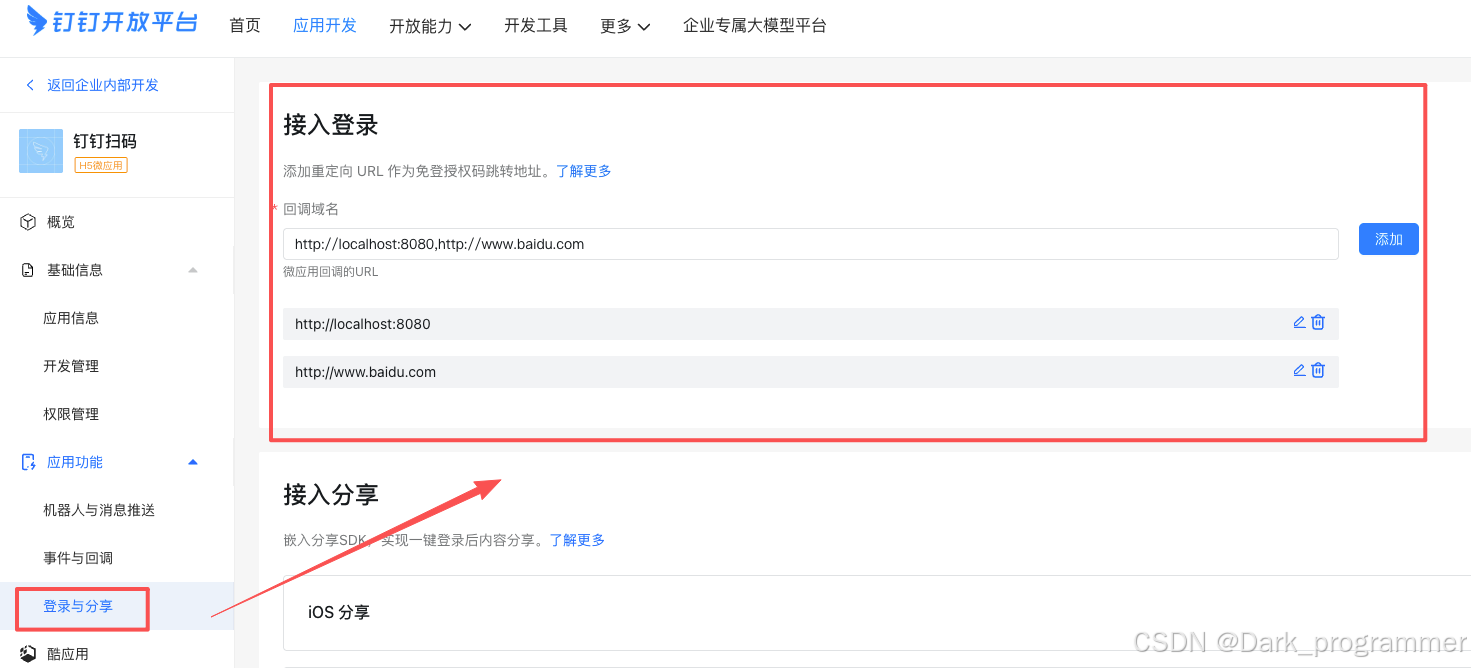
2.2 增加回调配置
⚠️警告: 这里如果不配置,跳转到钉钉授权页面会报错
增加的域名为前端项目部署后的域名以及期望授权后跳转的域名(可以为同一个)
3. 代码
示例是以vue3来实现的 (直接复制即可)
<template>
  <button @click="handleLogin">钉钉登录</button>
</template>

<script>
import { onMounted } from 'vue';

export default {
  setup() {
    // 获取URL参数的工具函数
    const urlParams = new URLSearchParams(window.location.search);
    const getUrlParam = (name) => urlParams.get(name);

    // ========== 钉钉登录配置 ==========
    const config = {
      // 钉钉应用信息(可通过URL参数覆盖)
      clientId: getUrlParam('clientId') || '这里是钉钉clientId',
      corpId: getUrlParam('corpId') || '这里是钉钉corpId',
      redirectUri: window.location.origin + window.location.pathname,

      // 钉钉OAuth授权参数
      authBaseUrl: 'https://login.dingtalk.com/oauth2/auth',
      responseType: 'code',
      scope: 'openid corpid',
      prompt: 'consent',

      // 后端API地址(可通过URL参数覆盖)
      apiUrl: 'http://localhost:8080/api/auth/dingtalk'
    };

    // 构建钉钉OAuth授权URL
    const buildAuthUrl = () => {
      const params = new URLSearchParams({
        redirect_uri: config.redirectUri,
        response_type: config.responseType,
        client_id: config.clientId,
        scope: config.scope,
        prompt: config.prompt
      });
      return `${config.authBaseUrl}?${params}`;
    };

    // 点击登录按钮:跳转到钉钉授权页面
    const handleLogin = () => {
      window.location.href = buildAuthUrl();
    };

    // 处理钉钉授权回调
    const handleCallback = async (code) => {
      try {
        console.log('收到钉钉授权码:', code);

        // 调用后端API验证授权码
        const response = await fetch(config.apiUrl, {
          method: 'POST',
          headers: { 'Content-Type': 'application/json' },
          body: JSON.stringify({
            ding_code: code,
            client_id: config.clientId,
            corp_id: config.corpId
          })
        });

        // 检查HTTP响应状态
        if (!response.ok) {
          throw new Error(`HTTP错误: ${response.status}`);
        }

        const result = await response.json();
        console.log('API响应:', result);

        // 登录成功,跳转到目标页面
        if (result.ec === 200) {
          const redirectUrl = result.redirectUrl;
          if (redirectUrl) {
            window.location.href = redirectUrl;
          } else {
            throw new Error('服务器未返回跳转地址');
          }
        } else {
          throw new Error(result.em || '登录失败');
        }
      } catch (error) {
        console.error('登录失败:', error);
        alert('登录失败: ' + error.message);
      }
    };

    // 页面加载时检查是否有钉钉回调参数
    onMounted(() => {
      const code = getUrlParam('code');
      if (code) handleCallback(code);
    });

    return { handleLogin };
  }
};
// 示例项目地址: https://github.com/bonnie-lihui/ding-talk-login
// 官方示例: https://open.dingtalk.com/document/dingstart/tutorial-obtaining-user-personal-information
</script>

<style scoped>
button {
  padding: 10px 20px;
  font-size: 14px;
  cursor: pointer;
}
</style>






 扫一扫
扫一扫


 8804
8804

 被折叠的 条评论
为什么被折叠?
被折叠的 条评论
为什么被折叠?
 到【灌水乐园】发言





