


 本文详述了一位用户在尝试为红米Note11TPro获取MIUI13系统根权限以及解包OTA更新过程中遇到的各种问题。从payload.bin的解包工具payload_dumper的安装和使用,到遇到的protobuf版本不兼容问题,再到尝试使用unota工具的失败,用户逐步排查并尝试了不同解决方案。最终,用户通过线刷包成功获取boot.img,并使用Magisk修补和隐藏root权限。在过程中遇到了AB分区、OEM解锁、Magisk模块等问题,展示了Android系统自定义和安全性的复杂性。
miuiv13-redmi-note11TPro-root
好多年不关注这些了,搜索发现多了ab分区、卡刷/OTA包payload.bin等变化。现在再看源码、搜资料自己解包payload.bin等是来不及了。所以还是先看看网上的一些教程吧。
payload.bin解包
- 更新MIUIV13.0.13的OTA包时保存了一份,结构如下:
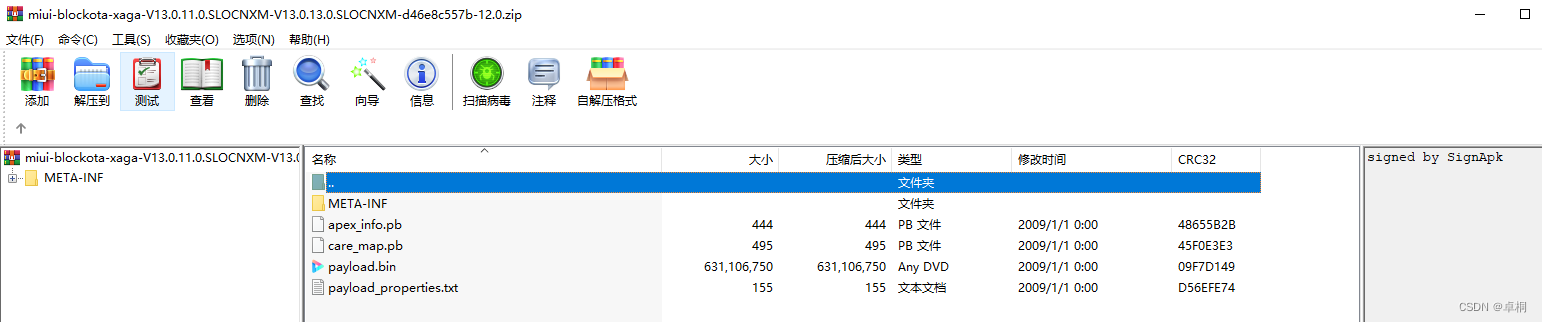
payload_dumper
- 根据:https://zhuanlan.zhihu.com/p/424625779、https://blog.youkuaiyun.com/weixin_43890033/article/details/119457211,使用https://github.com/vm03/payload_dumper,git clone下来。
- 把payload.bin放在payload_dumper目录,使用Win10子系统Ubuntu18.04LTS执行:
python3 payload_dumper.py payload.bin
Traceback (most recent call last):
  File "payload_dumper.py", line 7, in <module>
    import bsdiff4
ModuleNotFoundError: No module named 'bsdiff4'
缺少库,根据requirements.txt安装
pip3 install bsdiff4>=1.1.5
安装protobuf报错。
python3 payload_dumper.py payload.bin
Traceback (most recent call last):
  File "payload_dumper.py", line 15, in <module>
    import update_metadata_pb2 as um
  File "/mnt/d/payload_dumper/update_metadata_pb2.py", line 6, in <module>
    from google.protobuf import descriptor as _descriptor
ModuleNotFoundError: No module named 'google'

pip3 install protobuf>=3.19.3
protobuf requires Python '>=3.7' but the running Python is 3.6.9
直接读取requirements.txt安装也是报错:protobuf requires Python ‘>=3.7’ but the running Python is 3.6.9。不想升级python。
pip3 install -r requirements.txt
Collecting protobuf>=3.19.3 (from -r requirements.txt (line 1))
  Using cached https://files.pythonhosted.org/packages/6c/be/4e32d02bf08b8f76bf6e59f2a531690c1e4264530404501f3489ca975d9a/protobuf-4.21.0-py2.py3-none-any.whl
protobuf requires Python '>=3.7' but the running Python is 3.6.9
因为不了解python,仔细看是大于等于的关系,安装的是protobuf-4.21.0版本,尝试安装protobuf-3.19.3版本成功:(six>=1.16.0通过requirements.txt安装了)
pip3 install protobuf==3. 最低0.47元/天 解锁文章






 扫一扫
扫一扫


 469
469

 被折叠的 条评论
为什么被折叠?
被折叠的 条评论
为什么被折叠?
 到【灌水乐园】发言





