



 本文详细介绍了Java中资源文件的加载方式,包括相对路径与绝对路径的区别,以及如何使用Class.getResource和ClassLoader.getResource方法来加载资源。通过示例代码展示了不同路径设置下资源加载的成功与否。
lass.getResource can take a "relative" resource name, which is treated relative to the class's package. Alternatively you can specify an "absolute" resource name by using a leading slash. Classloader resource paths are always deemed to be absolute.
So they are basically equivalent:
foo.bar.Baz.class.getResource("xyz.txt");
foo.bar.Baz.class.getClassLoader().getResource("foo/bar/xyz.txt");
And so are these (but they're different to the above :)
foo.bar.Baz.class.getResource("/data/xyz.txt");
foo.bar.Baz.class.getClassLoader().getResource("data/xyz.txt");
---------------------------------------------------------
getResourceAsStream in static method
Non Static Method
URL url = getClass().getResource("ListStopWords.txt");
File file = new File(url.getPath());
InputStream inputStream =
getClass().getClassLoader().getResourceAsStream("config.properties");
2. Static Method
InputStream inputStream =
	    FileHelper.class.getClassLoader().getResourceAsStream("config.properties");
-------------------------------------------------------
For Class.getResourceAsStream(String name), if the name parameter doesn't start with a "/", then it's a relative path to the class's package. If the name parameter starts with a "/", then it's an absolute path.
For ClassLoader.getResourceAsStream(String name), the name parameter is always an absolute path, and it can never start with a "/". If it does, the resource is never found.
If the file cannot be found, both methods return null and no exception is thrown.
The following program illustrates the difference.
Project structure
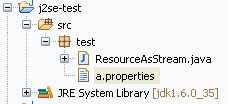
ResourceAsStream.java
public class ResourceAsStream {

    /**
     * @param args
     */
    public static void main(String[] args) {
        String path1 = "a.properties";
        String path2 = "/a.properties";
        String path3 = "test/a.properties";
        String path4 = "/test/a.properties";

        System.out.println("Class.getResourceAsStream()");
        InputStream is = ResourceAsStream.class.getResourceAsStream(path1);
        System.out.println(path1 + " " + (is != null));
        is = ResourceAsStream.class.getResourceAsStream(path2);
        System.out.println(path2 + " " + (is != null));
        is = ResourceAsStream.class.getResourceAsStream(path3);
        System.out.println(path3 + " " + (is != null));
        is = ResourceAsStream.class.getResourceAsStream(path4);
        System.out.println(path4 + " " + (is != null));
        System.out.println();
        System.out.println("ClassLoader.getResourceAsStream()");
        is = ResourceAsStream.class.getClassLoader().getResourceAsStream(path1);
        System.out.println(path1 + " " + (is != null));
        is = ResourceAsStream.class.getClassLoader().getResourceAsStream(path2);
        System.out.println(path2 + " " + (is != null));
        is = ResourceAsStream.class.getClassLoader().getResourceAsStream(path3);
        System.out.println(path3 + " " + (is != null));
        is = ResourceAsStream.class.getClassLoader().getResourceAsStream(path4);
        System.out.println(path4 + " " + (is != null));

    }

}
Result:
Class.getResourceAsStream()
a.properties true
/a.properties false
test/a.properties false
/test/a.properties true

ClassLoader.getResourceAsStream()
a.properties false
/a.properties false
test/a.properties true
/test/a.properties false





 扫一扫
扫一扫


 被折叠的 条评论
为什么被折叠?
被折叠的 条评论
为什么被折叠?
 到【灌水乐园】发言





