


In this tutorial, we will show you how to use Maven build tool, to create a single executable Jar, and how to deal with the project’s dependencies.
Tools used :
- Maven 3.1.1
- JDK 1.7
- log4j 1.2.17
- Joda-time 2.5
- Eclipse 4.3
1. Create a simple Java project
Create a Java project from the Maven quick start template.
$ mvn archetype:generate -DgroupId=com.mkyong.core.utils -DartifactId=dateUtils
 -DarchetypeArtifactId=maven-archetype-quickstart -DinteractiveMode=false
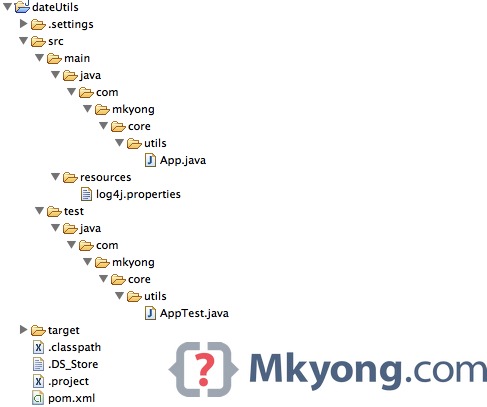
The following files and folder structure will be created.
.
|____dateUtils
| |____pom.xml
| |____src
| | |____main
| | | |____java
| | | | |____com
| | | | | |____mkyong
| | | | | | |____core
| | | | | | | |____utils
| | | | | | | | |____App.java
| | |____test
| | | |____java
| | | | |____com
| | | | | |____mkyong
| | | | | | |____core
| | | | | | | |____utils
| | | | | | | | |____AppTest.java
Above folder structure is not enough, create a log4j.properties file and put it in src/main/resources/log4j.properties, just create the resources folder manually.
# Root logger option
log4j.rootLogger=DEBUG, stdout

# Direct log messages to stdout
log4j.appender.stdout=org.apache.log4j.ConsoleAppender
log4j.appender.stdout.layout=org.apache.log4j.PatternLayout
log4j.appender.stdout.layout.ConversionPattern=%d{ABSOLUTE} %5p %c{1}:%L - %m%n
Make it support Eclipse.
$ mvn eclipse:eclipse
And imports the project into Eclipse IDE, the final project structure should be like this :
2. Update Pom.xml
Update pom.xml to declare both log4j and the jodatime dependencies, for output to a jar format, make sure the packaging is set to “jar”. Read below comment for self-explanatory.
<project xmlns="http://maven.apache.org/POM/4.0.0"
	xmlns:xsi="http://www.w3.org/2001/XMLSchema-instance"
	xsi:schemaLocation="http://maven.apache.org/POM/4.0.0
	http://maven.apache.org/maven-v4_0_0.xsd">
	<modelVersion>4.0.0</modelVersion>
	<groupId>com.mkyong.core.utils</groupId>
	<artifactId>dateUtils</artifactId>

	<!-- Output to jar format -->
	<packaging>jar</packaging>

	<version>1.0-SNAPSHOT</version>
	<name>dateUtils</name>
	<url>http://maven.apache.org</url>

	<properties>
		<jdk.version>1.7</jdk.version>
		<jodatime.version>2.5</jodatime.version>
		<junit.version>4.11</junit.version>
		<log4j.version>1.2.17</log4j.version>
	</properties>

	<dependencies>
		<dependency>
			<groupId>junit</groupId>
			<artifactId>junit</artifactId>
			<version>${junit.version}</version>
			<scope>test</scope>
		</dependency>
		<dependency>
			<groupId>joda-time</groupId>
			<artifactId>joda-time</artifactId>
			<version>${jodatime.version}</version>
		</dependency>
		<dependency>
			<groupId>log4j</groupId>
			<artifactId>log4j</artifactId>
			<version>${log4j.version}</version>
		</dependency>
	</dependencies>

	<build>
		<finalName>dateutils</finalName>
		<plugins>

			<!-- download source code in Eclipse, best practice -->
			<plugin>
				<groupId>org.apache.maven.plugins</groupId>
				<artifactId>maven-eclipse-plugin</artifactId>
				<version>2.9</version>
				<configuration>
					<downloadSources>true</downloadSources>
					<downloadJavadocs>false</downloadJavadocs>
				</configuration>
			</plugin>

			<!-- Set a JDK compiler level -->
			<plugin>
				<groupId>org.apache.maven.plugins</groupId>
				<artifactId>maven-compiler-plugin</artifactId>
				<version>2.3.2</version>
				<configuration>
					<source>${jdk.version}</source>
					<target>${jdk.version}</target>
				</configuration>
			</plugin>

			<!-- Make this jar executable -->
			<plugin>
				<groupId>org.apache.maven.plugins</groupId>
				<artifactId>maven-jar-plugin</artifactId>
				<configuration>
				  <!-- DO NOT include log4j.properties file in your Jar -->
				  <excludes>
					<exclude>**/log4j.properties</exclude>
				  </excludes>
				  <archive>
					<manifest>
						<!-- Jar file entry point -->
						<mainClass>com.mkyong.core.utils.App</mainClass>
					</manifest>
				  </archive>
				</configuration>
			</plugin>

		</plugins>
	</build>

</project>
3. Update App.java
Update the generated App.java with the following content :
package com.mkyong.core.utils;

import org.apache.log4j.Logger;
import org.joda.time.LocalDate;

public class App {

	private static final Logger logger = Logger.getLogger(App.class);

	public static void main(String[] args) {
		System.out.println(getLocalCurrentDate());
	}

	private static String getLocalCurrentDate() {

		if (logger.isDebugEnabled()) {
			logger.debug("getLocalCurrentDate() is executed!");
		}

		LocalDate date = new LocalDate();
		return date.toString();

	}

}
Now, this project has two dependencies : log4j and jodatime.
4. Working with Dependencies
4.1. How can I add dependencies in a jar?
– You can put both log4j.jar and jodatime.jar inside the final.jar, but your classes are unable to call other classes which is inside the unpack log4j.jar, Java jar is designed like this, unless you create a special class loader like one-jar plugin.
– Alternatively, use maven-assembly-plugin to extract all dependency jars into raw classes, and group it together. Read thisStackOverflow thread. This hack is workable in project with less dependencies only, for large project with many dependencies, it will cause Java class name conflict issue.
– Try one-jar plugin, it will create a fat-jar, which includes the entire project’s dependencies into a single jar file, read this article – Create a fat Jar file with Maven
4.2 Solution
The one-jar solution is really good, but I don’t like the custom class loader and fat-jar concept. My simplest and always working solution is copy the entire project’s dependencies to a pre-defined folder, and define the dependency classpath in the jar’s manifest file.
Below is the updated and final pom.xml, to use maven-dependency-plugin to copy all dependencies totarget/dependency-jars/ folder, and use maven-jar-plugin to add the dependency classpath.
<project xmlns="http://maven.apache.org/POM/4.0.0"
	xmlns:xsi="http://www.w3.org/2001/XMLSchema-instance"
	xsi:schemaLocation="http://maven.apache.org/POM/4.0.0
	http://maven.apache.org/maven-v4_0_0.xsd">
	<modelVersion>4.0.0</modelVersion>
	<groupId>com.mkyong.core.utils</groupId>
	<artifactId>dateUtils</artifactId>
	<packaging>jar</packaging>
	<version>1.0-SNAPSHOT</version>
	<name>dateUtils</name>
	<url>http://maven.apache.org</url>

	<properties>
		<jdk.version>1.7</jdk.version>
		<jodatime.version>2.5</jodatime.version>
		<junit.version>4.11</junit.version>
		<log4j.version>1.2.17</log4j.version>
	</properties>

	<dependencies>
		<dependency>
			<groupId>junit</groupId>
			<artifactId>junit</artifactId>
			<version>${junit.version}</version>
			<scope>test</scope>
		</dependency>
		<dependency>
			<groupId>joda-time</groupId>
			<artifactId>joda-time</artifactId>
			<version>${jodatime.version}</version>
		</dependency>
		<dependency>
			<groupId>log4j</groupId>
			<artifactId>log4j</artifactId>
			<version>${log4j.version}</version>
		</dependency>
	</dependencies>

	<build>
		<finalName>dateutils</finalName>
		<plugins>

			<!-- download source code in Eclipse, best practice -->
			<plugin>
				<groupId>org.apache.maven.plugins</groupId>
				<artifactId>maven-eclipse-plugin</artifactId>
				<version>2.9</version>
				<configuration>
					<downloadSources>true</downloadSources>
					<downloadJavadocs>false</downloadJavadocs>
				</configuration>
			</plugin>

			<!-- Set a compiler level -->
			<plugin>
				<groupId>org.apache.maven.plugins</groupId>
				<artifactId>maven-compiler-plugin</artifactId>
				<version>2.3.2</version>
				<configuration>
					<source>${jdk.version}</source>
					<target>${jdk.version}</target>
				</configuration>
			</plugin>

			<!-- Make this jar executable -->
			<plugin>
				<groupId>org.apache.maven.plugins</groupId>
				<artifactId>maven-jar-plugin</artifactId>
				<configuration>
				  <excludes>
					<exclude>**/log4j.properties</exclude>
				  </excludes>
				  <archive>
				    <manifest>
					<addClasspath>true</addClasspath>
					<mainClass>com.mkyong.core.utils.App</mainClass>
					<classpathPrefix>dependency-jars/</classpathPrefix>
				    </manifest>
				  </archive>
				</configuration>
			</plugin>

			<!-- Copy project dependency -->
			<plugin>
				<groupId>org.apache.maven.plugins</groupId>
				<artifactId>maven-dependency-plugin</artifactId>
				<version>2.5.1</version>
				<executions>
				  <execution>
					<id>copy-dependencies</id>
					<phase>package</phase>
					<goals>
						<goal>copy-dependencies</goal>
					</goals>
					<configuration>
					  <!-- exclude junit, we need runtime dependency only -->
					  <includeScope>runtime</includeScope>
					  <outputDirectory>${project.build.directory}/dependency-jars/</outputDirectory>
					</configuration>
				  </execution>
				</executions>
			</plugin>

		</plugins>
	</build>

</project>
5.The final Jar file
5.1 Package the project.
$ mvn package
Review the folder structure in the target folder
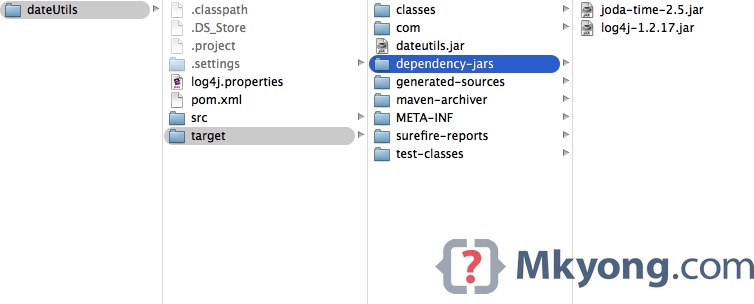
A dateutils.jar is created, and the entire project runtime dependencies (excluded junit) are copied totarget/dependency-jars/ folder.
5.2 List out the dateutils.jar content :
$ jar tf target/dateutils.jar
META-INF/
META-INF/MANIFEST.MF
com/
com/mkyong/
com/mkyong/core/
com/mkyong/core/utils/
com/mkyong/core/utils/App.class
META-INF/maven/
META-INF/maven/com.mkyong.core.utils/
META-INF/maven/com.mkyong.core.utils/dateUtils/
META-INF/maven/com.mkyong.core.utils/dateUtils/pom.xml
META-INF/maven/com.mkyong.core.utils/dateUtils/pom.properties
5.3 Extracts and review the content of MANIFEST.MF, the dependencies are added in the Class-Path.
Manifest-Version: 1.0
Built-By: mkyong
Build-Jdk: 1.7.0_05
Class-Path: dependency-jars/joda-time-2.5.jar dependency-jars/log4j-1.2.17.jar
Created-By: Apache Maven 3.1.1
Main-Class: com.mkyong.core.utils.App
Archiver-Version: Plexus Archiver
5.4 Run it
$ java -jar target/dateutils.jar

log4j:WARN No appenders could be found for logger (com.mkyong.core.utils.App).
log4j:WARN Please initialize the log4j system properly.
log4j:WARN See http://logging.apache.org/log4j/1.2/faq.html#noconfig for more info.
2014-10-19
Oppss…
5.5 Where is log4j.properties?
This is a GOOD practice to exclude the log4j.properties in the jar file, to avoid issues like multiple log4j.propertiesfiles in classpath.
You can still pass in the log4j properties via the log4j.configuration system property like this :
$ java -jar -Dlog4j.configuration=file:/full_path/log4j.properties target/dateutils.jar

17:09:15,385 DEBUG App:18 - getLocalCurrentDate() is executed!
2014-10-19
In future, if you want to move
dateUtils.jar, make sure to copy its
dependency-jars folder as well. If you have a better idea, do share with me, thanks.
Done.
一点总结:maven-assembly-plugin 插件配置jar-with-dependencies 时,会将所有依赖的jar解压,有时候这个功能会有用。

 434


 扫一扫


 被折叠的 条评论
为什么被折叠?
 到【灌水乐园】发言


