



 本文介绍如何使用Java创建并发布WebService,包括接口定义、实现类及服务器部署过程,并提供两种客户端调用方法。
server:
package dpnice;

/**
 * @author DPn!ce   date 2018 07 23 下午 5:53
 */
public interface TestInterface {
    /**
     *
     * @param uName d
     * @return uName
     */
    public String testSayHello(String uName);
}
package dpnice;
import javax.jws.WebService;
/**
* @author DPn!ce date 2018 07 23 下午 6:03
* WebService表示该类是一个服务类,需要发布其中的public的方法
*/
@WebService
public class TestInterfaceImpl implements TestInterface {
@Override
public String testSayHello(String uName) {
return "Hello:" + uName;
}
}
package dpnice;

import javax.xml.ws.Endpoint;

/**
 * @author DPn!ce   date 2018 07 23 下午 6:05
 */
public class TestWebServiceServer {
    public static void main(String[] args) {
        //Endpoint发布服务
        //参数解释
        //1.address - 服务地址
        //2.implementor - 实现类
        Endpoint.publish("http://localhost:7777/webService", new TestInterfaceImpl());
        System.out.println("启动成功");
        //测试  http://localhost:7777/webService?wsdl
    }

}
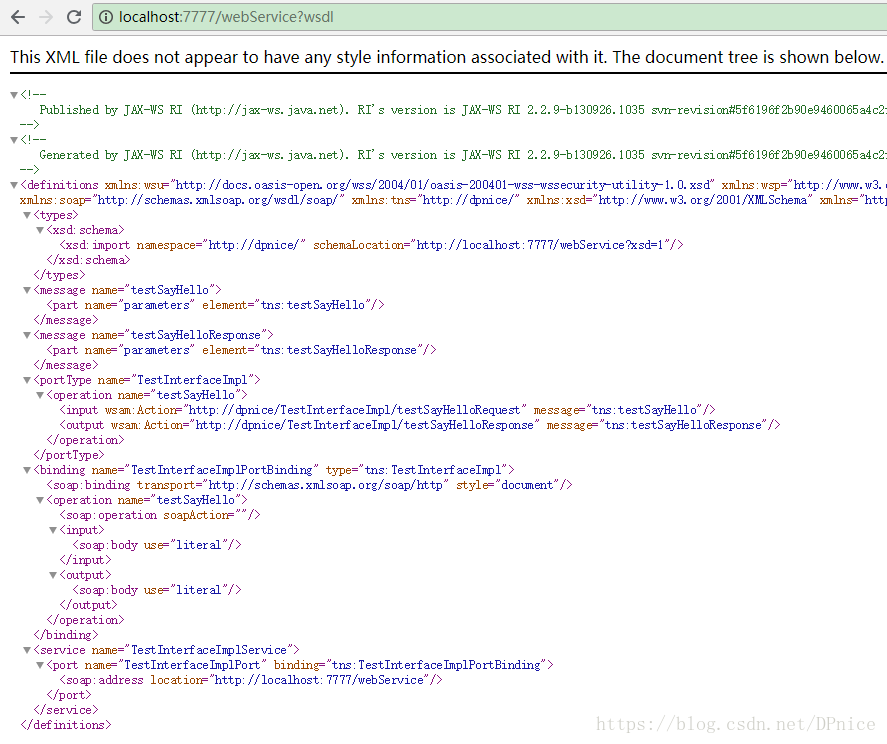
浏览器测试:http://localhost:7777/webService?wsdl
两种client方式:
一:
wsimport -s D:\clientWebService\src\main\java -keep http://localhost:7777/webService?wsdl-keep 不生成 class 文件 之生成java 文件
package dpnice;

/**
 * @author DPn!ce   date 2018 07 23 下午 7:04
 */
public class Client {
    public static void main(String[] args) {

        TestInterfaceImplService testInterfaceImplService = new TestInterfaceImplService();
        TestInterfaceImpl testInterfaceImplPort = testInterfaceImplService.getTestInterfaceImplPort();
        String sayHello = testInterfaceImplPort.testSayHello("阳宝");
        System.out.println(sayHello);

    }
}
二:
package docorai;

import dpnice.TestInterfaceImpl;

import javax.xml.namespace.QName;
import javax.xml.ws.Service;
import java.io.IOException;
import java.net.URL;

/**
 * @author DPn!ce   date 2018 07 23 下午 7:11
 */
public class ServiceClient {
    public static void main(String[] args) throws IOException {

        //创建WSDL的URL,注意不是服务地址
        URL url = new URL("http://localhost:7777/webService?wsdl");

        //创建服务名称
        //1.namespaceURI - 命名空间地址
        //2.localPart - 服务视图名  wsdl 中的service name
        QName qname = new QName("http://dpnice/", "TestInterfaceImplService");
        //创建服务视图
        //参数解释:
        //1.wsdlDocumentLocation - wsdl地址
        //2.serviceName - 服务名称
        Service service = Service.create(url, qname);
        //获取服务实现类 接口形式
        TestInterfaceImpl testInterface = service.getPort(TestInterfaceImpl.class);
        //调用查询方法
        String result = testInterface.testSayHello("阳宝");
        System.out.println(result);

    }
}





 扫一扫
扫一扫


 1822
1822

 被折叠的 条评论
为什么被折叠?
被折叠的 条评论
为什么被折叠?
 到【灌水乐园】发言





