实体类层
@Data
public class ColumnMeta {
    private String columnName;      // 字段名
    private String dataType;        // 数据类型
    private String columnComment;   // 字段说明
}
service层
import org.springframework.beans.factory.annotation.Autowired;
import org.springframework.stereotype.Service;

import javax.sql.DataSource;
import java.sql.*;
import java.util.ArrayList;
import java.util.List;

@Service
public class TableMetaService {

    @Autowired
    private DataSource dataSource;

    // 获取字段信息
    public List<ColumnMeta> getTableColumns(String tableName) {
        List<ColumnMeta> columnList = new ArrayList<>();
        String sql = "SELECT COLUMN_NAME, DATA_TYPE, COLUMN_COMMENT " +
                "FROM information_schema.COLUMNS " +
                "WHERE TABLE_SCHEMA = ? AND TABLE_NAME = ?";

        try (Connection conn = dataSource.getConnection();
             PreparedStatement stmt = conn.prepareStatement(sql)) {

            String dbName = conn.getCatalog(); // 当前数据库名
            stmt.setString(1, dbName);
            stmt.setString(2, tableName);

            ResultSet rs = stmt.executeQuery();
            while (rs.next()) {
                ColumnMeta meta = new ColumnMeta();
                meta.setColumnName(rs.getString("COLUMN_NAME"));
                meta.setDataType(rs.getString("DATA_TYPE"));
                meta.setColumnComment(rs.getString("COLUMN_COMMENT"));
                columnList.add(meta);
            }
        } catch (SQLException e) {
            e.printStackTrace();
        }
        return columnList;
    }

    // 获取表注释
    public String getTableComment(String tableName) {
        String sql = "SELECT TABLE_COMMENT FROM information_schema.TABLES " +
                "WHERE TABLE_SCHEMA = ? AND TABLE_NAME = ?";
        try (Connection conn = dataSource.getConnection();
             PreparedStatement stmt = conn.prepareStatement(sql)) {

            String dbName = conn.getCatalog();
            stmt.setString(1, dbName);
            stmt.setString(2, tableName);

            ResultSet rs = stmt.executeQuery();
            if (rs.next()) {
                return rs.getString("TABLE_COMMENT");
            }
        } catch (SQLException e) {
            e.printStackTrace();
        }
        return "";
    }
}
Controller层
import com.ruoyi.api.ColumnMeta;
import com.ruoyi.api.PdfExportUtil;
import com.ruoyi.api.service.TableMetaService;
import com.ruoyi.common.annotation.Anonymous;
import io.swagger.annotations.Api;
import io.swagger.annotations.ApiOperation;
import org.springframework.beans.factory.annotation.Autowired;
import org.springframework.web.bind.annotation.*;
import javax.servlet.http.HttpServletResponse;
import java.net.URLEncoder;
import java.util.List;
@Api(tags = "数据库表结构导出")
@RestController
@RequestMapping("/tool/meta")
public class TablePdfController {

    @Autowired
    private TableMetaService tableMetaService;

    @ApiOperation("导出指定表结构为 PDF")
    @GetMapping("/pdf/{tableName}")
    @Anonymous
    public void exportTablePdf(@PathVariable String tableName, HttpServletResponse response) {
        try {
            List<ColumnMeta> columns = tableMetaService.getTableColumns(tableName);
            String tableComment = tableMetaService.getTableComment(tableName);

            response.setContentType("application/pdf");
            response.setHeader("Content-Disposition",
                    "attachment;filename=" + URLEncoder.encode(tableName + "_结构文档.pdf", "UTF-8"));

            PdfExportUtil.exportTableMetadata(response.getOutputStream(), tableName, tableComment, columns);
        } catch (Exception e) {
            e.printStackTrace();
        }
    }
}
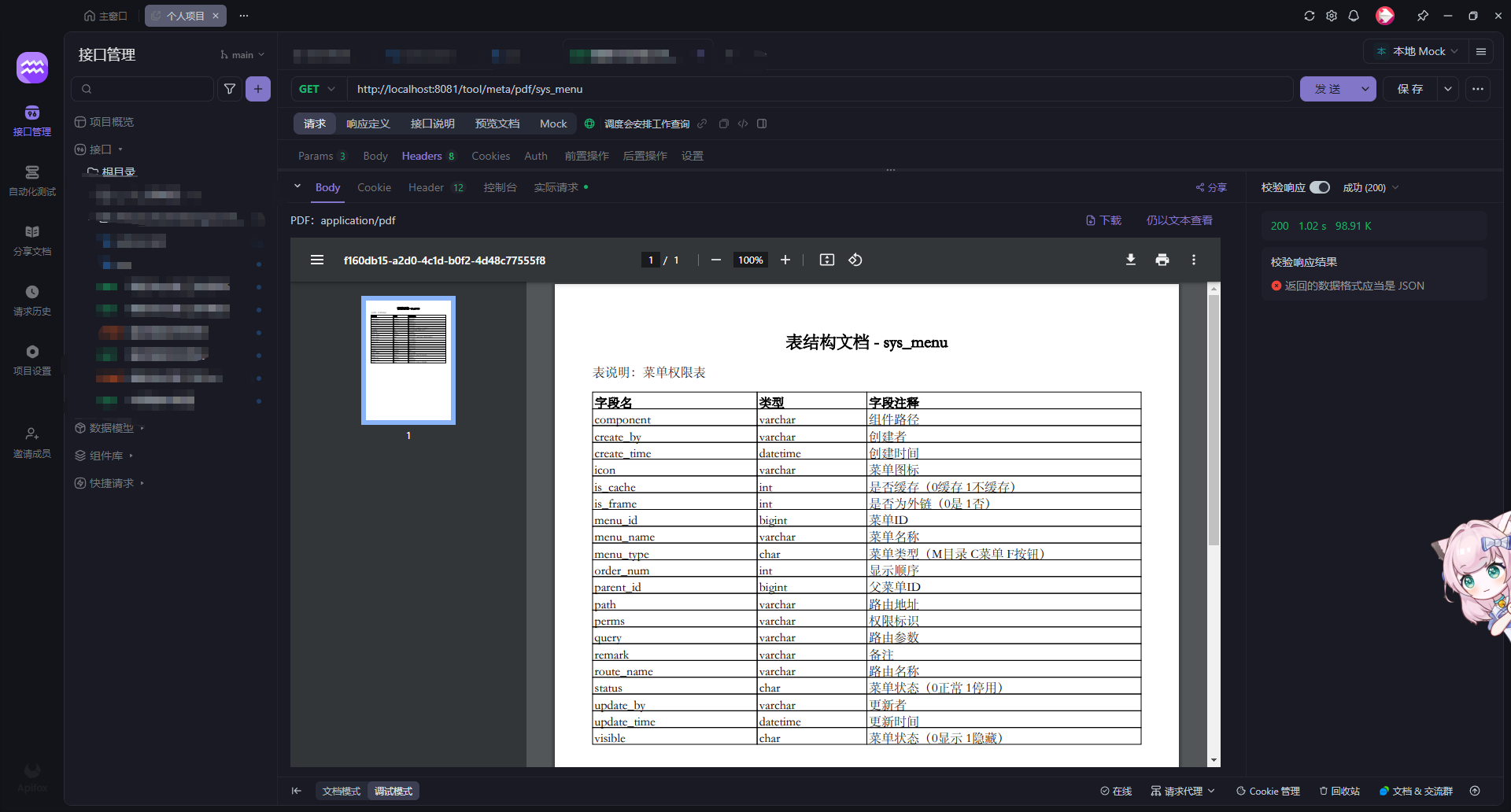
测试方式








 扫一扫
扫一扫


 7135
7135

 被折叠的 条评论
为什么被折叠?
被折叠的 条评论
为什么被折叠?
 到【灌水乐园】发言





