


 在Android 9.0及以上版本,系统默认禁止http请求。本文提供两种解决方案:1) 使用认证过的https;2) 创建network_security_config.xml文件,并在AndroidManifest.xml中配置,允许http请求。建议遵循更安全的https实践。
错误原因:android9.0默认禁止访问不安全的请求,比如http。
解决方案:
方法1: 使用认证过的https(我用的是阿里云免费证书,因为使用https还得配置,所以用了http)
方法2: 分为两步
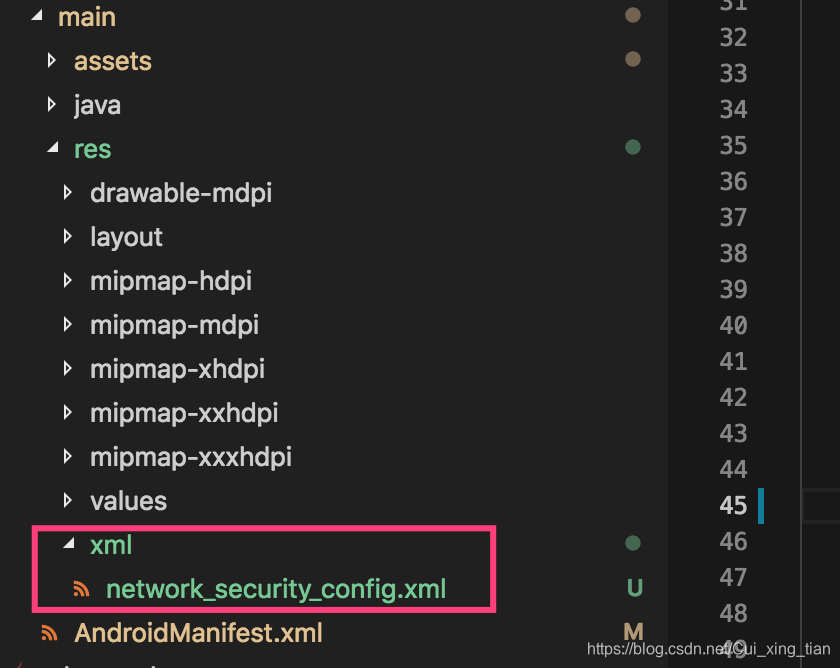
第一步:在res下新增加一个xml目录,然后创建一个名为network_security_config.xml文件
如下图:
文件内容如下:
<?xml version="1.0" encoding="utf-8"?>
<network-security-config>
    <base-config cleartextTrafficPermitted="true" />
</network-security-config>
第二步:
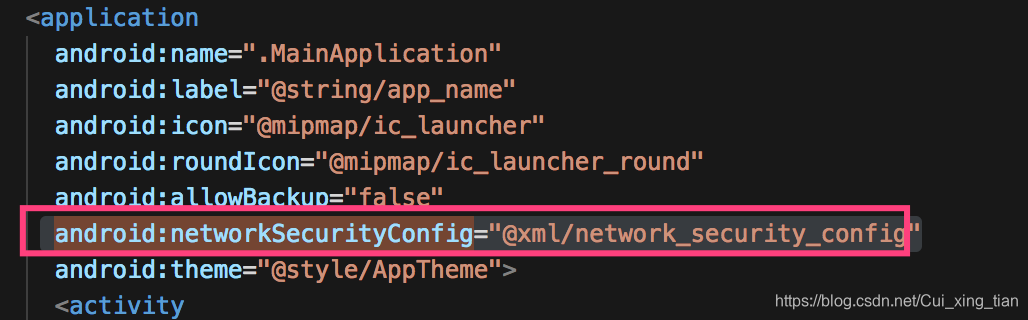
在androidManifiest.xml文件中添加
android:networkSecurityConfig="@xml/network_security_config"如下图:
下面还有一种方式 本质上跟第二种方法一样,简便但不规范 建议用上面的方法
 最低0.47元/天 解锁文章






 扫一扫
扫一扫


 1118
1118

 被折叠的 条评论
为什么被折叠?
被折叠的 条评论
为什么被折叠?
 到【灌水乐园】发言





