



 本文详细解析了iView UI框架中Tree组件的事件和方法使用,包括'on-check-change'等事件的绑定与触发,以及如何通过'ref'属性调用组件的方法如'getCheckedNodes'来获取选中的节点。
iview中的事件和方法如下:
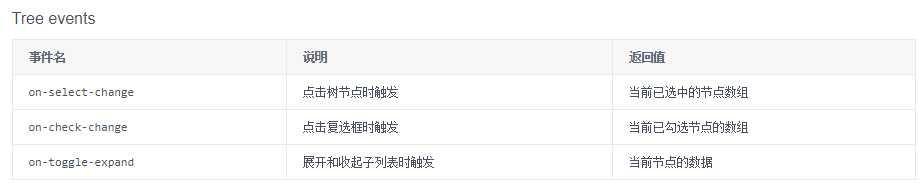

案例说明:
html代码
<Tree :data="data4" @on-check-change="choiceAll" ref="tree4" show-checkbox multiple></Tree>
-------------------------------------------------------------------------------------------
data(){
data4: [
{
title: ‘parent 1-1‘,
expand: true,
children: [
{
title: ‘leaf 1-1-1‘,
},
{
title: ‘leaf 1-1-2‘
}
]
},
{
title: ‘parent 1-2‘,
expand: true,
children: [
{
title: ‘leaf 1-2-1‘,
checked: true
},
{
title: ‘leaf 1-2-1‘
}
]
}
]
},
methods:{
choiceAll:function(data){
console.log(data); //当复选框选中时则会打印出选中的内容
let choicesAll=this.$refs.tree4.getCheckedNodes; //方法的运用 getSelectedNodes也是如此用法
console.log(choicesAll);
}
}
总结:
on-select-change,on-check-change,on-toggle-expand 运用方法是类同而tree方法的运用则需要先添加一个ref





 扫一扫
扫一扫


 2091
2091


 被折叠的 条评论
为什么被折叠?
被折叠的 条评论
为什么被折叠?
 到【灌水乐园】发言




