

Think php 5.1 省略public/index.php,实现简化URL

本文介绍了如何在ThinkPHP 5.1框架中省略public/index.php,实现更简洁的URL访问。通过复制并修改public目录的index.php和.htaccess文件,然后调整index.php内容,可以将URL从http://127.0.0.1/tp5/public/index.php/index/index/index缩短为http://127.0.0.1/tp5/index/index/index。同时,文章展示了如何访问admin模块下的控制器方法。

由于好久没使用过 TP 5框架,突然想熟悉一下

于是在 Think php官网 下载了tp5.1压缩包,解压,运行,没有什么问题

在本地访问到时候,路径是这样的:http://127.0.0.1/tp5/public/index.php/index/index/index

看着好难受啊,我想把它变成这样:http://127.0.0.1/tp5/index/index/index


如何简化呢?肯定是从入口文件下手了

tp5.1的入口文件index.php在public文件夹下 

如图所示:

步骤一:复制public文件夹中的index.php和.htaccess文件

步骤二:将复制的文件粘贴到与public文件夹同级的地方

粘贴后效果 如图所示:
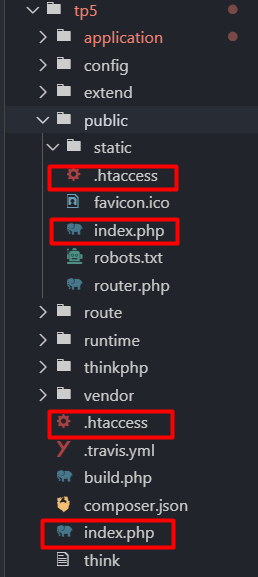
步骤三:最关键的一步

修改刚刚复制的index.ph

<?xml version="1.0" encoding="UTF-8"?> <project xmlns="http://maven.apache.org/POM/4.0.0" xmlns:xsi="http://www.w3.org/2001/XMLSchema-instance" xsi:schemaLocation="http://maven.apache.org/POM/4.0.0 https://maven.apache.org/xsd/maven-4.0.0.xsd"> <modelVersion>4.0.0</modelVersion> <!-- 继承Spring Boot父工程(已定义Spring Boot 2.3.12.RELEASE版本) --> <parent> <groupId>org.springframework.boot</groupId> <artifactId>spring-boot-starter-parent</artifactId> <version>2.3.12.RELEASE</version> <relativePath/> </parent> <groupId>com.example</groupId> <artifactId>auth-service</artifactId> <version>0.0.1-SNAPSHOT</version> <name>auth-service</name> <description>OAuth2认证授权服务</description> <properties> <java.version>1.8</java.version> <project.build.sourceEncoding>UTF-8</project.build.sourceEncoding> <project.reporting.outputEncoding>UTF-8</project.reporting.outputEncoding> <spring-cloud.version>Hoxton.SR12</spring-cloud.version> <!-- 兼容Spring Boot 2.3.x的Spring Cloud版本 --> </properties> <!-- Maven仓库配置(加速依赖下载) --> <repositories> <repository> <id>central</id> <url>https://repo1.maven.org/maven2</url> <snapshots><enabled>false</enabled></snapshots> </repository> <repository> <id>aliyun</id> <url>https://maven.aliyun.com/repository/public</url> <releases><enabled>true</enabled></releases> <snapshots><enabled>false</enabled></snapshots> </repository> </repositories> <pluginRepositories> <pluginRepository> <id>central</id> <url>https://repo1.maven.org/maven2</url> <snapshots><enabled>false</enabled></snapshots> </pluginRepository> <pluginRepository> <id>aliyun</id> <url>https://maven.aliyun.com/repository/public</url> <releases><enabled>true</enabled></releases> <snapshots><enabled>false</enabled></snapshots> </pluginRepository> </pluginRepositories> <dependencies> <!-- Spring Boot Web依赖 --> <dependency> <groupId>org.springframework.boot</groupId> <artifactId>spring-boot-starter-web</artifactId> </dependency> <!-- Spring Boot Security依赖(基础安全框架) --> <dependency> <groupId>org.springframework.boot</groupId> <artifactId>spring-boot-starter-security</artifactId> </dependency> <!-- OAuth2自动配置依赖(支持Password模式等旧版特性) --> <!-- 测试依赖 --> <dependency> <groupId>org.springframework.boot</groupId> <artifactId>spring-boot-starter-test</artifactId> <scope>test</scope> </dependency> <dependency> <groupId>org.springframework.security</groupId> <artifactId>spring-security-oauth2-authorization-server</artifactId> <version>1.2.0</version> <!-- 最新稳定版 --> </dependency> </dependencies> <!-- 依赖管理(统一Spring Cloud版本) --> <dependencyManagement> <dependencies> <dependency> <groupId>org.springframework.cloud</groupId> <artifactId>spring-cloud-dependencies</artifactId> <version>${spring-cloud.version}</version> <type>pom</type> <scope>import</scope> </dependency> </dependencies> </dependencyManagement> <build> <plugins> <!-- Java编译插件 --> <plugin> <groupId>org.apache.maven.plugins</groupId> <artifactId>maven-compiler-plugin</artifactId> <version>3.8.1</version> <configuration> <source>1.8</source> <!-- 源码Java版本 --> <target>1.8</target> <!-- 目标Java版本 --> <encoding>UTF-8</encoding> </configuration> </plugin> <!-- Spring Boot打包插件 --> <plugin> <groupId>org.springframework.boot</groupId> <artifactId>spring-boot-maven-plugin</artifactId> <!-- 无需指定version,继承父工程的Spring Boot版本 --> <configuration> <mainClass>com.example.authservice.AuthServiceApplication</mainClass> <!-- 主类全路径 --> <skip>false</skip> <!-- 允许打包(默认值,可省略) --> </configuration> <executions> <execution> <id>repackage</id> <goals> <goal>repackage</goal> <!-- 生成可执行JAR --> </goals> </execution> </executions> </plugin> </plugins> </build> </project>package com.example; import org.springframework.security.core.Authentication; import org.springframework.security.core.context.SecurityContextHolder; import org.springframework.web.bind.annotation.GetMapping; import org.springframework.web.bind.annotation.RequestMapping; import org.springframework.web.bind.annotation.RestController; import java.util.HashMap; import java.util.Map; @RestController @RequestMapping("/api/auth") public class UserInfoController { @GetMapping("/userinfo") public Map<String, Object> getUserInfo() { Authentication authentication = SecurityContextHolder.getContext().getAuthentication(); Map<String, Object> userInfo = new HashMap<>(); userInfo.put("username", authentication.getName()); userInfo.put("authorities", authentication.getAuthorities()); return userInfo; } }package com.example; import org.springframework.context.annotation.Bean; import org.springframework.context.annotation.Configuration; import org.springframework.security.authentication.AuthenticationManager; import org.springframework.security.authentication.ProviderManager; import org.springframework.security.authentication.dao.DaoAuthenticationProvider; import org.springframework.security.config.annotation.authentication.builders.AuthenticationManagerBuilder; import org.springframework.security.config.annotation.web.builders.HttpSecurity; import org.springframework.security.config.annotation.web.configuration.EnableWebSecurity; import org.springframework.security.config.annotation.web.configuration.WebSecurityConfigurerAdapter; import org.springframework.security.core.userdetails.User; import org.springframework.security.core.userdetails.UserDetailsService; import org.springframework.security.crypto.bcrypt.BCryptPasswordEncoder; import org.springframework.security.crypto.password.PasswordEncoder; import org.springframework.security.provisioning.InMemoryUserDetailsManager; @Configuration @EnableWebSecurity public class SecurityConfig extends WebSecurityConfigurerAdapter { // 1. 定义用户详情服务(已实现,保留) @Bean @Override public UserDetailsService userDetailsService() { return new InMemoryUserDetailsManager( User.withUsername("user") .password(passwordEncoder().encode("password")) .roles("USER") .build() ); } // 2. 密码编码器(已实现,保留) @Bean public PasswordEncoder passwordEncoder() { return new BCryptPasswordEncoder(); } // 3. 关键修复:配置AuthenticationManager使用自定义UserDetailsService @Override protected void configure(AuthenticationManagerBuilder auth) throws Exception { auth.userDetailsService(userDetailsService()) // 关联用户详情服务 .passwordEncoder(passwordEncoder()); // 关联密码编码器 } // 4. 暴露AuthenticationManager Bean(已实现,保留) @Override @Bean public AuthenticationManager authenticationManagerBean() throws Exception { return super.authenticationManagerBean(); } // 5. 关闭CSRF(保留) @Override protected void configure(HttpSecurity http) throws Exception { http.csrf().disable(); } @Bean public AuthenticationManager authenticationManager() { DaoAuthenticationProvider provider = new DaoAuthenticationProvider(); provider.setUserDetailsService(userDetailsService()); provider.setPasswordEncoder(passwordEncoder()); return new ProviderManager(provider); } }package com.example; import org.springframework.context.annotation.Bean; import org.springframework.context.annotation.Configuration; import org.springframework.security.authentication.AuthenticationManager; import org.springframework.security.authentication.ProviderManager; import org.springframework.security.authentication.dao.DaoAuthenticationProvider; import org.springframework.security.config.annotation.authentication.builders.AuthenticationManagerBuilder; import org.springframework.security.config.annotation.web.builders.HttpSecurity; import org.springframework.security.config.annotation.web.configuration.EnableWebSecurity; import org.springframework.security.config.annotation.web.configuration.WebSecurityConfigurerAdapter; import org.springframework.security.core.userdetails.User; import org.springframework.security.core.userdetails.UserDetailsService; import org.springframework.security.crypto.bcrypt.BCryptPasswordEncoder; import org.springframework.security.crypto.password.PasswordEncoder; import org.springframework.security.provisioning.InMemoryUserDetailsManager; @Configuration @EnableWebSecurity public class SecurityConfig extends WebSecurityConfigurerAdapter { // 1. 定义用户详情服务(已实现,保留) @Bean @Override public UserDetailsService userDetailsService() { return new InMemoryUserDetailsManager( User.withUsername("user") .password(passwordEncoder().encode("password")) .roles("USER") .build() ); } // 2. 密码编码器(已实现,保留) @Bean public PasswordEncoder passwordEncoder() { return new BCryptPasswordEncoder(); } // 3. 关键修复:配置AuthenticationManager使用自定义UserDetailsService @Override protected void configure(AuthenticationManagerBuilder auth) throws Exception { auth.userDetailsService(userDetailsService()) // 关联用户详情服务 .passwordEncoder(passwordEncoder()); // 关联密码编码器 } // 4. 暴露AuthenticationManager Bean(已实现,保留) @Override @Bean public AuthenticationManager authenticationManagerBean() throws Exception { return super.authenticationManagerBean(); } // 5. 关闭CSRF(保留) @Override protected void configure(HttpSecurity http) throws Exception { http.csrf().disable(); } @Bean public AuthenticationManager authenticationManager() { DaoAuthenticationProvider provider = new DaoAuthenticationProvider(); provider.setUserDetailsService(userDetailsService()); provider.setPasswordEncoder(passwordEncoder()); return new ProviderManager(provider); } }package com.example; import org.springframework.context.annotation.Bean; import org.springframework.context.annotation.Configuration; import org.springframework.security.authentication.AuthenticationManager; import org.springframework.security.authentication.ProviderManager; import org.springframework.security.authentication.dao.DaoAuthenticationProvider; import org.springframework.security.config.annotation.authentication.builders.AuthenticationManagerBuilder; import org.springframework.security.config.annotation.web.builders.HttpSecurity; import org.springframework.security.config.annotation.web.configuration.EnableWebSecurity; import org.springframework.security.config.annotation.web.configuration.WebSecurityConfigurerAdapter; import org.springframework.security.core.userdetails.User; import org.springframework.security.core.userdetails.UserDetailsService; import org.springframework.security.crypto.bcrypt.BCryptPasswordEncoder; import org.springframework.security.crypto.password.PasswordEncoder; import org.springframework.security.provisioning.InMemoryUserDetailsManager; @Configuration @EnableWebSecurity public class SecurityConfig extends WebSecurityConfigurerAdapter { // 1. 定义用户详情服务(已实现,保留) @Bean @Override public UserDetailsService userDetailsService() { return new InMemoryUserDetailsManager( User.withUsername("user") .password(passwordEncoder().encode("password")) .roles("USER") .build() ); } // 2. 密码编码器(已实现,保留) @Bean public PasswordEncoder passwordEncoder() { return new BCryptPasswordEncoder(); } // 3. 关键修复:配置AuthenticationManager使用自定义UserDetailsService @Override protected void configure(AuthenticationManagerBuilder auth) throws Exception { auth.userDetailsService(userDetailsService()) // 关联用户详情服务 .passwordEncoder(passwordEncoder()); // 关联密码编码器 } // 4. 暴露AuthenticationManager Bean(已实现,保留) @Override @Bean public AuthenticationManager authenticationManagerBean() throws Exception { return super.authenticationManagerBean(); } // 5. 关闭CSRF(保留) @Override protected void configure(HttpSecurity http) throws Exception { http.csrf().disable(); } @Bean public AuthenticationManager authenticationManager() { DaoAuthenticationProvider provider = new DaoAuthenticationProvider(); provider.setUserDetailsService(userDetailsService()); provider.setPasswordEncoder(passwordEncoder()); return new ProviderManager(provider); } }package com.example; import org.springframework.context.annotation.Bean; import org.springframework.context.annotation.Configuration; import org.springframework.security.config.annotation.web.builders.HttpSecurity; import org.springframework.security.crypto.password.PasswordEncoder; import org.springframework.security.oauth2.core.AuthorizationGrantType; import org.springframework.security.oauth2.core.ClientAuthenticationMethod; import org.springframework.security.oauth2.server.authorization.client.InMemoryRegisteredClientRepository; import org.springframework.security.oauth2.server.authorization.client.RegisteredClient; import org.springframework.security.oauth2.server.authorization.client.RegisteredClientRepository; import org.springframework.security.oauth2.server.authorization.config.annotation.web.configuration.OAuth2AuthorizationServerConfiguration; import org.springframework.security.oauth2.server.authorization.config.annotation.web.configurers.OAuth2AuthorizationServerConfigurer; import org.springframework.security.web.SecurityFilterChain; import java.util.UUID; import java.time.Duration; import java.time.temporal.ChronoUnit; @Configuration public class AuthServerConfig { @Bean public SecurityFilterChain authorizationServerSecurityFilterChain(HttpSecurity http) throws Exception { OAuth2AuthorizationServerConfiguration.applyDefaultSecurity(http); // 旧版0.2.3.RELEASE无需配置authenticationProviders,删除lambda表达式 http.getConfigurer(OAuth2AuthorizationServerConfigurer.class); return http.build(); } @Bean public RegisteredClientRepository registeredClientRepository(PasswordEncoder passwordEncoder) { RegisteredClient testClient = RegisteredClient.withId(UUID.randomUUID().toString()) .clientId("testClient") .clientSecret(passwordEncoder.encode("123456")) .clientAuthenticationMethod(ClientAuthenticationMethod.CLIENT_SECRET_BASIC) .authorizationGrantType(AuthorizationGrantType.PASSWORD) .authorizationGrantType(AuthorizationGrantType.REFRESH_TOKEN) .scope("read") .scope("write") .accessTokenTimeToLive(Duration.of(1, ChronoUnit.HOURS)) // JDK 8兼容写法 .refreshTokenTimeToLive(Duration.of(1, ChronoUnit.DAYS)) // JDK 8兼容写法 .build(); return new InMemoryRegisteredClientRepository(testClient); } }package com.example.authservice; import org.springframework.boot.SpringApplication; import org.springframework.boot.autoconfigure.SpringBootApplication; import org.springframework.context.annotation.ComponentScan; @SpringBootApplication @ComponentScan(basePackages = {"com.example", "com.example"}) // 扫描多个包 public class AuthServiceApplication { public static void main(String[] args) { SpringApplication.run(AuthServiceApplication.class, args); } } 代码报错,怎么修改
最新发布
09-30
# 确定模块安装路径 $moduleDir = if ($PSVersionTable.PSEdition -eq "Core") { Join-Path $HOME ".local/share/powershell/Modules/CurlTools" } else { Join-Path $env:ProgramFiles "WindowsPowerShell/Modules/CurlTools" } # 创建目录结构 $dirs = @( $moduleDir (Join-Path $moduleDir "Private") (Join-Path $moduleDir "Public") ) $dirs | ForEach-Object { if (-not (Test-Path $_)) { New-Item -ItemType Directory -Path $_ -Force | Out-Null Write-Host "创建目录: $_" } } # ===== 函数定义 ===== # 核心基础函数 $getPlatformContent = @' function Get-Platform { <# .SYNOPSIS 检测当前操作系统平台 #> if ($PSVersionTable.PSEdition -eq "Core") { if ($IsWindows) { "Windows" } elseif ($IsLinux) { "Linux" } elseif ($IsMacOS) { "macOS" } else { "Unknown" } } else { if ($env:OS -like "Windows*") { "Windows" } elseif (Test-Path "/etc/os-release") { "Linux" } elseif (Test-Path "/System/Library/CoreServices/SystemVersion.plist") { "macOS" } else { "Unknown" } } } '@ # 其他函数内容(在实际脚本中需要完整填充) $validateCurlPathContent = @' function Test-CurlPath { <# .SYNOPSIS 验证curl路径是否有效 .PARAMETER Path 要验证的curl安装目录 #> param( [Parameter(Mandatory=$true)] [string]$Path ) $platform = Get-Platform $exeName = if ($platform -eq "Windows") { "curl.exe" } else { "curl" } $exePath = Join-Path $Path $exeName if (-not (Test-Path $exePath)) { return $false } try { $null = & $exePath --version 2>$null return ($LASTEXITCODE -eq 0) } catch { return $false } } '@ # 其他函数内容省略(实际使用时需要完整填充) # ===== 保存所有文件 ===== $files = @{ # 模块主文件 "CurlTools.psm1" = @' # 安全的模块路径检测 $moduleRoot = if ($PSScriptRoot) { $PSScriptRoot } elseif ($MyInvocation.MyCommand.Path) { Split-Path -Parent $MyInvocation.MyCommand.Path } else { $manifestPath = (Get-Module CurlTools -ListAvailable | Select-Object -First 1).Path if ($manifestPath) { Split-Path -Parent $manifestPath } else { throw "无法确定模块根目录" } } # 加载所有函数文件(先基础后功能) $privatePath = Join-Path $moduleRoot "Private" $publicPath = Join-Path $moduleRoot "Public" # 1. 加载核心基础函数(无依赖) . (Join-Path $privatePath "GetPlatform.ps1") . (Join-Path $privatePath "ValidateCurlPath.ps1") # 2. 加载其他私有函数 Get-ChildItem -Path "$privatePath/*.ps1" -Exclude "GetPlatform.ps1", "ValidateCurlPath.ps1" | ForEach-Object { . $_.FullName Write-Verbose "已加载私有函数: $($_.BaseName)" } # 3. 加载公共函数 Get-ChildItem -Path "$publicPath/*.ps1" | ForEach-Object { . $_.FullName Write-Verbose "已加载公共函数: $($_.BaseName)" } # 延迟导出函数 $exportFunctions = @( 'Get-CurlPath' 'Set-CurlPath' 'Get-CurlVersion' 'Invoke-SecureDownload' ) if ($ExecutionContext.SessionState.Module) { Export-ModuleMember -Function $exportFunctions } # 执行模块初始化 $script:ModuleInitialized = $false Initialize-Module | Out-Null '@ # 私有函数 "Private/GetPlatform.ps1" = $getPlatformContent "Private/ValidateCurlPath.ps1" = $validateCurlPathContent "Private/FindCurlPath.ps1" = $findCurlPathContent "Private/InitializeModule.ps1" = $initializeModuleContent "Private/InstallCurl.ps1" = $installCurlContent # 公共函数 "Public/GetCurlPath.ps1" = $getCurlPathContent "Public/SetCurlPath.ps1" = $setCurlPathContent "Public/GetCurlVersion.ps1" = $getCurlVersionContent "Public/SecureDownload.ps1" = $secureDownloadContent # 模块清单 "CurlTools.psd1" = @' @{ ModuleVersion = '5.0.0' GUID = 'c0d1b1e1-1a2b-4c3d-8e4f-9a0b1c2d3e4f' Author = 'PowerShell Expert' Description = 'Robust curl tools for PowerShell' RootModule = 'CurlTools.psm1' PowerShellVersion = '5.1' CompatiblePSEditions = @('Desktop', 'Core') FunctionsToExport = @( 'Get-CurlPath', 'Set-CurlPath', 'Get-CurlVersion', 'Invoke-SecureDownload' ) RequiredModules = @() VariablesToExport = @() AliasesToExport = @() CmdletsToExport = @() } '@ } # 保存所有文件 foreach ($path in $files.Keys) { $fullPath = Join-Path $moduleDir $path $dir = Split-Path $fullPath -Parent if (-not (Test-Path $dir)) { New-Item -ItemType Directory -Path $dir -Force | Out-Null } Set-Content -Path $fullPath -Value $files[$path] -Force Write-Host "已创建: $fullPath" } # ===== 安装后测试 ===== try { # 重新加载模块 Write-Host "`n重新加载模块..." -ForegroundColor Cyan Remove-Module CurlTools -ErrorAction SilentlyContinue -Force Import-Module $moduleDir -Force -ErrorAction Stop # 基本功能测试 $tests = @( { Write-Host "测试: Get-CurlPath" -ForegroundColor Cyan $path = Get-CurlPath if (-not $path) { throw "返回空路径" } Write-Host "✅ 成功 | 路径: $path" -ForegroundColor Green $path } { Write-Host "测试: Get-CurlVersion" -ForegroundColor Cyan $version = Get-CurlVersion if (-not $version) { throw "返回空版本" } Write-Host "✅ 成功 | 版本: $($version.Version)" -ForegroundColor Green $version } { Write-Host "测试: Invoke-SecureDownload" -ForegroundColor Cyan $url = "https://www.example.com" $out = Join-Path $env:TEMP "test_$(Get-Date -Format 'yyyyMMddHHmmss').html" $result = Invoke-SecureDownload -Url $url -OutputPath $out if (-not (Test-Path $out)) { throw "文件未创建" } Write-Host "✅ 成功 | 文件大小: $((Get-Item $out).Length) bytes" -ForegroundColor Green $out } ) foreach ($test in $tests) { try { $result = & $test if (-not $result) { Write-Warning "⚠️ 测试返回空结果: $($test.ToString())" } } catch { Write-Error "❌ 测试失败: $($test.ToString()) - $_" $global:TestFailed = $true } } if ($global:TestFailed) { Write-Error "❌ 模块安装完成,但部分测试失败" -ForegroundColor Red } else { Write-Host "`n✅ 模块安装成功并通过所有测试" -ForegroundColor Green } } catch { Write-Error "❌ 模块加载失败: $_" exit 1 }
08-13
评论
成就一亿技术人!
拼手气红包6.0元
还能输入1000个字符
 
红包 添加红包
表情包 插入表情
 条评论被折叠 查看
添加红包

请填写红包祝福语或标题

红包个数最小为10个

红包金额最低5元

当前余额3.43前往充值 >
需支付:10.00
成就一亿技术人!
领取后你会自动成为博主和红包主的粉丝 规则
hope_wisdom
发出的红包

打赏作者

Colt666

你的鼓励将是我创作的最大动力

¥1 ¥2 ¥4 ¥6 ¥10 ¥20
扫码支付:¥1
获取中
扫码支付

您的余额不足,请更换扫码支付或充值

打赏作者

实付
使用余额支付
点击重新获取
扫码支付
钱包余额 0

抵扣说明:

1.余额是钱包充值的虚拟货币,按照1:1的比例进行支付金额的抵扣。
2.余额无法直接购买下载,可以购买VIP、付费专栏及课程。

余额充值



