



最近准备做一个深度学习的项目,从零开始学习深度学习。在博客里记录学习的代码,方便回看。
配置:GPU Notebook Colab
深度学习框架:fastai/Pytorch
数据:Kaggle上Titanic数据集 Titanic - Machine Learning from Disaster | Kaggle
完整代码:https://www.kaggle.com/code/jhoward/why-you-should-use-a-framework
在上一篇实践文章中,使用全部手写的方法将神经网络中初始化、计算预测值、更新参数、训练模型等函数均使用Pytorch内置函数写出。在本章中使用更加完善的fastai库,使得代码更加简洁
读取数据
from fastai.tabular.all import *

pd.options.display.float_format = '{:.2f}'.format
set_seed(42)

df = pd.read_csv(path/'train.csv')

splits = RandomSplitter(seed=42)(df)  # Use `splits` for indices of training and validation sets

dls = TabularPandas(
    df, splits=splits,
    # Turn strings into categories, fill missing values in numeric columns with the median, normalise all numeric columns
    procs = [Categorify, FillMissing, Normalize],
    # These are the categorical independent variables
    cat_names=["Sex","Pclass","Embarked","Deck", "Title"],
    # These are the continuous independent variables
    cont_names=['Age', 'SibSp', 'Parch', 'LogFare', 'Alone', 'TicketFreq', 'Family'],
    # This is the dependent variable
    y_names="Survived",
    # The dependent variable is categorical (so build a classification model, not a regression model
    y_block = CategoryBlock(),
).dataloaders(path=".")
训练模型
learn = tabular_learner(dls, metrics=accuracy, layers=[10,10])

learn.lr_find(suggest_funcs=(slide, valley))
fastai内置函数`lr_find`可以有效帮助快速确定learning_rate的取值区间
输出:
SuggestedLRs(slide=0.033113110810518265, valley=0.009120108559727669)
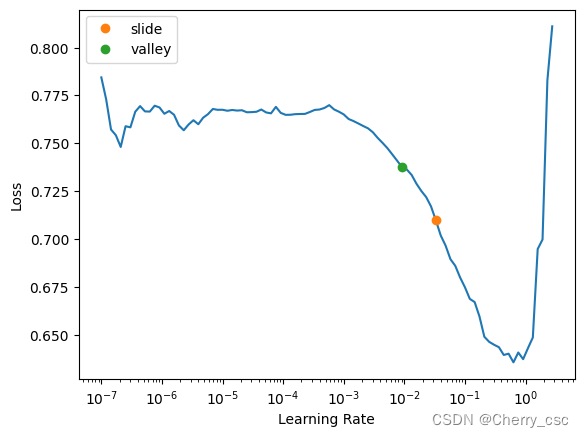
表示合适的learning_rate 范围在0.033和0.009之间
训练模型,epochs=16, learning_rate=0.03
learn.fit(16, lr=0.03)





 扫一扫
扫一扫


 被折叠的 条评论
为什么被折叠?
被折叠的 条评论
为什么被折叠?
 到【灌水乐园】发言





